聊天信息存储方案

需求分析

我们希望客户端在登录后,从服务器拉取聊天信息,并且展示。常规的设计中,客户端本地也会有一个数据库,缓存上一次获取的最后的聊天信息,如果客户端下线了,再次登录,只需要从服务器拉取未接受的数据即可。

所以综合考虑过后将需求列出

  1. 客户端本地数据库缓存已经接受的消息(以后再做)
  2. 客户端登录后,将本地数据的最大的消息id发送给服务器,服务器根据这个id去数据库查找,找到比这个id大的消息,将消息回传给客户端
  3. 客户端登录后,先加载旧的数据,再差异加载未读取的数据即可。

客户端本地数据库存储放在之后实现,所以我们客户端目前只发送消息id为0即可。

数据模型设计

  1. 消息唯一标识
    • 在服务器端的 MySQL 表里,为每条消息分配一个全局唯一的自增主键(message_id),再配合时间戳(created_at)。
    • 客户端本地用同样的 message_id 做主键,这样就能很方便地做增量同步与去重。
  2. 会话/用户维度的索引
    • 如果支持多对多(群聊),再维护一个会话表(thread_id)和用户—会话关联表。
    • 查询和分页时,都按 (thread_id, message_id)(thread_id, created_at) 建复合索引,加速筛选。

同步流程

  1. 客户端登录时

    1. 从本地 SQLite 加载最近 N 条消息(按 message_id 或时间倒序),渲染到界面。

    2. 读取本地记录的「每个会话已同步到的最大 message_id」,发送给服务器:

      1
      2
      3
      4
      5
      {
      "action": "fetch_messages",
      "thread_id": 123,
      "since_id": 3456
      }
  2. 服务器端响应

    • 查询 WHERE thread_id=123 AND message_id>3456 ORDER BY message_id ASC LIMIT 1000
    • 返回消息列表(可以分页返回,大量时前端可循环拉取,或返回 has_more 标记)。
  3. 客户端接收并保存

    • 将服务器返回的消息批量插入本地 SQLite,注意用「主键冲突忽略(INSERT OR IGNORE)」防止重复。
    • 更新本地「已同步最大 message_id」。
  4. 后续聊天时

    • 新消息既推到服务器,也实时写入本地 SQLite。
    • 如果走长连接(Asio + 自定义协议或使用 WebSocket),服务器收到新消息后直接广播给在线客户端,并提示客户端写到本地。
    • 如果客户端离线,新消息积累在服务器,下一次登录再按 above 流程拉取。

聊天消息表

下面给出消息聊天表的字段和解释,包含了message_id, thread_id以及常见的其他字段

1
2
3
4
5
6
7
8
9
10
11
12
13
14
CREATE TABLE `chat_message` (
`message_id` BIGINT UNSIGNED NOT NULL AUTO_INCREMENT,
`thread_id` BIGINT UNSIGNED NOT NULL,
`sender_id` BIGINT UNSIGNED NOT NULL,
`recv_id` BIGINT UNSIGNED NOT NULL,
`content` TEXT NOT NULL,
`created_at` TIMESTAMP NOT NULL DEFAULT CURRENT_TIMESTAMP,
`updated_at` TIMESTAMP NOT NULL DEFAULT CURRENT_TIMESTAMP ON UPDATE CURRENT_TIMESTAMP,
`status` TINYINT NOT NULL DEFAULT 0 COMMENT '0=未读 1=已读 2=撤回',
PRIMARY KEY (`message_id`),
KEY `idx_thread_created` (`thread_id`, `created_at`),
KEY `idx_thread_message` (`thread_id`, `message_id`)
) ENGINE=InnoDB DEFAULT CHARSET=utf8mb4 COLLATE=utf8mb4_unicode_ci;

字段说明

  • message_id:全局自增主键,唯一标识一条消息。
  • thread_id:会话(单聊、群聊)ID,同一会话下的所有消息共用一个 thread_id
  • sender_id:发送者用户 ID,指向用户表的主键。
  • recv_id : 接收者用户ID,指向用户表主键
  • content:消息正文,TEXT 类型,适合存储普通文字。
  • created_at:消息创建时间,自动记录插入时刻。
  • updated_at:消息更新时间,可用于标记“撤回”(status 变更)、编辑等操作。
  • status:消息状态,用于标记未读/已读/撤回等(也可扩展更多状态)。

索引设计

  1. 主键索引PRIMARY KEY (message_id) 用于唯一检索消息。
  2. 会话+时间索引KEY (thread_id, created_at) 支持按会话分页、按时间范围查询。
  3. 会话+消息ID 索引KEY (thread_id, message_id) 支持按 message_id 做增量拉取(WHERE thread_id=… AND message_id > since_id)。

可选扩展

  • 群聊用户表:如果支持群聊,需要一个 thread_member 表,记录每个 thread_id 下的成员及其角色。
  • 附件支持:若要存储图片/文件,可额外建 message_attachment 表,字段例如 attachment_idmessage_idfile_urlfile_type
  • 已读回执:单独设计 message_read 表,记录哪些用户在何时已读了该消息,字段如 (message_id, user_id, read_at)

会话消息表

全局聊天线程表

建立chat_thread主表,给它一个全局自增id,记录所有私聊/群聊的线程统一入口

1
2
3
4
5
6
CREATE TABLE chat_thread (
`id` BIGINT UNSIGNED NOT NULL AUTO_INCREMENT,
`type` ENUM('private','group') NOT NULL,
`created_at` TIMESTAMP NOT NULL DEFAULT CURRENT_TIMESTAMP,
PRIMARY KEY (id)
);

单聊表设计

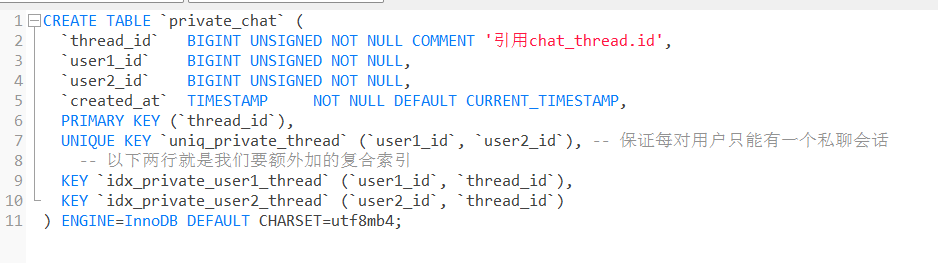
对于单聊,只有两个人,所以可以直接在private_chat表中定义两个字段存储user1_id和user2_id,这样能直接确定参与者

1
2
3
4
5
6
7
8
9
10
11
CREATE TABLE `private_chat` (
`thread_id` BIGINT UNSIGNED NOT NULL COMMENT '引用chat_thread.id',
`user1_id` BIGINT UNSIGNED NOT NULL,
`user2_id` BIGINT UNSIGNED NOT NULL,
`created_at` TIMESTAMP NOT NULL DEFAULT CURRENT_TIMESTAMP,
PRIMARY KEY (`thread_id`),
UNIQUE KEY `uniq_private_thread` (`user1_id`, `user2_id`), -- 保证每对用户只能有一个私聊会话
-- 以下两行就是我们要额外加的复合索引
KEY `idx_private_user1_thread` (`user1_id`, `thread_id`),
KEY `idx_private_user2_thread` (`user2_id`, `thread_id`)
) ENGINE=InnoDB DEFAULT CHARSET=utf8mb4;
  • 通过 user1_iduser2_id 唯一确定一个单聊会话
  • 询某两个用户的单聊时,直接 SELECT 即可。

群聊表设计

群聊相较于单聊要复杂一些,需要记录每个群聊的多名成员及其角色、权限等信息

先建一个独立的会话(线程)表:

1
2
3
4
5
6
CREATE TABLE `group_chat` (
`thread_id` BIGINT UNSIGNED NOT NULL COMMENT '引用chat_thread.id',
`name` VARCHAR(255) DEFAULT NULL COMMENT '群聊名称',
`created_at` TIMESTAMP NOT NULL DEFAULT CURRENT_TIMESTAMP,
PRIMARY KEY (`thread_id`)
) ENGINE=InnoDB DEFAULT CHARSET=utf8mb4;
  • 群聊会话表只存储群聊本身的信息(如群名称、创建时间等),thread_id 是唯一标识符

群聊成员表设计

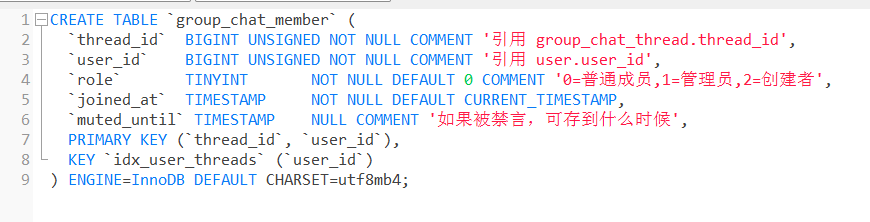
  • 群聊成员表用于存储群聊中各成员的信息(包括角色、加入时间、禁言等)。
1
2
3
4
5
6
7
8
9
10
CREATE TABLE `group_chat_member` (
`thread_id` BIGINT UNSIGNED NOT NULL COMMENT '引用 group_chat_thread.thread_id',
`user_id` BIGINT UNSIGNED NOT NULL COMMENT '引用 user.user_id',
`role` TINYINT NOT NULL DEFAULT 0 COMMENT '0=普通成员,1=管理员,2=创建者',
`joined_at` TIMESTAMP NOT NULL DEFAULT CURRENT_TIMESTAMP,
`muted_until` TIMESTAMP NULL COMMENT '如果被禁言,可存到什么时候',
PRIMARY KEY (`thread_id`, `user_id`),
KEY `idx_user_threads` (`user_id`)
) ENGINE=InnoDB DEFAULT CHARSET=utf8mb4;

前端聊天框调整

回顾

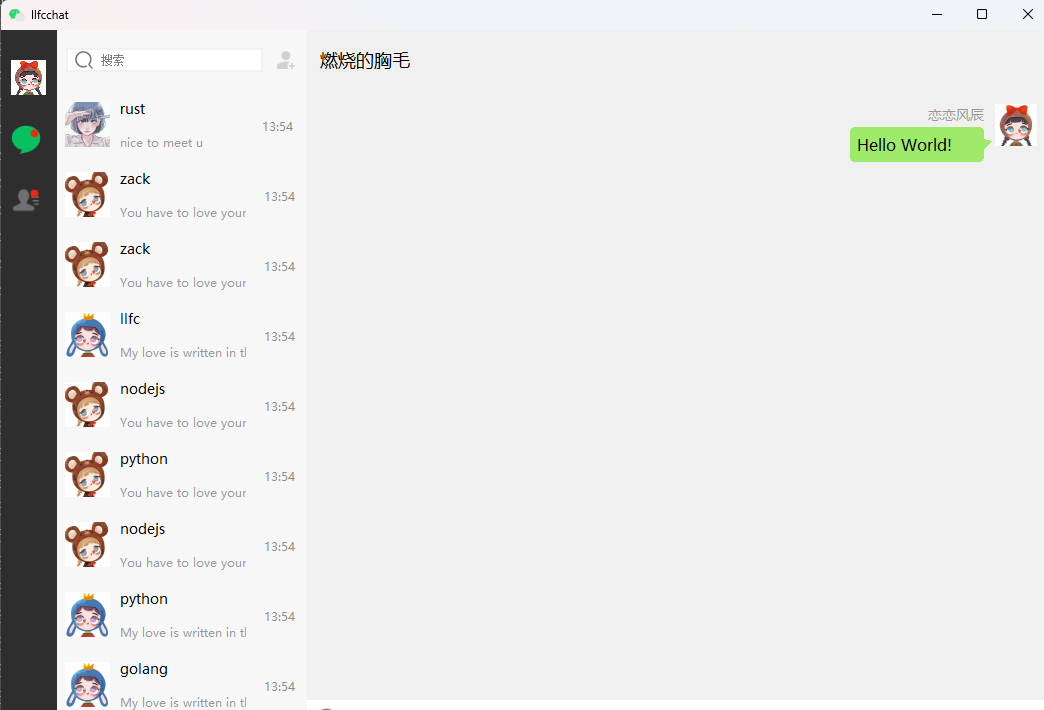
我们先回顾一下之前设计的聊天框

https://cdn.llfc.club/1718417551126.jpg

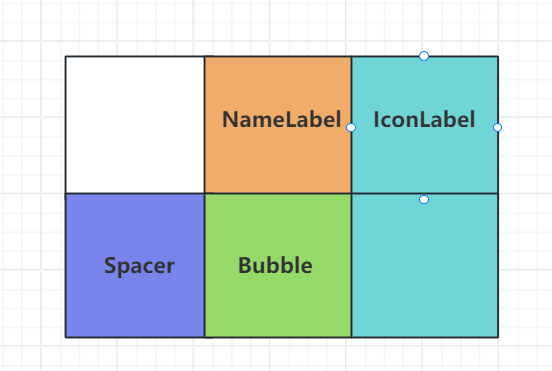
对于我们自己发出的信息,我们可以实现这样一个网格布局管理

https://cdn.llfc.club/1718423760358.jpg

NameLabel用来显示用户的名字,Bubble用来显示聊天信息,Spacer是个弹簧,保证将NameLabel``,IconLabelBubble等挤压到右侧。

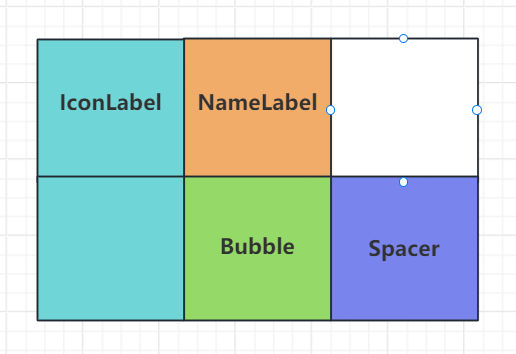
如果是别人发出的消息,我们设置这样一个网格布局

https://cdn.llfc.club/1718497364660.jpg

增加状态标签

因为自己发送的时候要增加发送状态(发送失败,未读,已读)三种,所以考虑将自己发送的消息改为如下
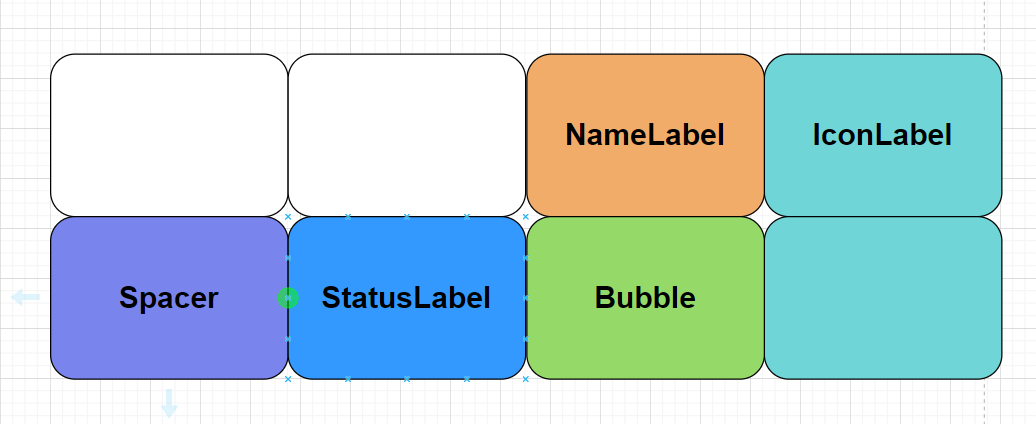
image-20250601121313179

大体结构如下

1
2
3
4
5
6
7
8
9
10
11
           列0       列1         列2             列3
┌───────┬───────────┬────────────┬──────────┐
行 0 │ │ (空) │ m_pNameLabel │ m_pIconLabel │
│ │ (col=1, │ (右对齐+8px)│ (跨两行、靠上) │
│ │ 未放置)│ │ │
├───────┼───────────┼────────────┴──────────┤
行 1 │ pSpacer│ m_pStatusLabel │ m_pBubble │ m_pIconLabel │
│ │ (row=1, │ (聊天气泡) │ (继续占位) │
│ │ col=1) │ │ │
└───────┴───────────┴──────────────────────┘

代码修改如下

1
2
3
4
5
6
7
8
9
10
11
12
13
14
15
16
17
18
19
20
21
22
23
24
25
26
27
28
29
30
31
32
33
34
35
36
37
38
39
40
41
42
43
44
45
46
47
48
49
50
51
52
53
54
55
56
ChatItemBase::ChatItemBase(ChatRole role, QWidget *parent)
: QWidget(parent)
, m_role(role)
{
m_pNameLabel = new QLabel();
m_pNameLabel->setObjectName("chat_user_name");
QFont font("Microsoft YaHei");
font.setPointSize(9);
m_pNameLabel->setFont(font);
m_pNameLabel->setFixedHeight(20);
m_pIconLabel = new QLabel();
m_pIconLabel->setScaledContents(true);
m_pIconLabel->setFixedSize(42, 42);
m_pBubble = new QWidget();
QGridLayout *pGLayout = new QGridLayout();
pGLayout->setVerticalSpacing(3);
pGLayout->setHorizontalSpacing(3);
pGLayout->setMargin(3);
QSpacerItem*pSpacer = new QSpacerItem(40, 20, QSizePolicy::Expanding, QSizePolicy::Minimum);

//添加状态图标控件
m_pStatusLabel = new QLabel();
m_pStatusLabel->setFixedSize(16, 16);
m_pStatusLabel->setScaledContents(true);

if(m_role == ChatRole::Self)
{
m_pNameLabel->setContentsMargins(0,0,8,0);
m_pNameLabel->setAlignment(Qt::AlignRight);
//名字标签
pGLayout->addWidget(m_pNameLabel, 0,2, 1,1);
//icon 头像
pGLayout->addWidget(m_pIconLabel, 0, 3, 2,1, Qt::AlignTop);
//第 0 列:依然是 pSpacer,占用第 1 行,第 0 列
pGLayout->addItem(pSpacer, 1, 0, 1, 1);
//气泡控件
pGLayout->addWidget(m_pBubble, 1,2, 1,1);
//状态图标
pGLayout->addWidget(m_pStatusLabel, 1, 1, 1, 1, Qt::AlignCenter);
pGLayout->setColumnStretch(0, 2);
pGLayout->setColumnStretch(1, 0); // status 图标 (固定大小)
pGLayout->setColumnStretch(2, 3); // 名字 + 气泡 (主要拉伸区域)
pGLayout->setColumnStretch(3, 0); // 头像 (固定大小)
}else{
m_pNameLabel->setContentsMargins(8,0,0,0);
m_pNameLabel->setAlignment(Qt::AlignLeft);
pGLayout->addWidget(m_pIconLabel, 0, 0, 2,1, Qt::AlignTop);
pGLayout->addWidget(m_pNameLabel, 0,1, 1,1);
pGLayout->addWidget(m_pBubble, 1,1, 1,1);
pGLayout->addItem(pSpacer, 2, 2, 1, 1);
pGLayout->setColumnStretch(1, 3);
pGLayout->setColumnStretch(2, 2);
}
this->setLayout(pGLayout);
}

增加接口设置状态

1
2
3
4
5
6
7
8
9
10
11
12
13
14
15
16
void ChatItemBase::setStatus(int status) {
if (status == MsgStatus::UN_READ) {
m_pStatusLabel->setPixmap(QPixmap(":/res/unread.png"));
return;
}

if (status == MsgStatus::SEND_FAILE) {
m_pStatusLabel->setPixmap(QPixmap(":/res/send_fail.png"));
return;
}

if (status == MsgStatus::READED) {
m_pStatusLabel->setPixmap(QPixmap(":/res/readed.png"));
return;
}
}

客户端同步流程

客户端本地会有sql记录该用户所有聊天记录最后收到的消息信息,包括message_id,thread_id等,每次客户端登录将本地最大messag_idthread_id发送给服务器,服务器按照每个thread_id将信息恢复给客户端,可支持分页返回。

举例

比如第一次请求,客户端携带message_id为1001,thread_id为22,那么服务器就会去chat_message中升序查找,比message_id(1001)大且thread_id为22的消息,返回20条

客户端拿到20条消息后,可根据最后一个消息messag_id继续请求消息。

所以我们得出一个结论要拉取消息就要有thread_id以及message_id

接下来的情形分为两种

情况1

本地有thread_id,但是在该用户A离线的时候B用户给他发消息,因为他们之前没有聊过天,所以此时B会通知服务器在private_chat表中创建新的thread_id,但是A本地数据库没有这个thread_id,所以A需要在登录时拉取.

拉取就传递目前A本地数据库中最大的thead_id以及自己的user_id给服务器,服务器去查找比这个thread_id大的会话列表返回即可,采取分页的方式,每次加载100个,并配合load_more字段通知客户端是否继续拉取

如果load_more字段为true则客户端继续拉取,传递上次服务器给它同步的最大的thread_id,服务器继续返回比thread_id大的会话列表。

直到load_morefalse,客户端不再拉取。

情况2

如果客户端换了新机器,本地没有记录信息,那么就需要在用户登录后向服务器发送user_idthread_id,thread_id 请求从 0 开始,服务器将返回该用户的所有聊天thread_id,必须分页返回,并且携带 load_more 字段,字段和上面类似。

一个服务器返回的数据格式如下

1
2
3
4
5
6
7
8
9
10
11
12
13
14
15
16
17
18
19
20
21
22
23
24
25
26
27
28
29
30
31
32
33
{
"error":0,
"uid" : 1001,
"load_more":true,

"threads":[
{
"thread_id": 1001,
"type": "private",
"user1_id": 1019,
"user2_id": 1020
},
{
"thread_id": 1002,
"type": "group",
"user1_id": 0,
"user2_id": 0,
},
{
"thread_id": 1003,
"type": "private",
"user1_id": 1019,
"user2_id": 1021
},
{
"thread_id": 1004,
"type": "group",
"user1_id": 0,
"user2_id": 0
}
]
}

可采用如下sql语句查询

1
2
3
4
5
6
7
8
9
10
11
12
13
14
15
16
17
18
19
20
21
22
23
24
25
26
-- 1) CTE 把私聊/群聊合并好
WITH all_threads AS (
SELECT
thread_id,
'private' AS type,
user1_id,
user2_id
FROM private_chat
WHERE (user1_id = :me OR user2_id = :me)
AND thread_id > :last_id
UNION ALL
SELECT
thread_id,
'group' AS type,
NULL AS user1_id,
NULL AS user2_id
FROM group_chat_member
WHERE user_id = :me
AND thread_id > :last_id
)
-- 2) 按 thread_id 升序,取 page_size+1 条
SELECT *
FROM all_threads
ORDER BY thread_id
LIMIT :page_size + 1;

然后在服务端(伪代码)处理结果:

1
2
3
4
5
6
7
8
9
10
11
12
13
14
15
16
17
18
19
20
def fetch_threads(me, last_id, page_size):
rows = db.query(sql, { "me": me, "last_id": last_id, "page_size": page_size })
# rows 最多有 page_size+1 条
if len(rows) > page_size:
load_more = True
rows = rows[:-1] # 丢掉第 page_size+1 条
else:
load_more = False

# 更新下一次游标:取最后一条的 thread_id
if rows:
next_last_id = rows[-1]["thread_id"]
else:
next_last_id = last_id

return {
"data": rows,
"next_last_id": next_last_id,
"load_more": load_more
}

说明

  1. 为什么要多取 1 条?
    • page_size + 1 条后,如果结果确实多出那 1 条,就说明“在本页之后”还有数据;
    • 如果正好只有 page_size 条或更少,就可以断定已经取尽。
  2. 游标(cursor)模式 vs OFFSET
    • 用游标(thread_id > last_id)可以保证性能,避免大 OFFSET 带来的全表扫描。
    • 每次请求只跑新数据所在的索引范围。
  3. 客户端流程
    • 初次加载:传 last_id = 0
    • 点「加载更多」:传上次接口返回的 next_last_id
    • **收到 load_more = false**:表示已到末尾,不要再发更多请求。

当然为了提升效率,可以在用户登录后,选择是否同步消息的勾选框

如果勾选则调用上述sql语句查询该用户所有chat_thread返回。

如果没勾选,就不用加载chat_thread。

重构聊天item

需要重构聊天左侧item列表结构,以支持聊天消息记录持久化存储。

默认情况下,会检索本地客户端是否有聊天记录信息,

如果没有则需要请求所有thread_id列表,然后更新左侧item列表。

如果有,也需要差异化加载 thread_id 列表,比如说 A 下线了,B 和 A 通信,A 之前没有收到过 B 的信息,所以也要拉取所有新建立的会话。

所以当务之急是先把这个聊天列表加载好

因为我们没有为客户端设置本地数据库,所以我们默认每次用户登录都请求一下所有thread_id列表,这样方便测试效果

Server返回聊天列表

Server需要根据用户uid返回他的聊天列表

1 注册消息

1
2
_fun_callbacks[ID_LOAD_CHAT_THREAD_REQ] = std::bind(&LogicSystem::GetUserThreadsHandler, this,
placeholders::_1, placeholders::_2, placeholders::_3);

2 实现获取聊天记录逻辑

1
2
3
4
5
6
7
8
9
10
11
12
13
14
15
16
17
18
19
20
21
22
23
24
25
26
27
28
29
30
31
32
33
34
35
36
37
38
39
40
41
void LogicSystem::GetUserThreadsHandler(std::shared_ptr<CSession> session, 
const short& msg_id, const string& msg_data)
{
//从数据库加chat_threads记录
Json::Reader reader;
Json::Value root;
reader.parse(msg_data, root);
auto uid = root["uid"].asInt();
std::cout << "get uid threads " << uid << std::endl;

Json::Value rtvalue;
rtvalue["error"] = ErrorCodes::Success;
rtvalue["uid"] = uid;
Defer defer([this, &rtvalue, session]() {
std::string return_str = rtvalue.toStyledString();
session->Send(return_str, ID_LOAD_CHAT_THREAD_RSP);
});

std::vector<std::shared_ptr<ChatThreadInfo>> threads;
bool res = GetUserThreads(uid, threads);
if (!res) {
rtvalue["error"] = ErrorCodes::UidInvalid;
return;
}

//整理threads数据写入json返回
for (auto& thread : threads) {
Json::Value thread_value;
thread_value["thread_id"] = int(thread->_thread_id);
thread_value["type"] = thread->_type;
thread_value["user1_id"] = thread->_user1_id;
thread_value["user2_id"] = thread->_user2_id;
rtvalue["threads"].append(thread_value);
}
}

bool LogicSystem::GetUserThreads(int userId,
std::vector<std::shared_ptr<ChatThreadInfo>>& threads)
{
return MysqlMgr::GetInstance()->GetUserThreads(userId, threads);
}

3 数据库加载聊天

1
2
3
4
5
6
7
8
9
10
11
12
13
14
15
16
17
18
19
20
21
22
23
24
25
26
27
28
29
30
31
32
33
34
35
36
37
38
39
40
41
42
43
44
45
46
47
48
49
50
51
52
53
54
55
56
57
58
59
60
61
62
63
64
65
66
67
68
69
70
71
72
73
74
75
76
77
78
79
80
81
82
83
84
85
86
87
88
89
90
91
92
// 新增两个输出参数:loadMore, nextLastId
bool MysqlDao::GetUserThreads(
int64_t userId,
int64_t lastId,
int pageSize,
std::vector<std::shared_ptr<ChatThreadInfo>>& threads,
bool& loadMore,
int64_t& nextLastId)
{
// 初始状态
loadMore = false;
nextLastId = lastId;
threads.clear();

auto con = pool_->getConnection();
if (!con) {
return false;
}
Defer defer([this, &con]() {
pool_->returnConnection(std::move(con));
});
auto& conn = con->_con;

try {
// 准备分页查询:CTE + UNION ALL + ORDER + LIMIT N+1
std::string sql =
"WITH all_threads AS ( "
" SELECT thread_id, 'private' AS type, user1_id, user2_id "
" FROM private_chat "
" WHERE (user1_id = ? OR user2_id = ?) "
" AND thread_id > ? "
" UNION ALL "
" SELECT thread_id, 'group' AS type, 0 AS user1_id, 0 AS user2_id "
" FROM group_chat_member "
" WHERE user_id = ? "
" AND thread_id > ? "
") "
"SELECT thread_id, type, user1_id, user2_id "
" FROM all_threads "
" ORDER BY thread_id "
" LIMIT ?;";

std::unique_ptr<sql::PreparedStatement> pstmt(
conn->prepareStatement(sql));

// 绑定参数:? 对应 (userId, userId, lastId, userId, lastId, pageSize+1)
int idx = 1;
pstmt->setInt64(idx++, userId); // private.user1_id
pstmt->setInt64(idx++, userId); // private.user2_id
pstmt->setInt64(idx++, lastId); // private.thread_id > lastId
pstmt->setInt64(idx++, userId); // group.user_id
pstmt->setInt64(idx++, lastId); // group.thread_id > lastId
pstmt->setInt(idx++, pageSize + 1); // LIMIT pageSize+1

// 执行
std::unique_ptr<sql::ResultSet> res(pstmt->executeQuery());

// 先把所有行读到临时容器
std::vector<std::shared_ptr<ChatThreadInfo>> tmp;
while (res->next()) {
auto cti = std::make_shared<ChatThreadInfo>();
cti->_thread_id = res->getInt64("thread_id");
cti->_type = res->getString("type");
cti->_user1_id = res->getInt64("user1_id");
cti->_user2_id = res->getInt64("user2_id");
tmp.push_back(cti);
}

// 判断是否多取到一条
if ((int)tmp.size() > pageSize) {
loadMore = true;
tmp.pop_back(); // 丢掉第 pageSize+1 条
}

// 如果还有数据,更新 nextLastId 为最后一条的 thread_id
if (!tmp.empty()) {
nextLastId = tmp.back()->_thread_id;
}

// 移入输出向量
threads = std::move(tmp);
}
catch (sql::SQLException& e) {
std::cerr << "SQLException: " << e.what()
<< " (MySQL error code: " << e.getErrorCode()
<< ", SQLState: " << e.getSQLState() << ")\n";
return false;
}

return true;
}

客户端请求聊天列表

1 完善loading对话框

完善加载对话框,调整下布局,增加一个label和旋转gif的布局
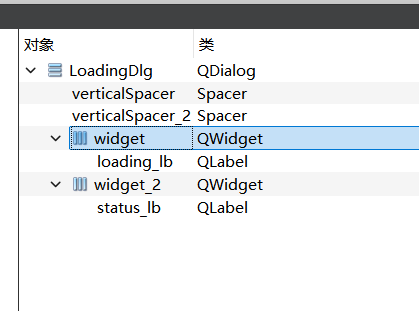
image-20250605180346879

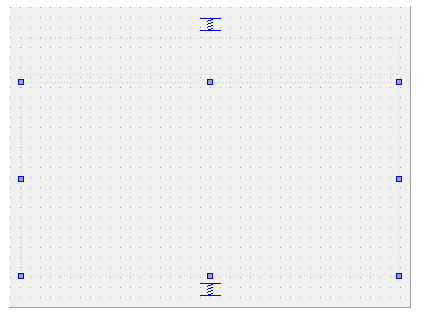
布局界面

image-20250605180401895

接下来调整下代码

1
2
3
4
5
6
7
8
9
10
11
12
13
14
15
16
17
18
19
20
21
22
23
#ifndef LOADINGDLG_H
#define LOADINGDLG_H

#include <QDialog>

namespace Ui {
class LoadingDlg;
}

class LoadingDlg : public QDialog
{
Q_OBJECT

public:
explicit LoadingDlg(QWidget *parent = nullptr, QString tip = "Loading...");
~LoadingDlg();

private:
Ui::LoadingDlg *ui;
};

#endif // LOADINGDLG_H

具体实现

1
2
3
4
5
6
7
8
9
10
11
12
13
14
15
16
17
18
19
20
21
22
23
24
25
26
27
28
29
30
31
32
33
34
35
LoadingDlg::LoadingDlg(QWidget *parent, QString tip):
QDialog(parent),
ui(new Ui::LoadingDlg)
{
ui->setupUi(this);

// 1. 让这个 Widget 透明背景、无边框、拦截底部事件
setWindowFlags(Qt::Dialog | Qt::FramelessWindowHint | Qt::WindowSystemMenuHint | Qt::WindowStaysOnTopHint);
setAttribute(Qt::WA_TranslucentBackground);// 设置背景透明
// 2. 让它覆盖父窗口整个面积
if (parent) {
// 获取屏幕尺寸
setFixedSize(parent->size()); // 设置对话框为全屏尺寸
}

if (parent) {
QPoint topLeft = parent->mapToGlobal(QPoint(0, 0));
move(topLeft);
}

// 3. 半透明黑色背景(alpha = 128,大约 50% 透明度)
// setStyleSheet("background-color: rgba(0, 0, 0, 128);");

QMovie *movie = new QMovie(":/res/loading2.gif"); // 加载动画的资源文件
ui->loading_lb->setMovie(movie);
movie->start();
// 3. 告诉 QMovie:将解码后的每一帧缩放到 100×100(固定大小)
movie->setScaledSize(ui->loading_lb->size());
ui->status_lb->setText(tip);
}

LoadingDlg::~LoadingDlg()
{
delete ui;
}

2 加载聊天记录

之前没有从数据库加载聊天记录,只是模拟从本地好友中加载为聊天记录了,现在需要将这部分从ChatDialog构造函数中移除

改为从服务器申请,并且此时展示LoadingDlg对话框,直到获取记录后,将LoadingDlg移除。

因为获取服务器记录是通过网络获取的,所以在客户端的TcpMgr中通过信号发送给ChatDialog界面

所以ChatDialog的构造函数改为如下

1
2
3
4
5
6
7
8
9
10
11
12
13
14
15
16
17
18
19
20
21
22
23
24
25
26
27
28
29
30
31
32
33
34
35
36
37
38
39
40
41
42
43
44
45
46
47
48
49
50
51
52
53
54
55
56
57
58
59
60
61
62
63
64
65
66
67
68
69
70
71
72
73
74
75
76
77
78
79
80
81
82
83
84
85
86
87
88
89
90
91
92
93
94
95
96
97
98
99
100
101
102
103
104
105
106
107
108
109
110
111
112
113
114
115
116
117
118
119
120
121
122
123
124
125
126
127
128
129
130
131
132
133
134
135
136
137
138
139
140
141
142
143
144
145
146
147
148
ChatDialog::ChatDialog(QWidget* parent) :
QDialog(parent),
ui(new Ui::ChatDialog), _b_loading(false), _mode(ChatUIMode::ChatMode),
_state(ChatUIMode::ChatMode), _last_widget(nullptr), _cur_chat_uid(0), _loading_dlg(nullptr)
{
ui->setupUi(this);

ui->add_btn->SetState("normal", "hover", "press");
ui->add_btn->setProperty("state", "normal");
QAction* searchAction = new QAction(ui->search_edit);
searchAction->setIcon(QIcon(":/res/search.png"));
ui->search_edit->addAction(searchAction, QLineEdit::LeadingPosition);
ui->search_edit->setPlaceholderText(QStringLiteral("搜索"));


// 创建一个清除动作并设置图标
QAction* clearAction = new QAction(ui->search_edit);
clearAction->setIcon(QIcon(":/res/close_transparent.png"));
// 初始时不显示清除图标
// 将清除动作添加到LineEdit的末尾位置
ui->search_edit->addAction(clearAction, QLineEdit::TrailingPosition);

// 当需要显示清除图标时,更改为实际的清除图标
connect(ui->search_edit, &QLineEdit::textChanged, [clearAction](const QString& text) {
if (!text.isEmpty()) {
clearAction->setIcon(QIcon(":/res/close_search.png"));
}
else {
clearAction->setIcon(QIcon(":/res/close_transparent.png")); // 文本为空时,切换回透明图标
}

});

// 连接清除动作的触发信号到槽函数,用于清除文本
connect(clearAction, &QAction::triggered, [this, clearAction]() {
ui->search_edit->clear();
clearAction->setIcon(QIcon(":/res/close_transparent.png")); // 清除文本后,切换回透明图标
ui->search_edit->clearFocus();
//清除按钮被按下则不显示搜索框
ShowSearch(false);
});

ui->search_edit->SetMaxLength(15);

//连接加载信号和槽
connect(ui->chat_user_list, &ChatUserList::sig_loading_chat_user, this, &ChatDialog::slot_loading_chat_user);
//模拟加载自己头像
QString head_icon = UserMgr::GetInstance()->GetIcon();
QPixmap pixmap(head_icon); // 加载图片
QPixmap scaledPixmap = pixmap.scaled(ui->side_head_lb->size(), Qt::KeepAspectRatio, Qt::SmoothTransformation); // 将图片缩放到label的大小
ui->side_head_lb->setPixmap(scaledPixmap); // 将缩放后的图片设置到QLabel上
ui->side_head_lb->setScaledContents(true); // 设置QLabel自动缩放图片内容以适应大小

ui->side_chat_lb->setProperty("state", "normal");

ui->side_chat_lb->SetState("normal", "hover", "pressed", "selected_normal", "selected_hover", "selected_pressed");

ui->side_contact_lb->SetState("normal", "hover", "pressed", "selected_normal", "selected_hover", "selected_pressed");

ui->side_settings_lb->SetState("normal", "hover", "pressed", "selected_normal", "selected_hover", "selected_pressed");

AddLBGroup(ui->side_chat_lb);
AddLBGroup(ui->side_contact_lb);
AddLBGroup(ui->side_settings_lb);

connect(ui->side_chat_lb, &StateWidget::clicked, this, &ChatDialog::slot_side_chat);
connect(ui->side_contact_lb, &StateWidget::clicked, this, &ChatDialog::slot_side_contact);
connect(ui->side_settings_lb, &StateWidget::clicked, this, &ChatDialog::slot_side_setting);

//链接搜索框输入变化
connect(ui->search_edit, &QLineEdit::textChanged, this, &ChatDialog::slot_text_changed);

ShowSearch(false);

//检测鼠标点击位置判断是否要清空搜索框
this->installEventFilter(this); // 安装事件过滤器

//设置聊天label选中状态
ui->side_chat_lb->SetSelected(true);
//设置选中条目
SetSelectChatItem();
//更新聊天界面信息
SetSelectChatPage();

//连接加载联系人的信号和槽函数
connect(ui->con_user_list, &ContactUserList::sig_loading_contact_user,
this, &ChatDialog::slot_loading_contact_user);

//连接联系人页面点击好友申请条目的信号
connect(ui->con_user_list, &ContactUserList::sig_switch_apply_friend_page,
this, &ChatDialog::slot_switch_apply_friend_page);

//连接清除搜索框操作
connect(ui->friend_apply_page, &ApplyFriendPage::sig_show_search, this, &ChatDialog::slot_show_search);

//为searchlist 设置search edit
ui->search_list->SetSearchEdit(ui->search_edit);

//连接申请添加好友信号
connect(TcpMgr::GetInstance().get(), &TcpMgr::sig_friend_apply, this, &ChatDialog::slot_apply_friend);

//连接认证添加好友信号
connect(TcpMgr::GetInstance().get(), &TcpMgr::sig_add_auth_friend, this, &ChatDialog::slot_add_auth_friend);

//链接自己认证回复信号
connect(TcpMgr::GetInstance().get(), &TcpMgr::sig_auth_rsp, this,
&ChatDialog::slot_auth_rsp);

//连接点击联系人item发出的信号和用户信息展示槽函数
connect(ui->con_user_list, &ContactUserList::sig_switch_friend_info_page,
this, &ChatDialog::slot_friend_info_page);

//设置中心部件为chatpage
ui->stackedWidget->setCurrentWidget(ui->chat_page);


//连接searchlist跳转聊天信号
connect(ui->search_list, &SearchList::sig_jump_chat_item, this, &ChatDialog::slot_jump_chat_item);

//连接好友信息界面发送的点击事件
connect(ui->friend_info_page, &FriendInfoPage::sig_jump_chat_item, this,
&ChatDialog::slot_jump_chat_item_from_infopage);

//连接聊天列表点击信号
connect(ui->chat_user_list, &QListWidget::itemClicked, this, &ChatDialog::slot_item_clicked);

//连接对端消息通知
connect(TcpMgr::GetInstance().get(), &TcpMgr::sig_text_chat_msg,
this, &ChatDialog::slot_text_chat_msg);

connect(ui->chat_page, &ChatPage::sig_append_send_chat_msg, this, &ChatDialog::slot_append_send_chat_msg);

_timer = new QTimer(this);
connect(_timer, &QTimer::timeout, this, [this]() {
auto user_info = UserMgr::GetInstance()->GetUserInfo();
QJsonObject textObj;
textObj["fromuid"] = user_info->_uid;
QJsonDocument doc(textObj);
QByteArray jsonData = doc.toJson(QJsonDocument::Compact);
emit TcpMgr::GetInstance()->sig_send_data(ReqId::ID_HEART_BEAT_REQ, jsonData);
});

_timer->start(10000);

//连接tcp返回的加载聊天回复
connect(TcpMgr::GetInstance().get(), &TcpMgr::sig_load_chat_thread,
this, &ChatDialog::slot_load_chat_thread);
}

当用户登录成功后会切换到聊天页面,此时请求聊天列表

1
2
3
4
5
6
7
8
9
10
11
12
void MainWindow::SlotSwitchChat()
{
_chat_dlg = new ChatDialog();
_chat_dlg->setWindowFlags(Qt::CustomizeWindowHint|Qt::FramelessWindowHint);
setCentralWidget(_chat_dlg);
_chat_dlg->show();
_login_dlg->hide();
this->setMinimumSize(QSize(1050,900));
this->setMaximumSize(QWIDGETSIZE_MAX, QWIDGETSIZE_MAX);
_ui_status = CHAT_UI;
_chat_dlg->loadChatList();
}

通过发送请求获取聊天记录

1
2
3
4
5
6
7
8
9
10
11
12
13
14
15
16
17
18
void ChatDialog::loadChatList()
{
showLoadingDlg(true);

//发送请求逻辑
QJsonObject jsonObj;
auto uid = UserMgr::GetInstance()->GetUid();
jsonObj["uid"] = uid;
int last_chat_thread_id = UserMgr::GetInstance()->GetLastChatThreadId();
jsonObj["thread_id"] = last_chat_thread_id;


QJsonDocument doc(jsonObj);
QByteArray jsonData = doc.toJson(QJsonDocument::Compact);

//发送tcp请求给chat server
emit TcpMgr::GetInstance()->sig_send_data(ReqId::ID_LOAD_CHAT_THREAD_REQ, jsonData);
}

TCPMgr注册从服务器获取回复的消息处理

1
2
3
4
5
6
7
8
9
10
11
12
13
14
15
16
17
18
19
20
21
22
23
24
25
26
27
28
29
30
31
32
33
34
35
36
37
38
39
40
41
42
43
44
_handlers.insert(ID_LOAD_CHAT_THREAD_RSP, [this](ReqId id, int len, QByteArray data) {
Q_UNUSED(len);
qDebug() << "handle id is " << id << " data is " << data;
// 将QByteArray转换为QJsonDocument
QJsonDocument jsonDoc = QJsonDocument::fromJson(data);

// 检查转换是否成功
if (jsonDoc.isNull()) {
qDebug() << "Failed to create QJsonDocument.";
return;
}

QJsonObject jsonObj = jsonDoc.object();

if (!jsonObj.contains("error")) {
int err = ErrorCodes::ERR_JSON;
qDebug() << "chat thread json parse failed " << err;
return;
}

int err = jsonObj["error"].toInt();
if (err != ErrorCodes::SUCCESS) {
qDebug() << "get chat thread rsp failed, error is " << err;
return;
}

qDebug() << "Receive chat thread rsp Success";

auto thread_array = jsonObj["threads"].toArray();
std::vector<std::shared_ptr<ChatThreadInfo>> chat_threads;
for (const QJsonValue& value : thread_array) {
auto cti = std::make_shared<ChatThreadInfo>();
cti->_thread_id = value["thread_id"].toInt();
cti->_type = value["type"].toString();
cti->_user1_id = value["user1_id"].toInt();
cti->_user2_id = value["user2_id"].toInt();
chat_threads.push_back(cti);
}

bool load_more = jsonObj["load_more"].toBool();
int next_last_id = jsonObj["next_last_id"].toInt();
//发送信号通知界面
emit sig_load_chat_thread(load_more, next_last_id, chat_threads);
});

ChatDialog接收TcpMgr发送的sig_load_chat_thread消息,然后触发如下函数,该函数主要加载聊天列表并且消除加载动画

1
2
3
4
5
6
7
8
9
10
11
12
13
14
15
16
17
18
19
20
21
22
23
24
25
26
27
28
29
30
31
32
33
34
35
36
37
38
39
40
41
42
43
44
45
46
47
48
49
50
51
52
53
54
55
56
57
58
59
60
61
62
63
64
void ChatDialog::slot_load_chat_thread(bool load_more, int last_thread_id,
std::vector<std::shared_ptr<ChatThreadInfo>> chat_threads)
{
for (auto& cti : chat_threads) {
//先处理单聊,群聊跳过,以后添加
if (cti->_type == "group") {
continue;
}

auto uid = UserMgr::GetInstance()->GetUid();
auto other_uid = 0;
if (uid == cti->_user1_id) {
other_uid = cti->_user2_id;
}else {
other_uid = cti->_user1_id;
}

auto friend_info = UserMgr::GetInstance()->GetFriendById(other_uid);
if (!friend_info) {
continue;
}

auto* chat_user_wid = new ChatUserWid();
auto user_info = std::make_shared<UserInfo>(friend_info);
chat_user_wid->SetInfo(user_info);
QListWidgetItem* item = new QListWidgetItem;
//qDebug()<<"chat_user_wid sizeHint is " << chat_user_wid->sizeHint();
item->setSizeHint(chat_user_wid->sizeHint());
ui->chat_user_list->addItem(item);
ui->chat_user_list->setItemWidget(item, chat_user_wid);
_chat_items_added.insert(user_info->_uid, item);

auto chat_thread_data = std::make_shared<ChatThreadData>();
chat_thread_data->_user1_id = uid;
chat_thread_data->_user2_id = other_uid;
chat_thread_data->_last_msg_id = 0;
chat_thread_data->_thread_id = cti->_thread_id;
UserMgr::GetInstance()->AddChatThreadData(chat_thread_data);
}

UserMgr::GetInstance()->SetLastChatThreadId(last_thread_id);

if (load_more) {
//发送请求逻辑
QJsonObject jsonObj;
auto uid = UserMgr::GetInstance()->GetUid();
jsonObj["uid"] = uid;
jsonObj["thread_id"] = last_thread_id;


QJsonDocument doc(jsonObj);
QByteArray jsonData = doc.toJson(QJsonDocument::Compact);

//发送tcp请求给chat server
emit TcpMgr::GetInstance()->sig_send_data(ReqId::ID_LOAD_CHAT_THREAD_REQ, jsonData);
return;
}

//更新聊天界面信息
SetSelectChatItem();
SetSelectChatPage();
showLoadingDlg(false);

}

数据库构建

navicat中执行上面数据模型设计中提到的几个sql语句

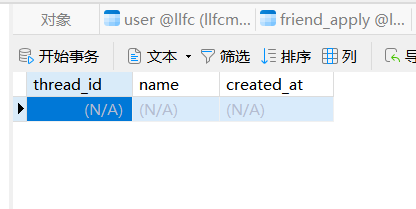
1 创建chat_thread

2 创建group_chat

image-20250613154003601

成功后显示

image-20250605181826063

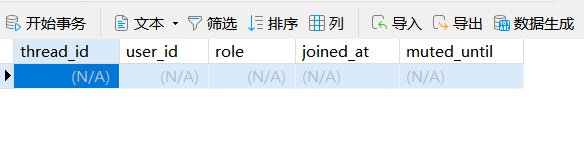
3 创建group_member

image-20250613154030973

成功后显示表

image-20250605182001600

4 创建私聊表

image-20250613154048586

成功后显示

image-20250605182147160

注意: 创建后没有数据,数据是我自己添加的,为了方便测试

开启服务器,客户端登陆后加载数据

效果如下
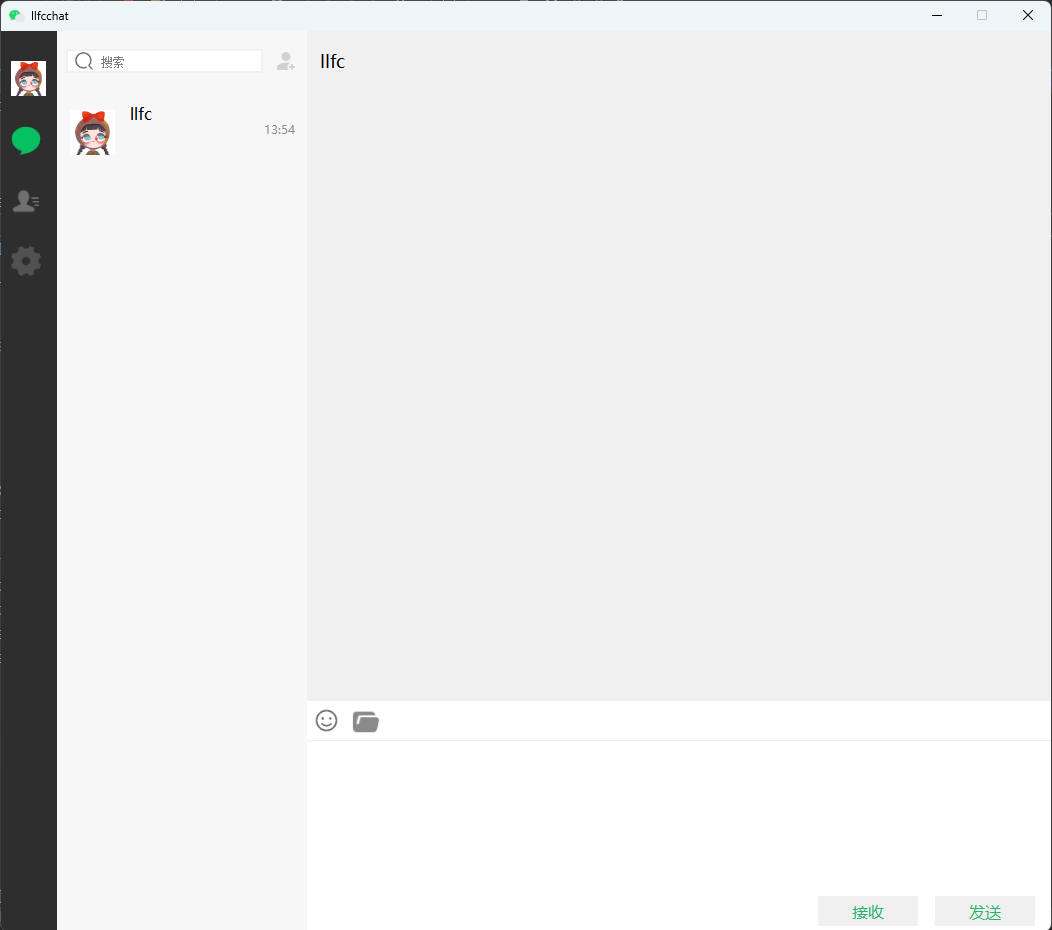
image-20250605183518757

首次单聊

A和B是好友,首次单聊,A发送给服务器创建聊天的请求。

服务器根据A的创建请求创建私聊,然后返回给客户端A。

注意

因为聊天服务是异步的,而且是分布式的,所以有可能对方B就在此时发送消息给A,服务器已经创建好了,或者服务器正在调用sql创建。

所以对于创建请求,sql需要先查询是否已经被其他人创建了thread_id, 我们可以制定一个规则,任何一方创建thread_id,在写入私聊表private_chat时都需要保证最小的uiduid1_id, 大的在uid2_id, 这样查询的时候也方便。

这个查询要加行级锁,避免分布式造成数据混乱。

总结

所以创建单聊时,要先去private_chat表根据uid查询,如果查到了则返回这个thread_id, 这个查询要加行级锁。

如果没查到,则在chat_thread表创建thread_id并且插入private_chat

思路

我们整理下思路

  1. 查询是否已存在私聊会话,如果存在则加锁行并返回 thread_id
1
2
3
4
SELECT thread_id
FROM private_chat
WHERE (user1_id = LEAST(:user1_id, :user2_id) AND user2_id = GREATEST(:user1_id, :user2_id))
FOR UPDATE; -- 使用行级锁,避免并发冲突

查询时使用 LEASTGREATEST 来保证无论是 user1_id 还是 user2_id,都将较小的 ID 存放在 user1_id,较大的存放在 user2_id。这样可以避免不同的用户顺序导致查找不到匹配的记录。

FOR UPDATE 关键字会锁定这些查询行,确保在事务结束之前不会有其他并发的操作修改数据。

  1. 如果未找到数据(查询返回空),则插入新记录:
1
2
3
4
5
--    1. 在 chat_thread 表中创建新记录
INSERT INTO chat_thread (type, created_at)
VALUES ('private', NOW());
-- 2. 获取新插入的 thread_id(假设你可以通过 LAST_INSERT_ID 获取)
SELECT LAST_INSERT_ID();
  1. 将新生成的 thread_id 插入 private_chat 表
1
2
INSERT INTO private_chat (thread_id, user1_id, user2_id, created_at)
VALUES (:new_thread_id, LEAST(:user1_id, :user2_id), GREATEST(:user1_id, :user2_id), NOW());

使用 INSERT INTO chat_thread 创建新的聊天记录,并使用 LAST_INSERT_ID() 获取新生成的 thread_id

将新 thread_id 插入到 private_chat 表中,同时使用 LEASTGREATEST 确保较小的 ID 存入 user1_id,较大的存入 user2_id

问题分析

  • 行级锁的生命周期:
    行级锁(通过 FOR UPDATE 获得的锁)只在当前事务中有效。当查询结束后,锁会被释放。也就是说,如果我们查询了是否存在 private_chat 的记录并加了锁,但在查询完成后进行插入 chat_threadprivate_chat 的操作时,其他并发请求可能会先插入新的私聊记录,从而造成数据冲突。
  • 可能的并发问题:
    例如:
    1. 线程 A 执行查询,锁定了 private_chat 表的行;
    2. 线程 B 也执行了相同的查询,发现没有记录,于是开始插入 chat_thread
    3. 线程 A 完成插入 chat_threadprivate_chat,但线程 B 也在此时完成了它的插入,导致 private_chat 表中出现两个重复的记录。

解决方案

为了确保并发操作的安全性,我们可以使用 事务 来保证在查询、插入 chat_threadprivate_chat 表的过程中,数据的一致性和原子性。具体步骤如下:

方案:使用事务(Atomic Transaction)

我们可以使用 事务 来确保操作的一致性,整个操作从查询到插入都在一个事务中进行。这样即使存在多个并发请求,也能保证同一时间只有一个请求可以成功创建 chat_threadprivate_chat

关键改动:

  1. 在查询时加行级锁。
  2. 确保所有的数据库操作(查询和插入)都在一个事务中进行,这样可以防止并发插入的问题。
  3. 使用事务提交(commit)和回滚(rollback)确保数据一致性。

关键代码

1
2
3
4
5
6
7
8
9
10
11
12
13
14
15
16
17
18
19
20
21
22
23
24
25
26
27
28
29
30
31
32
33
34
35
36
37
38
39
40
41
42
43
44
45
46
47
48
49
50
51
52
53
54
55
56
57
58
59
60
61
62
63
64
65
66
67
68
69
70
71
72
73
74
75
76
bool MysqlDao::CreatePrivateChat(int user1_id, int user2_id, int& thread_id)
{
auto con = pool_->getConnection();
if (!con) {
return false;
}
Defer defer([this, &con]() {
pool_->returnConnection(std::move(con));
});
auto& conn = con->_con;
try {
// 开启事务
conn->setAutoCommit(false);
// 1. 查询是否已存在私聊并加行级锁
int uid1 = std::min(user1_id, user2_id);
int uid2 = std::max(user1_id, user2_id);
std::string check_sql =
"SELECT thread_id FROM private_chat "
"WHERE (user1_id = ? AND user2_id = ?) "
"FOR UPDATE;";

std::unique_ptr<sql::PreparedStatement> pstmt(conn->prepareStatement(check_sql));
pstmt->setInt64(1, uid1);
pstmt->setInt64(2, uid2);
std::unique_ptr<sql::ResultSet> res(pstmt->executeQuery());

if (res->next()) {
// 如果已存在,返回该 thread_id
thread_id = res->getInt("thread_id");
conn->commit(); // 提交事务
return true;
}

// 2. 如果未找到,创建新的 chat_thread 和 private_chat 记录
// 在 chat_thread 表插入新记录
std::string insert_chat_thread_sql =
"INSERT INTO chat_thread (type, created_at) VALUES ('private', NOW());";

std::unique_ptr<sql::PreparedStatement> pstmt_insert_thread(conn->prepareStatement(insert_chat_thread_sql));
pstmt_insert_thread->executeUpdate();

// 获取新插入的 thread_id
std::string get_last_insert_id_sql = "SELECT LAST_INSERT_ID();";
std::unique_ptr<sql::PreparedStatement> pstmt_last_insert_id(conn->prepareStatement(get_last_insert_id_sql));
std::unique_ptr<sql::ResultSet> res_last_id(pstmt_last_insert_id->executeQuery());
res_last_id->next();
thread_id = res_last_id->getInt(1);

// 3. 在 private_chat 表插入新记录
std::string insert_private_chat_sql =
"INSERT INTO private_chat (thread_id, user1_id, user2_id, created_at) "
"VALUES (?, ?, ?, NOW());";


std::unique_ptr<sql::PreparedStatement> pstmt_insert_private(conn->prepareStatement(insert_private_chat_sql));
pstmt_insert_private->setInt64(1, thread_id);
pstmt_insert_private->setInt64(2, uid1);
pstmt_insert_private->setInt64(3, uid2);
pstmt_insert_private->executeUpdate();

// 提交事务
conn->commit();
return true;
}
catch (sql::SQLException& e) {
std::cerr << "SQLException: " << e.what() << std::endl;
conn->rollback();
return false;
}
return false;
}

bool MysqlMgr::CreatePrivateChat(int user1_id, int user2_id, int& thread_id)
{
return _dao.CreatePrivateChat(user1_id, user2_id, thread_id);
}

LogicSystem添加创建聊天的回调函数,并且注册

1
2
3
4
5
6
7
8
9
10
11
12
13
14
15
16
17
18
19
20
21
22
23
24
25
26
27
28
29
30
void LogicSystem::CreatePrivateChat(std::shared_ptr<CSession> session, const short& msg_id, const string& msg_data)
{
Json::Reader reader;
Json::Value root;
reader.parse(msg_data, root);
auto uid = root["uid"].asInt();
auto other_id = root["other_id"].asInt();

Json::Value rtvalue;
rtvalue["error"] = ErrorCodes::Success;
rtvalue["uid"] = uid;
rtvalue["other_id"] = other_id;

Defer defer([this, &rtvalue, session]() {
std::string return_str = rtvalue.toStyledString();
session->Send(return_str, ID_LOAD_CHAT_THREAD_RSP);
});

int thread_id = 0;
bool res = MysqlMgr::GetInstance()->CreatePrivateChat(uid, other_id, thread_id);
if (!res) {
rtvalue["error"] = ErrorCodes::CREATE_CHAT_FAILED;
return;
}

rtvalue["thread_id"] = thread_id;
}

_fun_callbacks[ID_CREATE_PRIVATE_CHAT_REQ] = std::bind(&LogicSystem::CreatePrivateChat, this,
placeholders::_1, placeholders::_2, placeholders::_3);

客户端完善

在好友信息界面

1
2
3
4
5
6
void FriendInfoPage::on_msg_chat_clicked()
{
qDebug() << "msg chat btn clicked";
emit sig_jump_chat_item(_user_info);
}

追踪这个信号,我们完善槽函数

1
2
3
4
5
6
7
8
9
10
11
12
13
14
15
16
17
18
19
20
21
22
23
24
25
26
27
28
29
30
31
32
33
34
35
36
37
38
39
40
41
42
43
44
45
46
void ChatDialog::slot_jump_chat_item_from_infopage(std::shared_ptr<UserInfo> user_info)
{
qDebug() << "slot jump chat item " << endl;
auto thread_id = UserMgr::GetInstance()->GetThreadIdByUid(user_info->_uid);
if (thread_id != -1) {
auto find_iter = _chat_thread_items.find(thread_id);
if (find_iter != _chat_thread_items.end()) {
qDebug() << "jump to chat item , uid is " << user_info->_uid;
ui->chat_user_list->scrollToItem(find_iter.value());
ui->side_chat_lb->SetSelected(true);
SetSelectChatItem(user_info->_uid);
//更新聊天界面信息
SetSelectChatPage(user_info->_uid);
slot_side_chat();
return;
} //说明之前有缓存过聊天列表,只是被删除了,那么重新加进来即可
else {
auto* chat_user_wid = new ChatUserWid();
chat_user_wid->SetInfo(user_info);
QListWidgetItem* item = new QListWidgetItem;
qDebug() << "chat_user_wid sizeHint is " << chat_user_wid->sizeHint();
ui->chat_user_list->insertItem(0, item);
ui->chat_user_list->setItemWidget(item, chat_user_wid);
_chat_thread_items.insert(thread_id, item);
ui->side_chat_lb->SetSelected(true);
SetSelectChatItem(user_info->_uid);
//更新聊天界面信息
SetSelectChatPage(user_info->_uid);
slot_side_chat();
return;
}
}

//如果没找到,则发送创建请求
auto uid = UserMgr::GetInstance()->GetUid();
QJsonObject jsonObj;
jsonObj["uid"] = uid;
jsonObj["other_id"] = user_info->_uid;

QJsonDocument doc(jsonObj);
QByteArray jsonData = doc.toJson(QJsonDocument::Compact);

//发送tcp请求给chat server
emit TcpMgr::GetInstance()->sig_send_data(ReqId::ID_CREATE_PRIVATE_CHAT_REQ, jsonData);
}

客户端注册服务器返回的消息ID_CREATE_PRIVATE_CHAT_RSP,进行处理

1
2
3
4
5
6
7
8
9
10
11
12
13
14
15
16
17
18
19
20
21
22
23
24
25
26
27
28
29
30
31
32
33
34
35
36
_handlers.insert(ID_CREATE_PRIVATE_CHAT_RSP, [this](ReqId id, int len, QByteArray data) {
Q_UNUSED(len);
qDebug() << "handle id is " << id << " data is " << data;
// 将QByteArray转换为QJsonDocument
QJsonDocument jsonDoc = QJsonDocument::fromJson(data);

// 检查转换是否成功
if (jsonDoc.isNull()) {
qDebug() << "Failed to create QJsonDocument.";
return;
}

QJsonObject jsonObj = jsonDoc.object();

if (!jsonObj.contains("error")) {
int err = ErrorCodes::ERR_JSON;
qDebug() << "parse create private chat json parse failed " << err;
return;
}

int err = jsonObj["error"].toInt();
if (err != ErrorCodes::SUCCESS) {
qDebug() << "get create private chat failed, error is " << err;
return;
}

qDebug() << "Receive create private chat rsp Success";

int uid = jsonObj["uid"].toInt();
int other_id = jsonObj["other_id"].toInt();
int thread_id = jsonObj["thread_id"].toInt();

//发送信号通知界面
emit sig_create_private_chat(uid, other_id, thread_id);
});

编写槽函数和sig_create_private_chat连接,并且增加聊天条目

1
2
3
//连接tcp返回的创建私聊的回复
connect(TcpMgr::GetInstance().get(), &TcpMgr::sig_create_private_chat,
this, &ChatDialog::slot_create_private_chat);

具体处理的槽函数

1
2
3
4
5
6
7
8
9
10
11
12
13
14
15
16
17
18
19
20
21
22
23
24
25
26
void ChatDialog::slot_create_private_chat(int uid, int other_id, int thread_id)
{
auto* chat_user_wid = new ChatUserWid();
auto user_info = UserMgr::GetInstance()->GetFriendById(other_id);
chat_user_wid->SetInfo(user_info);
QListWidgetItem* item = new QListWidgetItem;
item->setSizeHint(chat_user_wid->sizeHint());
qDebug() << "chat_user_wid sizeHint is " << chat_user_wid->sizeHint();
ui->chat_user_list->insertItem(0, item);
ui->chat_user_list->setItemWidget(item, chat_user_wid);
_chat_thread_items.insert(thread_id, item);

auto chat_thread_data = std::make_shared<ChatThreadData>();
chat_thread_data->_user1_id = uid;
chat_thread_data->_user2_id = other_id;
chat_thread_data->_last_msg_id = 0;
chat_thread_data->_thread_id = thread_id;
UserMgr::GetInstance()->AddChatThreadData(chat_thread_data, other_id);

ui->side_chat_lb->SetSelected(true);
SetSelectChatItem(user_info->_uid);
//更新聊天界面信息
SetSelectChatPage(user_info->_uid);
slot_side_chat();
return;
}

聊天消息重构

ChaUserWid重构

之前我们的会话列表由一个一个的ChatUserWid构成
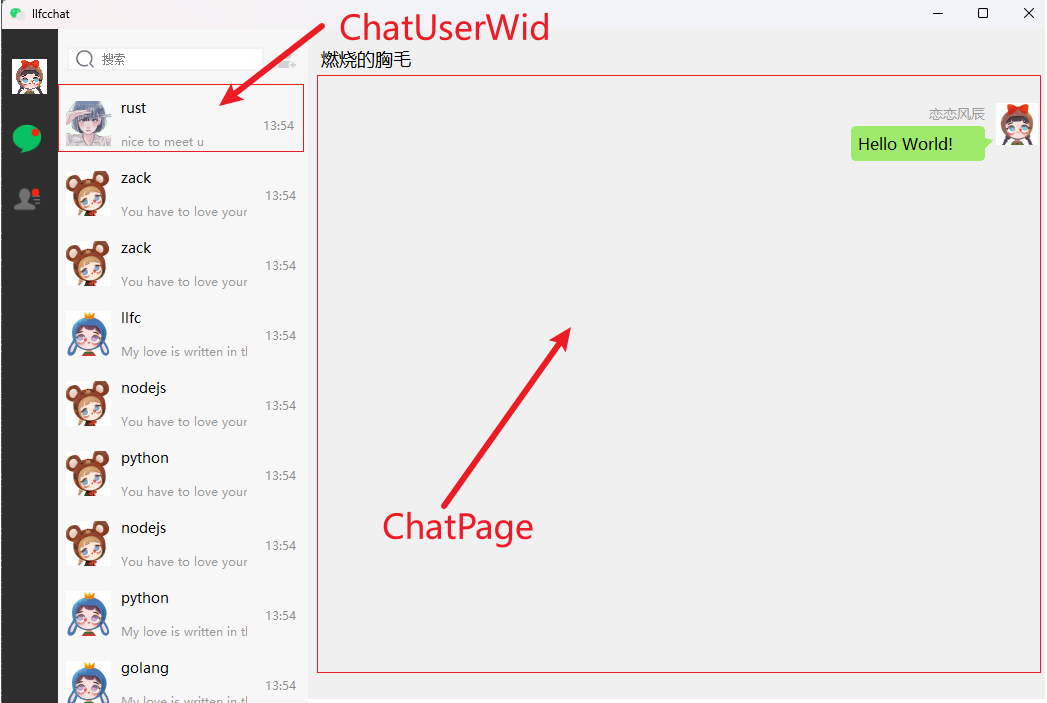
image-20250622085350930

原来的ChatUserWid内部存储的是UserInfo结构,目前我们已经增加了ChatThread数据库内容,所以要将会话列表的每个ChatUserWid中存储ChatThreadData结构。

接下来我们定义这几个结构

1
2
3
4
5
6
7
8
9
10
11
12
13
14
15
16
class ChatUserWid : public ListItemBase
{
Q_OBJECT

public:
explicit ChatUserWid(QWidget *parent = nullptr);
~ChatUserWid();
QSize sizeHint() const override;
void SetChatData(std::shared_ptr<ChatThreadData> chat_data);
std::shared_ptr<ChatThreadData> GetChatData();
void ShowRedPoint(bool bshow);
void updateLastMsg(std::vector<std::shared_ptr<TextChatData>> msgs);
private:
Ui::ChatUserWid *ui;
std::shared_ptr<ChatThreadData> _chat_data;
};

具体定义

1
2
3
4
5
6
7
8
9
10
11
12
13
14
15
16
17
18
19
20
21
void ChatUserWid::SetChatData(std::shared_ptr<ChatThreadData> chat_data) {
_chat_data = chat_data;
auto other_id = _chat_data->GetOtherId();
auto other_info = UserMgr::GetInstance()->GetFriendById(other_id);
// 加载图片
QPixmap pixmap(other_info->_icon);

// 设置图片自动缩放
ui->icon_lb->setPixmap(pixmap.scaled(ui->icon_lb->size(), Qt::KeepAspectRatio, Qt::SmoothTransformation));
ui->icon_lb->setScaledContents(true);

ui->user_name_lb->setText(other_info->_name);

ui->user_chat_lb->setText(chat_data->GetLastMsg());

}

std::shared_ptr<ChatThreadData> ChatUserWid::GetChatData()
{
return _chat_data;
}

这样我们就将聊天会话的信息写入到了ChatUserWid这样一个个小条目了。

消息类抽象

因为我们将来要存储文本,文件以及图片不同类型的消息,那么就将原来的消息抽象出一个基类

1
2
3
4
5
6
7
8
9
10
11
12
13
14
15
16
17
18
19
20
21
22
23
24
25
26
27
28
29
30
class ChatDataBase {
public:
ChatDataBase(int msg_id, int thread_id, ChatFormType form_type, ChatMsgType msg_type,
QString content,int _send_uid);
ChatDataBase(QString unique_id, int thread_id, ChatFormType form_type, ChatMsgType msg_type,
QString content, int send_uid);
int GetMsgId() { return _msg_id; }
int GetThreadId() { return _thread_id; }
ChatFormType GetFormType() { return _form_type; }
ChatMsgType GetMsgType() { return _msg_type; }
QString GetContent() { return _content; }
int GetSendUid() { return _send_uid; }
QString GetMsgContent(){return _content;}
void SetUniqueId(int unique_id);
QString GetUniqueId();
private:
//客户端本地唯一标识
QString _unique_id;
//消息id
int _msg_id;
//会话id
int _thread_id;
//群聊还是私聊
ChatFormType _form_type;
//文本信息为0,图片为1,文件为2
ChatMsgType _msg_type;
QString _content;
//发送者id
int _send_uid;
};

然后基于上面的基类,我们可以定义不同类型的消息,如文本消息

1
2
3
4
5
6
7
8
9
10
11
12
13
14
15
16
17
18
class TextChatData : public ChatDataBase {
public:

TextChatData(int msg_id, int thread_id, ChatFormType form_type, ChatMsgType msg_type, QString content,
int send_uid):
ChatDataBase(msg_id, thread_id, form_type, msg_type, content, send_uid)
{

}

TextChatData(QString unique_id, int thread_id, ChatFormType form_type, ChatMsgType msg_type, QString content,
int send_uid):
ChatDataBase(unique_id, thread_id, form_type, msg_type, content, send_uid)
{

}

};

有了这个文本消息后,我们可以将基类指针ChatDataBase存储起来,将来通过实现虚函数,进行多态调用.

ChatThreadData聊天线程

聊天线程数据,重构和完善

1
2
3
4
5
6
7
8
9
10
11
12
13
14
15
16
17
18
19
20
21
22
23
24
25
26
27
28
//客户端本地存储的聊天线程数据结构
class ChatThreadData {
public:
ChatThreadData(int other_id, int thread_id, int last_msg_id):
_other_id(other_id), _thread_id(thread_id), _last_msg_id(last_msg_id){}
void AddMsg(std::shared_ptr<ChatDataBase> msg);
void SetLastMsgId(int msg_id);
void SetOtherId(int other_id);
int GetOtherId();
QString GetGroupName();
QMap<int, std::shared_ptr<ChatDataBase>> GetMsgMap();
int GetThreadId();
QMap<int, std::shared_ptr<ChatDataBase>>& GetMsgMapRef();
void AppendMsg(int msg_id, std::shared_ptr<ChatDataBase> base_msg);
QString GetLastMsg();
private:
//如果是私聊,则为对方的id;如果是群聊,则为0
int _other_id;
int _last_msg_id;
int _thread_id;
QString _last_msg;
//群聊信息,成员列表
std::vector<int> _group_members;
//群聊名称
QString _group_name;
//缓存消息map,抽象为基类,因为会有图片等其他类型消息
QMap<int, std::shared_ptr<ChatDataBase>> _msg_map;
};

具体实现

1
2
3
4
5
6
7
8
9
10
11
12
13
14
15
16
17
18
19
20
21
22
23
24
25
26
27
28
29
30
31
32
33
34
35
36
37
38
39
40
41
42
43
44
45
46
47
48
49
50
void ChatThreadData::AddMsg(std::shared_ptr<ChatDataBase> msg)
{
_msg_map.insert(msg->GetMsgId(), msg);
}

void ChatThreadData::SetLastMsgId(int msg_id)
{
_last_msg_id = msg_id;
}

void ChatThreadData::SetOtherId(int other_id)
{
_other_id = other_id;
}

int ChatThreadData::GetOtherId() {
return _other_id;
}

QString ChatThreadData::GetGroupName()
{
return _group_name;
}

QMap<int, std::shared_ptr<ChatDataBase>> ChatThreadData::GetMsgMap() {
return _msg_map;
}

int ChatThreadData::GetThreadId()
{
return _thread_id;
}

QMap<int, std::shared_ptr<ChatDataBase>>& ChatThreadData::GetMsgMapRef()
{
return _msg_map;
}


void ChatThreadData::AppendMsg(int msg_id, std::shared_ptr<ChatDataBase> base_msg) {
_msg_map.insert(msg_id, base_msg);
_last_msg = base_msg->GetMsgContent();
_last_msg_id = msg_id;
}

QString ChatThreadData::GetLastMsg()
{
return _last_msg;
}

好友认证

对于好友认证时,如果双方通过,也要默认建立聊天消息,并且产生会话列表.

我们先从这块接入聊天消息列表,完善整体流程

proto协议修改

因为认证添加好友后,会生成两条聊天信息(比如,我们已经是好友了等),同时通知给对方,协议格式增加和修改如下

1
2
3
4
5
6
7
8
9
10
11
12
13
14
15
16
17
18
19
20
message AddFriendMsg{
int32 sender_id = 1;
string unique_id = 2;
int32 msg_id = 3;
int32 thread_id = 4;
string msgcontent = 5;
}

message AuthFriendReq{
int32 fromuid = 1;
int32 touid = 2;
repeated AddFriendMsg textmsgs = 3;
}

message AuthFriendRsp{
int32 error = 1;
int32 fromuid = 2;
int32 touid = 3;
}

服务器接收好友申请

服务器收到A向B添加好友的请求,会更新数据库申请记录,同时转发给B

1
2
3
4
5
6
7
8
9
10
11
12
13
14
15
16
17
18
19
20
21
22
23
24
25
26
27
28
29
30
31
32
33
34
35
36
37
38
39
40
41
42
43
44
45
46
47
48
49
50
51
52
53
54
55
56
57
58
59
60
61
62
63
64
65
66
67
68
69
70
71
72
73
74
75
76
77
78
void LogicSystem::AddFriendApply(std::shared_ptr<CSession> session, const short& msg_id, const string& msg_data)
{
Json::Reader reader;
Json::Value root;
reader.parse(msg_data, root);
auto uid = root["uid"].asInt();
auto desc = root["applyname"].asString();
auto bakname = root["bakname"].asString();
auto touid = root["touid"].asInt();
std::cout << "user login uid is " << uid << " applydesc is "
<< desc << " bakname is " << bakname << " touid is " << touid << endl;

Json::Value rtvalue;
rtvalue["error"] = ErrorCodes::Success;
Defer defer([this, &rtvalue, session]() {
std::string return_str = rtvalue.toStyledString();
session->Send(return_str, ID_ADD_FRIEND_RSP);
});

//先更新数据库
MysqlMgr::GetInstance()->AddFriendApply(uid, touid, desc, bakname);

//查询redis 查找touid对应的server ip
auto to_str = std::to_string(touid);
auto to_ip_key = USERIPPREFIX + to_str;
std::string to_ip_value = "";
bool b_ip = RedisMgr::GetInstance()->Get(to_ip_key, to_ip_value);
if (!b_ip) {
return;
}


auto& cfg = ConfigMgr::Inst();
auto self_name = cfg["SelfServer"]["Name"];


std::string base_key = USER_BASE_INFO + std::to_string(uid);
auto apply_info = std::make_shared<UserInfo>();
bool b_info = GetBaseInfo(base_key, uid, apply_info);

//直接通知对方有申请消息
if (to_ip_value == self_name) {
auto session = UserMgr::GetInstance()->GetSession(touid);
if (session) {
//在内存中则直接发送通知对方
Json::Value notify;
notify["error"] = ErrorCodes::Success;
notify["applyuid"] = uid;
notify["name"] = apply_info->name;
notify["desc"] = desc;
if (b_info) {
notify["icon"] = apply_info->icon;
notify["sex"] = apply_info->sex;
notify["nick"] = apply_info->nick;
}
std::string return_str = notify.toStyledString();
session->Send(return_str, ID_NOTIFY_ADD_FRIEND_REQ);
}

return ;
}


AddFriendReq add_req;
add_req.set_applyuid(uid);
add_req.set_touid(touid);
add_req.set_name(apply_info->name);
add_req.set_desc(desc);
if (b_info) {
add_req.set_icon(apply_info->icon);
add_req.set_sex(apply_info->sex);
add_req.set_nick(apply_info->nick);
}

//发送通知
ChatGrpcClient::GetInstance()->NotifyAddFriend(to_ip_value,add_req);

}

如果不在一个服务器,则通过grpc通知对端所在服务器, 对端服务器收到后,组织消息转发

1
2
3
4
5
6
7
8
9
10
11
12
13
14
15
16
17
18
19
20
21
22
23
24
25
26
27
28
29
30
31
32
Status ChatServiceImpl::NotifyAddFriend(ServerContext* context, const AddFriendReq* request, AddFriendRsp* reply)
{
//查找用户是否在本服务器
auto touid = request->touid();
auto session = UserMgr::GetInstance()->GetSession(touid);

Defer defer([request, reply]() {
reply->set_error(ErrorCodes::Success);
reply->set_applyuid(request->applyuid());
reply->set_touid(request->touid());
});

//用户不在内存中则直接返回
if (session == nullptr) {
return Status::OK;
}

//在内存中则直接发送通知对方
Json::Value rtvalue;
rtvalue["error"] = ErrorCodes::Success;
rtvalue["applyuid"] = request->applyuid();
rtvalue["name"] = request->name();
rtvalue["desc"] = request->desc();
rtvalue["icon"] = request->icon();
rtvalue["sex"] = request->sex();
rtvalue["nick"] = request->nick();

std::string return_str = rtvalue.toStyledString();

session->Send(return_str, ID_NOTIFY_ADD_FRIEND_REQ);
return Status::OK;
}

服务器收到同意申请

当B客户同意添加好友,会将请求发送给服务器

服务器收到后会执行

1
2
3
4
5
6
7
8
9
10
11
12
13
14
15
16
17
18
19
20
21
22
23
24
25
26
27
28
29
30
31
32
33
34
35
36
37
38
39
40
41
42
43
44
45
46
47
48
49
50
51
52
53
54
55
56
57
58
59
60
61
62
63
64
65
66
67
68
69
70
71
72
73
74
75
76
77
78
79
80
81
82
83
84
85
86
87
88
89
90
91
92
93
94
95
96
97
98
99
100
101
102
103
104
105
106
107
108
109
110
111
112
113
114
void LogicSystem::AuthFriendApply(std::shared_ptr<CSession> session, const short& msg_id, const string& msg_data) {

Json::Reader reader;
Json::Value root;
reader.parse(msg_data, root);

auto uid = root["fromuid"].asInt();
auto touid = root["touid"].asInt();
auto back_name = root["back"].asString();
std::cout << "from " << uid << " auth friend to " << touid << std::endl;

Json::Value rtvalue;
rtvalue["error"] = ErrorCodes::Success;
auto user_info = std::make_shared<UserInfo>();

std::string base_key = USER_BASE_INFO + std::to_string(touid);
bool b_info = GetBaseInfo(base_key, touid, user_info);
if (b_info) {
rtvalue["name"] = user_info->name;
rtvalue["nick"] = user_info->nick;
rtvalue["icon"] = user_info->icon;
rtvalue["sex"] = user_info->sex;
rtvalue["uid"] = touid;
}
else {
rtvalue["error"] = ErrorCodes::UidInvalid;
}


Defer defer([this, &rtvalue, session]() {
std::string return_str = rtvalue.toStyledString();
session->Send(return_str, ID_AUTH_FRIEND_RSP);
});

//先更新数据库, 放到事务中,此处不再处理
//MysqlMgr::GetInstance()->AuthFriendApply(uid, touid);

std::vector<std::shared_ptr<AddFriendMsg>> chat_datas;

//更新数据库添加好友
MysqlMgr::GetInstance()->AddFriend(uid, touid,back_name, chat_datas);

//查询redis 查找touid对应的server ip
auto to_str = std::to_string(touid);
auto to_ip_key = USERIPPREFIX + to_str;
std::string to_ip_value = "";
bool b_ip = RedisMgr::GetInstance()->Get(to_ip_key, to_ip_value);
if (!b_ip) {
return;
}

auto& cfg = ConfigMgr::Inst();
auto self_name = cfg["SelfServer"]["Name"];
//直接通知对方有认证通过消息
if (to_ip_value == self_name) {
auto session = UserMgr::GetInstance()->GetSession(touid);
if (session) {
//在内存中则直接发送通知对方
Json::Value notify;
notify["error"] = ErrorCodes::Success;
notify["fromuid"] = uid;
notify["touid"] = touid;
std::string base_key = USER_BASE_INFO + std::to_string(uid);
auto user_info = std::make_shared<UserInfo>();
bool b_info = GetBaseInfo(base_key, uid, user_info);
if (b_info) {
notify["name"] = user_info->name;
notify["nick"] = user_info->nick;
notify["icon"] = user_info->icon;
notify["sex"] = user_info->sex;
}
else {
notify["error"] = ErrorCodes::UidInvalid;
}

for(auto & chat_data : chat_datas)
{
Json::Value chat;
chat["sender"] = chat_data->sender_id();
chat["msg_id"] = chat_data->msg_id();
chat["thread_id"] = chat_data->thread_id();
chat["unique_id"] = chat_data->unique_id();
chat["msg_content"] = chat_data->msgcontent();
notify["chat_datas"].append(chat);
rtvalue["chat_datas"].append(chat);
}

std::string return_str = notify.toStyledString();
session->Send(return_str, ID_NOTIFY_AUTH_FRIEND_REQ);
}

return ;
}


AuthFriendReq auth_req;
auth_req.set_fromuid(uid);
auth_req.set_touid(touid);
for(auto& chat_data : chat_datas)
{
auto text_msg = auth_req.add_textmsgs();
text_msg->CopyFrom(*chat_data);
Json::Value chat;
chat["sender"] = chat_data->sender_id();
chat["msg_id"] = chat_data->msg_id();
chat["thread_id"] = chat_data->thread_id();
chat["unique_id"] = chat_data->unique_id();
chat["msg_content"] = chat_data->msgcontent();
rtvalue["chat_datas"].append(chat);
}
//发送通知
ChatGrpcClient::GetInstance()->NotifyAuthFriend(to_ip_value, auth_req);
}

数据库处理

1
2
3
4
5
6
7
8
9
10
11
12
13
14
15
16
17
18
19
20
21
22
23
24
25
26
27
28
29
30
31
32
33
34
35
36
37
38
39
40
41
42
43
44
45
46
47
48
49
50
51
52
53
54
55
56
57
58
59
60
61
62
63
64
65
66
67
68
69
70
71
72
73
74
75
76
77
78
79
80
81
82
83
84
85
86
87
88
89
90
91
92
93
94
95
96
97
98
99
100
101
102
103
104
105
106
107
108
109
110
111
112
113
114
115
116
117
118
119
120
121
122
123
124
125
126
127
128
129
130
131
132
133
134
135
136
137
138
139
140
141
142
143
144
145
146
147
148
149
150
151
152
153
154
155
156
157
158
159
160
161
162
163
164
165
166
167
168
169
170
171
172
173
174
175
176
177
178
179
180
181
182
183
184
185
186
187
188
189
190
191
192
193
194
195
196
197
198
199
200
201
202
203
204
205
206
207
208
209
210
211
212
213
214
215
bool MysqlDao::AddFriend(const int& from, const int& to, std::string back_name,
std::vector<std::shared_ptr<AddFriendMsg>>& chat_datas) {
auto con = pool_->getConnection();
if (con == nullptr) {
return false;
}

Defer defer([this, &con]() {
pool_->returnConnection(std::move(con));
});

try {

//开始事务
con->_con->setAutoCommit(false);
std::string reverse_back;
std::string apply_desc;

{
// 1. 锁定并读取
std::unique_ptr<sql::PreparedStatement> selStmt(con->_con->prepareStatement(
"SELECT back_name, descs "
"FROM friend_apply "
"WHERE from_uid = ? AND to_uid = ? "
"FOR UPDATE"
));
selStmt->setInt(1, to);
selStmt->setInt(2, from);

std::unique_ptr<sql::ResultSet> rsSel(selStmt->executeQuery());

if (rsSel->next()) {
reverse_back = rsSel->getString("back_name");
apply_desc = rsSel->getString("descs");
}
else {
// 没有对应的申请记录,直接 rollback 并返回失败
con->_con->rollback();
return false;
}
}

{
// 2. 执行真正的更新
std::unique_ptr<sql::PreparedStatement> updStmt(con->_con->prepareStatement(
"UPDATE friend_apply "
"SET status = 1 "
"WHERE from_uid = ? AND to_uid = ?"
));

updStmt->setInt(1, to);
updStmt->setInt(2, from);

if (updStmt->executeUpdate() != 1) {
// 更新行数不对,回滚
con->_con->rollback();
return false;
}
}

{
// 3. 准备第一个SQL语句, 插入认证方好友数据
std::unique_ptr<sql::PreparedStatement> pstmt(con->_con->prepareStatement("INSERT IGNORE INTO friend(self_id, friend_id, back) "
"VALUES (?, ?, ?) "
));
//反过来的申请时from,验证时to
pstmt->setInt(1, from); // from id
pstmt->setInt(2, to);
pstmt->setString(3, back_name);
// 执行更新
int rowAffected = pstmt->executeUpdate();
if (rowAffected < 0) {
con->_con->rollback();
return false;
}

//准备第二个SQL语句,插入申请方好友数据
std::unique_ptr<sql::PreparedStatement> pstmt2(con->_con->prepareStatement("INSERT IGNORE INTO friend(self_id, friend_id, back) "
"VALUES (?, ?, ?) "
));
//反过来的申请时from,验证时to
pstmt2->setInt(1, to); // from id
pstmt2->setInt(2, from);
pstmt2->setString(3, reverse_back);
// 执行更新
int rowAffected2 = pstmt2->executeUpdate();
if (rowAffected2 < 0) {
con->_con->rollback();
return false;
}
}


// 4. 创建 chat_thread
long long threadId = 0;
{
std::unique_ptr<sql::PreparedStatement> threadStmt(con->_con->prepareStatement(
"INSERT INTO chat_thread (type, created_at) VALUES ('private', NOW());"
));

threadStmt->executeUpdate();

std::unique_ptr<sql::Statement> stmt(con->_con->createStatement());
std::unique_ptr<sql::ResultSet> rs(
stmt->executeQuery("SELECT LAST_INSERT_ID()")
);

if (rs->next()) {
threadId = rs->getInt64(1);
}
else {
return false;
}
}

// 5. 插入 private_chat
{
std::unique_ptr<sql::PreparedStatement> pcStmt(con->_con->prepareStatement(
"INSERT INTO private_chat(thread_id, user1_id, user2_id) VALUES (?, ?, ?)"
));

pcStmt->setInt64(1, threadId);
pcStmt->setInt(2, from);
pcStmt->setInt(3, to);
if (pcStmt->executeUpdate() < 0) return false;
}

// 6. 可选:插入初始消息到 chat_message
if (apply_desc.empty() == false)
{
std::unique_ptr<sql::PreparedStatement> msgStmt(con->_con->prepareStatement(
"INSERT INTO chat_message(thread_id, sender_id, recv_id, content,created_at, updated_at, status) VALUES (?, ?, ?, ?,NOW(),NOW(),?)"
));

msgStmt->setInt64(1, threadId);
msgStmt->setInt(2, to);
msgStmt->setInt(3, from);
msgStmt->setString(4, apply_desc);
msgStmt->setInt(5, 0);
if (msgStmt->executeUpdate() < 0) { return false; }

std::unique_ptr<sql::Statement> stmt(con->_con->createStatement());
std::unique_ptr<sql::ResultSet> rs(
stmt->executeQuery("SELECT LAST_INSERT_ID()")
);
if (rs->next()) {
auto messageId = rs->getInt64(1);
auto tx_data = std::make_shared<AddFriendMsg>();
tx_data->set_sender_id(to);
tx_data->set_msg_id(messageId);
tx_data->set_msgcontent(apply_desc);
tx_data->set_thread_id(threadId);
tx_data->set_unique_id("");
std::cout << "addfriend insert message success" << std::endl;
chat_datas.push_back(tx_data);
}
else {
return false;
}
}

{
std::unique_ptr<sql::PreparedStatement> msgStmt(con->_con->prepareStatement(
"INSERT INTO chat_message(thread_id, sender_id, recv_id, content, created_at, updated_at, status) VALUES (?, ?, ?, ?,NOW(),NOW(),?)"
));

msgStmt->setInt64(1, threadId);
msgStmt->setInt(2, from);
msgStmt->setInt(3, to);
msgStmt->setString(4, "We are friends now!");

msgStmt->setInt(5, 0);

if (msgStmt->executeUpdate() < 0) { return false; }

std::unique_ptr<sql::Statement> stmt(con->_con->createStatement());
std::unique_ptr<sql::ResultSet> rs(
stmt->executeQuery("SELECT LAST_INSERT_ID()")
);
if (rs->next()) {
auto messageId = rs->getInt64(1);
auto tx_data = std::make_shared<AddFriendMsg>();
tx_data->set_sender_id(from);
tx_data->set_msg_id(messageId);
tx_data->set_msgcontent("We are friends now!");
tx_data->set_thread_id(threadId);
tx_data->set_unique_id("");
chat_datas.push_back(tx_data);
}
else {
return false;
}
}

// 提交事务
con->_con->commit();
std::cout << "addfriend insert friends success" << std::endl;

return true;
}
catch (sql::SQLException& e) {
// 如果发生错误,回滚事务
if (con) {
con->_con->rollback();
}
std::cerr << "SQLException: " << e.what();
std::cerr << " (MySQL error code: " << e.getErrorCode();
std::cerr << ", SQLState: " << e.getSQLState() << " )" << std::endl;
return false;
}


return true;
}

服务器收到同意通知

B同意A的申请,此时B所在的服务器会将同意的通知发送到A所在的服务器

下面是A所在的服务器收到请求后,发送通知给A的逻辑

1
2
3
4
5
6
7
8
9
10
11
12
13
14
15
16
17
18
19
20
21
22
23
24
25
26
27
28
29
30
31
32
33
34
35
36
37
38
39
40
41
42
43
44
45
46
47
48
49
50
51
52
Status ChatServiceImpl::NotifyAuthFriend(ServerContext* context, const AuthFriendReq* request,
AuthFriendRsp* reply) {
//查找用户是否在本服务器
auto touid = request->touid();
auto fromuid = request->fromuid();
auto session = UserMgr::GetInstance()->GetSession(touid);

Defer defer([request, reply]() {
reply->set_error(ErrorCodes::Success);
reply->set_fromuid(request->fromuid());
reply->set_touid(request->touid());
});

//用户不在内存中则直接返回
if (session == nullptr) {
return Status::OK;
}

//在内存中则直接发送通知对方
Json::Value rtvalue;
rtvalue["error"] = ErrorCodes::Success;
rtvalue["fromuid"] = request->fromuid();
rtvalue["touid"] = request->touid();

std::string base_key = USER_BASE_INFO + std::to_string(fromuid);
auto user_info = std::make_shared<UserInfo>();
bool b_info = GetBaseInfo(base_key, fromuid, user_info);
if (b_info) {
rtvalue["name"] = user_info->name;
rtvalue["nick"] = user_info->nick;
rtvalue["icon"] = user_info->icon;
rtvalue["sex"] = user_info->sex;
}
else {
rtvalue["error"] = ErrorCodes::UidInvalid;
}

for(auto& msg : request->textmsgs()) {
Json::Value chat;
chat["sender"] = msg.sender_id();
chat["msg_id"] = msg.msg_id();
chat["thread_id"] = msg.thread_id();
chat["unique_id"] = msg.unique_id();
chat["msg_content"] = msg.msgcontent();
rtvalue["chat_datas"].append(chat);
}

std::string return_str = rtvalue.toStyledString();

session->Send(return_str, ID_NOTIFY_AUTH_FRIEND_REQ);
return Status::OK;
}

客户端收到好友同意回复

当A申请B加好友,B同意后,服务器会回复给B消息,这样B的客户端要处理同意的回包

1
2
3
4
5
6
7
8
9
10
11
12
13
14
15
16
17
18
19
20
21
22
23
24
25
26
27
28
29
30
31
32
33
34
35
36
37
38
39
40
41
42
43
44
45
46
47
48
49
50
_handlers.insert(ID_AUTH_FRIEND_RSP, [this](ReqId id, int len, QByteArray data) {
Q_UNUSED(len);
qDebug() << "handle id is " << id << " data is " << data;
// 将QByteArray转换为QJsonDocument
QJsonDocument jsonDoc = QJsonDocument::fromJson(data);

// 检查转换是否成功
if (jsonDoc.isNull()) {
qDebug() << "Failed to create QJsonDocument.";
return;
}

QJsonObject jsonObj = jsonDoc.object();

if (!jsonObj.contains("error")) {
int err = ErrorCodes::ERR_JSON;
qDebug() << "Auth Friend Failed, err is Json Parse Err" << err;
return;
}

int err = jsonObj["error"].toInt();
if (err != ErrorCodes::SUCCESS) {
qDebug() << "Auth Friend Failed, err is " << err;
return;
}

auto name = jsonObj["name"].toString();
auto nick = jsonObj["nick"].toString();
auto icon = jsonObj["icon"].toString();
auto sex = jsonObj["sex"].toInt();
auto uid = jsonObj["uid"].toInt();

std::vector<std::shared_ptr<TextChatData>> chat_datas;
for (const QJsonValue& data : jsonObj["chat_datas"].toArray()) {
auto send_uid = data["sender"].toInt();
auto msg_id = data["msg_id"].toInt();
auto thread_id = data["thread_id"].toInt();
auto unique_id = data["unique_id"].toInt();
auto msg_content = data["msg_content"].toString();
auto chat_data = std::make_shared<TextChatData>(msg_id, thread_id, ChatFormType::PRIVATE,
ChatMsgType::TEXT, msg_content, send_uid);
chat_datas.push_back(chat_data);
}

auto rsp = std::make_shared<AuthRsp>(uid, name, nick, icon, sex);
rsp->SetChatDatas(chat_datas);
emit sig_auth_rsp(rsp);

qDebug() << "Auth Friend Success " ;
});

界面和好友状态更新

1
2
3
4
5
6
7
8
9
10
11
12
13
14
15
16
17
18
19
20
21
22
23
24
25
26
27
28
29
30
31
void ChatDialog::slot_auth_rsp(std::shared_ptr<AuthRsp> auth_rsp)
{
qDebug() << "receive slot_auth_rsp uid is " << auth_rsp->_uid
<< " name is " << auth_rsp->_name << " nick is " << auth_rsp->_nick;

//判断如果已经是好友则跳过
auto bfriend = UserMgr::GetInstance()->CheckFriendById(auth_rsp->_uid);
if (bfriend) {
return;
}

UserMgr::GetInstance()->AddFriend(auth_rsp);
int randomValue = QRandomGenerator::global()->bounded(100); // 生成0到99之间的随机整数
int str_i = randomValue % strs.size();
int head_i = randomValue % heads.size();
int name_i = randomValue % names.size();

auto* chat_user_wid = new ChatUserWid();
auto chat_thread_data = std::make_shared<ChatThreadData>(auth_rsp->_uid, auth_rsp->_thread_id, 0);
UserMgr::GetInstance()->AddChatThreadData(chat_thread_data, auth_rsp->_uid);
for (auto& chat_msg : auth_rsp->_chat_datas) {
chat_thread_data->AppendMsg(chat_msg->GetMsgId(), chat_msg);
}
chat_user_wid->SetChatData(chat_thread_data);
QListWidgetItem* item = new QListWidgetItem;
//qDebug()<<"chat_user_wid sizeHint is " << chat_user_wid->sizeHint();
item->setSizeHint(chat_user_wid->sizeHint());
ui->chat_user_list->insertItem(0, item);
ui->chat_user_list->setItemWidget(item, chat_user_wid);
_chat_thread_items.insert(auth_rsp->_thread_id, item);
}

客户端收到好友同意通知

A加B为好友,B同意后,服务器通知A,以下为A收到通知后的处理

1
2
3
4
5
6
7
8
9
10
11
12
13
14
15
16
17
18
19
20
21
22
23
24
25
26
27
28
29
30
31
32
33
34
35
36
37
38
39
40
41
42
43
44
45
46
47
48
49
50
_handlers.insert(ID_NOTIFY_AUTH_FRIEND_REQ, [this](ReqId id, int len, QByteArray data) {
Q_UNUSED(len);
qDebug() << "handle id is " << id << " data is " << data;
// 将QByteArray转换为QJsonDocument
QJsonDocument jsonDoc = QJsonDocument::fromJson(data);

// 检查转换是否成功
if (jsonDoc.isNull()) {
qDebug() << "Failed to create QJsonDocument.";
return;
}

QJsonObject jsonObj = jsonDoc.object();
if (!jsonObj.contains("error")) {
int err = ErrorCodes::ERR_JSON;
qDebug() << "Auth Friend Failed, err is " << err;
return;
}

int err = jsonObj["error"].toInt();
if (err != ErrorCodes::SUCCESS) {
qDebug() << "Auth Friend Failed, err is " << err;
return;
}

int from_uid = jsonObj["fromuid"].toInt();
QString name = jsonObj["name"].toString();
QString nick = jsonObj["nick"].toString();
QString icon = jsonObj["icon"].toString();
int sex = jsonObj["sex"].toInt();

std::vector<std::shared_ptr<TextChatData>> chat_datas;
for (const QJsonValue& data : jsonObj["chat_datas"].toArray()) {
auto send_uid = data["sender"].toInt();
auto msg_id = data["msg_id"].toInt();
auto thread_id = data["thread_id"].toInt();
auto unique_id = data["unique_id"].toInt();
auto msg_content = data["msg_content"].toString();
auto chat_data = std::make_shared<TextChatData>(msg_id, thread_id, ChatFormType::PRIVATE,
ChatMsgType::TEXT, msg_content, send_uid);
chat_datas.push_back(chat_data);
}

auto auth_info = std::make_shared<AuthInfo>(from_uid,name,
nick, icon, sex);

auth_info->SetChatDatas(chat_datas);

emit sig_add_auth_friend(auth_info);
});

界面添加好友会话状态更新

1
2
3
4
5
6
7
8
9
10
11
12
13
14
15
16
17
18
19
20
21
22
23
24
25
26
27
void ChatDialog::slot_add_auth_friend(std::shared_ptr<AuthInfo> auth_info) {
qDebug() << "receive slot_add_auth__friend uid is " << auth_info->_uid
<< " name is " << auth_info->_name << " nick is " << auth_info->_nick;

//判断如果已经是好友则跳过
auto bfriend = UserMgr::GetInstance()->CheckFriendById(auth_info->_uid);
if (bfriend) {
return;
}

UserMgr::GetInstance()->AddFriend(auth_info);

auto* chat_user_wid = new ChatUserWid();
auto chat_thread_data = std::make_shared<ChatThreadData>(auth_info->_uid, auth_info->_thread_id, 0);
UserMgr::GetInstance()->AddChatThreadData(chat_thread_data, auth_info->_uid);
for (auto& chat_msg : auth_info->_chat_datas) {
chat_thread_data->AppendMsg(chat_msg->GetMsgId(), chat_msg);
}

chat_user_wid->SetChatData(chat_thread_data);
QListWidgetItem* item = new QListWidgetItem;
//qDebug()<<"chat_user_wid sizeHint is " << chat_user_wid->sizeHint();
item->setSizeHint(chat_user_wid->sizeHint());
ui->chat_user_list->insertItem(0, item);
ui->chat_user_list->setItemWidget(item, chat_user_wid);
_chat_thread_items.insert(auth_info->_thread_id, item);
}

效果展示

image-20250622131525274

GRPC同步认证消息认证

分布式认证就是让两个客户端分别登录不同的服务器,注意因为我们修改了连接检测和记录的方式,改为通过心跳定时更新,为了避免两个客户端同时登录到一个服务器的情况,可以在一个客户端登录服务器后,另一个客户端延迟一分钟登录。

同时要注意StatusServer要将getChatServer这个函数打开

1
2
3
4
5
6
7
8
9
10
11
12
13
14
15
16
17
18
19
20
21
22
23
24
25
26
27
28
29
30
31
32
33
34
35
36
ChatServer StatusServiceImpl::getChatServer() {
std::lock_guard<std::mutex> guard(_server_mtx);
auto minServer = _servers.begin()->second;

auto count_str = RedisMgr::GetInstance()->HGet(LOGIN_COUNT, minServer.name);
if (count_str.empty()) {
//不存在则默认设置为最大
minServer.con_count = INT_MAX;
}
else {
minServer.con_count = std::stoi(count_str);
}


// 使用范围基于for循环
for ( auto& server : _servers) {

if (server.second.name == minServer.name) {
continue;
}

auto count_str = RedisMgr::GetInstance()->HGet(LOGIN_COUNT, server.second.name);
if (count_str.empty()) {
server.second.con_count = INT_MAX;
}
else {
server.second.con_count = std::stoi(count_str);
}

if (server.second.con_count < minServer.con_count) {
minServer = server.second;
}
}

return minServer;
}

两个客户端登录后,确保后台看到两个用户登录不同的Server

1019用户登录Server2
image-20250625212522598

1002用户登录Server1

image-20250625212740526

这样二者都登陆成功了,然后任意一方向对方发送添加好友请求,另一方同意,看到的效果如下

image-20250625212823862

聊天记录增量加载

客户端逻辑

聊天记录增量加载,可以在加载完聊天会话列表后,继续分页加载聊天信息。

因为qt支持信号和槽函数机制,所以我们可以加载完会话列表后发送, 在UserMgr中设置一个当前加载的_cur_load_chat_index用来记录将要加载的会话消息。

我们对外暴露两个接口,分别是获取当前要加载会话信息,和下次加载的会话信息

1
2
3
4
5
6
7
8
9
10
11
12
13
std::shared_ptr<ChatThreadData> UserMgr::GetCurLoadData()
{
if (_cur_load_chat_index >= _chat_thread_ids.size()) {
return nullptr;
}

auto iter = _chat_map.find(_chat_thread_ids[_cur_load_chat_index]);
if (iter == _chat_map.end()) {
return nullptr;
}

return iter.value();
}

然后封装加载消息的函数

1
2
3
4
5
6
7
8
9
10
11
12
13
14
15
16
17
18
19
20
21
22
23
void ChatDialog::loadChatMsg() {

//发送聊天记录请求
_cur_load_chat = UserMgr::GetInstance()->GetCurLoadData();
if (_cur_load_chat == nullptr) {
return;
}

showLoadingDlg(true);

//发送请求给服务器
//发送请求逻辑
QJsonObject jsonObj;
jsonObj["thread_id"] = _cur_load_chat->GetThreadId();
jsonObj["message_id"] = _cur_load_chat->GetLastMsgId();

QJsonDocument doc(jsonObj);
QByteArray jsonData = doc.toJson(QJsonDocument::Compact);

//发送tcp请求给chat server
emit TcpMgr::GetInstance()->sig_send_data(ReqId::ID_LOAD_CHAT_MSG_REQ, jsonData);
}

接下来我们在加载完会话列表后调用这个函数

1
2
3
4
5
6
7
8
9
10
11
12
13
14
15
16
17
18
19
20
21
22
23
24
25
26
27
28
29
30
31
32
33
34
35
36
37
38
39
40
41
42
43
44
45
46
47
48
49
50
51
52
53
void ChatDialog::slot_load_chat_thread(bool load_more, int last_thread_id,
std::vector<std::shared_ptr<ChatThreadInfo>> chat_threads)
{
for (auto& cti : chat_threads) {
//先处理单聊,群聊跳过,以后添加
if (cti->_type == "group") {
continue;
}

auto uid = UserMgr::GetInstance()->GetUid();
auto other_uid = 0;
if (uid == cti->_user1_id) {
other_uid = cti->_user2_id;
}
else {
other_uid = cti->_user1_id;
}

auto chat_thread_data = std::make_shared<ChatThreadData>(other_uid, cti->_thread_id, 0);
UserMgr::GetInstance()->AddChatThreadData(chat_thread_data, other_uid);

auto* chat_user_wid = new ChatUserWid();
chat_user_wid->SetChatData(chat_thread_data);
QListWidgetItem* item = new QListWidgetItem;
//qDebug()<<"chat_user_wid sizeHint is " << chat_user_wid->sizeHint();
item->setSizeHint(chat_user_wid->sizeHint());
ui->chat_user_list->addItem(item);
ui->chat_user_list->setItemWidget(item, chat_user_wid);
_chat_thread_items.insert(cti->_thread_id, item);
}

UserMgr::GetInstance()->SetLastChatThreadId(last_thread_id);

if (load_more) {
//发送请求逻辑
QJsonObject jsonObj;
auto uid = UserMgr::GetInstance()->GetUid();
jsonObj["uid"] = uid;
jsonObj["thread_id"] = last_thread_id;


QJsonDocument doc(jsonObj);
QByteArray jsonData = doc.toJson(QJsonDocument::Compact);

//发送tcp请求给chat server
emit TcpMgr::GetInstance()->sig_send_data(ReqId::ID_LOAD_CHAT_THREAD_REQ, jsonData);
return;
}

showLoadingDlg(false);
//继续加载聊天数据
loadChatMsg();
}

在收到服务器回复时处理消息

1
2
3
4
5
6
7
8
9
10
11
12
13
14
15
16
17
18
19
20
21
22
23
24
25
26
27
28
29
30
31
32
33
34
35
36
37
38
39
40
41
42
43
44
45
46
47
48
_handlers.insert(ID_LOAD_CHAT_MSG_RSP, [this](ReqId id, int len, QByteArray data) {
Q_UNUSED(len);
qDebug() << "handle id is " << id << " data is " << data;
// 将QByteArray转换为QJsonDocument
QJsonDocument jsonDoc = QJsonDocument::fromJson(data);

// 检查转换是否成功
if (jsonDoc.isNull()) {
qDebug() << "Failed to create QJsonDocument.";
return;
}

QJsonObject jsonObj = jsonDoc.object();

if (!jsonObj.contains("error")) {
int err = ErrorCodes::ERR_JSON;
qDebug() << "parse create private chat json parse failed " << err;
return;
}

int err = jsonObj["error"].toInt();
if (err != ErrorCodes::SUCCESS) {
qDebug() << "get create private chat failed, error is " << err;
return;
}

qDebug() << "Receive create private chat rsp Success";

int thread_id = jsonObj["thread_id"].toInt();
int last_msg_id = jsonObj["last_message_id"].toInt();
bool load_more = jsonObj["load_more"].toBool();

std::vector<std::shared_ptr<TextChatData>> chat_datas;
for (const QJsonValue& data : jsonObj["chat_datas"].toArray()) {
auto send_uid = data["sender"].toInt();
auto msg_id = data["msg_id"].toInt();
auto thread_id = data["thread_id"].toInt();
auto unique_id = data["unique_id"].toInt();
auto msg_content = data["msg_content"].toString();
QString chat_time = data["chat_time"].toString();
auto chat_data = std::make_shared<TextChatData>(msg_id, thread_id, ChatFormType::PRIVATE,
ChatMsgType::TEXT, msg_content, send_uid, chat_time);
chat_datas.push_back(chat_data);
}

//发送信号通知界面
emit sig_load_chat_msg(thread_id, last_msg_id, load_more, chat_datas);
});

界面收到sig_load_chat_msg后添加消息,并且判断是否还有剩余消息加载

1
2
3
4
5
6
7
8
9
10
11
12
13
14
15
16
17
18
19
20
21
22
23
24
25
26
27
28
29
30
31
32
33
34
35
36
37
38
39
40
41
42
43
44
45
46
47
48
void ChatDialog::slot_load_chat_msg(int thread_id, int msg_id, bool load_more, std::vector<std::shared_ptr<TextChatData>> msglists)
{
_cur_load_chat->SetLastMsgId(msg_id);
//加载聊天信息
for (auto& chat_msg : msglists) {
_cur_load_chat->AppendMsg(chat_msg->GetMsgId(), chat_msg);
}

//还有未加载完的消息,就继续加载
if (load_more) {
//发送请求给服务器
//发送请求逻辑
QJsonObject jsonObj;
jsonObj["thread_id"] = _cur_load_chat->GetThreadId();
jsonObj["message_id"] = _cur_load_chat->GetLastMsgId();

QJsonDocument doc(jsonObj);
QByteArray jsonData = doc.toJson(QJsonDocument::Compact);

//发送tcp请求给chat server
emit TcpMgr::GetInstance()->sig_send_data(ReqId::ID_LOAD_CHAT_MSG_REQ, jsonData);
return;
}

//获取下一个chat_thread
_cur_load_chat = UserMgr::GetInstance()->GetNextLoadData();
//都加载完了
if(!_cur_load_chat){
//更新聊天界面信息
SetSelectChatItem();
SetSelectChatPage();
showLoadingDlg(false);
return;
}

//继续加载下一个聊天
//发送请求给服务器
//发送请求逻辑
QJsonObject jsonObj;
jsonObj["thread_id"] = _cur_load_chat->GetThreadId();
jsonObj["message_id"] = _cur_load_chat->GetLastMsgId();

QJsonDocument doc(jsonObj);
QByteArray jsonData = doc.toJson(QJsonDocument::Compact);

//发送tcp请求给chat server
emit TcpMgr::GetInstance()->sig_send_data(ReqId::ID_LOAD_CHAT_MSG_REQ, jsonData);
}

服务器逻辑

注册消息

1
2
_fun_callbacks[ID_LOAD_CHAT_MSG_REQ] = std::bind(&LogicSystem::LoadChatMsg, this,
placeholders::_1, placeholders::_2, placeholders::_3);

具体逻辑处理

1
2
3
4
5
6
7
8
9
10
11
12
13
14
15
16
17
18
19
20
21
22
23
24
25
26
27
28
29
30
31
32
33
34
35
36
37
38
39
40
41
void LogicSystem::LoadChatMsg(std::shared_ptr<CSession> session, 
const short& msg_id, const string& msg_data) {

Json::Reader reader;
Json::Value root;
reader.parse(msg_data, root);
auto thread_id = root["thread_id"].asInt();
auto message_id = root["message_id"].asInt();


Json::Value rtvalue;
rtvalue["error"] = ErrorCodes::Success;
rtvalue["thread_id"] = thread_id;

Defer defer([this, &rtvalue, session]() {
std::string return_str = rtvalue.toStyledString();
session->Send(return_str, ID_LOAD_CHAT_MSG_RSP);
});

int page_size = 10;
std::shared_ptr<PageResult> res = MysqlMgr::GetInstance()->LoadChatMsg(thread_id, message_id, page_size);
if (!res) {
rtvalue["error"] = ErrorCodes::LOAD_CHAT_FAILED;
return;
}

rtvalue["last_message_id"] = res->next_cursor;
rtvalue["load_more"] = res->load_more;
for (auto& chat : res->messages) {
Json::Value chat_data;
chat_data["sender"] = chat.sender_id;
chat_data["msg_id"] = chat.message_id;
chat_data["thread_id"] = chat.thread_id;
chat_data["unique_id"] = 0;
chat_data["msg_content"] = chat.content;
chat_data["chat_time"] = chat.chat_time;
rtvalue["chat_datas"].append(chat_data);
}

}

数据库新增根据thread_idmessage_id返回分页数据

1
2
3
4
std::shared_ptr<PageResult> MysqlMgr::LoadChatMsg(int threadId, int lastId, int pageSize)
{
return _dao.LoadChatMsg(threadId, lastId, pageSize);
}

具体在MysqlDao层面实现分页加载

1
2
3
4
5
6
7
8
9
10
11
12
13
14
15
16
17
18
19
20
21
22
23
24
25
26
27
28
29
30
31
32
33
34
35
36
37
38
39
40
41
42
43
44
45
46
47
48
49
50
51
52
53
54
55
56
57
58
59
60
61
std::shared_ptr<PageResult> MysqlDao::LoadChatMsg(int thread_id, int last_message_id, int page_size)
{
auto con = pool_->getConnection();
if (!con) {
return nullptr;
}
Defer defer([this, &con]() {
pool_->returnConnection(std::move(con));
});
auto& conn = con->_con;


try {
auto page_res = std::make_shared<PageResult>();
page_res->load_more = false;
page_res->next_cursor = last_message_id;

// SQL:多取一条,用于判断是否还有更多
const std::string sql = R"(
SELECT message_id, thread_id, sender_id, recv_id, content,
created_at, updated_at, status
FROM chat_message
WHERE thread_id = ?
AND message_id > ?
ORDER BY message_id ASC
LIMIT ?
)";

uint32_t fetch_limit = page_size + 1;
auto pstmt = std::unique_ptr<sql::PreparedStatement>(
conn->prepareStatement(sql)
);
pstmt->setInt(1, thread_id);
pstmt->setInt(2, last_message_id);
pstmt->setInt(3, fetch_limit);

auto rs = std::unique_ptr<sql::ResultSet>(pstmt->executeQuery());

// 读取 fetch_limit 条记录
while (rs->next()) {
ChatMessage msg;
msg.message_id = rs->getUInt64("message_id");
msg.thread_id = rs->getUInt64("thread_id");
msg.sender_id = rs->getUInt64("sender_id");
msg.recv_id = rs->getUInt64("recv_id");
msg.content = rs->getString("content");
msg.chat_time = rs->getString("created_at");
msg.status = rs->getInt("status");
page_res->messages.push_back(std::move(msg));
}

return page_res;
}
catch (sql::SQLException& e) {
std::cerr << "SQLException: " << e.what() << std::endl;
conn->rollback();
return nullptr;
}
return nullptr;

}

效果展示

image-20250702125912799

发送和接收消息同步

客户端缓存发送消息

我们需要在客户端缓存一下发送的消息,等到服务器回复后再将收到的消息放入ChatThreadData中。

为了标识消息的唯一性,我们需要在客户端生成唯一unique_id,构造成ChatTextData先放到ChatThreadData中存起来。

1
2
//已发送的消息,还未收到回应的。
QMap<QString, std::shared_ptr<TextChatData>> _msg_unrsp_map;

实现发送逻辑

1
2
3
4
5
6
7
8
9
10
11
12
13
14
15
16
17
18
19
20
21
22
23
24
25
26
27
28
29
30
31
32
33
34
35
36
37
38
39
40
41
42
43
44
45
46
47
48
49
50
51
52
53
54
55
56
57
58
59
60
61
62
63
64
65
66
67
68
69
70
71
72
73
74
75
76
77
78
79
80
81
82
83
84
85
86
87
88
89
90
91
92
93
94
95
96
97
98
99
100
101
102
void ChatPage::on_send_btn_clicked()
{
if (_chat_data == nullptr) {
qDebug() << "friend_info is empty";
return;
}

auto user_info = UserMgr::GetInstance()->GetUserInfo();
auto pTextEdit = ui->chatEdit;
ChatRole role = ChatRole::Self;
QString userName = user_info->_name;
QString userIcon = user_info->_icon;

const QVector<MsgInfo>& msgList = pTextEdit->getMsgList();
QJsonObject textObj;
QJsonArray textArray;
int txt_size = 0;
auto thread_id = _chat_data->GetThreadId();
for(int i=0; i<msgList.size(); ++i)
{
//消息内容长度不合规就跳过
if(msgList[i].content.length() > 1024){
continue;
}

QString type = msgList[i].msgFlag;
ChatItemBase *pChatItem = new ChatItemBase(role);
pChatItem->setUserName(userName);
pChatItem->setUserIcon(QPixmap(userIcon));
QWidget *pBubble = nullptr;
//生成唯一id
QUuid uuid = QUuid::createUuid();
//转为字符串
QString uuidString = uuid.toString();
if(type == "text")
{
pBubble = new TextBubble(role, msgList[i].content);
if(txt_size + msgList[i].content.length()> 1024){
textObj["fromuid"] = user_info->_uid;
textObj["touid"] = _chat_data->GetOtherId();
textObj["thread_id"] = thread_id;
textObj["text_array"] = textArray;
QJsonDocument doc(textObj);
QByteArray jsonData = doc.toJson(QJsonDocument::Compact);
//发送并清空之前累计的文本列表
txt_size = 0;
textArray = QJsonArray();
textObj = QJsonObject();
//发送tcp请求给chat server
emit TcpMgr::GetInstance()->sig_send_data(ReqId::ID_TEXT_CHAT_MSG_REQ, jsonData);
}

//将bubble和uid绑定,以后可以等网络返回消息后设置是否送达
//_bubble_map[uuidString] = pBubble;
txt_size += msgList[i].content.length();
QJsonObject obj;
QByteArray utf8Message = msgList[i].content.toUtf8();
auto content = QString::fromUtf8(utf8Message);
obj["content"] = content;
obj["unique_id"] = uuidString;
textArray.append(obj);
//todo... 注意,此处先按私聊处理
auto txt_msg = std::make_shared<TextChatData>(uuidString, thread_id, ChatFormType::PRIVATE,
ChatMsgType::TEXT, content, user_info->_uid, 0);
//将未回复的消息加入到未回复列表中,以便后续处理
_chat_data->AppendUnRspMsg(uuidString,txt_msg);
}
else if(type == "image")
{
pBubble = new PictureBubble(QPixmap(msgList[i].content) , role);
}
else if(type == "file")
{

}
//发送消息
if(pBubble != nullptr)
{
pChatItem->setWidget(pBubble);
pChatItem->setStatus(0);
ui->chat_data_list->appendChatItem(pChatItem);
_unrsp_item_map[uuidString] = pChatItem;
}

}

qDebug() << "textArray is " << textArray ;
//发送给服务器
textObj["text_array"] = textArray;
textObj["fromuid"] = user_info->_uid;
textObj["touid"] = _chat_data->GetOtherId();
textObj["thread_id"] = thread_id;
QJsonDocument doc(textObj);
QByteArray jsonData = doc.toJson(QJsonDocument::Compact);
//发送并清空之前累计的文本列表
txt_size = 0;
textArray = QJsonArray();
textObj = QJsonObject();
//发送tcp请求给chat server
emit TcpMgr::GetInstance()->sig_send_data(ReqId::ID_TEXT_CHAT_MSG_REQ, jsonData);
}

相比于之前,我们在json中增加了unique_idthread_id字段,服务器收到后根据thread_id生成消息放入到数据库,并携带unique_id回传给客户端。

客户端缓存消息放入UserMgr

1
2
//将未回复的消息加入到未回复列表中,以便后续处理
_chat_data->AppendUnRspMsg(uuidString,txt_msg);

此外,客户端需要设置聊天文本状态为未回复

1
pChatItem->setStatus(0);

切换聊天不丢失状态

如果此时切换页面,再切回来,也要保证之前服务器未回复的消息能重新加载

切换的逻辑在

1
2
3
4
5
6
7
8
9
10
11
12
13
14
15
16
17
18
19
20
21
22
23
24
25
26
27
28
29
30
31
32
33
34
35
36
37
38
39
40
41
42
43
44
45
46
47
48
49
50
51
52
53
54
55
56
57
58
59
void ChatDialog::SetSelectChatPage(int thread_id)
{
if (ui->chat_user_list->count() <= 0) {
return;
}

if (thread_id == 0) {
auto item = ui->chat_user_list->item(0);
//转为widget
QWidget* widget = ui->chat_user_list->itemWidget(item);
if (!widget) {
return;
}

auto con_item = qobject_cast<ChatUserWid*>(widget);
if (!con_item) {
return;
}

//设置信息
auto chat_data = con_item->GetChatData();
ui->chat_page->SetChatData(chat_data);
return;
}

auto find_iter = _chat_thread_items.find(thread_id);
if (find_iter == _chat_thread_items.end()) {
return;
}

//转为widget
QWidget* widget = ui->chat_user_list->itemWidget(find_iter.value());
if (!widget) {
return;
}

//判断转化为自定义的widget
// 对自定义widget进行操作, 将item 转化为基类ListItemBase
ListItemBase* customItem = qobject_cast<ListItemBase*>(widget);
if (!customItem) {
qDebug() << "qobject_cast<ListItemBase*>(widget) is nullptr";
return;
}

auto itemType = customItem->GetItemType();
if (itemType == CHAT_USER_ITEM) {
auto con_item = qobject_cast<ChatUserWid*>(customItem);
if (!con_item) {
return;
}

//设置信息
auto chat_data = con_item->GetChatData();
ui->chat_page->SetChatData(chat_data);

return;
}

}

其中SetChatData是设置页面聊天信息列表

1
2
3
4
5
6
7
8
9
10
11
12
13
14
15
16
17
18
19
20
21
22
23
24
25
26
void ChatPage::SetChatData(std::shared_ptr<ChatThreadData> chat_data) {
_chat_data = chat_data;
auto other_id = _chat_data->GetOtherId();
if(other_id == 0) {
//说明是群聊
ui->title_lb->setText(_chat_data->GetGroupName());
//todo...加载群聊信息和成员信息
return;
}

//私聊
auto friend_info = UserMgr::GetInstance()->GetFriendById(other_id);
if (friend_info == nullptr) {
return;
}
ui->title_lb->setText(friend_info->_name);
ui->chat_data_list->removeAllItem();
_unrsp_item_map.clear();
for(auto & msg : chat_data->GetMsgMapRef()){
AppendChatMsg(msg);
}

for (auto& msg : chat_data->GetMsgUnRspRef()) {
AppendChatMsg(msg);
}
}

这样我们可以加载服务器已经回复的和服务器未回复的。保证完全,具体添加逻辑

1
2
3
4
5
6
7
8
9
10
11
12
13
14
15
16
17
18
19
20
21
22
23
24
25
26
27
28
29
30
31
32
33
34
35
36
37
38
39
40
41
42
43
44
45
46
47
48
void ChatPage::AppendChatMsg(std::shared_ptr<ChatDataBase> msg)
{
auto self_info = UserMgr::GetInstance()->GetUserInfo();
ChatRole role;
if (msg->GetSendUid() == self_info->_uid) {
role = ChatRole::Self;
ChatItemBase* pChatItem = new ChatItemBase(role);

pChatItem->setUserName(self_info->_name);
pChatItem->setUserIcon(QPixmap(self_info->_icon));
QWidget* pBubble = nullptr;
if (msg->GetMsgType() == ChatMsgType::TEXT) {
pBubble = new TextBubble(role, msg->GetMsgContent());
}

pChatItem->setWidget(pBubble);
auto status = msg->GetStatus();
pChatItem->setStatus(status);
ui->chat_data_list->appendChatItem(pChatItem);
if (status == 0) {
_unrsp_item_map[msg->GetUniqueId()] = pChatItem;
}
}
else {
role = ChatRole::Other;
ChatItemBase* pChatItem = new ChatItemBase(role);
auto friend_info = UserMgr::GetInstance()->GetFriendById(msg->GetSendUid());
if (friend_info == nullptr) {
return;
}
pChatItem->setUserName(friend_info->_name);
pChatItem->setUserIcon(QPixmap(friend_info->_icon));
QWidget* pBubble = nullptr;
if (msg->GetMsgType() == ChatMsgType::TEXT) {
pBubble = new TextBubble(role, msg->GetMsgContent());
}
pChatItem->setWidget(pBubble);
auto status = msg->GetStatus();
pChatItem->setStatus(status);
ui->chat_data_list->appendChatItem(pChatItem);
if (status == 0) {
_unrsp_item_map[msg->GetUniqueId()] = pChatItem;
}
}


}

其中_unrsp_item_map是聊天页面上的服务器未回复的聊天记录的,每次切换页面清掉,再重新创建加载。

这么做效率不高,后期给大家介绍Module View Delegate模式去优化聊天数据加载和管理。

这里先把持久化存储功能先实现再说。

客户端收到服务器回复

收到服务器回复后,需要组织数据发送给ChatDialog界面,将未回复的消息更新为已回复。

1
2
3
4
5
6
7
8
9
10
11
12
13
14
15
16
17
18
19
20
21
22
23
24
25
26
27
28
29
30
31
32
33
34
35
36
37
38
39
40
41
42
43
44
45
46
47
48
_handlers.insert(ID_TEXT_CHAT_MSG_RSP, [this](ReqId id, int len, QByteArray data) {
Q_UNUSED(len);
qDebug() << "handle id is " << id << " data is " << data;
// 将QByteArray转换为QJsonDocument
QJsonDocument jsonDoc = QJsonDocument::fromJson(data);

// 检查转换是否成功
if (jsonDoc.isNull()) {
qDebug() << "Failed to create QJsonDocument.";
return;
}

QJsonObject jsonObj = jsonDoc.object();

if (!jsonObj.contains("error")) {
int err = ErrorCodes::ERR_JSON;
qDebug() << "Chat Msg Rsp Failed, err is Json Parse Err" << err;
return;
}

int err = jsonObj["error"].toInt();
if (err != ErrorCodes::SUCCESS) {
qDebug() << "Chat Msg Rsp Failed, err is " << err;
return;
}

qDebug() << "Receive Text Chat Rsp Success " ;
//收到消息后转发给页面
auto thread_id = jsonObj["thread_id"].toInt();
auto sender = jsonObj["fromuid"].toInt();


std::vector<std::shared_ptr<TextChatData>> chat_datas;
for (const QJsonValue& data : jsonObj["chat_datas"].toArray()) {
auto msg_id = data["message_id"].toInt();
auto unique_id = data["unique_id"].toString();
auto msg_content = data["content"].toString();
QString chat_time = data["chat_time"].toString();
int status = data["status"].toInt();
auto chat_data = std::make_shared<TextChatData>(msg_id,unique_id, thread_id, ChatFormType::PRIVATE,
ChatMsgType::TEXT, msg_content, sender, status, chat_time);
chat_datas.push_back(chat_data);
}

//发送信号通知界面
emit sig_chat_msg_rsp(thread_id, chat_datas);

});

将信号和槽函数连接

1
connect(TcpMgr::GetInstance().get(), &TcpMgr::sig_chat_msg_rsp, this, &ChatDialog::slot_add_chat_msg);

会触发槽函数, 槽函数内部检测消息,将消息存储到已经回复列表中。

1
2
3
4
5
6
7
8
9
10
11
12
13
14
15
16
17
18
void ChatDialog::slot_add_chat_msg(int thread_id, std::vector<std::shared_ptr<TextChatData>> msglists) {
auto chat_data = UserMgr::GetInstance()->GetChatThreadByThreadId(thread_id);
if (chat_data == nullptr) {
return;
}

//将消息放入数据中管理
for (auto& msg : msglists) {
chat_data->MoveMsg(msg);

if (_cur_chat_thread_id != thread_id) {
continue;
}
//更新聊天界面信息
ui->chat_page->UpdateChatStatus(msg->GetUniqueId(),msg->GetStatus());
}

}

转移逻辑, 其实就是去未回复中查找对应消息,如果有就移动到已回复列表,如果没有就直接将回复的消息插入已回复列表中

1
2
3
4
5
6
7
8
9
10
11
12
13
14
15
16
17
18
19
void ChatThreadData::MoveMsg(std::shared_ptr<ChatDataBase> msg) {
auto iter = _msg_unrsp_map.find(msg->GetUniqueId());
if (iter == _msg_unrsp_map.end()) {
AddMsg(msg);
return;
}

iter.value()->SetStatus(2);
AddMsg(iter.value());
_msg_unrsp_map.erase(iter);
}

void ChatThreadData::AddMsg(std::shared_ptr<ChatDataBase> msg)
{
_msg_map.insert(msg->GetMsgId(), msg);
_last_msg = msg->GetMsgContent();
_last_msg_id = msg->GetMsgId();
}

对端收到消息通知

客户端对端收到通知消息

1
2
3
4
5
6
7
8
9
10
11
12
13
14
15
16
17
18
19
20
21
22
23
24
25
26
27
28
29
30
31
32
33
34
35
36
37
38
39
40
41
42
43
44
45
46
47
48
_handlers.insert(ID_NOTIFY_TEXT_CHAT_MSG_REQ, [this](ReqId id, int len, QByteArray data) {
Q_UNUSED(len);
qDebug() << "handle id is " << id << " data is " << data;
// 将QByteArray转换为QJsonDocument
QJsonDocument jsonDoc = QJsonDocument::fromJson(data);

// 检查转换是否成功
if (jsonDoc.isNull()) {
qDebug() << "Failed to create QJsonDocument.";
return;
}

QJsonObject jsonObj = jsonDoc.object();

if (!jsonObj.contains("error")) {
int err = ErrorCodes::ERR_JSON;
qDebug() << "Notify Chat Msg Failed, err is Json Parse Err" << err;
return;
}

int err = jsonObj["error"].toInt();
if (err != ErrorCodes::SUCCESS) {
qDebug() << "Notify Chat Msg Failed, err is " << err;
return;
}

qDebug() << "Receive Text Chat Notify Success " ;

//收到消息后转发给页面
auto thread_id = jsonObj["thread_id"].toInt();
auto sender = jsonObj["fromuid"].toInt();


std::vector<std::shared_ptr<TextChatData>> chat_datas;
for (const QJsonValue& data : jsonObj["chat_datas"].toArray()) {
auto msg_id = data["message_id"].toInt();
auto unique_id = data["unique_id"].toString();
auto msg_content = data["content"].toString();
QString chat_time = data["chat_time"].toString();
int status = data["status"].toInt();
auto chat_data = std::make_shared<TextChatData>(msg_id, unique_id, thread_id, ChatFormType::PRIVATE,
ChatMsgType::TEXT, msg_content, sender, status, chat_time);
chat_datas.push_back(chat_data);
}


emit sig_text_chat_msg(chat_datas);
});

这个消息连接槽函数

1
2
3
//连接对端消息通知
connect(TcpMgr::GetInstance().get(), &TcpMgr::sig_text_chat_msg,
this, &ChatDialog::slot_text_chat_msg);

因为被通知,可能此时不在对应的会话中

1
2
3
4
5
6
7
8
9
10
11
12
13
14
15
16
17
18
void ChatDialog::slot_text_chat_msg(std::vector<std::shared_ptr<TextChatData>> msglists)
{
for (auto& msg : msglists) {

//更新数据
auto thread_id = msg->GetThreadId();
auto thread_data = UserMgr::GetInstance()->GetChatThreadByThreadId(thread_id);

thread_data->AddMsg(msg);

if (_cur_chat_thread_id != thread_id) {
continue;
}

ui->chat_page->AppendChatMsg(msg);
}

}

服务器逻辑

服务器在收到聊天消息后要将消息入库,并且判断对方是否通服,如果不是一个服务器,则用grpc通知对方所在的服务器,再通过对方服务器的Session通知对方。

如果是同一个服务器,则直接通过Session通知对方

1
2
3
4
5
6
7
8
9
10
11
12
13
14
15
16
17
18
19
20
21
22
23
24
25
26
27
28
29
30
31
32
33
34
35
36
37
38
39
40
41
42
43
44
45
46
47
48
49
50
51
52
53
54
55
56
57
58
59
60
61
62
63
64
65
66
67
68
69
70
71
72
73
74
75
76
77
78
79
80
81
82
83
84
85
86
87
88
89
90
91
92
93
94
95
96
97
void LogicSystem::DealChatTextMsg(std::shared_ptr<CSession> session, const short& msg_id, const string& msg_data) {
Json::Reader reader;
Json::Value root;
reader.parse(msg_data, root);

auto uid = root["fromuid"].asInt();
auto touid = root["touid"].asInt();

const Json::Value arrays = root["text_array"];

Json::Value rtvalue;
rtvalue["error"] = ErrorCodes::Success;

rtvalue["fromuid"] = uid;
rtvalue["touid"] = touid;
auto thread_id = root["thread_id"].asInt();
rtvalue["thread_id"] = thread_id;
std::vector<std::shared_ptr<ChatMessage>> chat_datas;
auto timestamp = getCurrentTimestamp();
for (const auto& txt_obj : arrays) {
auto content = txt_obj["content"].asString();
auto unique_id = txt_obj["unique_id"].asString();
std::cout << "content is " << content << std::endl;
std::cout << "unique_id is " << unique_id << std::endl;
auto chat_msg = std::make_shared<ChatMessage>();
chat_msg->chat_time = timestamp;
chat_msg->sender_id = uid;
chat_msg->recv_id = touid;
chat_msg->unique_id = unique_id;
chat_msg->thread_id = thread_id;
chat_msg->content = content;
chat_msg->status = 2;
chat_datas.push_back(chat_msg);
}


//插入数据库
MysqlMgr::GetInstance()->AddChatMsg(chat_datas);


for (const auto& chat_data : chat_datas) {
Json::Value chat_msg;
chat_msg["message_id"] = chat_data->message_id;
chat_msg["unique_id"] = chat_data->unique_id;
chat_msg["content"] = chat_data->content;
chat_msg["status"] = chat_data->status;
chat_msg["chat_time"] = chat_data->chat_time;
rtvalue["chat_datas"].append(chat_msg);
}

Defer defer([this, &rtvalue, session]() {
std::string return_str = rtvalue.toStyledString();
session->Send(return_str, ID_TEXT_CHAT_MSG_RSP);
});


//查询redis 查找touid对应的server ip
auto to_str = std::to_string(touid);
auto to_ip_key = USERIPPREFIX + to_str;
std::string to_ip_value = "";
bool b_ip = RedisMgr::GetInstance()->Get(to_ip_key, to_ip_value);
if (!b_ip) {
return;
}

auto& cfg = ConfigMgr::Inst();
auto self_name = cfg["SelfServer"]["Name"];
//直接通知对方有认证通过消息
if (to_ip_value == self_name) {
auto session = UserMgr::GetInstance()->GetSession(touid);
if (session) {
//在内存中则直接发送通知对方
std::string return_str = rtvalue.toStyledString();
session->Send(return_str, ID_NOTIFY_TEXT_CHAT_MSG_REQ);
}

return ;
}


TextChatMsgReq text_msg_req;
text_msg_req.set_fromuid(uid);
text_msg_req.set_touid(touid);
text_msg_req.set_thread_id(thread_id);
for (const auto& chat_data : chat_datas) {
auto *text_msg = text_msg_req.add_textmsgs();
text_msg->set_unique_id(chat_data->unique_id);
text_msg->set_msgcontent(chat_data->content);
text_msg->set_msg_id(chat_data->message_id);
text_msg->set_chat_time(chat_data->chat_time);
}


//发送通知 todo...
ChatGrpcClient::GetInstance()->NotifyTextChatMsg(to_ip_value, text_msg_req, rtvalue);
}

数据库处理

1
2
3
bool MysqlMgr::AddChatMsg(std::vector<std::shared_ptr<ChatMessage>>& chat_datas) {
return _dao.AddChatMsg(chat_datas);
}

Dao层做了详细的数据库操作

1
2
3
4
5
6
7
8
9
10
11
12
13
14
15
16
17
18
19
20
21
22
23
24
25
26
27
28
29
30
31
32
33
34
35
36
37
38
39
40
41
42
43
44
45
46
47
48
49
50
51
52
53
54
55
56
57
58
59
60
61
62
bool MysqlDao::AddChatMsg(std::vector<std::shared_ptr<ChatMessage>>& chat_datas) {
auto con = pool_->getConnection();
if (!con) {
return false;
}
Defer defer([this, &con]() {
pool_->returnConnection(std::move(con));
});
auto& conn = con->_con;


try {
//关闭自动提交,以手动管理事务
conn->setAutoCommit(false);
auto pstmt = std::unique_ptr<sql::PreparedStatement>(
conn->prepareStatement(
"INSERT INTO chat_message "
"(thread_id, sender_id, recv_id, content, created_at, updated_at, status) "
"VALUES (?, ?, ?, ?, ?, ?, ?)"
)
);

for (auto& msg : chat_datas) {
// 普通字段
pstmt->setUInt64(1, msg->thread_id);
pstmt->setUInt64(2, msg->sender_id);
pstmt->setUInt64(3, msg->recv_id);
pstmt->setString(4, msg->content);

pstmt->setString(5, msg->chat_time); // created_at
pstmt->setString(6, msg->chat_time); // updated_at

pstmt->setInt(7, msg->status);
pstmt->executeUpdate();

// 2. 取 LAST_INSERT_ID()
std::unique_ptr<sql::Statement> keyStmt(
conn->createStatement()
);
std::unique_ptr<sql::ResultSet> rs(
keyStmt->executeQuery("SELECT LAST_INSERT_ID()")
);
if (rs->next()) {
msg->message_id = rs->getUInt64(1);
}
else {
continue;
}
}

conn->commit();
return true;
}
catch (sql::SQLException& e) {
std::cerr << "SQLException: " << e.what() << std::endl;
conn->rollback();
return false;
}
return true;

}

grpc协议完善

1
2
3
4
5
6
7
8
9
10
11
12
13
14
15
16
17
18
19
20
21
message TextChatMsgReq {
int32 fromuid = 1;
int32 touid = 2;
int32 thread_id = 3;
repeated TextChatData textmsgs = 4;
}

message TextChatData{
string unique_id = 1;
int32 msg_id = 2;
string msgcontent = 3;
string chat_time = 4;
}

message TextChatMsgRsp {
int32 error = 1;
int32 fromuid = 2;
int32 touid = 3;
int32 thread_id = 4;
repeated TextChatData textmsgs = 5;
}

对端服务器处理

如果客户不在本服,则通知对端服务处理

1
2
3
4
5
6
7
8
9
10
11
12
13
14
15
16
17
18
19
20
21
22
23
24
25
26
27
28
29
30
31
32
33
34
35
Status ChatServiceImpl::NotifyTextChatMsg(::grpc::ServerContext* context,
const TextChatMsgReq* request, TextChatMsgRsp* reply) {
//查找用户是否在本服务器
auto touid = request->touid();
auto session = UserMgr::GetInstance()->GetSession(touid);
reply->set_error(ErrorCodes::Success);

//用户不在内存中则直接返回
if (session == nullptr) {
return Status::OK;
}

//在内存中则直接发送通知对方
Json::Value rtvalue;
rtvalue["error"] = ErrorCodes::Success;
rtvalue["fromuid"] = request->fromuid();
rtvalue["touid"] = request->touid();
rtvalue["thread_id"] = request->thread_id();
//将聊天数据组织为数组
Json::Value text_array;
for (auto& msg : request->textmsgs()) {
Json::Value element;
element["content"] = msg.msgcontent();
element["unique_id"] = msg.unique_id();
element["message_id"] = msg.msg_id();
element["chat_time"] = msg.chat_time();
text_array.append(element);
}
rtvalue["chat_datas"] = text_array;

std::string return_str = rtvalue.toStyledString();

session->Send(return_str, ID_NOTIFY_TEXT_CHAT_MSG_REQ);
return Status::OK;
}

验证效果

image-20250725233631386

待完善部分

目前切换页面会将之前的记录删掉,这样每次重新加载会影响效率。

考虑以后采用多页缓存机制。

以后用Model View Delegate改造数据存储模式。

使用 Model/View 架构(QListView + QAbstractListModel + Delegate)

  • 思路:不要手动往布局里插 widget,而是把 “一条聊天消息” 抽象成一个数据结构,存到自定义的 QAbstractListModel
  • 在右侧放一个 QListView,并为它写一个 QStyledItemDelegate,统一负责绘制消息气泡、头像、时间等。
  • 优点:Qt 的视图会自动做 行缓存(view recycling)、懒加载 等优化,数据量大也能保持流畅。
  • 切换用户:只需 model->setMessages(userMessages)(内部发 beginResetModel()/endResetModel()),视图自动刷新。

方案一:在同一个 Model 里 reset 数据

  1. 维护一个消息列表

    1
    2
    3
    4
    5
    6
    7
    8
    9
    10
    11
    class ChatModel : public QAbstractListModel {
    QVector<Message> m_msgs;
    public:
    // 必要的 override:rowCount(), data(), roleNames()...

    void setMessages(const QVector<Message>& msgs) {
    beginResetModel();
    m_msgs = msgs;
    endResetModel();
    }
    };
  2. 切换用户时

    1
    2
    3
    4
    5
    6
    7
    8
    // 假设你有一个 ChatModel* model 和 QListView* listView
    // listView->setModel(model); // 已经在初始化时做过一次
    void onUserClicked(const User& u) {
    QVector<Message> msgs = loadMessagesFromDb(u.id);
    model->setMessages(msgs);
    // 可选:滚到最底部
    listView->scrollToBottom();
    }
  3. 优点

    • 结构简单,一处 model,view 自动刷新。
    • 不需要销毁或创建 widget,性能最佳。

方案二:每个用户一个 Model,切换指针

如果你希望把每个用户的数据和 model 分开管理,也可以为每个用户维护独立的 ChatModel

1
2
3
4
5
6
7
8
9
10
11
12
QMap<UserId, ChatModel*> modelPool;

void onUserClicked(const User& u) {
if (!modelPool.contains(u.id)) {
// 第一次点击,创建并加载
ChatModel* m = new ChatModel(this);
m->setMessages(loadMessagesFromDb(u.id));
modelPool[u.id] = m;
}
listView->setModel(modelPool[u.id]);
listView->scrollToBottom();
}
  • 优点:切换立刻就有缓存好的数据,不用每次都从数据库/网络加载。
  • 缺点:如果用户特别多,内存开销会比较大。

更细粒度的更新

如果你不想一次 beginResetModel()/endResetModel() 重刷全表,还可以在 model 里实现增删改接口:

1
2
3
4
5
6
7
8
9
10
void ChatModel::appendMessage(const Message& m) {
beginInsertRows(QModelIndex(), m_msgs.size(), m_msgs.size());
m_msgs.append(m);
endInsertRows();
}
void ChatModel::clearMessages() {
beginRemoveRows(QModelIndex(), 0, m_msgs.size()-1);
m_msgs.clear();
endRemoveRows();
}
  • 切换用户时先 clearMessages(),然后循环 appendMessage()
  • 这样 view 能做更细粒度的动画或局部刷新。

总结

  • 最简单:一个 model,内部维护 QVector<Message>,切换时调用 setMessages()
  • 缓存多用户:给每个用户分配一个 model,切换时调用 listView->setModel(...)
  • 增量更新:用 beginInsertRows/beginRemoveRows 实现局部刷新。

选哪种方案,取决于你的聊天数据量和内存/加载开销:

  • 少量用户、消息量大 → 方案一(reset)+ 分页加载
  • 用户量多、切换频繁 → 方案二(model 池)
  • 想要炫酷的动画或更精细性能 → 增量更新。