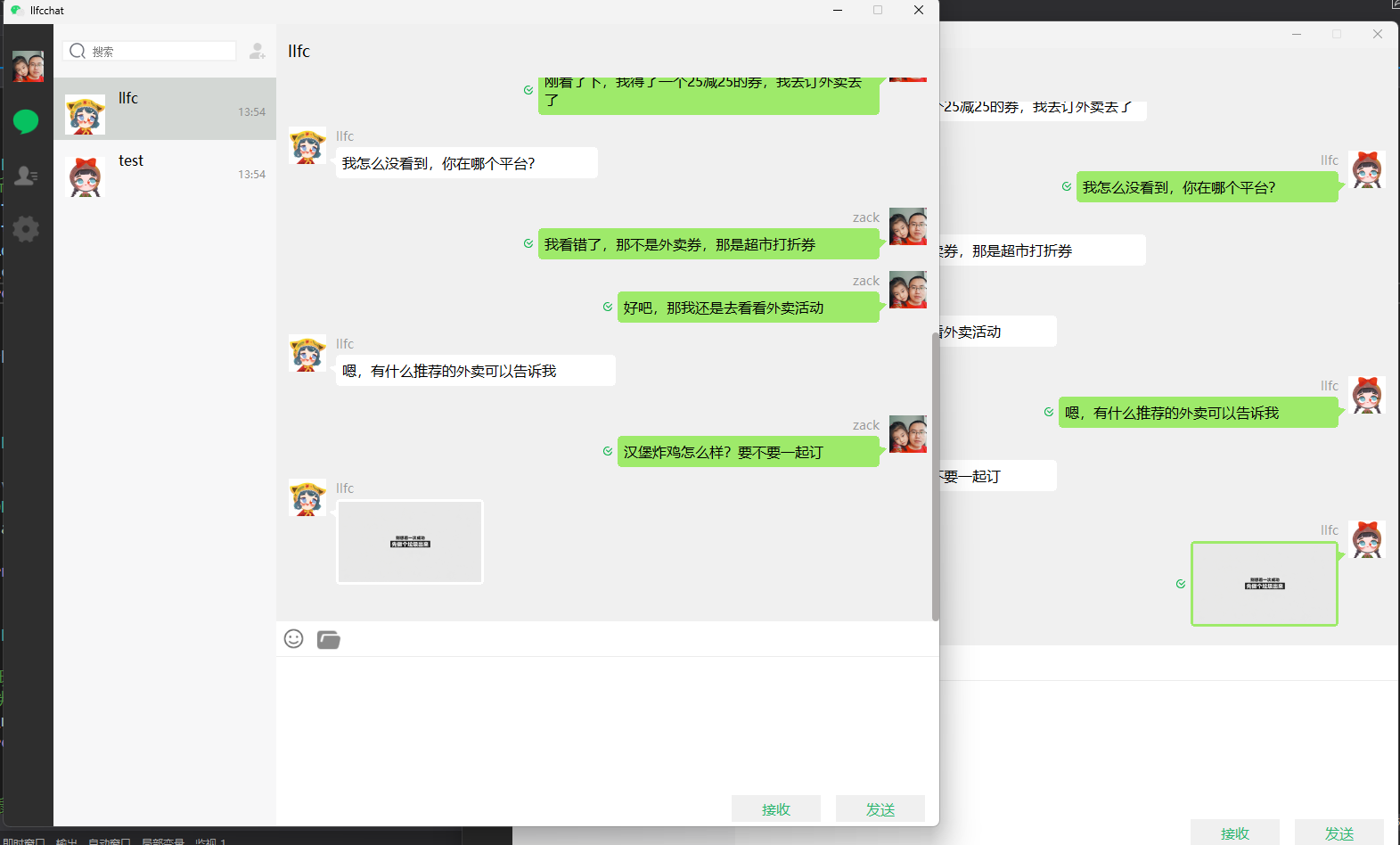
rpc通知客户端异步下载聊天图片

前情回顾

前面我们搞定了1,2,3以及5过程
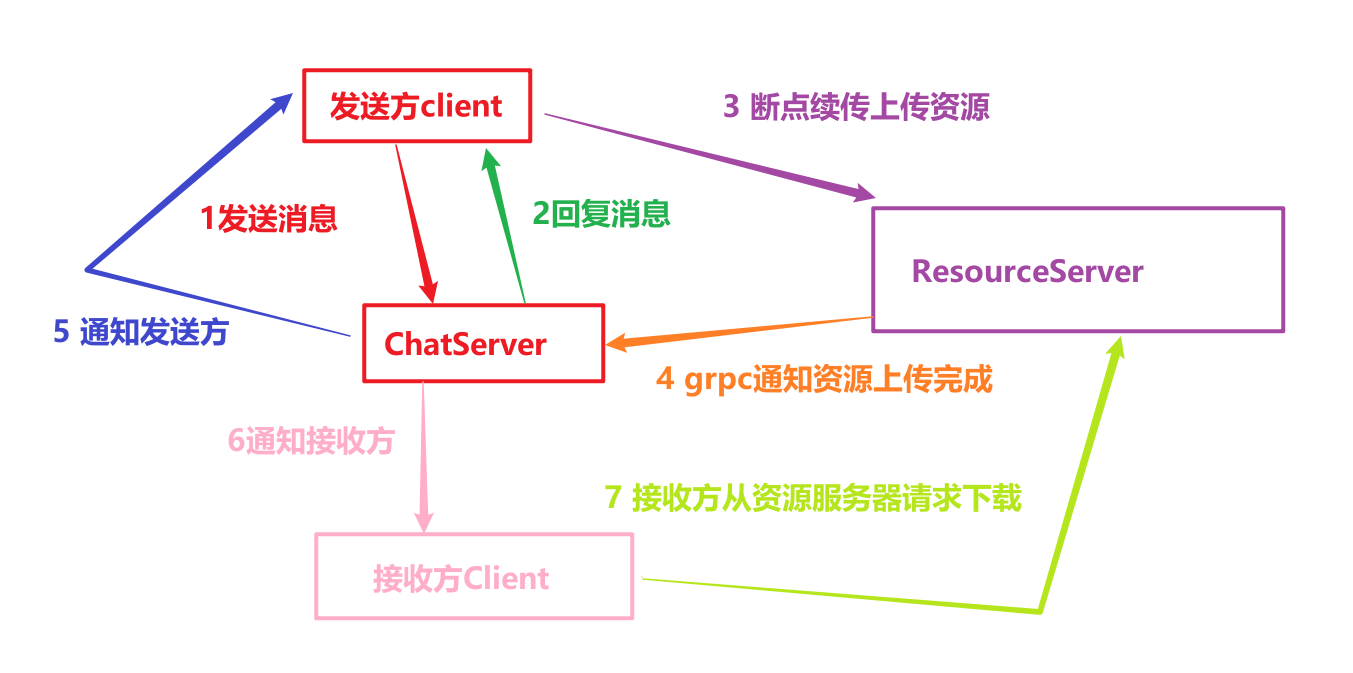
image-20260208131004814

今天主要完成

4,6和7

资源服务器grpc设置

因为资源服务器要通知ChatServer,所以要设置grpc客户端

完善下proto协议,新增消息通知请求
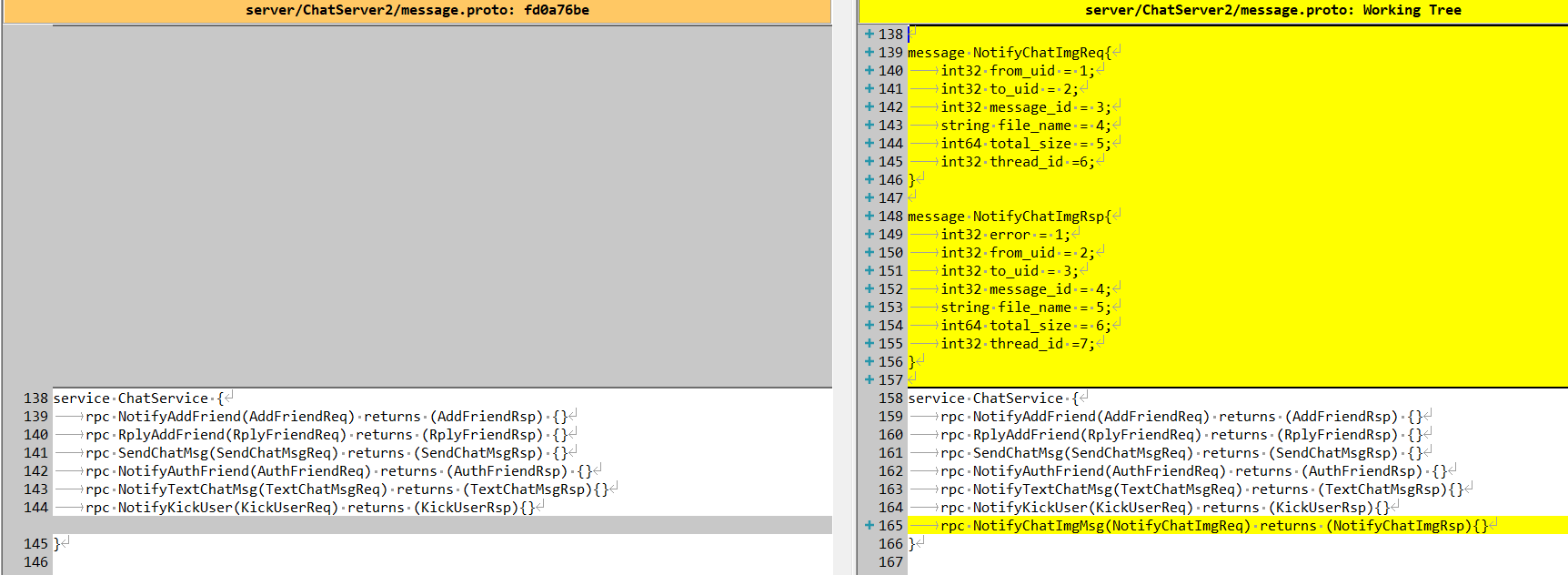
image-20260208133832656

具体代码逻辑

1
2
3
4
5
6
7
8
9
10
11
12
13
14
15
16
17
18
19
20
21
22
23
24
25
26
27
28
message NotifyChatImgReq{
int32 from_uid = 1;
int32 to_uid = 2;
int32 message_id = 3;
string file_name = 4;
int64 total_size = 5;
int32 thread_id =6;
}

message NotifyChatImgRsp{
int32 error = 1;
int32 from_uid = 2;
int32 to_uid = 3;
int32 message_id = 4;
string file_name = 5;
int64 total_size = 6;
int32 thread_id =7;
}

service ChatService {
rpc NotifyAddFriend(AddFriendReq) returns (AddFriendRsp) {}
rpc RplyAddFriend(RplyFriendReq) returns (RplyFriendRsp) {}
rpc SendChatMsg(SendChatMsgReq) returns (SendChatMsgRsp) {}
rpc NotifyAuthFriend(AuthFriendReq) returns (AuthFriendRsp) {}
rpc NotifyTextChatMsg(TextChatMsgReq) returns (TextChatMsgRsp){}
rpc NotifyKickUser(KickUserReq) returns (KickUserRsp){}
rpc NotifyChatImgMsg(NotifyChatImgReq) returns (NotifyChatImgRsp){}
}

实现grpc客户端逻辑如下:

1
2
3
4
5
6
7
8
9
10
11
12
13
14
15
16
17
18
19
20
21
22
23
24
25
26
27
28
29
30
31
32
33
34
35
36
37
38
39
40
41
42
43
44
45
46
47
48
49
50
51
52
53
54
55
56
57
58
59
60
61
62
63
64
65
66
67
68
69
70
71
72
73
74
75
76
77
78
79
80
81
82
83
84
85
86
87
88
89
90
91
92
93
#pragma once
#include "const.h"
#include "Singleton.h"
#include "ConfigMgr.h"
#include "message.grpc.pb.h"
#include "message.pb.h"
#include <grpcpp/grpcpp.h>
#include <queue>
#include <condition_variable>
using grpc::Channel;
using grpc::Status;
using grpc::ClientContext;


using message::ChatService;
using message::NotifyChatImgReq;
using message::NotifyChatImgRsp;

class ChatServerConPool {
public:
ChatServerConPool(size_t poolSize, std::string host, std::string port)
: poolSize_(poolSize), host_(host), port_(port), b_stop_(false) {
for (size_t i = 0; i < poolSize_; ++i) {

std::shared_ptr<Channel> channel = grpc::CreateChannel(host + ":" + port,
grpc::InsecureChannelCredentials());

connections_.push(ChatService::NewStub(channel));
}
}

~ChatServerConPool() {
std::lock_guard<std::mutex> lock(mutex_);
Close();
while (!connections_.empty()) {
connections_.pop();
}
}

std::unique_ptr<ChatService::Stub> getConnection() {
std::unique_lock<std::mutex> lock(mutex_);
cond_.wait(lock, [this] {
if (b_stop_) {
return true;
}
return !connections_.empty();
});
//如果停止则直接返回空指针
if (b_stop_) {
return nullptr;
}
auto context = std::move(connections_.front());
connections_.pop();
return context;
}

void returnConnection(std::unique_ptr<ChatService::Stub> context) {
std::lock_guard<std::mutex> lock(mutex_);
if (b_stop_) {
return;
}
connections_.push(std::move(context));
cond_.notify_one();
}

void Close() {
b_stop_ = true;
cond_.notify_all();
}

private:
atomic<bool> b_stop_;
size_t poolSize_;
std::string host_;
std::string port_;
std::queue<std::unique_ptr<ChatService::Stub>> connections_;
std::mutex mutex_;
std::condition_variable cond_;
};

class ChatServerGrpcClient :public Singleton<ChatServerGrpcClient>
{
friend class Singleton<ChatServerGrpcClient>;
public:
~ChatServerGrpcClient() {

}
NotifyChatImgRsp NotifyChatImgMsg(int message_id, std::string chatserver);
private:
ChatServerGrpcClient();
//sever_ip到连接池的映射, <chatserver1,std::unique_ptr<ChatServerConPool>>
std::unordered_map<std::string, std::unique_ptr<ChatServerConPool>> _hash_pools;
};

具体实现

1
2
3
4
5
6
7
8
9
10
11
12
13
14
15
16
17
18
19
20
21
22
23
24
25
26
27
28
29
30
31
32
33
34
35
36
37
38
39
40
41
42
43
44
45
46
47
48
49
50
51
52
53
#include "ChatServerGrpcClient.h"
#include "MysqlMgr.h"

NotifyChatImgRsp ChatServerGrpcClient::NotifyChatImgMsg(int message_id,std::string chatserver)
{
ClientContext context;
NotifyChatImgRsp reply;
NotifyChatImgReq request;
request.set_message_id(message_id);
if (_hash_pools.find(chatserver) == _hash_pools.end()) {
reply.set_error(ErrorCodes::ServerIpErr);
return reply;
}
auto chat_msg = MysqlMgr::GetInstance()->GetChatMsgById(message_id);
request.set_file_name(chat_msg->content);
request.set_from_uid(chat_msg->sender_id);
request.set_to_uid(chat_msg->recv_id);
request.set_thread_id(chat_msg->thread_id);
// 资源文件路径
auto file_dir = ConfigMgr::Inst().GetFileOutPath();
//该消息是接收方客户端发送过来的,服务器将资源存储在发送方的文件夹中
auto uid_str = std::to_string(chat_msg->sender_id);
auto file_path = (file_dir / uid_str / chat_msg->content);
boost::uintmax_t file_size = boost::filesystem::file_size(file_path);
request.set_total_size(file_size);

auto &pool_ = _hash_pools[chatserver];
auto stub = pool_->getConnection();
Status status = stub->NotifyChatImgMsg(&context, request, &reply);
Defer defer([&stub, &pool_, this]() {
pool_->returnConnection(std::move(stub));
});
if (status.ok()) {
return reply;
}
else {
reply.set_error(ErrorCodes::RPCFailed);
return reply;
}
}

ChatServerGrpcClient::ChatServerGrpcClient()
{
auto& gCfgMgr = ConfigMgr::Inst();
std::string host1 = gCfgMgr["chatserver1"]["Host"];
std::string port1 = gCfgMgr["chatserver1"]["Port"];
_hash_pools["chatserver1"] = std::make_unique<ChatServerConPool>(5, host1, port1);

std::string host2 = gCfgMgr["chatserver2"]["Host"];
std::string port2 = gCfgMgr["chatserver2"]["Port"];
_hash_pools["chatserver2"] = std::make_unique<ChatServerConPool>(5, host2, port2);
}

实现了通知接口,用来通知ChatServer图片消息上传完成,让ChatServer再通知其他客户端.

ChatServer响应资源服务器通知

ChatServer的proto也需要进行同样配置,这里略去

具体在ChatServiceImpl中添加响应消息通知的逻辑

1
2
3
4
5
6
7
8
9
10
11
12
13
14
15
16
17
18
19
20
21
22
23
Status ChatServiceImpl::NotifyChatImgMsg(::grpc::ServerContext* context, const ::message::NotifyChatImgReq* request, ::message::NotifyChatImgRsp* response)
{
//查找用户是否在本服务器
auto uid = request->to_uid();
auto session = UserMgr::GetInstance()->GetSession(uid);

Defer defer([request, response]() {
//设置具体的回包信息
response->set_error(ErrorCodes::Success);
response->set_message_id(request->message_id());
});

//用户不在内存中则直接返回
if (session == nullptr) {
//这里只是返回1个状态
return Status::OK;
}

//在内存中则直接发送通知对方
session->NotifyChatImgRecv(request);
//这里只是返回1个状态
return Status::OK;
}

通过Session通知客户端

1
2
3
4
5
6
7
8
9
10
11
12
13
14
15
void CSession::NotifyChatImgRecv(const ::message::NotifyChatImgReq* request) {
Json::Value rtvalue;
rtvalue["error"] = ErrorCodes::Success;
rtvalue["message_id"] = request->message_id();
rtvalue["sender_id"] = request->from_uid();
rtvalue["receiver_id"] = request->to_uid();
rtvalue["img_name"] = request->file_name();
rtvalue["total_size"] = std::to_string(request->total_size());
rtvalue["thread_id"] = request->thread_id();

std::string return_str = rtvalue.toStyledString();
//通知图片聊天信息
Send(return_str, ID_NOTIFY_IMG_CHAT_MSG_REQ);
return;
}

客户端获取通知

客户端收到服务器通知后,会优先查看本地资源是否存在,如果存在则直接加载图片,添加聊天记录到页面。

如果不存在则组织下载,但是也需要将消息添加到聊天界面。

1
2
3
4
5
6
7
8
9
10
11
12
13
14
15
16
17
18
19
20
21
22
23
24
25
26
27
28
29
30
31
32
33
34
35
36
37
38
39
40
41
42
43
44
45
46
47
48
49
50
51
52
53
54
55
56
57
58
59
60
61
62
63
64
65
66
67
68
69
70
71
72
73
74
_handlers.insert(ID_NOTIFY_IMG_CHAT_MSG_REQ, [this](ReqId id, int len, QByteArray data) {
Q_UNUSED(len);
qDebug() << "handle id is " << id << " data is " << data;
// 将QByteArray转换为QJsonDocument
QJsonDocument jsonDoc = QJsonDocument::fromJson(data);

// 检查转换是否成功
if (jsonDoc.isNull()) {
qDebug() << "Failed to create QJsonDocument.";
return;
}

QJsonObject jsonObj = jsonDoc.object();
qDebug() << "receive notify img chat msg req success" ;


//收到消息后转发给页面
auto thread_id = jsonObj["thread_id"].toInt();
auto sender_id = jsonObj["sender_id"].toInt();
auto message_id = jsonObj["message_id"].toInt();
auto receiver_id = jsonObj["receiver_id"].toInt();
auto img_name = jsonObj["img_name"].toString();
auto total_size_str = jsonObj["total_size"].toString();
auto total_size = total_size_str.toLongLong();
auto uid = UserMgr::GetInstance()->GetUid();
//客户端存储聊天记录,按照如下格式存储C:\Users\secon\AppData\Roaming\llfcchat\chatimg\uid, uid为对方uid
QString storageDir = QStandardPaths::writableLocation(QStandardPaths::AppDataLocation);
QString img_path_str = storageDir +"/user/"+ QString::number(uid)+ "/chatimg/" + QString::number(sender_id);
auto file_info = UserMgr::GetInstance()->GetTransFileByName(img_name);
//正常情况是找不到的,所以这里初始化一个文件信息放入UserMgr中管理
if (!file_info) {
//预览图先默认空白,md5为空
file_info = std::make_shared<MsgInfo>(MsgType::IMG_MSG, img_path_str, CreateLoadingPlaceholder(200, 200), img_name, total_size, "");
UserMgr::GetInstance()->AddTransFile(img_name, file_info);
}

file_info->_msg_id = message_id;
file_info->_sender = sender_id;
file_info->_receiver = receiver_id;
file_info->_thread_id = thread_id;
//设置文件传输的类型
file_info->_transfer_type = TransferType::Download;
//设置文件传输状态
file_info->_transfer_state = TransferState::Uploading;

auto img_chat_data_ptr = std::make_shared<ImgChatData>(file_info, "",
thread_id, ChatFormType::PRIVATE, ChatMsgType::PIC,
sender_id, MsgStatus::READED);


emit sig_img_chat_msg(img_chat_data_ptr);

//组织请求,准备下载
QJsonObject jsonObj_send;
jsonObj_send["name"] = img_name;
jsonObj_send["seq"] = file_info->_seq;
jsonObj_send["trans_size"] = "0";
jsonObj_send["total_size"] = QString::number(file_info->_total_size);
jsonObj_send["token"] = UserMgr::GetInstance()->GetToken();
jsonObj_send["sender_id"] = sender_id;
jsonObj_send["receiver_id"] = receiver_id;
jsonObj_send["message_id"] = message_id;
jsonObj_send["uid"] = uid;
//客户端存储聊天记录,按照如下格式存储C:\Users\secon\AppData\Roaming\llfcchat\chatimg\uid, uid为对方uid
QDir chatimgDir(img_path_str);
jsonObj["client_path"] = img_path_str;
if (!chatimgDir.exists()) {
chatimgDir.mkpath("."); // 创建当前路径
}

QJsonDocument doc(jsonObj_send);
auto send_data = doc.toJson();
FileTcpMgr::GetInstance()->SendData(ID_IMG_CHAT_DOWN_REQ, send_data);
});

收到服务器通知后,开始构造json数据,发送ID_IMG_CHAT_DOWN_REQ请求

聊天记录添加

客户端在请求服务器资源的时候,因为本地没有资源,可以先在聊天界面生成一个预览的空白图片,同时显示进度条

这部分逻辑是在客户端的tcpmgr中处理服务器通知聊天消息的逻辑里

1
2
3
4
5
_handlers.insert(ID_NOTIFY_IMG_CHAT_MSG_REQ, [this](ReqId id, int len, QByteArray data) {
//...
//发送给界面显示
emit sig_img_chat_msg(img_chat_data_ptr);
}

客户端将图片消息发送给界面显示

在ChatDialog的构造函数中添加信号槽链接

1
2
connect(TcpMgr::GetInstance().get(), &TcpMgr::sig_img_chat_msg,
this, &ChatDialog::slot_img_chat_msg);

ChatDialog收到该信号后,会触发添加消息的逻辑

1
2
3
4
5
6
7
8
9
10
void ChatDialog::slot_img_chat_msg(std::shared_ptr<ImgChatData> imgchat) {
//更新数据
auto thread_id = imgchat->GetThreadId();
auto thread_data = UserMgr::GetInstance()->GetChatThreadByThreadId(thread_id);
thread_data->AddMsg(imgchat);
if (_cur_chat_thread_id != thread_id) {
return;
}
ui->chat_page->AppendOtherMsg(imgchat);
}

添加其他消息的逻辑, 此处都是将其他人发送的图片消息添加到聊天界面显示

1
2
3
4
5
6
7
8
9
10
11
12
13
14
15
16
17
18
19
20
21
22
23
24
25
26
27
28
29
30
31
32
33
34
35
36
37
38
39
40
41
42
43
44
45
46
47
48
49
50
51
52
53
54
55
56
57
58
59
60
61
62
63
64
65
66
67
68
69
70
71
72
73
74
75
76
77
78
79
80
81
82
83
84
85
86
87
88
89
90
91
92
93
94
95
96
97
void ChatPage::AppendOtherMsg(std::shared_ptr<ChatDataBase> msg) {
auto self_info = UserMgr::GetInstance()->GetUserInfo();
ChatRole role;
if (msg->GetSendUid() == self_info->_uid) {
role = ChatRole::Self;
ChatItemBase* pChatItem = new ChatItemBase(role);

pChatItem->setUserName(self_info->_name);
SetSelfIcon(pChatItem, self_info->_icon);
QWidget* pBubble = nullptr;
if (msg->GetMsgType() == ChatMsgType::TEXT) {
pBubble = new TextBubble(role, msg->GetMsgContent());
}
else if (msg->GetMsgType() == ChatMsgType::PIC) {
auto img_msg = dynamic_pointer_cast<ImgChatData>(msg);
auto pic_bubble = new PictureBubble(img_msg->_msg_info->_preview_pix, role, img_msg->_msg_info->_total_size);
pic_bubble->setMsgInfo(img_msg->_msg_info);
pBubble = pic_bubble;
//连接暂停和恢复信号
connect(dynamic_cast<PictureBubble*>(pBubble), &PictureBubble::pauseRequested,
this, &ChatPage::on_clicked_paused);
connect(dynamic_cast<PictureBubble*>(pBubble), &PictureBubble::resumeRequested,
this, &ChatPage::on_clicked_resume);
}

pChatItem->setWidget(pBubble);
auto status = msg->GetStatus();
pChatItem->setStatus(status);
ui->chat_data_list->appendChatItem(pChatItem);
_base_item_map[msg->GetMsgId()] = pChatItem;
}
else {
role = ChatRole::Other;
ChatItemBase* pChatItem = new ChatItemBase(role);
auto friend_info = UserMgr::GetInstance()->GetFriendById(msg->GetSendUid());
if (friend_info == nullptr) {
return;
}
pChatItem->setUserName(friend_info->_name);

// 使用正则表达式检查是否是默认头像
QRegularExpression regex("^:/res/head_(\\d+)\\.jpg$");
QRegularExpressionMatch match = regex.match(friend_info->_icon);
if (match.hasMatch()) {
pChatItem->setUserIcon(QPixmap(friend_info->_icon));
}
else {
// 如果是用户上传的头像,获取存储目录
QString storageDir = QStandardPaths::writableLocation(QStandardPaths::AppDataLocation);
auto uid = UserMgr::GetInstance()->GetUid();
QDir avatarsDir(storageDir + "/user/" + QString::number(uid) + "/avatars");
auto file_name = QFileInfo(self_info->_icon).fileName();
// 确保目录存在
if (avatarsDir.exists()) {
QString avatarPath = avatarsDir.filePath(file_name); // 获取上传头像的完整路径
QPixmap pixmap(avatarPath); // 加载上传的头像图片
if (!pixmap.isNull()) {
pChatItem->setUserIcon(pixmap);
}
else {
qWarning() << "无法加载上传的头像:" << avatarPath;
auto icon_label = pChatItem->getIconLabel();
LoadHeadIcon(avatarPath, icon_label, file_name, "self_icon");
}
}
else {
qWarning() << "头像存储目录不存在:" << avatarsDir.path();
//创建目录
avatarsDir.mkpath(".");
auto icon_label = pChatItem->getIconLabel();
QString avatarPath = avatarsDir.filePath(file_name);
LoadHeadIcon(avatarPath, icon_label, file_name, "self_icon");
}
}

QWidget* pBubble = nullptr;
if (msg->GetMsgType() == ChatMsgType::TEXT) {
pBubble = new TextBubble(role, msg->GetMsgContent());
}
else if (msg->GetMsgType() == ChatMsgType::PIC) {
auto img_msg = dynamic_pointer_cast<ImgChatData>(msg);
auto pic_bubble = new PictureBubble(img_msg->_msg_info->_preview_pix, role, img_msg->_msg_info->_total_size);
pic_bubble->setMsgInfo(img_msg->_msg_info);
pBubble = pic_bubble;
//连接暂停和恢复信号
connect(dynamic_cast<PictureBubble*>(pBubble), &PictureBubble::pauseRequested,
this, &ChatPage::on_clicked_paused);
connect(dynamic_cast<PictureBubble*>(pBubble), &PictureBubble::resumeRequested,
this, &ChatPage::on_clicked_resume);
}
pChatItem->setWidget(pBubble);
auto status = msg->GetStatus();
pChatItem->setStatus(status);
ui->chat_data_list->appendChatItem(pChatItem);
_base_item_map[msg->GetMsgId()] = pChatItem;
}
}

资源服务器响应下载请求

LogicWorker中增加请求的处理

1
2
3
4
5
6
7
8
9
10
11
12
13
14
15
16
17
18
19
20
21
22
23
24
25
26
27
28
29
30
31
32
33
34
35
36
37
38
39
40
41
42
43
44
45
46
47
48
49
50
51
52
53
54
55
56
57
58
59
60
61
62
63
64
65
66
67
68
_fun_callbacks[ID_IMG_CHAT_DOWN_REQ] = [this](std::shared_ptr<CSession> session, const short& msg_req_id,
const string& msg_data) {

Json::Reader reader;
Json::Value root;
reader.parse(msg_data, root);

auto seq = root["seq"].asInt();
auto name = root["name"].asString();
auto total_size_str = root["total_size"].asString();
auto trans_size_str = root["trans_size"].asString();
auto file_path = ConfigMgr::Inst().GetFileOutPath();
auto message_id = root["message_id"].asInt();
auto sender = root["sender_id"].asInt();
auto receiver = root["receiver_id"].asInt();
auto token = root["token"].asString();
auto uid = root["uid"].asInt();

auto callback = [=](const Json::Value& result) {
// 在异步任务完成后调用
Json::Value rtvalue = result;
rtvalue["error"] = ErrorCodes::Success;
rtvalue["name"] = name;
rtvalue["sender_id"] = sender;
rtvalue["receiver_id"] = receiver;
std::string return_str = rtvalue.toStyledString();
session->Send(return_str, ID_IMG_CHAT_DOWN_RSP);
};

// 使用 std::hash 对字符串进行哈希
std::hash<std::string> hash_fn;
size_t hash_value = hash_fn(name); // 生成哈希值
int index = hash_value % DOWN_LOAD_WORKER_COUNT;
std::cout << "Hash value: " << hash_value << std::endl;


//第一个包校验一下token是否合理
if (seq == 1) {
//从redis获取用户token是否正确
std::string uid_str = std::to_string(uid);
std::string token_key = USERTOKENPREFIX + uid_str;
std::string token_value = "";
bool success = RedisMgr::GetInstance()->Get(token_key, token_value);
Json::Value rtvalue;
if (!success) {
rtvalue["error"] = ErrorCodes::UidInvalid;
std::string return_str = rtvalue.toStyledString();
session->Send(return_str, ID_IMG_CHAT_DOWN_RSP);
return;
}

if (token_value != token) {
rtvalue["error"] = ErrorCodes::TokenInvalid;
std::string return_str = rtvalue.toStyledString();
session->Send(return_str, ID_IMG_CHAT_DOWN_RSP);
return;
}
}

auto sender_str = std::to_string(sender);
//转化为字符串
auto uid_str = std::to_string(uid);
auto file_path_str = (file_path / sender_str / name).string();

auto down_load_task = std::make_shared<DownloadTask>(session, uid, name, seq, file_path_str, callback);

FileSystem::GetInstance()->PostDownloadTaskToQue(down_load_task,index);
};

LogicWorker将请求投递给FileSystem队列,FileSystem队列排队处理消息,被DownloaderWorker处理

1
2
3
4
5
6
7
8
9
10
11
12
13
14
15
16
17
18
19
20
21
22
23
24
25
26
27
28
29
30
31
32
33
34
35
36
37
38
39
40
41
42
43
44
45
46
47
48
49
50
51
52
53
54
55
56
57
58
59
60
61
62
63
64
65
66
67
68
69
70
71
72
73
74
75
76
77
78
79
80
81
82
83
84
85
86
87
88
89
90
91
92
93
94
95
96
97
98
99
100
101
102
103
104
105
106
107
108
109
110
111
112
113
114
115
116
117
118
119
120
121
122
123
124
125
126
127
128
129
130
131
132
133
134
135
void DownloadWorker::task_callback(std::shared_ptr<DownloadTask> task)
{
// 解码
auto file_path_str = task->_file_path;

//std::cout << "file_path_str is " << file_path_str << std::endl;

boost::filesystem::path file_path(file_path_str);

Json::Value result;
result["error"] = ErrorCodes::Success;

if (!boost::filesystem::exists(file_path)) {
std::cerr << "文件不存在: " << file_path_str << std::endl;
result["error"] = ErrorCodes::FileNotExists;
task->_callback(result);
return;
}

std::ifstream infile(file_path_str, std::ios::binary);
if (!infile) {
std::cerr << "无法打开文件进行读取。" << std::endl;
result["error"] = ErrorCodes::FileReadPermissionFailed;
task->_callback(result);
return;
}

std::shared_ptr<FileInfo> file_info = nullptr;

if (task->_seq == 1) {
// 获取文件大小
infile.seekg(0, std::ios::end);
std::streamsize file_size = infile.tellg();
infile.seekg(0, std::ios::beg);
//如果为空,则创建FileInfo 构造数据存储
file_info = std::make_shared<FileInfo>();
file_info->_file_path_str = file_path_str;
file_info->_name = task->_name;
file_info->_seq = 1;

file_info->_total_size = file_size;
file_info->_trans_size = 0;
// 立即保存到 Redis,覆盖旧数据,设置过期时间
RedisMgr::GetInstance()->SetDownLoadInfo(task->_name, file_info);
std::cout << "[新下载] 文件: " << task->_name
<< ", 大小: " << file_size << " 字节" << std::endl;
}
else {
//断点续传,从 Redis 获取历史信息
file_info = RedisMgr::GetInstance()->GetDownloadInfo(task->_name);
if (file_info == nullptr) {
// Redis 中没有信息(可能过期了)
std::cerr << "断点续传失败,Redis 中无下载信息: " << task->_name << std::endl;
result["error"] = ErrorCodes::RedisReadErr;
task->_callback(result);
infile.close();
return;
}
// 验证序列号是否匹配
if (task->_seq != file_info->_seq) {
std::cerr << "序列号不匹配,期望: " << file_info->_seq
<< ", 实际: " << task->_seq << std::endl;
result["error"] = ErrorCodes::FileSeqInvalid;
task->_callback(result);
infile.close();
return;
}

std::cout << "[续传] 文件: " << task->_name
<< ", seq: " << task->_seq
<< ", 进度: " << file_info->_trans_size
<< "/" << file_info->_total_size << std::endl;
}

// 计算当前偏移量
std::streamsize offset = ((std::streamsize)task->_seq - 1) * MAX_FILE_LEN;
if (offset >= file_info->_total_size) {
std::cerr << "偏移量超出文件大小。" << std::endl;
result["error"] = ErrorCodes::FileOffsetInvalid;
task->_callback(result);
infile.close();
return;
}

// 定位到指定偏移量
infile.seekg(offset);

// 读取最多MAX_FILE_LEN字节
char buffer[MAX_FILE_LEN];
infile.read(buffer, MAX_FILE_LEN);
//获取read实际读取多少字节
std::streamsize bytes_read = infile.gcount();

if (bytes_read <= 0) {
std::cerr << "读取文件失败。" << std::endl;
result["error"] = ErrorCodes::FileReadFailed;
task->_callback(result);
infile.close();
return;
}

// 将读取的数据进行base64编码
std::string data_to_encode(buffer, bytes_read);
std::string encoded_data = base64_encode(data_to_encode);

// 检查是否是最后一个包
std::streamsize current_pos = offset + bytes_read;
bool is_last = (current_pos >= file_info->_total_size);

// 设置返回结果
result["data"] = encoded_data;
result["seq"] = task->_seq;
result["total_size"] = std::to_string(file_info->_total_size);
result["current_size"] = std::to_string(current_pos);
result["is_last"] = is_last;

infile.close();

if (is_last) {
std::cout << "文件读取完成: " << file_path_str << std::endl;
RedisMgr::GetInstance()->DelDownLoadInfo(task->_name);
}
else {
//更新信息
file_info->_seq++;
file_info->_trans_size = offset + bytes_read;
//更新redis
RedisMgr::GetInstance()->SetDownLoadInfo(task->_name, file_info);
}

if (task->_callback) {
task->_callback(result);
}

}

资源服务器每次收到请求后,由DownloadWorker从队列中获取请求,查询服务器资源,将资源按照seq计算偏移量最后读取数据发送给客户端。

客户端存储下载的资源

客户端需要存储服务器传输的资源

1
2
3
4
5
6
7
8
9
10
11
12
13
14
15
16
17
18
19
20
21
22
23
24
25
26
27
28
29
30
31
32
33
34
35
36
37
38
39
40
41
42
43
44
45
46
47
48
49
50
51
52
53
54
55
56
57
58
59
60
61
62
63
64
65
66
67
68
69
70
71
72
73
74
75
76
77
78
79
80
81
82
83
84
85
86
87
88
89
90
91
92
93
94
95
96
97
98
99
100
101
102
103
104
105
106
107
108
109
110
111
112
113
114
115
116
117
118
_handlers.insert(ID_IMG_CHAT_DOWN_RSP, [this](ReqId id, int len, QByteArray data) {
Q_UNUSED(len);
qDebug() << "handle id is " << id << " data is " << data;
// 将QByteArray转换为QJsonDocument

QJsonDocument jsonDoc = QJsonDocument::fromJson(data);

// 检查转换是否成功
if (jsonDoc.isNull()) {
qDebug() << "Failed to create QJsonDocument.";
return;
}

QJsonObject jsonObj = jsonDoc.object();

if (!jsonObj.contains("error")) {
int err = ErrorCodes::ERR_JSON;
qDebug() << "parse create private chat json parse failed " << err;
return;
}

int err = jsonObj["error"].toInt();
if (err != ErrorCodes::SUCCESS) {
qDebug() << "get create private chat failed, error is " << err;
return;
}

qDebug() << "Receive download file info rsp success";

QString base64Data = jsonObj["data"].toString();
int seq = jsonObj["seq"].toInt();
bool is_last = jsonObj["is_last"].toBool();
QString total_size_str = jsonObj["total_size"].toString();
qint64 total_size = total_size_str.toLongLong(nullptr);
QString current_size_str = jsonObj["current_size"].toString();
qint64 current_size = current_size_str.toLongLong(nullptr);
QString name = jsonObj["name"].toString();

auto file_info = UserMgr::GetInstance()->GetTransFileByName(name);
if (file_info == nullptr) {
qDebug() << "file: " << name << " not found";
return;
}

file_info->_current_size = current_size;
file_info->_rsp_size = current_size;
file_info->_total_size = total_size;
auto clientPath = file_info->_text_or_url;

//Base64解码
QByteArray decodedData = QByteArray::fromBase64(base64Data.toUtf8());
auto file_path = clientPath + "/" + name;
QFile file(file_path);

// 根据 seq 决定打开模式
QIODevice::OpenMode mode;
if (seq == 1) {
// 第一个包,覆盖写入
mode = QIODevice::WriteOnly;
}
else {
// 后续包,追加写入
mode = QIODevice::WriteOnly | QIODevice::Append;
}

if (!file.open(mode)) {
qDebug() << "Failed to open file for writing:" << clientPath;
qDebug() << "Error:" << file.errorString();
return;
}


qint64 bytesWritten = file.write(decodedData);
if (bytesWritten != decodedData.size()) {
qDebug() << "Failed to write all data. Written:" << bytesWritten
<< "Expected:" << decodedData.size();
}

file.close();

qDebug() << "Successfully wrote" << bytesWritten << "bytes to file";
qDebug() << "Progress:" << current_size << "/" << total_size
<< "(" << (current_size * 100 / total_size) << "%)";

if (is_last) {
qDebug() << "File download completed:" << clientPath;
UserMgr::GetInstance()->RmvTransFileByName(name);
//通知界面下载完成
emit sig_download_finish(file_info, file_path);
}
else {
//继续请求
file_info->_seq = seq + 1;
file_info->_last_confirmed_seq = seq;
if (file_info->_transfer_state == TransferState::Paused) {
//暂停状态,则直接返回
return;
}
//组织请求,准备下载
QJsonObject jsonObj_send;
jsonObj_send["name"] = name;
jsonObj_send["seq"] = file_info->_seq;
jsonObj_send["trans_size"] = QString::number(file_info->_current_size);
jsonObj_send["total_size"] = QString::number(file_info->_total_size);
jsonObj_send["token"] = UserMgr::GetInstance()->GetToken();
jsonObj_send["sender_id"] = file_info->_sender;
jsonObj_send["receiver_id"] = file_info->_receiver;
jsonObj_send["message_id"] = file_info->_msg_id;
auto uid = UserMgr::GetInstance()->GetUid();
jsonObj_send["uid"] = uid;
QJsonDocument doc(jsonObj_send);
auto send_data = doc.toJson();
FileTcpMgr::GetInstance()->SendData(ID_IMG_CHAT_DOWN_REQ, send_data);
//todo...通知界面更新进度
emit sig_update_download_progress(file_info);
}
});

通过QFile类实现文件写入。

客户端进度显示

为了让客户端更为直观的显示下载进度,可以在收到服务器消息后,将文件下载进度同步给界面,同时显示支持暂停和继续

进度通知在上述逻辑中

1
2
3
4
5

_handlers.insert(ID_IMG_CHAT_DOWN_RSP, [this](ReqId id, int len, QByteArray data) {
//...
emit sig_update_download_progress(file_info);
});

同样是在ChatDialog构造函数中添加消息链接

1
2
3
//接收tcp返回的下载进度信息
connect(FileTcpMgr::GetInstance().get(), &FileTcpMgr::sig_update_download_progress,
this, &ChatDialog::slot_update_download_progress);

进度处理槽函数

1
2
3
4
5
6
7
8
9
10
11
12
13
14
15
16
17
18
void ChatDialog::slot_update_download_progress(std::shared_ptr<MsgInfo> msg_info) {
auto chat_data = UserMgr::GetInstance()->GetChatThreadByThreadId(msg_info->_thread_id);
if (chat_data == nullptr) {
return;
}

//更新消息,其实不用更新,都是共享msg_info的一块内存,这里为了安全还是再次更新下

chat_data->UpdateProgress(msg_info);

if (_cur_chat_thread_id != msg_info->_thread_id) {
return;
}


//更新聊天界面信息
ui->chat_page->UpdateFileProgress(msg_info);
}

在ChatPage中详细处理更新

1
2
3
4
5
6
7
8
9
10
11
12
13
void ChatPage::UpdateFileProgress(std::shared_ptr<MsgInfo> msg_info) {
auto iter = _base_item_map.find(msg_info->_msg_id);
if (iter == _base_item_map.end()) {
return;
}

if (msg_info->_msg_type == MsgType::IMG_MSG) {
auto bubble = iter.value()->getBubble();
PictureBubble* pic_bubble = dynamic_cast<PictureBubble*>(bubble);
pic_bubble->setProgress(msg_info->_rsp_size, msg_info->_total_size);
}

}

PicBubble中完成状态显示

1
2
3
4
5
6
7
8
9
10
11
void PictureBubble::setProgress(int value, int total_value)
{
if (m_total_size != total_value) {
m_total_size = total_value;
}
float percent = (value / (m_total_size*1.0))*100;
m_progressBar->setValue(percent);
if (percent >= 100) {
setState(TransferState::Completed);
}
}

断点续传

因为在客户端收到服务器通知的图片聊天信息的时候,已经通过sig_img_chat_msg将消息发送给ChatDialog添加到页面上了。同时传输了图片的状态为下载中。

点击继续和暂停的逻辑可以复用PicBubble的逻辑

1
2
3
4
5
6
7
8
9
10
11
12
13
14
15
16
17
18
19
20
21
22
23
24
25
26
void PictureBubble::onPictureClicked()
{
switch (m_state) {
case TransferState::Downloading:
case TransferState::Uploading:
// 暂停
setState(TransferState::Paused);
emit pauseRequested(_msg_info->_unique_name, _msg_info->_transfer_type);
break;

case TransferState::Paused:
// 继续
resumeState(); //
emit resumeRequested(_msg_info->_unique_name, _msg_info->_transfer_type);
break;

case TransferState::Failed:
// 重试
emit resumeRequested(_msg_info->_unique_name, _msg_info->_transfer_type);
break;

default:
// 其他状态可以实现查看大图等功能
break;
}
}

接下来我们响应暂停和继续,这部分逻辑也已经复用之前的逻辑即可

暂停逻辑

1
2
3
4
5
6
7
8
9
10
11
12
13
14
void ChatPage::on_clicked_paused(QString unique_name, TransferType transfer_type)
{
UserMgr::GetInstance()->PauseTransFileByName(unique_name);
}

void UserMgr::PauseTransFileByName(QString name) {
std::lock_guard<std::mutex> mtx(_trans_mtx);
auto iter = _name_to_msg_info.find(name);
if (iter == _name_to_msg_info.end()) {
return;
}

iter.value()->_transfer_state = TransferState::Paused;
}

恢复逻辑

1
2
3
4
5
6
7
8
9
10
11
12
13
14
15
16
17
18
19
20
21
22
23
24
25
26
27
28
29
30
31
32
33
34

void ChatPage::on_clicked_resume(QString unique_name, TransferType transfer_type)
{
UserMgr::GetInstance()->ResumeTransFileByName(unique_name);
//继续发送或者下载
if (transfer_type == TransferType::Upload) {
FileTcpMgr::GetInstance()->ContinueUploadFile(unique_name);
return;
}

if (transfer_type == TransferType::Download) {
FileTcpMgr::GetInstance()->ContinueDownloadFile(unique_name);
return;
}
}

void UserMgr::ResumeTransFileByName(QString name)
{
std::lock_guard<std::mutex> mtx(_trans_mtx);
auto iter = _name_to_msg_info.find(name);
if (iter == _name_to_msg_info.end()) {
return;
}

if (iter.value()->_transfer_type == TransferType::Download) {
iter.value()->_transfer_state = TransferState::Downloading;
return;
}

if (iter.value()->_transfer_type == TransferType::Upload) {
iter.value()->_transfer_state = TransferState::Uploading;
return;
}
}

发送继续下载信号通知FileTcpMgr继续下载

1
2
3
void FileTcpMgr::ContinueDownloadFile(QString unique_name) {
emit sig_continue_download_file(unique_name);
}

FileTcpMgr响应下载逻辑

1
2
3
4
5
6
7
8
9
10
11
12
13
14
15
16
17
18
19
20
21
22
23
24
25
26
27
void FileTcpMgr::slot_continue_download_file(QString unique_name) {
auto file_info = UserMgr::GetInstance()->GetTransFileByName(unique_name);
if (file_info == nullptr) {
return;
}

if (file_info->_current_size >= file_info->_total_size) {
qDebug() << "file has received finished";
return;
}

//组织请求,准备下载
QJsonObject jsonObj_send;
jsonObj_send["name"] = unique_name;
jsonObj_send["seq"] = file_info->_seq;
jsonObj_send["trans_size"] = QString::number(file_info->_current_size);
jsonObj_send["total_size"] = QString::number(file_info->_total_size);
jsonObj_send["token"] = UserMgr::GetInstance()->GetToken();
jsonObj_send["sender_id"] = file_info->_sender;
jsonObj_send["receiver_id"] = file_info->_receiver;
jsonObj_send["message_id"] = file_info->_msg_id;
auto uid = UserMgr::GetInstance()->GetUid();
jsonObj_send["uid"] = uid;
QJsonDocument doc(jsonObj_send);
auto send_data = doc.toJson();
FileTcpMgr::GetInstance()->SendData(ID_IMG_CHAT_DOWN_REQ, send_data);
}

通过上述逻辑可以实现客户端的断点下载和暂停。

效果演示

image-20260208162803229

源码链接

https://gitee.com/secondtonone1/llfcchat

注意第二季分支为Season_2