用户登录加载聊天资源

前情回顾

前面我们实现了聊天资源的下载和上传,以及异步通知断点下载等功能。

今天主要实现登录后聊天信息的加载,之前把文本信息的加载实现了,现在需要实现用户登录后图片信息的加载。

这个功能做完,聊天的基本功能就都收尾了,有意思的是好像一个圆圈,我们又回到了最初的原点,从登录逻辑出发,补充聊天资源加载

登录流程回顾
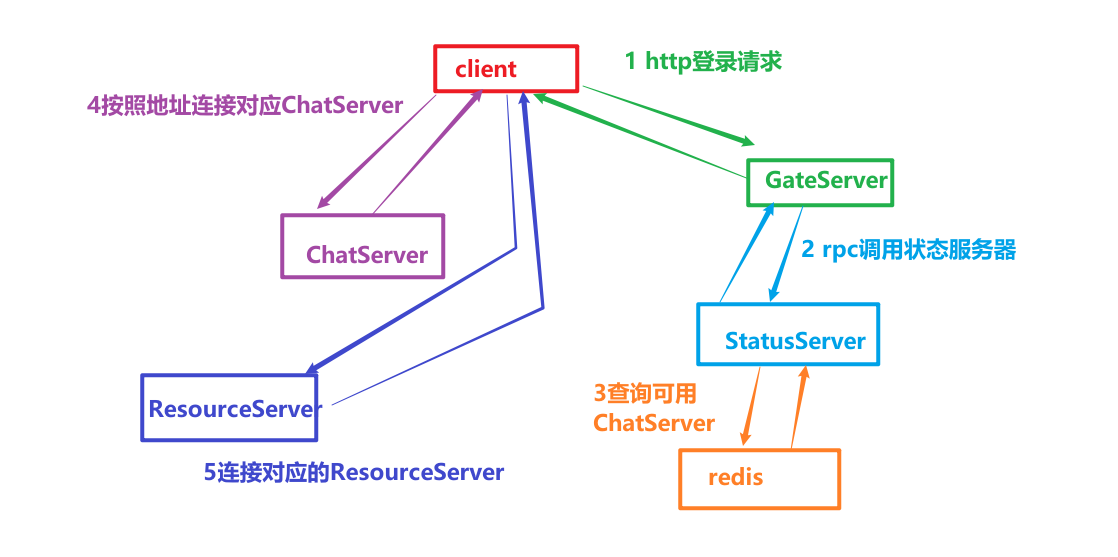
image-20260209150133552

点击登录按钮后,通过HttpMgr发送登录请求

1
2
3
4
5
6
7
8
9
10
11
12
13
14
15
16
17
18
19
20
21
void LoginDialog::on_login_btn_clicked()
{
qDebug()<<"login btn clicked";
if(checkUserValid() == false){
return;
}

if(checkPwdValid() == false){
return ;
}

enableBtn(false);
auto email = ui->email_edit->text();
auto pwd = ui->pass_edit->text();
//发送http请求登录
QJsonObject json_obj;
json_obj["email"] = email;
json_obj["passwd"] = xorString(pwd);
HttpMgr::GetInstance()->PostHttpReq(QUrl(gate_url_prefix+"/user_login"),
json_obj, ReqId::ID_LOGIN_USER,Modules::LOGINMOD);
}

HttpMgr内部封装了PostHttpReq接口,这是异步http请求,会提前构造好一个reply,以及注册一个回调函数,将来GateServer将登录信息返回后会出发这个回调函数

1
2
3
4
5
6
7
8
9
10
11
12
13
14
15
16
17
18
19
20
21
22
23
24
25
26
27
28
29
30
31
void HttpMgr::PostHttpReq(QUrl url, QJsonObject json, ReqId req_id, Modules mod)
{
//创建一个HTTP POST请求,并设置请求头和请求体
QByteArray data = QJsonDocument(json).toJson();
//通过url构造请求
QNetworkRequest request(url);
request.setHeader(QNetworkRequest::ContentTypeHeader, "application/json");
request.setHeader(QNetworkRequest::ContentLengthHeader, QByteArray::number(data.length()));
//发送请求,并处理响应, 获取自己的智能指针,构造伪闭包并增加智能指针引用计数
auto self = shared_from_this();
QNetworkReply * reply = _manager.post(request, data);
//设置信号和槽等待发送完成
QObject::connect(reply, &QNetworkReply::finished, [reply, self, req_id, mod](){
//处理错误的情况
if(reply->error() != QNetworkReply::NoError){
qDebug() << reply->errorString();
//发送信号通知完成
emit self->sig_http_finish(req_id, "", ErrorCodes::ERR_NETWORK, mod);
reply->deleteLater();
return;
}

//无错误则读回请求
QString res = reply->readAll();

//发送信号通知完成
emit self->sig_http_finish(req_id, res, ErrorCodes::SUCCESS,mod);
reply->deleteLater();
return;
});
}

我们查看下GateServer的处理流程

1
2
3
4
5
6
7
8
bool LogicSystem::HandlePost(std::string path, std::shared_ptr<HttpConnection> con) {
if (_post_handlers.find(path) == _post_handlers.end()) {
return false;
}

_post_handlers[path](con);
return true;
}

服务器会根据客户端传递的url进行分析,然后去_post_handlers中根据path查找并调用回调函数

回调函数在LogicSystem中提前注册到_post_handlers中

1
2
3
void LogicSystem::RegPost(std::string url, HttpHandler handler) {
_post_handlers.insert(make_pair(url, handler));
}

在构造函数中调用RegPost注册消息

1
2
3
4
5
6
7
8
9
10
11
12
13
14
15
16
17
18
19
20
21
22
23
24
25
26
27
28
29
30
31
32
33
34
35
36
37
38
39
40
41
42
43
44
45
46
47
48
49
50
51
52
53
54
55
56
57
//用户登录逻辑
RegPost("/user_login", [](std::shared_ptr<HttpConnection> connection) {
auto body_str = boost::beast::buffers_to_string(connection->_request.body().data());
std::cout << "receive body is " << body_str << std::endl;
connection->_response.set(http::field::content_type, "text/json");
Json::Value root;
Json::Reader reader;
Json::Value src_root;
bool parse_success = reader.parse(body_str, src_root);
if (!parse_success) {
std::cout << "Failed to parse JSON data!" << std::endl;
root["error"] = ErrorCodes::Error_Json;
std::string jsonstr = root.toStyledString();
beast::ostream(connection->_response.body()) << jsonstr;
return true;
}

auto email = src_root["email"].asString();
auto pwd = src_root["passwd"].asString();
UserInfo userInfo;
//查询数据库判断用户名和密码是否匹配
bool pwd_valid = MysqlMgr::GetInstance()->CheckPwd(email, pwd, userInfo);
if (!pwd_valid) {
std::cout << " user pwd not match" << std::endl;
root["error"] = ErrorCodes::PasswdInvalid;
std::string jsonstr = root.toStyledString();
beast::ostream(connection->_response.body()) << jsonstr;
return true;
}

//查询StatusServer找到合适的连接
auto reply = StatusGrpcClient::GetInstance()->GetChatServer(userInfo.uid);
if (reply.error()) {
std::cout << " grpc get chat server failed, error is " << reply.error()<< std::endl;
root["error"] = ErrorCodes::RPCFailed;
std::string jsonstr = root.toStyledString();
beast::ostream(connection->_response.body()) << jsonstr;
return true;
}

std::cout << "succeed to load userinfo uid is " << userInfo.uid << std::endl;
root["error"] = 0;
root["email"] = email;
root["uid"] = userInfo.uid;
root["token"] = reply.token();
root["chathost"] = reply.host();
root["chatport"] = reply.port();
auto& gCfgMgr = ConfigMgr::Inst();
std::string res_port = gCfgMgr["ResServer"]["Port"];
std::string res_host = gCfgMgr["ResServer"]["Host"];
root["reshost"] = res_host;
root["resport"] = res_port;

std::string jsonstr = root.toStyledString();
beast::ostream(connection->_response.body()) << jsonstr;
return true;
});

所以GateServer会触发上面的lambda表达式处理

在lambda表达式中调用GRPC连接池,向StatusServer发送请求,获取可用的聊天服务器地址,将聊天服务器地址返回给GateServer,GateServer再将地址返回给客户端, rpc封装

1
2
3
4
5
6
7
8
9
10
11
12
13
14
15
16
17
18
19
GetChatServerRsp StatusGrpcClient::GetChatServer(int uid)
{
ClientContext context;
GetChatServerRsp reply;
GetChatServerReq request;
request.set_uid(uid);
auto stub = pool_->getConnection();
Status status = stub->GetChatServer(&context, request, &reply);
Defer defer([&stub, this]() {
pool_->returnConnection(std::move(stub));
});
if (status.ok()) {
return reply;
}
else {
reply.set_error(ErrorCodes::RPCFailed);
return reply;
}
}

客户端收到GateServer回复后,客户端会根据消息ID为ReqId::ID_LOGIN_USER发送sig_http_finish信号通知

该信号连接了

1
2
3
4
5
HttpMgr::HttpMgr()
{
//连接http请求和完成信号,信号槽机制保证队列消费
connect(this, &HttpMgr::sig_http_finish, this, &HttpMgr::slot_http_finish);
}

分别对应三个请求的处理

1
2
3
4
5
6
7
8
9
10
11
12
13
14
15
16
void HttpMgr::slot_http_finish(ReqId id, QString res, ErrorCodes err, Modules mod)
{
if(mod == Modules::REGISTERMOD){
//发送信号通知指定模块http响应结束
emit sig_reg_mod_finish(id, res, err);
}

if(mod == Modules::RESETMOD){
//发送信号通知指定模块http响应结束
emit sig_reset_mod_finish(id, res, err);
}

if(mod == Modules::LOGINMOD){
emit sig_login_mod_finish(id, res, err);
}
}

对于登录请求,主要逻辑在sig_login_mod_finish信号发出看,该信号在LoginDialog中连接

1
2
3
//连接登录回包信号
connect(HttpMgr::GetInstance().get(), &HttpMgr::sig_login_mod_finish, this,
&LoginDialog::slot_login_mod_finish);

进而出发槽函数

1
2
3
4
5
6
7
8
9
10
11
12
13
14
15
16
17
18
19
20
21
22
23
24
25
26
27
void LoginDialog::slot_login_mod_finish(ReqId id, QString res, ErrorCodes err)
{
if(err != ErrorCodes::SUCCESS){
showTip(tr("网络请求错误"),false);
return;
}

// 解析 JSON 字符串,res需转化为QByteArray
QJsonDocument jsonDoc = QJsonDocument::fromJson(res.toUtf8());
//json解析错误
if(jsonDoc.isNull()){
showTip(tr("json解析错误"),false);
return;
}

//json解析错误
if(!jsonDoc.isObject()){
showTip(tr("json解析错误"),false);
return;
}


//调用对应的逻辑,根据id回调。
_handlers[id](jsonDoc.object());

return;
}

槽函数中根据id获取提前注册好的回调函数

1
_handlers[id](jsonDoc.object());

之前的注册逻辑

1
2
3
4
5
6
7
8
9
10
11
12
13
14
15
16
17
18
19
20
21
22
23
24
25
26
27
28
29
30
31
32
33
34
void LoginDialog::initHttpHandlers()
{
//注册获取登录回包逻辑
_handlers.insert(ReqId::ID_LOGIN_USER, [this](QJsonObject jsonObj){
int error = jsonObj["error"].toInt();
if(error != ErrorCodes::SUCCESS){
showTip(tr("参数错误"),false);
enableBtn(true);
return;
}
auto email = jsonObj["email"].toString();

//发送信号通知tcpMgr发送长链接
_si = std::make_shared<ServerInfo>();

_si->_uid = jsonObj["uid"].toInt();
_si->_chat_host = jsonObj["chathost"].toString();
_si->_chat_port = jsonObj["chatport"].toString();
_si->_token = jsonObj["token"].toString();

_si->_res_host = jsonObj["reshost"].toString();
_si->_res_port = jsonObj["resport"].toString();


qDebug()<< "email is " << email << " uid is " << _si->_uid <<" chat host is "
<< _si->_chat_host << " chat port is "
<< _si->_chat_port << " token is " << _si->_token
<< " res host is " << _si->_res_host
<< " res port is " << _si->_res_port;
emit sig_connect_tcp(_si);
// qDebug() << "send thread is " << QThread::currentThread();
// emit sig_test();
});
}

所以当消息到来时会出发上面的lambda表达式,进而发出sig_connect_tcp信号, 该信号链接槽函数slot_tcp_connect

1
2
//连接tcp连接请求的信号和槽函数
connect(this, &LoginDialog::sig_connect_tcp, TcpMgr::GetInstance().get(), &TcpMgr::slot_tcp_connect);

槽函数内根据host地址链接指定的tcpserver

1
2
3
4
5
6
7
8
9
void TcpMgr::slot_tcp_connect(std::shared_ptr<ServerInfo> si)
{
qDebug()<< "receive tcp connect signal";
// 尝试连接到服务器
qDebug() << "Connecting to chat server...";
_host = si->_chat_host;
_port = static_cast<uint16_t>(si->_chat_port.toUInt());
_socket.connectToHost(_host, _port);
}

_socket 是QTcpSocket类型,发出连接请求后,如果和服务器建立好连接后,会触发链接成功的回调, 在TcpMgr的构造函数中提前注册了消息和回调函数

1
2
3
4
5
6
7
8
9
10
11
12
13
14
15
16
17
18
19
20
21
22
23
24
25
26
27
28
29
30
31
32
33
34
35
36
37
38
39
40
41
42
43
44
45
46
47
48
49
50
51
52
53
54
55
56
57
58
59
60
61
62
63
64
65
66
67
68
69
70
71
72
73
74
75
76
77
78
79
80
81
82
83
84
85
86
87
88
89
90
91
92
93
94
95
96
97
98
99
100
101
102
103
104
105
106
107
108
109
110
111
112
113
114
115
116
117
118
119
120
121
122
123
124
125
126
127
128
129
TcpMgr::TcpMgr():_host(""),_port(0),_b_recv_pending(false),_message_id(0),_message_len(0),_bytes_sent(0),_pending(false)
{
registerMetaType();
QObject::connect(&_socket, &QTcpSocket::connected, this, [&]() {
qDebug() << "Connected to server!";
// 连接建立后发送消息
emit sig_con_success(true);
});

QObject::connect(&_socket, &QTcpSocket::readyRead, this, [&]() {
// 当有数据可读时,读取所有数据
// 读取所有数据并追加到缓冲区
_buffer.append(_socket.readAll());

forever {
//先解析头部
if(!_b_recv_pending){
// 检查缓冲区中的数据是否足够解析出一个消息头(消息ID + 消息长度)
if (_buffer.size() < static_cast<int>(sizeof(quint16) * 2)) {
return; // 数据不够,等待更多数据
}

// ✅ 每次都重新创建stream
QDataStream stream(_buffer);
stream.setVersion(QDataStream::Qt_5_0);
stream >> _message_id >> _message_len;
_buffer.remove(0, sizeof(quint16) * 2); // 使用remove代替mid赋值
qDebug() << "Message ID:" << _message_id << ", Length:" << _message_len;

}

//buffer剩余长读是否满足消息体长度,不满足则退出继续等待接受
if(_buffer.size() < _message_len){
_b_recv_pending = true;
return;
}

_b_recv_pending = false;
// 读取消息体
QByteArray messageBody = _buffer.mid(0, _message_len);
qDebug() << "receive body msg is " << messageBody ;

_buffer = _buffer.mid(_message_len);
handleMsg(ReqId(_message_id),_message_len, messageBody);
}

});

//5.15 之后版本
// QObject::connect(&_socket, QOverload<QAbstractSocket::SocketError>::of(&QTcpSocket::errorOccurred), [&](QAbstractSocket::SocketError socketError) {
// Q_UNUSED(socketError)
// qDebug() << "Error:" << _socket.errorString();
// });

// 处理错误(适用于Qt 5.15之前的版本)
QObject::connect(&_socket, static_cast<void (QTcpSocket::*)(QTcpSocket::SocketError)>(&QTcpSocket::error),
this,
[&](QTcpSocket::SocketError socketError) {
qDebug() << "Error:" << _socket.errorString() ;
switch (socketError) {
case QTcpSocket::ConnectionRefusedError:
qDebug() << "Connection Refused!";
emit sig_con_success(false);
break;
case QTcpSocket::RemoteHostClosedError:
qDebug() << "Remote Host Closed Connection!";
break;
case QTcpSocket::HostNotFoundError:
qDebug() << "Host Not Found!";
emit sig_con_success(false);
break;
case QTcpSocket::SocketTimeoutError:
qDebug() << "Connection Timeout!";
emit sig_con_success(false);
break;
case QTcpSocket::NetworkError:
qDebug() << "Network Error!";
break;
default:
qDebug() << "Other Error!";
break;
}
});

// 处理连接断开
QObject::connect(&_socket, &QTcpSocket::disconnected, this,[&]() {
qDebug() << "Disconnected from server.";
//并且发送通知到界面
emit sig_connection_closed();
});
//连接发送信号用来发送数据
QObject::connect(this, &TcpMgr::sig_send_data, this, &TcpMgr::slot_send_data);

//连接发送信号
QObject::connect(&_socket, &QTcpSocket::bytesWritten, this, [this](qint64 bytes) {
//更新发送数据
_bytes_sent += bytes;
//未发送完整
if (_bytes_sent < _current_block.size()) {
//继续发送
auto data_to_send = _current_block.mid(_bytes_sent);
_socket.write(data_to_send);
return;
}

//发送完全,则查看队列是否为空
if (_send_queue.isEmpty()) {
//队列为空,说明已经将所有数据发送完成,将pending设置为false,这样后续要发送数据时可以继续发送
_current_block.clear();
_pending = false;
_bytes_sent = 0;
return;
}

//队列不为空,则取出队首元素
_current_block = _send_queue.dequeue();
_bytes_sent = 0;
_pending = true;
qint64 w2 = _socket.write(_current_block);
qDebug() << "[TcpMgr] Dequeued and write() returned" << w2;
});


//关闭socket
connect(this, &TcpMgr::sig_close, this, &TcpMgr::slot_tcp_close);
//注册消息
initHandlers();

}

当客户端和服务器建立连接后,会出发下面的lambda表达式

1
2
3
4
5
QObject::connect(&_socket, &QTcpSocket::connected, this, [&]() {
qDebug() << "Connected to server!";
// 连接建立后发送消息
emit sig_con_success(true);
});

从而发出sig_con_success信号, 信号连接了槽函数slot_tcp_con_finish

1
2
//连接tcp管理者发出的连接成功信号
connect(TcpMgr::GetInstance().get(), &TcpMgr::sig_con_success, this, &LoginDialog::slot_tcp_con_finish);

槽函数里链接资源服务器

1
2
3
4
5
6
7
8
9
void LoginDialog::slot_tcp_con_finish(bool bsuccess)
{
if(bsuccess){
showTip(tr("聊天服务连接成功,正在连接资源服务器..."),true);
emit sig_connect_res_server(_si);
}else{
showTip(tr("网络异常"), false);
}
}

该信号连接了槽函数

1
2
3
//连接tcp连接资源服务器请求的信号和槽函数
connect(this, &LoginDialog::sig_connect_res_server,
FileTcpMgr::GetInstance().get(), &FileTcpMgr::slot_tcp_connect);

链接资源服务器的逻辑和之前链接ChatServer类似

1
2
3
4
5
6
7
8
9
void FileTcpMgr::slot_tcp_connect(std::shared_ptr<ServerInfo> si)
{
qDebug() << "receive tcp connect signal";
// 尝试连接到服务器
qDebug() << "Connecting to server...";
_host = si->_res_host;
_port = static_cast<uint16_t>(si->_res_port.toUInt());
_socket.connectToHost(_host, _port);
}

当客户端链接资源服务器成功了,就会出发lambda表达式

1
2
3
4
QObject::connect(&_socket, &QTcpSocket::connected, this, [&]() {
qDebug() << "Connected to server!";
emit sig_con_success(true);
});

信号sig_con_success和槽函数链接

1
connect(FileTcpMgr::GetInstance().get(), &FileTcpMgr::sig_con_success, this, &LoginDialog::slot_res_con_finish);

进而触发这个函数,内部发送登录请求给ChatServer

1
2
3
4
5
6
7
8
9
10
11
12
13
14
15
16
17
18
19
void LoginDialog::slot_res_con_finish(bool bsuccess)
{
if(bsuccess){
showTip(tr("聊天服务连接成功,正在登录..."),true);
QJsonObject jsonObj;
jsonObj["uid"] = _si->_uid;
jsonObj["token"] = _si->_token;

QJsonDocument doc(jsonObj);
QByteArray jsonData = doc.toJson(QJsonDocument::Indented);

//发送tcp请求给chat server
emit TcpMgr::GetInstance()->sig_send_data(ReqId::ID_CHAT_LOGIN, jsonData);

}else{
showTip(tr("网络异常"),false);
enableBtn(true);
}
}

这里略去ChatServer的处理,客户端收到ID_CHAT_LOGIN_RSP回复后,出发lambda表达式

1
2
3
4
5
6
7
8
9
10
11
12
13
14
15
16
17
18
19
20
21
22
23
24
25
26
27
28
29
30
31
32
33
34
35
36
37
38
39
40
41
42
43
44
45
46
47
48
49
50
51
_handlers.insert(ID_CHAT_LOGIN_RSP, [this](ReqId id, int len, QByteArray data){
Q_UNUSED(len);
qDebug()<< "handle id is "<< id ;
// 将QByteArray转换为QJsonDocument
QJsonDocument jsonDoc = QJsonDocument::fromJson(data);

// 检查转换是否成功
if(jsonDoc.isNull()){
qDebug() << "Failed to create QJsonDocument.";
return;
}

QJsonObject jsonObj = jsonDoc.object();
qDebug()<< "data jsonobj is " << jsonObj ;

if(!jsonObj.contains("error")){
int err = ErrorCodes::ERR_JSON;
qDebug() << "Login Failed, err is Json Parse Err" << err ;
emit sig_login_failed(err);
return;
}

int err = jsonObj["error"].toInt();
if(err != ErrorCodes::SUCCESS){
qDebug() << "Login Failed, err is " << err ;
emit sig_login_failed(err);
return;
}

auto uid = jsonObj["uid"].toInt();
auto name = jsonObj["name"].toString();
auto nick = jsonObj["nick"].toString();
auto icon = jsonObj["icon"].toString();
auto sex = jsonObj["sex"].toInt();
auto desc = jsonObj["desc"].toString();
auto user_info = std::make_shared<UserInfo>(uid, name, nick, icon, sex,"",desc);

UserMgr::GetInstance()->SetUserInfo(user_info);
UserMgr::GetInstance()->SetToken(jsonObj["token"].toString());
if(jsonObj.contains("apply_list")){
UserMgr::GetInstance()->AppendApplyList(jsonObj["apply_list"].toArray());
}

//添加好友列表
if (jsonObj.contains("friend_list")) {
UserMgr::GetInstance()->AppendFriendList(jsonObj["friend_list"].toArray());
}

emit sig_swich_chatdlg();
});

将用户信息,以及好友列表,申请列表等数据组织好后存储UserMgr中,然后发送信号sig_swich_chatdlg跳转到登录界面

链接信号

1
2
//连接创建聊天界面信号
connect(TcpMgr::GetInstance().get(),&TcpMgr::sig_swich_chatdlg, this, &MainWindow::SlotSwitchChat);

跳转逻辑

1
2
3
4
5
6
7
8
9
10
11
12
13

void MainWindow::SlotSwitchChat()
{
_chat_dlg = new ChatDialog();
_chat_dlg->setWindowFlags(Qt::CustomizeWindowHint|Qt::FramelessWindowHint);
setCentralWidget(_chat_dlg);
_chat_dlg->show();
_login_dlg->hide();
this->setMinimumSize(QSize(1050,900));
this->setMaximumSize(QWIDGETSIZE_MAX, QWIDGETSIZE_MAX);
_ui_status = CHAT_UI;
_chat_dlg->loadChatList();
}

至此完成登录界面加载以及聊天记录加载,聊天记录加载具体流程看下面

加载聊天记录

其中加载聊天记录核心逻辑

1
2
3
4
5
6
7
8
9
10
11
12
13
14
15
16
17
void ChatDialog::loadChatList()
{
showLoadingDlg(true);
//发送请求逻辑
QJsonObject jsonObj;
auto uid = UserMgr::GetInstance()->GetUid();
jsonObj["uid"] = uid;
int last_chat_thread_id = UserMgr::GetInstance()->GetLastChatThreadId();
jsonObj["thread_id"] = last_chat_thread_id;


QJsonDocument doc(jsonObj);
QByteArray jsonData = doc.toJson(QJsonDocument::Compact);

//发送tcp请求给chat server
emit TcpMgr::GetInstance()->sig_send_data(ReqId::ID_LOAD_CHAT_THREAD_REQ, jsonData);
}

发送ID_LOAD_CHAT_THREAD_REQ逻辑给ChatServer,略去服务器处理流程,客户端会受到会话列表的回复数据

1
2
3
4
5
6
7
8
9
10
11
12
13
14
15
16
17
18
19
20
21
22
23
24
25
26
27
28
29
30
31
32
33
34
35
36
37
38
39
40
41
42
43
44
_handlers.insert(ID_LOAD_CHAT_THREAD_RSP, [this](ReqId id, int len, QByteArray data) {
Q_UNUSED(len);
qDebug() << "handle id is " << id << " data is " << data;
// 将QByteArray转换为QJsonDocument
QJsonDocument jsonDoc = QJsonDocument::fromJson(data);

// 检查转换是否成功
if (jsonDoc.isNull()) {
qDebug() << "Failed to create QJsonDocument.";
return;
}

QJsonObject jsonObj = jsonDoc.object();

if (!jsonObj.contains("error")) {
int err = ErrorCodes::ERR_JSON;
qDebug() << "chat thread json parse failed " << err;
return;
}

int err = jsonObj["error"].toInt();
if (err != ErrorCodes::SUCCESS) {
qDebug() << "get chat thread rsp failed, error is " << err;
return;
}

qDebug() << "Receive chat thread rsp Success";

auto thread_array = jsonObj["threads"].toArray();
std::vector<std::shared_ptr<ChatThreadInfo>> chat_threads;
for (const QJsonValue& value : thread_array) {
auto cti = std::make_shared<ChatThreadInfo>();
cti->_thread_id = value["thread_id"].toInt();
cti->_type = value["type"].toString();
cti->_user1_id = value["user1_id"].toInt();
cti->_user2_id = value["user2_id"].toInt();
chat_threads.push_back(cti);
}

bool load_more = jsonObj["load_more"].toBool();
int next_last_id = jsonObj["next_last_id"].toInt();
//发送信号通知界面
emit sig_load_chat_thread(load_more, next_last_id, chat_threads);
});

解析会话列表,按照会话id请求每个会话具体内容

1
2
3
4
5
6
7
8
9
10
11
12
13
14
15
16
17
18
19
20
21
22
23
24
25
26
27
28
29
30
31
32
33
34
35
36
37
38
39
40
41
42
43
44
45
46
47
48
49
50
51
52
53
void ChatDialog::slot_load_chat_thread(bool load_more, int last_thread_id,
std::vector<std::shared_ptr<ChatThreadInfo>> chat_threads)
{
for (auto& cti : chat_threads) {
//先处理单聊,群聊跳过,以后添加
if (cti->_type == "group") {
continue;
}

auto uid = UserMgr::GetInstance()->GetUid();
auto other_uid = 0;
if (uid == cti->_user1_id) {
other_uid = cti->_user2_id;
}
else {
other_uid = cti->_user1_id;
}

auto chat_thread_data = std::make_shared<ChatThreadData>(other_uid, cti->_thread_id, 0);
UserMgr::GetInstance()->AddChatThreadData(chat_thread_data, other_uid);

auto* chat_user_wid = new ChatUserWid();
chat_user_wid->SetChatData(chat_thread_data);
QListWidgetItem* item = new QListWidgetItem;
//qDebug()<<"chat_user_wid sizeHint is " << chat_user_wid->sizeHint();
item->setSizeHint(chat_user_wid->sizeHint());
ui->chat_user_list->addItem(item);
ui->chat_user_list->setItemWidget(item, chat_user_wid);
_chat_thread_items.insert(cti->_thread_id, item);
}

UserMgr::GetInstance()->SetLastChatThreadId(last_thread_id);

if (load_more) {
//发送请求逻辑
QJsonObject jsonObj;
auto uid = UserMgr::GetInstance()->GetUid();
jsonObj["uid"] = uid;
jsonObj["thread_id"] = last_thread_id;


QJsonDocument doc(jsonObj);
QByteArray jsonData = doc.toJson(QJsonDocument::Compact);

//发送tcp请求给chat server
emit TcpMgr::GetInstance()->sig_send_data(ReqId::ID_LOAD_CHAT_THREAD_REQ, jsonData);
return;
}

showLoadingDlg(false);
//继续加载聊天数据
loadChatMsg();
}

如果load_more为true,说明有会话没加载完,需要继续加载,等到所有会话信息加载成功后,load_more为false,则将当前会话的消息列表添加到聊天界面。如果会话列表加载完成了,则继续加载会话内部的多个消息。

1
2
3
4
5
6
7
8
9
10
11
12
13
14
15
16
17
18
19
20
21
22
void ChatDialog::loadChatMsg() {

//发送聊天记录请求
_cur_load_chat = UserMgr::GetInstance()->GetCurLoadData();
if (_cur_load_chat == nullptr) {
return;
}

showLoadingDlg(true);

//发送请求给服务器
//发送请求逻辑
QJsonObject jsonObj;
jsonObj["thread_id"] = _cur_load_chat->GetThreadId();
jsonObj["message_id"] = _cur_load_chat->GetLastMsgId();

QJsonDocument doc(jsonObj);
QByteArray jsonData = doc.toJson(QJsonDocument::Compact);

//发送tcp请求给chat server
emit TcpMgr::GetInstance()->sig_send_data(ReqId::ID_LOAD_CHAT_MSG_REQ, jsonData);
}

回包消息处理

1
2
3
4
5
6
7
8
9
10
11
12
13
14
15
16
17
18
19
20
21
22
23
24
25
26
27
28
29
30
31
32
33
34
35
36
37
38
39
40
41
42
43
44
45
46
47
48
49
50
51
52
53
54
55
56
57
58
59
60
61
62
63
64
65
66
67
68
69
70
71
72
73
74
75
76
77
78
79
80
81
82
83
84
85
86
87
88
89
90
91
92
93
94
95
96
97
98
99
100
_handlers.insert(ID_LOAD_CHAT_MSG_RSP, [this](ReqId id, int len, QByteArray data) {
Q_UNUSED(len);
qDebug() << "handle id is " << id << " data is " << data;
// 将QByteArray转换为QJsonDocument
QJsonDocument jsonDoc = QJsonDocument::fromJson(data);

// 检查转换是否成功
if (jsonDoc.isNull()) {
qDebug() << "Failed to create QJsonDocument.";
return;
}

QJsonObject jsonObj = jsonDoc.object();

if (!jsonObj.contains("error")) {
int err = ErrorCodes::ERR_JSON;
qDebug() << "parse create private chat json parse failed " << err;
return;
}

int err = jsonObj["error"].toInt();
if (err != ErrorCodes::SUCCESS) {
qDebug() << "get create private chat failed, error is " << err;
return;
}

qDebug() << "Receive create private chat rsp Success";

int thread_id = jsonObj["thread_id"].toInt();
int last_msg_id = jsonObj["last_message_id"].toInt();
bool load_more = jsonObj["load_more"].toBool();

std::vector<std::shared_ptr<ChatDataBase>> chat_datas;
for (const QJsonValue& data : jsonObj["chat_datas"].toArray()) {
auto send_uid = data["sender"].toInt();
auto msg_id = data["msg_id"].toInt();
auto thread_id = data["thread_id"].toInt();
auto unique_id = data["unique_id"].toInt();
auto msg_content = data["msg_content"].toString();
QString chat_time = data["chat_time"].toString();
int status = data["status"].toInt();
int msg_type = data["msg_type"].toInt();
int recv_id = data["receiver"].toInt();
if (msg_type == int(ChatMsgType::TEXT)) {
auto chat_data = std::make_shared<TextChatData>(msg_id, thread_id, ChatFormType::PRIVATE,
ChatMsgType::TEXT, msg_content, send_uid, status, chat_time);
chat_datas.push_back(chat_data);
continue;
}

if (msg_type == int(ChatMsgType::PIC)) {
auto uid = UserMgr::GetInstance()->GetUid();
QString storageDir = QStandardPaths::writableLocation(QStandardPaths::AppDataLocation);
QString img_path_str = storageDir + "/user/" + QString::number(uid) + "/chatimg/" + QString::number(send_uid);
QString img_path = img_path_str + "/" + msg_content;
//文件不存在,则创建空白图片占位,同时组织数据准备发送
if (QFile::exists(img_path) == false) {

CreatePlaceholderImgMsgL(img_path_str, msg_content,
msg_id, thread_id, send_uid, recv_id, status, chat_time,
chat_datas);
continue;
}
//如果文件存在
//如果文件存在则直接构建MsgInfo
// 获取文件大小
QFileInfo fileInfo(img_path);
qint64 file_size = fileInfo.size();
//从文件路径加载QPixmap
QPixmap pixmap(img_path);
//如果图片加载失败,也是创建占位符,然后组织发送
if (pixmap.isNull()) {
CreatePlaceholderImgMsgL(img_path_str, msg_content,
msg_id, thread_id, send_uid, recv_id, status, chat_time,
chat_datas);
continue;
}

//说明图片加载正确,构建真实图片
auto file_info = std::make_shared<MsgInfo>(MsgType::IMG_MSG, img_path_str,
pixmap, msg_content, file_size, "");
file_info->_msg_id = msg_id;
file_info->_sender = send_uid;
file_info->_receiver = recv_id;
file_info->_thread_id = thread_id;
//设置文件传输的类型
file_info->_transfer_type = TransferType::Download;
//设置文件传输状态
file_info->_transfer_state = TransferState::None;
//放入chat_datas列表
auto chat_data = std::make_shared<ImgChatData>(file_info,"", thread_id, ChatFormType::PRIVATE,
ChatMsgType::PIC, send_uid, status, chat_time);
chat_datas.push_back(chat_data);
continue;
}
}

//发送信号通知界面
emit sig_load_chat_msg(thread_id, last_msg_id, load_more, chat_datas);
});

这里加载了thread会话信息,以及每个会话的消息列表,如果消息列表没有加载完全,则继续发送信号sig_load_chat_msg信号继续加载消息。

最终在此处将所有会话的所有消息加载完成

1
2
3
4
5
6
7
8
9
10
11
12
13
14
15
16
17
18
19
20
21
22
23
24
25
26
27
28
29
30
31
32
33
34
35
36
37
38
39
40
41
42
43
44
45
46
47
48
49
50
void ChatDialog::slot_load_chat_msg(int thread_id, int msg_id, bool load_more, 
std::vector<std::shared_ptr<ChatDataBase>> msglists)
{
_cur_load_chat->SetLastMsgId(msg_id);
//加载聊天信息
for (auto& chat_msg : msglists) {
_cur_load_chat->AppendMsg(chat_msg->GetMsgId(), chat_msg);
}

//还有未加载完的消息,就继续加载
if (load_more) {
//发送请求给服务器
//发送请求逻辑
QJsonObject jsonObj;
jsonObj["thread_id"] = _cur_load_chat->GetThreadId();
jsonObj["message_id"] = _cur_load_chat->GetLastMsgId();

QJsonDocument doc(jsonObj);
QByteArray jsonData = doc.toJson(QJsonDocument::Compact);

//发送tcp请求给chat server
emit TcpMgr::GetInstance()->sig_send_data(ReqId::ID_LOAD_CHAT_MSG_REQ, jsonData);
return;
}

//获取下一个chat_thread
_cur_load_chat = UserMgr::GetInstance()->GetNextLoadData();
//都加载完了
if(!_cur_load_chat){
//更新聊天界面信息
SetSelectChatItem();
SetSelectChatPage();
showLoadingDlg(false);
return;
}

//继续加载下一个聊天
//发送请求给服务器
//发送请求逻辑
QJsonObject jsonObj;
jsonObj["thread_id"] = _cur_load_chat->GetThreadId();
jsonObj["message_id"] = _cur_load_chat->GetLastMsgId();

QJsonDocument doc(jsonObj);
QByteArray jsonData = doc.toJson(QJsonDocument::Compact);

//发送tcp请求给chat server
emit TcpMgr::GetInstance()->sig_send_data(ReqId::ID_LOAD_CHAT_MSG_REQ, jsonData);
}

资源消息加载

核心的资源消息加载是在ID_LOAD_CHAT_MSG_RSP回报的逻辑里

1
2
3
4
5
6
7
8
9
10
11
12
13
14
15
16
17
18
19
20
21
22
23
24
25
26
27
28
29
30
31
32
33
34
35
36
37
38
39
40
41
42
43
44
45
46
47
48
49
50
51
52
53
54
55
56
57
58
59
60
61
62
63
64
65
66
67
68
69
70
71
72
73
74
75
76
77
78
79
80
81
82
83
84
85
86
87
88
89
90
91
92
93
94
95
96
97
98
99
100
_handlers.insert(ID_LOAD_CHAT_MSG_RSP, [this](ReqId id, int len, QByteArray data) {
Q_UNUSED(len);
qDebug() << "handle id is " << id << " data is " << data;
// 将QByteArray转换为QJsonDocument
QJsonDocument jsonDoc = QJsonDocument::fromJson(data);

// 检查转换是否成功
if (jsonDoc.isNull()) {
qDebug() << "Failed to create QJsonDocument.";
return;
}

QJsonObject jsonObj = jsonDoc.object();

if (!jsonObj.contains("error")) {
int err = ErrorCodes::ERR_JSON;
qDebug() << "parse create private chat json parse failed " << err;
return;
}

int err = jsonObj["error"].toInt();
if (err != ErrorCodes::SUCCESS) {
qDebug() << "get create private chat failed, error is " << err;
return;
}

qDebug() << "Receive create private chat rsp Success";

int thread_id = jsonObj["thread_id"].toInt();
int last_msg_id = jsonObj["last_message_id"].toInt();
bool load_more = jsonObj["load_more"].toBool();

std::vector<std::shared_ptr<ChatDataBase>> chat_datas;
for (const QJsonValue& data : jsonObj["chat_datas"].toArray()) {
auto send_uid = data["sender"].toInt();
auto msg_id = data["msg_id"].toInt();
auto thread_id = data["thread_id"].toInt();
auto unique_id = data["unique_id"].toInt();
auto msg_content = data["msg_content"].toString();
QString chat_time = data["chat_time"].toString();
int status = data["status"].toInt();
int msg_type = data["msg_type"].toInt();
int recv_id = data["receiver"].toInt();
if (msg_type == int(ChatMsgType::TEXT)) {
auto chat_data = std::make_shared<TextChatData>(msg_id, thread_id, ChatFormType::PRIVATE,
ChatMsgType::TEXT, msg_content, send_uid, status, chat_time);
chat_datas.push_back(chat_data);
continue;
}

if (msg_type == int(ChatMsgType::PIC)) {
auto uid = UserMgr::GetInstance()->GetUid();
QString storageDir = QStandardPaths::writableLocation(QStandardPaths::AppDataLocation);
QString img_path_str = storageDir + "/user/" + QString::number(uid) + "/chatimg/" + QString::number(send_uid);
QString img_path = img_path_str + "/" + msg_content;
//文件不存在,则创建空白图片占位,同时组织数据准备发送
if (QFile::exists(img_path) == false) {

CreatePlaceholderImgMsgL(img_path_str, msg_content,
msg_id, thread_id, send_uid, recv_id, status, chat_time,
chat_datas);
continue;
}
//如果文件存在
//如果文件存在则直接构建MsgInfo
// 获取文件大小
QFileInfo fileInfo(img_path);
qint64 file_size = fileInfo.size();
//从文件路径加载QPixmap
QPixmap pixmap(img_path);
//如果图片加载失败,也是创建占位符,然后组织发送
if (pixmap.isNull()) {
CreatePlaceholderImgMsgL(img_path_str, msg_content,
msg_id, thread_id, send_uid, recv_id, status, chat_time,
chat_datas);
continue;
}

//说明图片加载正确,构建真实图片
auto file_info = std::make_shared<MsgInfo>(MsgType::IMG_MSG, img_path_str,
pixmap, msg_content, file_size, "");
file_info->_msg_id = msg_id;
file_info->_sender = send_uid;
file_info->_receiver = recv_id;
file_info->_thread_id = thread_id;
//设置文件传输的类型
file_info->_transfer_type = TransferType::Download;
//设置文件传输状态
file_info->_transfer_state = TransferState::None;
//放入chat_datas列表
auto chat_data = std::make_shared<ImgChatData>(file_info,"", thread_id, ChatFormType::PRIVATE,
ChatMsgType::PIC, send_uid, status, chat_time);
chat_datas.push_back(chat_data);
continue;
}
}

//发送信号通知界面
emit sig_load_chat_msg(thread_id, last_msg_id, load_more, chat_datas);
});

核心逻辑是这部分

1
2
3
4
5
6
7
8
9
10
11
12
13
14
15
16
17
18
19
20
21
22
23
24
25
26
27
28
29
30
31
32
33
34
35
36
37
38
39
40
41
42
43
44
45
46
47
48
49
50
51
52
53

if (msg_type == int(ChatMsgType::TEXT)) {
auto chat_data = std::make_shared<TextChatData>(msg_id, thread_id, ChatFormType::PRIVATE,
ChatMsgType::TEXT, msg_content, send_uid, status, chat_time);
chat_datas.push_back(chat_data);
continue;
}

if (msg_type == int(ChatMsgType::PIC)) {
auto uid = UserMgr::GetInstance()->GetUid();
QString storageDir = QStandardPaths::writableLocation(QStandardPaths::AppDataLocation);
QString img_path_str = storageDir + "/user/" + QString::number(uid) + "/chatimg/" + QString::number(send_uid);
QString img_path = img_path_str + "/" + msg_content;
//文件不存在,则创建空白图片占位,同时组织数据准备发送
if (QFile::exists(img_path) == false) {

CreatePlaceholderImgMsgL(img_path_str, msg_content,
msg_id, thread_id, send_uid, recv_id, status, chat_time,
chat_datas);
continue;
}
//如果文件存在
//如果文件存在则直接构建MsgInfo
// 获取文件大小
QFileInfo fileInfo(img_path);
qint64 file_size = fileInfo.size();
//从文件路径加载QPixmap
QPixmap pixmap(img_path);
//如果图片加载失败,也是创建占位符,然后组织发送
if (pixmap.isNull()) {
CreatePlaceholderImgMsgL(img_path_str, msg_content,
msg_id, thread_id, send_uid, recv_id, status, chat_time,
chat_datas);
continue;
}

//说明图片加载正确,构建真实图片
auto file_info = std::make_shared<MsgInfo>(MsgType::IMG_MSG, img_path_str,
pixmap, msg_content, file_size, "");
file_info->_msg_id = msg_id;
file_info->_sender = send_uid;
file_info->_receiver = recv_id;
file_info->_thread_id = thread_id;
//设置文件传输的类型
file_info->_transfer_type = TransferType::Download;
//设置文件传输状态
file_info->_transfer_state = TransferState::None;
//放入chat_datas列表
auto chat_data = std::make_shared<ImgChatData>(file_info,"", thread_id, ChatFormType::PRIVATE,
ChatMsgType::PIC, send_uid, status, chat_time);
chat_datas.push_back(chat_data);
continue;
}