恋恋风辰的个人博客


  • Home

  • Archives

  • Categories

  • Tags

  • Search

聊天项目(20) 动态加载聊天列表

Posted on 2024-08-31 | In C++聊天项目

聊天列表动态加载

如果要动态加载聊天列表内容,我们可以在列表的滚动区域捕获鼠标滑轮事件,并且在滚动到底部的时候我们发送一个加载聊天用户的信号

1
2
3
4
5
6
7
8
9
10
11
12
13
14
15
16
17
18
19
20
21
22
23
24
25
26
27
28
29
30
31
32
33
34
35
36
37
38
39
40
bool ChatUserList::eventFilter(QObject *watched, QEvent *event)
{
// 检查事件是否是鼠标悬浮进入或离开
if (watched == this->viewport()) {
if (event->type() == QEvent::Enter) {
// 鼠标悬浮,显示滚动条
this->setVerticalScrollBarPolicy(Qt::ScrollBarAsNeeded);
} else if (event->type() == QEvent::Leave) {
// 鼠标离开,隐藏滚动条
this->setVerticalScrollBarPolicy(Qt::ScrollBarAlwaysOff);
}
}

// 检查事件是否是鼠标滚轮事件
if (watched == this->viewport() && event->type() == QEvent::Wheel) {
QWheelEvent *wheelEvent = static_cast<QWheelEvent*>(event);
int numDegrees = wheelEvent->angleDelta().y() / 8;
int numSteps = numDegrees / 15; // 计算滚动步数

// 设置滚动幅度
this->verticalScrollBar()->setValue(this->verticalScrollBar()->value() - numSteps);

// 检查是否滚动到底部
QScrollBar *scrollBar = this->verticalScrollBar();
int maxScrollValue = scrollBar->maximum();
int currentValue = scrollBar->value();
//int pageSize = 10; // 每页加载的联系人数量

if (maxScrollValue - currentValue <= 0) {
// 滚动到底部,加载新的联系人
qDebug()<<"load more chat user";
//发送信号通知聊天界面加载更多聊天内容
emit sig_loading_chat_user();
}

return true; // 停止事件传递
}

return QListWidget::eventFilter(watched, event);
}

回到ChatDialog类里添加槽函数

1
2
3
4
5
6
7
8
9
10
11
12
13
14
15
16
17
void ChatDialog::slot_loading_chat_user()
{
if(_b_loading){
return;
}

_b_loading = true;
LoadingDlg *loadingDialog = new LoadingDlg(this);
loadingDialog->setModal(true);
loadingDialog->show();
qDebug() << "add new data to list.....";
addChatUserList();
// 加载完成后关闭对话框
loadingDialog->deleteLater();

_b_loading = false;
}

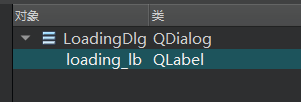
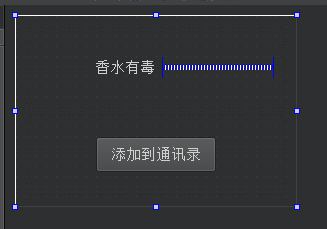
槽函数中我们添加了LoadingDlg类,这个类也是个QT 设计师界面类,ui如下
https://cdn.llfc.club/1717637779912.jpg

添加stackwidget管理界面

ChatDialog界面里添加stackedWidget,然后添加两个页面

https://cdn.llfc.club/1717639561119.jpg

回头我们将这两个界面升级为我们自定义的界面

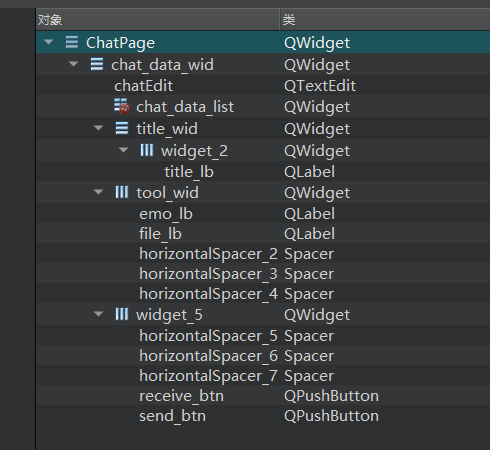
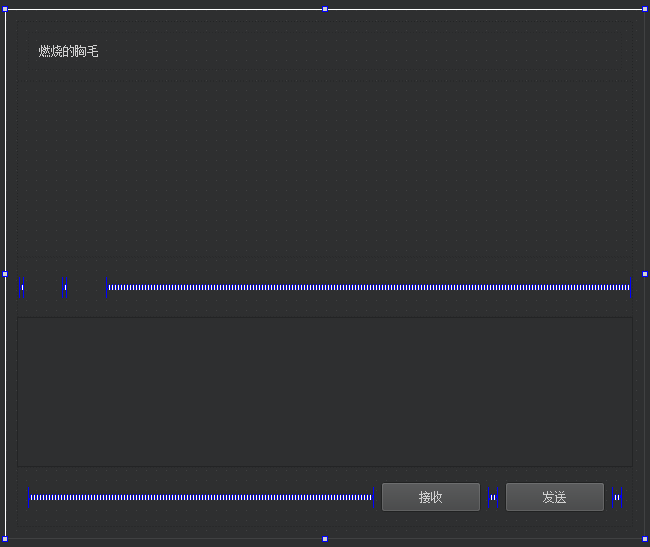
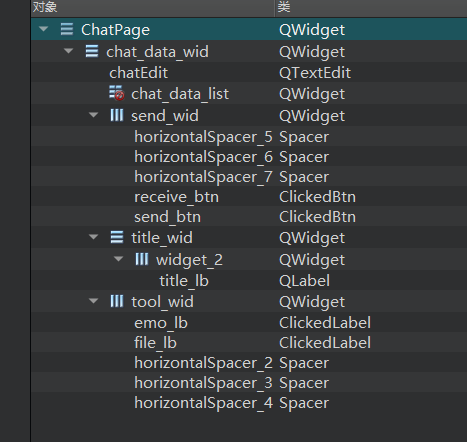
我们先添加一个自定义的QT设计师界面类ChatPage,然后将原来放在ChatDialog.ui中的chat_data_wid这个widget移动到ChatPage中ui布局如下
https://cdn.llfc.club/1717640323397.jpg

布局属性如下

https://cdn.llfc.club/1717640426705.jpg

然后我们将ChatDialog.ui中的chat_page 升级为ChatPage。

接着我们将ChatPage中的一些控件比如emo_lb, file_lb升级为ClickedLabel, receive_btn, send_btn升级为ClickedBtn

如下图:
https://cdn.llfc.club/1717644080174.jpg

然后我们在ChatPage的构造函数中添加按钮样式的编写

1
2
3
4
5
6
7
8
9
10
11
12
13
ChatPage::ChatPage(QWidget *parent) :
QWidget(parent),
ui(new Ui::ChatPage)
{
ui->setupUi(this);
//设置按钮样式
ui->receive_btn->SetState("normal","hover","press");
ui->send_btn->SetState("normal","hover","press");

//设置图标样式
ui->emo_lb->SetState("normal","hover","press","normal","hover","press");
ui->file_lb->SetState("normal","hover","press","normal","hover","press");
}

因为我们继承了QWidget,我们想实现样式更新,需要重写paintEvent

1
2
3
4
5
6
7
void ChatPage::paintEvent(QPaintEvent *event)
{
QStyleOption opt;
opt.init(this);
QPainter p(this);
style()->drawPrimitive(QStyle::PE_Widget, &opt, &p, this);
}

类似的,我们的ListItemBase

1
2
3
4
5
6
7
void ListItemBase::paintEvent(QPaintEvent *event)
{
QStyleOption opt;
opt.init(this);
QPainter p(this);
style()->drawPrimitive(QStyle::PE_Widget, &opt, &p, this);
}

ClickedLabel完善

我们希望ClickedLabel在按下的时候显示按下状态的资源,在抬起的时候显示抬起的资源,所以修改按下事件和抬起事件

1
2
3
4
5
6
7
8
9
10
11
12
13
14
15
16
17
18
19
20
21
22
void ClickedLabel::mousePressEvent(QMouseEvent *event)
{
if (event->button() == Qt::LeftButton) {
if(_curstate == ClickLbState::Normal){
qDebug()<<"clicked , change to selected hover: "<< _selected_hover;
_curstate = ClickLbState::Selected;
setProperty("state",_selected_press);
repolish(this);
update();

}else{
qDebug()<<"clicked , change to normal hover: "<< _normal_hover;
_curstate = ClickLbState::Normal;
setProperty("state",_normal_press);
repolish(this);
update();
}
return;
}
// 调用基类的mousePressEvent以保证正常的事件处理
QLabel::mousePressEvent(event);
}

抬起事件

1
2
3
4
5
6
7
8
9
10
11
12
13
14
15
16
17
18
19
20
21
void ClickedLabel::mouseReleaseEvent(QMouseEvent *event)
{
if (event->button() == Qt::LeftButton) {
if(_curstate == ClickLbState::Normal){
// qDebug()<<"ReleaseEvent , change to normal hover: "<< _normal_hover;
setProperty("state",_normal_hover);
repolish(this);
update();

}else{
// qDebug()<<"ReleaseEvent , change to select hover: "<< _selected_hover;
setProperty("state",_selected_hover);
repolish(this);
update();
}
emit clicked();
return;
}
// 调用基类的mousePressEvent以保证正常的事件处理
QLabel::mousePressEvent(event);
}

qss美化

我们添加qss美化一下

1
2
3
4
5
6
7
8
9
10
11
12
13
14
15
16
17
18
19
20
21
22
23
24
25
26
27
28
29
30
31
32
33
34
35
36
37
38
39
40
41
42
43
44
45
46
47
48
49
50
51
52
53
54
55
56
57
58
59
60
61
62
63
64
65
66
67
68
69
70
71
72
73
74
75
76
77
78
79
80
81
82
83
84
85
86
87
88
89
90
91
92
93
94
95
96
97
98
99
100
101
102
103
104
105
106
107
108
109
110
111
112
LoadingDlg{
background: #f2eada;
}

#title_lb{
font-family: "Microsoft YaHei";
font-size: 18px;
font-weight: normal;
}

#chatEdit{
background: #ffffff;
border: none; /* 隐藏边框 */
font-family: "Microsoft YaHei"; /* 设置字体 */
font-size: 18px; /* 设置字体大小 */
padding: 5px; /* 设置内边距 */
}

#send_wid{
background: #ffffff;
border: none; /* 隐藏边框 */
}

#add_btn[state='normal']{
border-image: url(:/res/add_friend_normal.png);
}

#add_btn[state='hover']{
border-image: url(:/res/add_friend_hover.png);

}

#add_btn[state='press']{
border-image: url(:/res/add_friend_hover.png);
}

#receive_btn[state='normal']{
background: #f0f0f0;
color: #2cb46e;
font-size: 16px; /* 设置字体大小 */
font-family: "Microsoft YaHei"; /* 设置字体 */
border-radius: 20px; /* 设置圆角 */
}

#receive_btn[state='hover']{
background: #d2d2d2;
color: #2cb46e;
font-size: 16px; /* 设置字体大小 */
font-family: "Microsoft YaHei"; /* 设置字体 */
border-radius: 20px; /* 设置圆角 */
}

#receive_btn[state='press']{
background: #c6c6c6;
color: #2cb46e;
font-size: 16px; /* 设置字体大小 */
font-family: "Microsoft YaHei"; /* 设置字体 */
border-radius: 20px; /* 设置圆角 */
}

#send_btn[state='normal']{
background: #f0f0f0;
color: #2cb46e;
font-size: 16px; /* 设置字体大小 */
font-family: "Microsoft YaHei"; /* 设置字体 */
border-radius: 20px; /* 设置圆角 */
}

#send_btn[state='hover']{
background: #d2d2d2;
color: #2cb46e;
font-size: 16px; /* 设置字体大小 */
font-family: "Microsoft YaHei"; /* 设置字体 */
border-radius: 20px; /* 设置圆角 */
}

#send_btn[state='press']{
background: #c6c6c6;
color: #2cb46e;
font-size: 16px; /* 设置字体大小 */
font-family: "Microsoft YaHei"; /* 设置字体 */
border-radius: 20px; /* 设置圆角 */
}

#tool_wid{
background: #ffffff;
border-bottom: 0.5px solid #ececec; /* 设置下边框颜色和宽度 */
}

#emo_lb[state='normal']{
border-image: url(:/res/smile.png);
}

#emo_lb[state='hover']{
border-image: url(:/res/smile_hover.png);
}

#emo_lb[state='press']{
border-image: url(:/res/smile_press.png);
}

#file_lb[state='normal']{
border-image: url(:/res/filedir.png);
}

#file_lb[state='hover']{
border-image: url(:/res/filedir_hover.png);
}

#file_lb[state='press']{
border-image: url(:/res/filedir_press.png);
}

效果

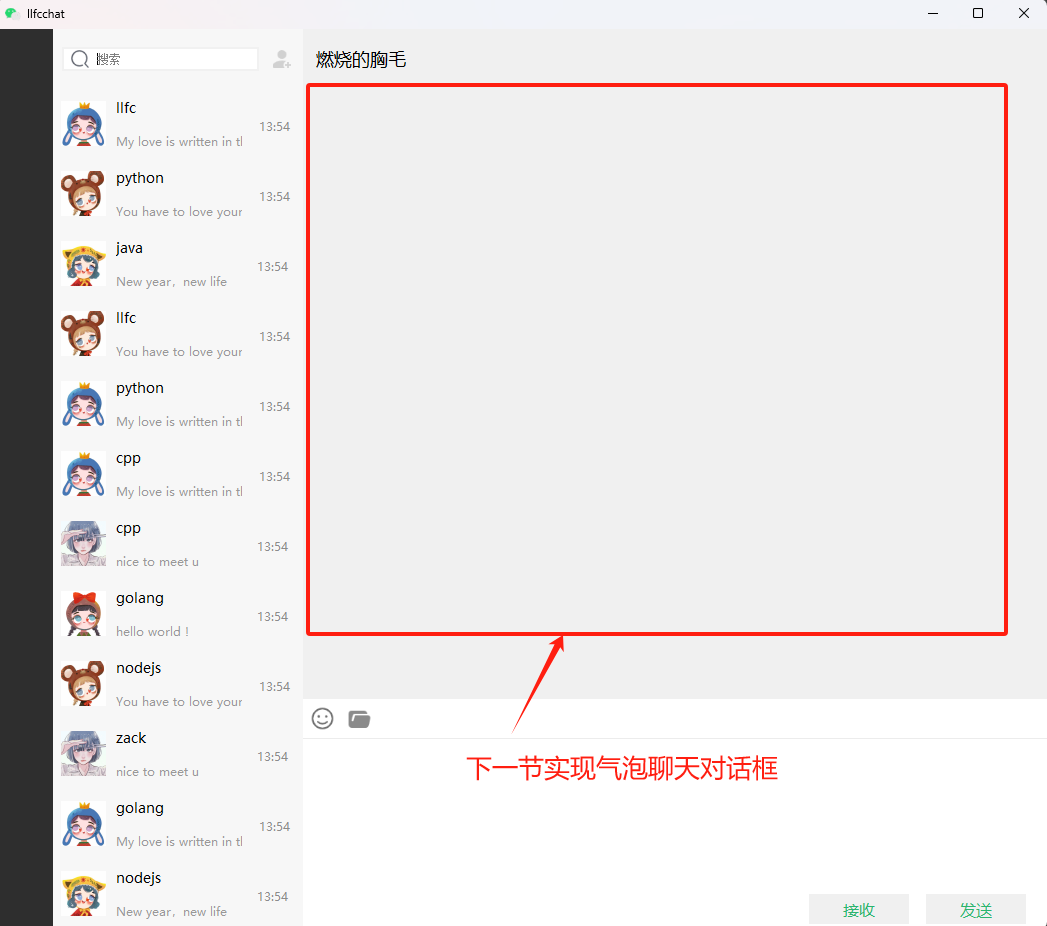
最后整体运行一下看看效果, 下一节我们实现红框内的内容
https://cdn.llfc.club/1717645209118.jpg

视频链接

https://www.bilibili.com/video/BV13Z421W7WA/?spm_id_from=333.788&vd_source=8be9e83424c2ed2c9b2a3ed1d01385e9

源码链接

https://gitee.com/secondtonone1/llfcchat

聊天项目(21) 滚动聊天布局设计

Posted on 2024-08-31 | In C++聊天项目

滚动聊天布局设计

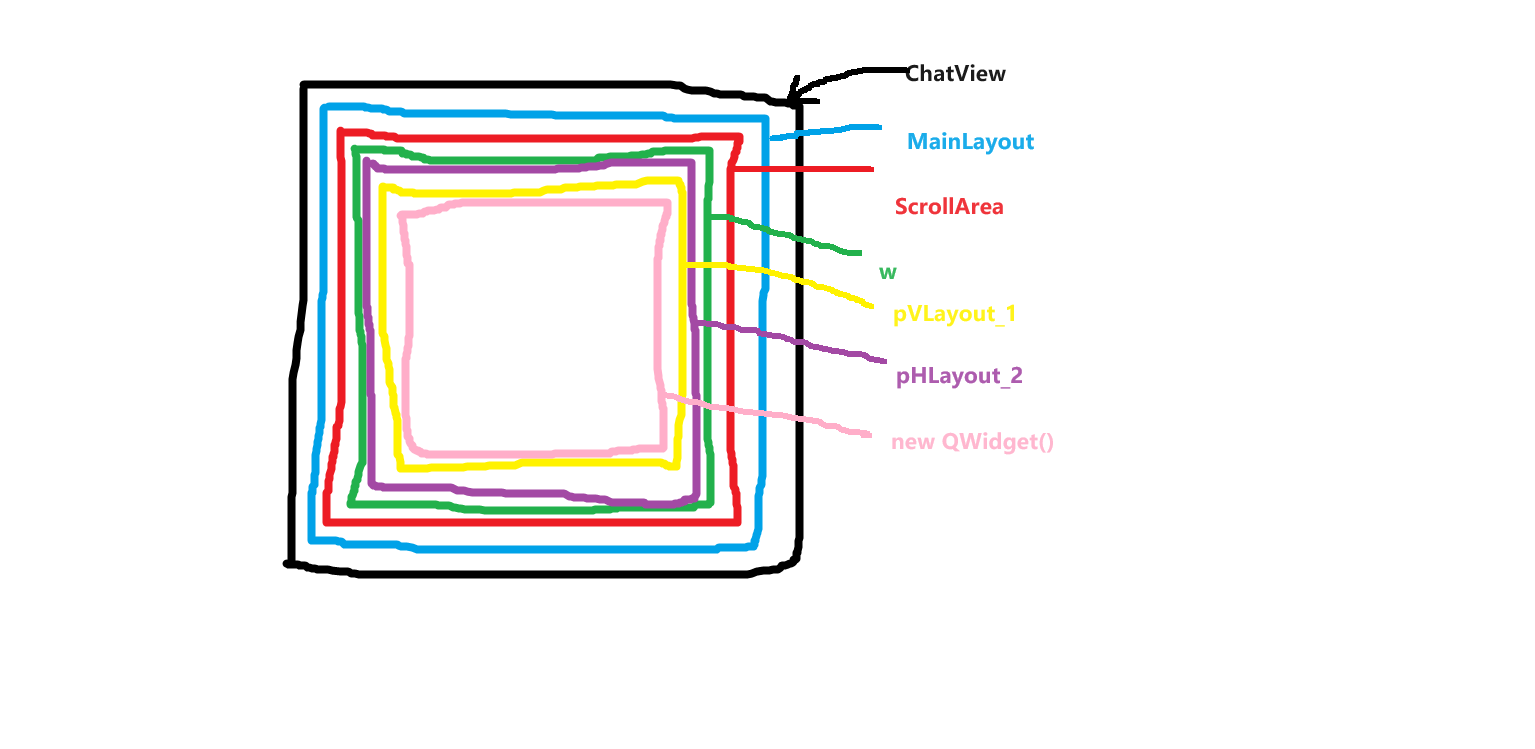
我们的聊天布局如下图
最外层的是一个chatview(黑色), chatview内部在添加一个MainLayout(蓝色),MainLayout内部添加一个scrollarea(红色),scrollarea内部包含一个widget(绿色),同时也包含一个HLayout(紫色)用来浮动显示滚动条。widget内部包含一个垂直布局Vlayout(黄色),黄色布局内部包含一个粉色的widget,widget占据拉伸比一万,保证充满整个布局。

https://cdn.llfc.club/layoutpic.png

代码实现

我们对照上面的图手写代码,在项目中添加ChatView类,然后先实现类的声明

1
2
3
4
5
6
7
8
9
10
11
12
13
14
15
16
17
18
19
20
21
class ChatView: public QWidget
{
Q_OBJECT
public:
ChatView(QWidget *parent = Q_NULLPTR);
void appendChatItem(QWidget *item); //尾插
void prependChatItem(QWidget *item); //头插
void insertChatItem(QWidget *before, QWidget *item);//中间插
protected:
bool eventFilter(QObject *o, QEvent *e) override;
void paintEvent(QPaintEvent *event) override;
private slots:
void onVScrollBarMoved(int min, int max);
private:
void initStyleSheet();
private:
//QWidget *m_pCenterWidget;
QVBoxLayout *m_pVl;
QScrollArea *m_pScrollArea;
bool isAppended;
};

接下来实现其函数定义, 先实现构造函数

1
2
3
4
5
6
7
8
9
10
11
12
13
14
15
16
17
18
19
20
21
22
23
24
25
26
27
28
29
30
31
32
33
34
35
ChatView::ChatView(QWidget *parent)  : QWidget(parent)
, isAppended(false)
{
QVBoxLayout *pMainLayout = new QVBoxLayout();
this->setLayout(pMainLayout);
pMainLayout->setMargin(0);

m_pScrollArea = new QScrollArea();
m_pScrollArea->setObjectName("chat_area");
pMainLayout->addWidget(m_pScrollArea);

QWidget *w = new QWidget(this);
w->setObjectName("chat_bg");
w->setAutoFillBackground(true);

QVBoxLayout *pVLayout_1 = new QVBoxLayout();
pVLayout_1->addWidget(new QWidget(), 100000);
w->setLayout(pVLayout_1);
m_pScrollArea->setWidget(w);

m_pScrollArea->setVerticalScrollBarPolicy(Qt::ScrollBarAlwaysOff);
QScrollBar *pVScrollBar = m_pScrollArea->verticalScrollBar();
connect(pVScrollBar, &QScrollBar::rangeChanged,this, &ChatView::onVScrollBarMoved);

//把垂直ScrollBar放到上边 而不是原来的并排
QHBoxLayout *pHLayout_2 = new QHBoxLayout();
pHLayout_2->addWidget(pVScrollBar, 0, Qt::AlignRight);
pHLayout_2->setMargin(0);
m_pScrollArea->setLayout(pHLayout_2);
pVScrollBar->setHidden(true);

m_pScrollArea->setWidgetResizable(true);
m_pScrollArea->installEventFilter(this);
initStyleSheet();
}

再实现添加条目到聊天背景

1
2
3
4
5
6
void ChatView::appendChatItem(QWidget *item)
{
QVBoxLayout *vl = qobject_cast<QVBoxLayout *>(m_pScrollArea->widget()->layout());
vl->insertWidget(vl->count()-1, item);
isAppended = true;
}

重写事件过滤器

1
2
3
4
5
6
7
8
9
10
11
12
13
14
15
16
bool ChatView::eventFilter(QObject *o, QEvent *e)
{
/*if(e->type() == QEvent::Resize && o == )
{

}
else */if(e->type() == QEvent::Enter && o == m_pScrollArea)
{
m_pScrollArea->verticalScrollBar()->setHidden(m_pScrollArea->verticalScrollBar()->maximum() == 0);
}
else if(e->type() == QEvent::Leave && o == m_pScrollArea)
{
m_pScrollArea->verticalScrollBar()->setHidden(true);
}
return QWidget::eventFilter(o, e);
}

重写paintEvent支持子类绘制

1
2
3
4
5
6
7
void ChatView::paintEvent(QPaintEvent *event)
{
QStyleOption opt;
opt.init(this);
QPainter p(this);
style()->drawPrimitive(QStyle::PE_Widget, &opt, &p, this);
}

监听滚动区域变化的槽函数

1
2
3
4
5
6
7
8
9
10
11
12
13
void ChatView::onVScrollBarMoved(int min, int max)
{
if(isAppended) //添加item可能调用多次
{
QScrollBar *pVScrollBar = m_pScrollArea->verticalScrollBar();
pVScrollBar->setSliderPosition(pVScrollBar->maximum());
//500毫秒内可能调用多次
QTimer::singleShot(500, [this]()
{
isAppended = false;
});
}
}

本节先到这里,完成聊天布局基本的构造

视频链接

https://www.bilibili.com/video/BV1xz421h7Ad/?vd_source=8be9e83424c2ed2c9b2a3ed1d01385e9

源码链接

https://gitee.com/secondtonone1/llfcchat

聊天项目(23) 侧边栏切换和搜索列表

Posted on 2024-08-31 | In C++聊天项目

侧边栏按钮

我们接下来实现侧边栏按钮功能,希望点击一个按钮,清空其他按钮的选中状态。而我们又希望按钮上面能在有新的通知的时候出现红点的图标,所以不能用简单的按钮,要用自定义的一个widget实现点击效果

我们自定义StateWidget ,声明如下

1
2
3
4
5
6
7
8
9
10
11
12
13
14
15
16
17
18
19
20
21
22
23
24
25
26
27
28
29
30
31
32
33
34
35
36
37
38
39
40
41
42
43
44
class StateWidget : public QWidget
{
Q_OBJECT
public:
explicit StateWidget(QWidget *parent = nullptr);

void SetState(QString normal="", QString hover="", QString press="",
QString select="", QString select_hover="", QString select_press="");

ClickLbState GetCurState();
void ClearState();

void SetSelected(bool bselected);
void AddRedPoint();
void ShowRedPoint(bool show=true);

protected:
void paintEvent(QPaintEvent* event);

virtual void mousePressEvent(QMouseEvent *ev) override;
virtual void mouseReleaseEvent(QMouseEvent *ev) override;
virtual void enterEvent(QEvent* event) override;
virtual void leaveEvent(QEvent* event) override;

private:

QString _normal;
QString _normal_hover;
QString _normal_press;

QString _selected;
QString _selected_hover;
QString _selected_press;

ClickLbState _curstate;
QLabel * _red_point;

signals:
void clicked(void);

signals:

public slots:
};

接下来实现定义

1
2
3
4
5
6
7
8
9
10
11
12
13
14
15
16
17
18
19
20
21
22
23
24
25
26
27
28
29
30
31
32
33
34
35
36
37
38
39
40
41
42
43
44
45
46
47
48
49
50
51
52
53
54
55
56
57
58
59
60
61
62
63
64
65
66
67
68
69
70
71
72
73
74
75
76
77
78
79
80
81
82
83
84
85
86
87
88
89
90
91
92
93
94
95
96
97
98
99
100
101
102
103
104
105
106
107
108
109
110
111
112
113
114
115
116
117
118
119
120
121
122
123
124
125
126
127
128
129
130
131
132
133
134
135
136
137
138
139
140
141
142
143
144
145
146
147
148
149
150
151
152
153
154
155
156
157
158
159
160
161
162
163
StateWidget::StateWidget(QWidget *parent): QWidget(parent),_curstate(ClickLbState::Normal)
{
setCursor(Qt::PointingHandCursor);
//添加红点
AddRedPoint();
}

void StateWidget::SetState(QString normal, QString hover, QString press, QString select, QString select_hover, QString select_press)
{
_normal = normal;
_normal_hover = hover;
_normal_press = press;

_selected = select;
_selected_hover = select_hover;
_selected_press = select_press;

setProperty("state",normal);
repolish(this);
}

ClickLbState StateWidget::GetCurState()
{
return _curstate;
}

void StateWidget::ClearState()
{
_curstate = ClickLbState::Normal;
setProperty("state",_normal);
repolish(this);
update();
}

void StateWidget::SetSelected(bool bselected)
{
if(bselected){
_curstate = ClickLbState::Selected;
setProperty("state",_selected);
repolish(this);
update();
return;
}

_curstate = ClickLbState::Normal;
setProperty("state",_normal);
repolish(this);
update();
return;
}


void StateWidget::AddRedPoint()
{
//添加红点示意图
_red_point = new QLabel();
_red_point->setObjectName("red_point");
QVBoxLayout* layout2 = new QVBoxLayout;
_red_point->setAlignment(Qt::AlignCenter);
layout2->addWidget(_red_point);
layout2->setMargin(0);
this->setLayout(layout2);
_red_point->setVisible(false);
}

void StateWidget::ShowRedPoint(bool show)
{
_red_point->setVisible(true);
}

void StateWidget::paintEvent(QPaintEvent *event)
{
QStyleOption opt;
opt.init(this);
QPainter p(this);
style()->drawPrimitive(QStyle::PE_Widget, &opt, &p, this);
return;
}

void StateWidget::mousePressEvent(QMouseEvent *event)
{
if (event->button() == Qt::LeftButton) {
if(_curstate == ClickLbState::Selected){
qDebug()<<"PressEvent , already to selected press: "<< _selected_press;
//emit clicked();
// 调用基类的mousePressEvent以保证正常的事件处理
QWidget::mousePressEvent(event);
return;
}

if(_curstate == ClickLbState::Normal){
qDebug()<<"PressEvent , change to selected press: "<< _selected_press;
_curstate = ClickLbState::Selected;
setProperty("state",_selected_press);
repolish(this);
update();
}

return;
}
// 调用基类的mousePressEvent以保证正常的事件处理
QWidget::mousePressEvent(event);
}

void StateWidget::mouseReleaseEvent(QMouseEvent *event)
{
if (event->button() == Qt::LeftButton) {
if(_curstate == ClickLbState::Normal){
//qDebug()<<"ReleaseEvent , change to normal hover: "<< _normal_hover;
setProperty("state",_normal_hover);
repolish(this);
update();

}else{
//qDebug()<<"ReleaseEvent , change to select hover: "<< _selected_hover;
setProperty("state",_selected_hover);
repolish(this);
update();
}
emit clicked();
return;
}
// 调用基类的mousePressEvent以保证正常的事件处理
QWidget::mousePressEvent(event);
}

void StateWidget::enterEvent(QEvent *event)
{
// 在这里处理鼠标悬停进入的逻辑
if(_curstate == ClickLbState::Normal){
//qDebug()<<"enter , change to normal hover: "<< _normal_hover;
setProperty("state",_normal_hover);
repolish(this);
update();

}else{
//qDebug()<<"enter , change to selected hover: "<< _selected_hover;
setProperty("state",_selected_hover);
repolish(this);
update();
}

QWidget::enterEvent(event);
}

void StateWidget::leaveEvent(QEvent *event)
{
// 在这里处理鼠标悬停离开的逻辑
if(_curstate == ClickLbState::Normal){
// qDebug()<<"leave , change to normal : "<< _normal;
setProperty("state",_normal);
repolish(this);
update();

}else{
// qDebug()<<"leave , change to select normal : "<< _selected;
setProperty("state",_selected);
repolish(this);
update();
}
QWidget::leaveEvent(event);
}

为了让按钮好看一点,我们修改下qss文件

1
2
3
4
5
6
7
8
9
10
11
12
13
14
15
16
17
18
19
20
21
22
23
24
25
26
27
28
29
30
31
32
33
34
35
36
37
38
39
40
41
42
43
44
45
46
47
48
49
50
51
52
53
#chat_user_name {
color:rgb(153,153,153);
font-size: 14px;
font-family: "Microsoft YaHei";
}

#side_chat_lb[state='normal']{
border-image: url(:/res/chat_icon.png);
}

#side_chat_lb[state='hover']{
border-image: url(:/res/chat_icon_hover.png);
}

#side_chat_lb[state='pressed']{
border-image: url(:/res/chat_icon_press.png);
}

#side_chat_lb[state='selected_normal']{
border-image: url(:/res/chat_icon_press.png);
}

#side_chat_lb[state='selected_hover']{
border-image: url(:/res/chat_icon_press.png);
}

#side_chat_lb[state='selected_pressed']{
border-image: url(:/res/chat_icon_press.png);
}

#side_contact_lb[state='normal']{
border-image: url(:/res/contact_list.png);
}

#side_contact_lb[state='hover']{
border-image: url(:/res/contact_list_hover.png);
}

#side_contact_lb[state='pressed']{
border-image: url(:/res/contact_list_press.png);
}

#side_contact_lb[state='selected_normal']{
border-image: url(:/res/contact_list_press.png);
}

#side_contact_lb[state='selected_hover']{
border-image: url(:/res/contact_list_press.png);
}

#side_contact_lb[state='selected_pressed']{
border-image: url(:/res/contact_list_press.png);
}

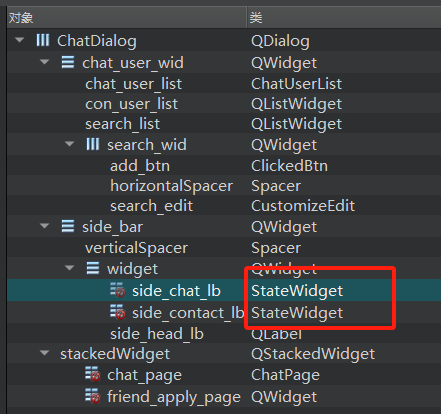
回到ChatDialog.ui中,将side_chat_lb改为StateWidget,side_contact_lb改为StateWidget。

https://cdn.llfc.club/1719028635439.jpg

接下来回到ChatDialog.cpp中构造函数中添加

1
2
3
4
5
6
7
8
9
10
11
12
13
14
15
16
17
QPixmap pixmap(":/res/head_1.jpg");
ui->side_head_lb->setPixmap(pixmap); // 将图片设置到QLabel上
QPixmap scaledPixmap = pixmap.scaled( ui->side_head_lb->size(), Qt::KeepAspectRatio); // 将图片缩放到label的大小
ui->side_head_lb->setPixmap(scaledPixmap); // 将缩放后的图片设置到QLabel上
ui->side_head_lb->setScaledContents(true); // 设置QLabel自动缩放图片内容以适应大小

ui->side_chat_lb->setProperty("state","normal");

ui->side_chat_lb->SetState("normal","hover","pressed","selected_normal","selected_hover","selected_pressed");

ui->side_contact_lb->SetState("normal","hover","pressed","selected_normal","selected_hover","selected_pressed");

AddLBGroup(ui->side_chat_lb);
AddLBGroup(ui->side_contact_lb);

connect(ui->side_chat_lb, &StateWidget::clicked, this, &ChatDialog::slot_side_chat);
connect(ui->side_contact_lb, &StateWidget::clicked, this, &ChatDialog::slot_side_contact);

切换函数中实现如下

1
2
3
4
5
6
7
8
void ChatDialog::slot_side_chat()
{
qDebug()<< "receive side chat clicked";
ClearLabelState(ui->side_chat_lb);
ui->stackedWidget->setCurrentWidget(ui->chat_page);
_state = ChatUIMode::ChatMode;
ShowSearch(false);
}

上述函数我们实现了清楚其他标签选中状态,只将被点击的标签设置为选中的效果,核心功能是下面

1
2
3
4
5
6
7
8
9
10
void ChatDialog::ClearLabelState(StateWidget *lb)
{
for(auto & ele: _lb_list){
if(ele == lb){
continue;
}

ele->ClearState();
}
}

我们在构造函数里将要管理的标签通过AddGroup函数加入_lb_list实现管理

1
2
3
4
void ChatDialog::AddLBGroup(StateWidget *lb)
{
_lb_list.push_back(lb);
}

搜索列表类

在pro中添加我们自定义一个搜索列表类

1
2
3
4
5
6
7
8
9
10
11
12
13
14
15
16
17
18
19
20
21
22
23
24
25
26
27
28
29
30
31
32
33
34
35
36
37
38
39
40
41
42
43
44
45
46
47
class SearchList: public QListWidget
{
Q_OBJECT
public:
SearchList(QWidget *parent = nullptr);
void CloseFindDlg();
void SetSearchEdit(QWidget* edit);
protected:
bool eventFilter(QObject *watched, QEvent *event) override {
// 检查事件是否是鼠标悬浮进入或离开
if (watched == this->viewport()) {
if (event->type() == QEvent::Enter) {
// 鼠标悬浮,显示滚动条
this->setVerticalScrollBarPolicy(Qt::ScrollBarAsNeeded);
} else if (event->type() == QEvent::Leave) {
// 鼠标离开,隐藏滚动条
this->setVerticalScrollBarPolicy(Qt::ScrollBarAlwaysOff);
}
}

// 检查事件是否是鼠标滚轮事件
if (watched == this->viewport() && event->type() == QEvent::Wheel) {
QWheelEvent *wheelEvent = static_cast<QWheelEvent*>(event);
int numDegrees = wheelEvent->angleDelta().y() / 8;
int numSteps = numDegrees / 15; // 计算滚动步数

// 设置滚动幅度
this->verticalScrollBar()->setValue(this->verticalScrollBar()->value() - numSteps);

return true; // 停止事件传递
}

return QListWidget::eventFilter(watched, event);
}
private:
void waitPending(bool pending = true);
bool _send_pending;
void addTipItem();
std::shared_ptr<QDialog> _find_dlg;
QWidget* _search_edit;
LoadingDlg * _loadingDialog;
private slots:
void slot_item_clicked(QListWidgetItem *item);
void slot_user_search(std::shared_ptr<SearchInfo> si);
signals:

};

然后在构造函数中初始化条目列表

1
2
3
4
5
6
7
8
9
10
11
12
13
14
SearchList::SearchList(QWidget *parent):QListWidget(parent),_find_dlg(nullptr), _search_edit(nullptr), _send_pending(false)
{
Q_UNUSED(parent);
this->setHorizontalScrollBarPolicy(Qt::ScrollBarAlwaysOff);
this->setVerticalScrollBarPolicy(Qt::ScrollBarAlwaysOff);
// 安装事件过滤器
this->viewport()->installEventFilter(this);
//连接点击的信号和槽
connect(this, &QListWidget::itemClicked, this, &SearchList::slot_item_clicked);
//添加条目
addTipItem();
//连接搜索条目
connect(TcpMgr::GetInstance().get(), &TcpMgr::sig_user_search, this, &SearchList::slot_user_search);
}

addTipItem是用来添加一个一个条目的

1
2
3
4
5
6
7
8
9
10
11
12
13
14
15
16
17
18
19
void SearchList::addTipItem()
{
auto *invalid_item = new QWidget();
QListWidgetItem *item_tmp = new QListWidgetItem;
//qDebug()<<"chat_user_wid sizeHint is " << chat_user_wid->sizeHint();
item_tmp->setSizeHint(QSize(250,10));
this->addItem(item_tmp);
invalid_item->setObjectName("invalid_item");
this->setItemWidget(item_tmp, invalid_item);
item_tmp->setFlags(item_tmp->flags() & ~Qt::ItemIsSelectable);


auto *add_user_item = new AddUserItem();
QListWidgetItem *item = new QListWidgetItem;
//qDebug()<<"chat_user_wid sizeHint is " << chat_user_wid->sizeHint();
item->setSizeHint(add_user_item->sizeHint());
this->addItem(item);
this->setItemWidget(item, add_user_item);
}

sig_user_search可以先在TcpMgr中声明信号

1
void sig_user_search(std::shared_ptr<SearchInfo>);

SearchInfo定义在userdata.h中

1
2
3
4
5
6
7
8
9
class SearchInfo {
public:
SearchInfo(int uid, QString name, QString nick, QString desc, int sex);
int _uid;
QString _name;
QString _nick;
QString _desc;
int _sex;
};

接下来实现我们自定义的AddUserItem, 在pro中添加qt设计师界面类AddUserItem

1
2
3
4
5
6
7
8
9
10
11
12
13
14
15
class AddUserItem : public ListItemBase
{
Q_OBJECT

public:
explicit AddUserItem(QWidget *parent = nullptr);
~AddUserItem();
QSize sizeHint() const override {
return QSize(250, 70); // 返回自定义的尺寸
}
protected:

private:
Ui::AddUserItem *ui;
};

实现

1
2
3
4
5
6
7
8
9
10
11
12
AddUserItem::AddUserItem(QWidget *parent) :
ListItemBase(parent),
ui(new Ui::AddUserItem)
{
ui->setupUi(this);
SetItemType(ListItemType::ADD_USER_TIP_ITEM);
}

AddUserItem::~AddUserItem()
{
delete ui;
}

我们将ChatDialog.ui中将search_list升级为SearchList类型

美化界面

我们用qss美化界面

1
2
3
4
5
6
7
8
9
10
11
12
13
14
15
16
17
18
19
20
21
22
23
24
25
26
27
28
29
30
31
32
33
34
35
36
37
38
39
40
41
42
43
44
45
46
#search_edit {
border: 2px solid #f1f1f1;
}

/* 搜索框列表*/
#search_list {
background-color: rgb(247,247,248);
border: none;
}

#search_list::item:selected {
background-color: #d3d7d4;
border: none;
outline: none;
}

#search_list::item:hover {
background-color: rgb(206,207,208);
border: none;
outline: none;
}

#search_list::focus {
border: none;
outline: none;
}

#invalid_item {
background-color: #eaeaea;
border: none;
}

#add_tip {
border-image: url(:/res/addtip.png);
}

#right_tip{
border-image: url(:/res/right_tip.png);
}

#message_tip{
text-align: center;
font-family: "Microsoft YaHei";
font-size: 12pt;
}

我们在ChatDialog的构造函数中添加

1
2
//链接搜索框输入变化
connect(ui->search_edit, &QLineEdit::textChanged, this, &ChatDialog::slot_text_changed);

slot_text_changed槽函数中实现

1
2
3
4
5
6
7
void ChatDialog::slot_text_changed(const QString &str)
{
//qDebug()<< "receive slot text changed str is " << str;
if (!str.isEmpty()) {
ShowSearch(true);
}
}

源码和视频

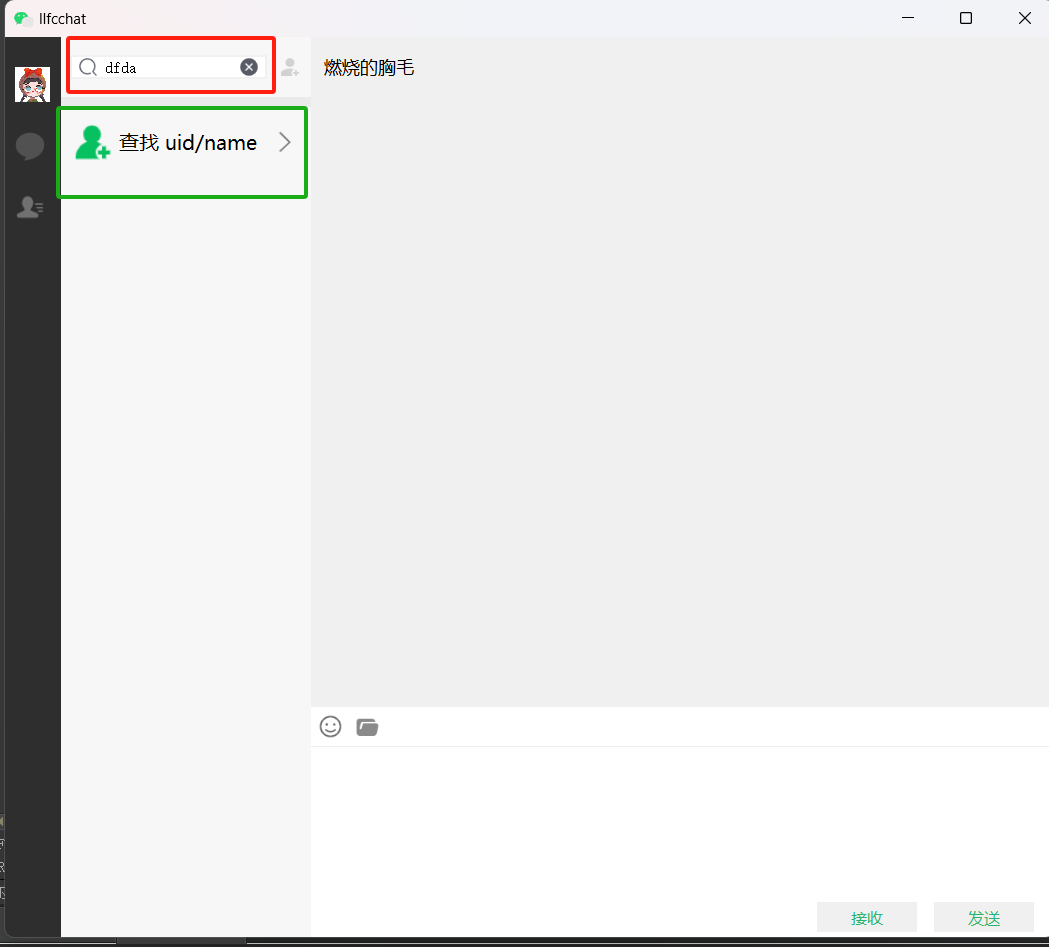
再次启动后在输入框输入文字,就会显示搜索框

https://cdn.llfc.club/1719113143252.jpg

视频

https://www.bilibili.com/video/BV1uM4m1U7MP/?spm_id_from=333.999.0.0&vd_source=8be9e83424c2ed2c9b2a3ed1d01385e9

源码链接

https://gitee.com/secondtonone1/llfcchat

聊天项目(22) 实现气泡聊天对话框

Posted on 2024-08-31 | In C++聊天项目

气泡聊天框设计

我们期待实现如下绿色的气泡对话框

https://cdn.llfc.club/1718417551126.jpg

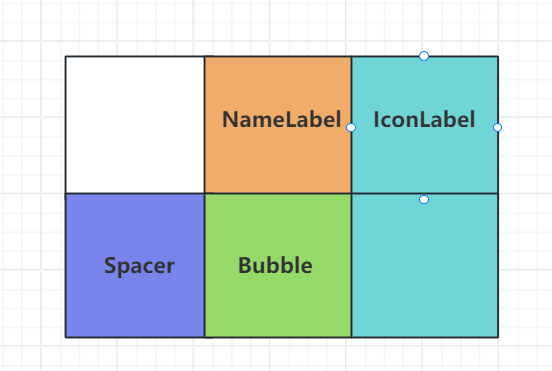
对于我们自己发出的信息,我们可以实现这样一个网格布局管理

https://cdn.llfc.club/1718423760358.jpg

NameLabel用来显示用户的名字,Bubble用来显示聊天信息,Spacer是个弹簧,保证将NameLabel,IconLabel,Bubble等挤压到右侧。

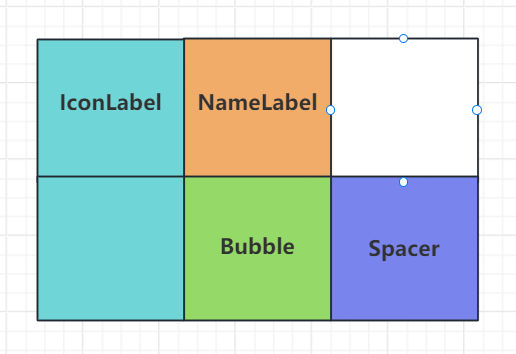
如果是别人发出的消息,我们设置这样一个网格布局

https://cdn.llfc.club/1718497364660.jpg

下面是实现布局的核心代码

1
2
3
4
5
6
7
8
9
10
11
12
13
14
15
16
17
18
19
20
21
22
23
24
25
26
27
28
29
30
31
32
33
34
35
36
37
38
39
40
41
ChatItemBase::ChatItemBase(ChatRole role, QWidget *parent)
: QWidget(parent)
, m_role(role)
{
m_pNameLabel = new QLabel();
m_pNameLabel->setObjectName("chat_user_name");
QFont font("Microsoft YaHei");
font.setPointSize(9);
m_pNameLabel->setFont(font);
m_pNameLabel->setFixedHeight(20);
m_pIconLabel = new QLabel();
m_pIconLabel->setScaledContents(true);
m_pIconLabel->setFixedSize(42, 42);
m_pBubble = new QWidget();
QGridLayout *pGLayout = new QGridLayout();
pGLayout->setVerticalSpacing(3);
pGLayout->setHorizontalSpacing(3);
pGLayout->setMargin(3);
QSpacerItem*pSpacer = new QSpacerItem(40, 20, QSizePolicy::Expanding, QSizePolicy::Minimum);
if(m_role == ChatRole::Self)
{
m_pNameLabel->setContentsMargins(0,0,8,0);
m_pNameLabel->setAlignment(Qt::AlignRight);
pGLayout->addWidget(m_pNameLabel, 0,1, 1,1);
pGLayout->addWidget(m_pIconLabel, 0, 2, 2,1, Qt::AlignTop);
pGLayout->addItem(pSpacer, 1, 0, 1, 1);
pGLayout->addWidget(m_pBubble, 1,1, 1,1);
pGLayout->setColumnStretch(0, 2);
pGLayout->setColumnStretch(1, 3);
}else{
m_pNameLabel->setContentsMargins(8,0,0,0);
m_pNameLabel->setAlignment(Qt::AlignLeft);
pGLayout->addWidget(m_pIconLabel, 0, 0, 2,1, Qt::AlignTop);
pGLayout->addWidget(m_pNameLabel, 0,1, 1,1);
pGLayout->addWidget(m_pBubble, 1,1, 1,1);
pGLayout->addItem(pSpacer, 2, 2, 1, 1);
pGLayout->setColumnStretch(1, 3);
pGLayout->setColumnStretch(2, 2);
}
this->setLayout(pGLayout);
}

设置用户名和头像

1
2
3
4
5
6
7
8
9
void ChatItemBase::setUserName(const QString &name)
{
m_pNameLabel->setText(name);
}

void ChatItemBase::setUserIcon(const QPixmap &icon)
{
m_pIconLabel->setPixmap(icon);
}

因为我们还要定制化实现气泡widget,所以要写个函数更新这个widget

1
2
3
4
5
6
7
void ChatItemBase::setWidget(QWidget *w)
{
QGridLayout *pGLayout = (qobject_cast<QGridLayout *>)(this->layout());
pGLayout->replaceWidget(m_pBubble, w);
delete m_pBubble;
m_pBubble = w;
}

聊天气泡

我们的消息分为几种,文件,文本,图片等。所以先实现BubbleFrame作为基类

1
2
3
4
5
6
7
8
9
10
11
12
13
14
15
class BubbleFrame : public QFrame
{
Q_OBJECT
public:
BubbleFrame(ChatRole role, QWidget *parent = nullptr);
void setMargin(int margin);
//inline int margin(){return margin;}
void setWidget(QWidget *w);
protected:
void paintEvent(QPaintEvent *e);
private:
QHBoxLayout *m_pHLayout;
ChatRole m_role;
int m_margin;
};

BubbleFrame基类构造函数创建一个布局,要根据是自己发送的消息还是别人发送的,做margin分布

1
2
3
4
5
6
7
8
9
10
11
12
13
14
const int WIDTH_SANJIAO  = 8;  //三角宽
BubbleFrame::BubbleFrame(ChatRole role, QWidget *parent)
:QFrame(parent)
,m_role(role)
,m_margin(3)
{
m_pHLayout = new QHBoxLayout();
if(m_role == ChatRole::Self)
m_pHLayout->setContentsMargins(m_margin, m_margin, WIDTH_SANJIAO + m_margin, m_margin);
else
m_pHLayout->setContentsMargins(WIDTH_SANJIAO + m_margin, m_margin, m_margin, m_margin);

this->setLayout(m_pHLayout);
}

将气泡框内设置文本内容,或者图片内容,所以实现了下面的函数

1
2
3
4
5
6
7
8
void BubbleFrame::setWidget(QWidget *w)
{
if(m_pHLayout->count() > 0)
return ;
else{
m_pHLayout->addWidget(w);
}
}

接下来绘制气泡

1
2
3
4
5
6
7
8
9
10
11
12
13
14
15
16
17
18
19
20
21
22
23
24
25
26
27
28
29
30
31
32
33
34
35
36
37
38
39
void BubbleFrame::paintEvent(QPaintEvent *e)
{
QPainter painter(this);
painter.setPen(Qt::NoPen);

if(m_role == ChatRole::Other)
{
//画气泡
QColor bk_color(Qt::white);
painter.setBrush(QBrush(bk_color));
QRect bk_rect = QRect(WIDTH_SANJIAO, 0, this->width()-WIDTH_SANJIAO, this->height());
painter.drawRoundedRect(bk_rect,5,5);
//画小三角
QPointF points[3] = {
QPointF(bk_rect.x(), 12),
QPointF(bk_rect.x(), 10+WIDTH_SANJIAO +2),
QPointF(bk_rect.x()-WIDTH_SANJIAO, 10+WIDTH_SANJIAO-WIDTH_SANJIAO/2),
};
painter.drawPolygon(points, 3);
}
else
{
QColor bk_color(158,234,106);
painter.setBrush(QBrush(bk_color));
//画气泡
QRect bk_rect = QRect(0, 0, this->width()-WIDTH_SANJIAO, this->height());
painter.drawRoundedRect(bk_rect,5,5);
//画三角
QPointF points[3] = {
QPointF(bk_rect.x()+bk_rect.width(), 12),
QPointF(bk_rect.x()+bk_rect.width(), 12+WIDTH_SANJIAO +2),
QPointF(bk_rect.x()+bk_rect.width()+WIDTH_SANJIAO, 10+WIDTH_SANJIAO-WIDTH_SANJIAO/2),
};
painter.drawPolygon(points, 3);

}

return QFrame::paintEvent(e);
}

绘制的过程很简单,先创建QPainter,然后设置NoPen,表示不绘制轮廓线,接下来用设置指定颜色的画刷绘制图形,我们先绘制矩形再绘制三角形。

对于文本消息的绘制

1
2
3
4
5
6
7
8
9
10
11
12
13
14
15
TextBubble::TextBubble(ChatRole role, const QString &text, QWidget *parent)
:BubbleFrame(role, parent)
{
m_pTextEdit = new QTextEdit();
m_pTextEdit->setReadOnly(true);
m_pTextEdit->setVerticalScrollBarPolicy(Qt::ScrollBarAlwaysOff);
m_pTextEdit->setHorizontalScrollBarPolicy(Qt::ScrollBarAlwaysOff);
m_pTextEdit->installEventFilter(this);
QFont font("Microsoft YaHei");
font.setPointSize(12);
m_pTextEdit->setFont(font);
setPlainText(text);
setWidget(m_pTextEdit);
initStyleSheet();
}

setPlainText设置文本最大宽度

1
2
3
4
5
6
7
8
9
10
11
12
13
14
15
16
17
18
19
20
void TextBubble::setPlainText(const QString &text)
{
m_pTextEdit->setPlainText(text);
//m_pTextEdit->setHtml(text);
//找到段落中最大宽度
qreal doc_margin = m_pTextEdit->document()->documentMargin();
int margin_left = this->layout()->contentsMargins().left();
int margin_right = this->layout()->contentsMargins().right();
QFontMetricsF fm(m_pTextEdit->font());
QTextDocument *doc = m_pTextEdit->document();
int max_width = 0;
//遍历每一段找到 最宽的那一段
for (QTextBlock it = doc->begin(); it != doc->end(); it = it.next()) //字体总长
{
int txtW = int(fm.width(it.text()));
max_width = max_width < txtW ? txtW : max_width; //找到最长的那段
}
//设置这个气泡的最大宽度 只需要设置一次
setMaximumWidth(max_width + doc_margin * 2 + (margin_left + margin_right)); //设置最大宽度
}

我们拉伸的时候要调整气泡的高度,这里重写事件过滤器

1
2
3
4
5
6
7
8
bool TextBubble::eventFilter(QObject *o, QEvent *e)
{
if(m_pTextEdit == o && e->type() == QEvent::Paint)
{
adjustTextHeight(); //PaintEvent中设置
}
return BubbleFrame::eventFilter(o, e);
}

调整高度

1
2
3
4
5
6
7
8
9
10
11
12
13
14
15
16
void TextBubble::adjustTextHeight()
{
qreal doc_margin = m_pTextEdit->document()->documentMargin(); //字体到边框的距离默认为4
QTextDocument *doc = m_pTextEdit->document();
qreal text_height = 0;
//把每一段的高度相加=文本高
for (QTextBlock it = doc->begin(); it != doc->end(); it = it.next())
{
QTextLayout *pLayout = it.layout();
QRectF text_rect = pLayout->boundingRect(); //这段的rect
text_height += text_rect.height();
}
int vMargin = this->layout()->contentsMargins().top();
//设置这个气泡需要的高度 文本高+文本边距+TextEdit边框到气泡边框的距离
setFixedHeight(text_height + doc_margin *2 + vMargin*2 );
}

设置样式表

1
2
3
4
void TextBubble::initStyleSheet()
{
m_pTextEdit->setStyleSheet("QTextEdit{background:transparent;border:none}");
}

对于图像的旗袍对话框类似,只是计算图像的宽高即可

1
2
3
4
5
6
7
8
9
10
11
12
13
14
15
16
17
#define PIC_MAX_WIDTH 160
#define PIC_MAX_HEIGHT 90

PictureBubble::PictureBubble(const QPixmap &picture, ChatRole role, QWidget *parent)
:BubbleFrame(role, parent)
{
QLabel *lb = new QLabel();
lb->setScaledContents(true);
QPixmap pix = picture.scaled(QSize(PIC_MAX_WIDTH, PIC_MAX_HEIGHT), Qt::KeepAspectRatio);
lb->setPixmap(pix);
this->setWidget(lb);

int left_margin = this->layout()->contentsMargins().left();
int right_margin = this->layout()->contentsMargins().right();
int v_margin = this->layout()->contentsMargins().bottom();
setFixedSize(pix.width()+left_margin + right_margin, pix.height() + v_margin *2);
}

发送测试

接下来在发送处实现文本和图片消息的展示,点击发送按钮根据不同的类型创建不同的气泡消息

1
2
3
4
5
6
7
8
9
10
11
12
13
14
15
16
17
18
19
20
21
22
23
24
25
26
27
28
29
30
31
32
33
34
void ChatPage::on_send_btn_clicked()
{
auto pTextEdit = ui->chatEdit;
ChatRole role = ChatRole::Self;
QString userName = QStringLiteral("恋恋风辰");
QString userIcon = ":/res/head_1.jpg";

const QVector<MsgInfo>& msgList = pTextEdit->getMsgList();
for(int i=0; i<msgList.size(); ++i)
{
QString type = msgList[i].msgFlag;
ChatItemBase *pChatItem = new ChatItemBase(role);
pChatItem->setUserName(userName);
pChatItem->setUserIcon(QPixmap(userIcon));
QWidget *pBubble = nullptr;
if(type == "text")
{
pBubble = new TextBubble(role, msgList[i].content);
}
else if(type == "image")
{
pBubble = new PictureBubble(QPixmap(msgList[i].content) , role);
}
else if(type == "file")
{

}
if(pBubble != nullptr)
{
pChatItem->setWidget(pBubble);
ui->chat_data_list->appendChatItem(pChatItem);
}
}
}

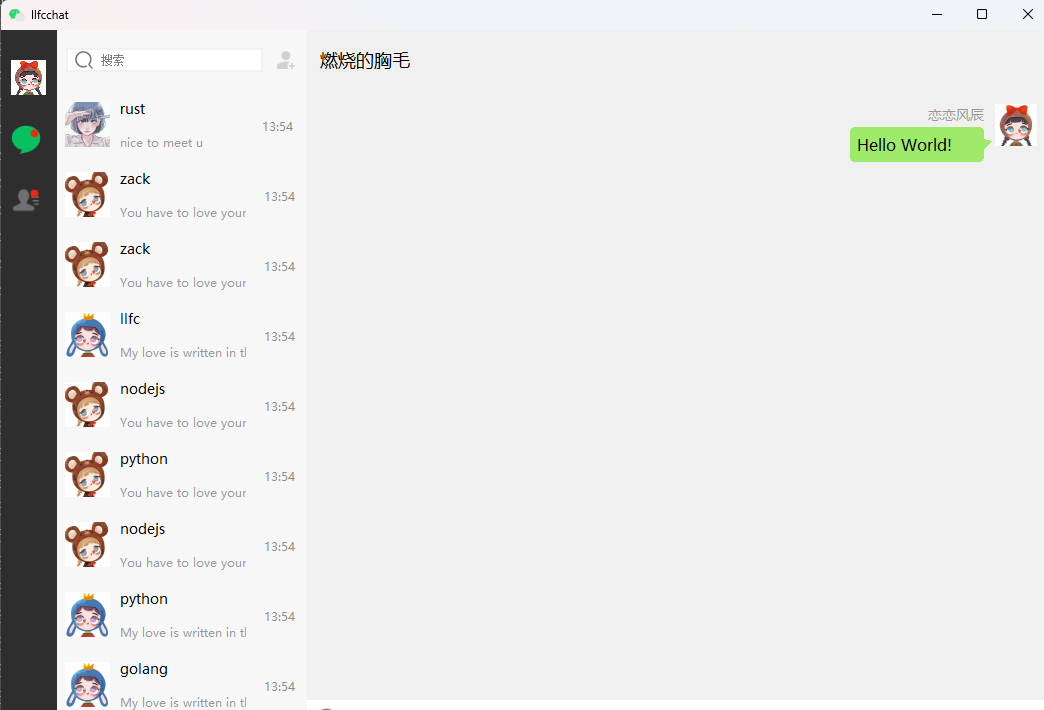
效果展示

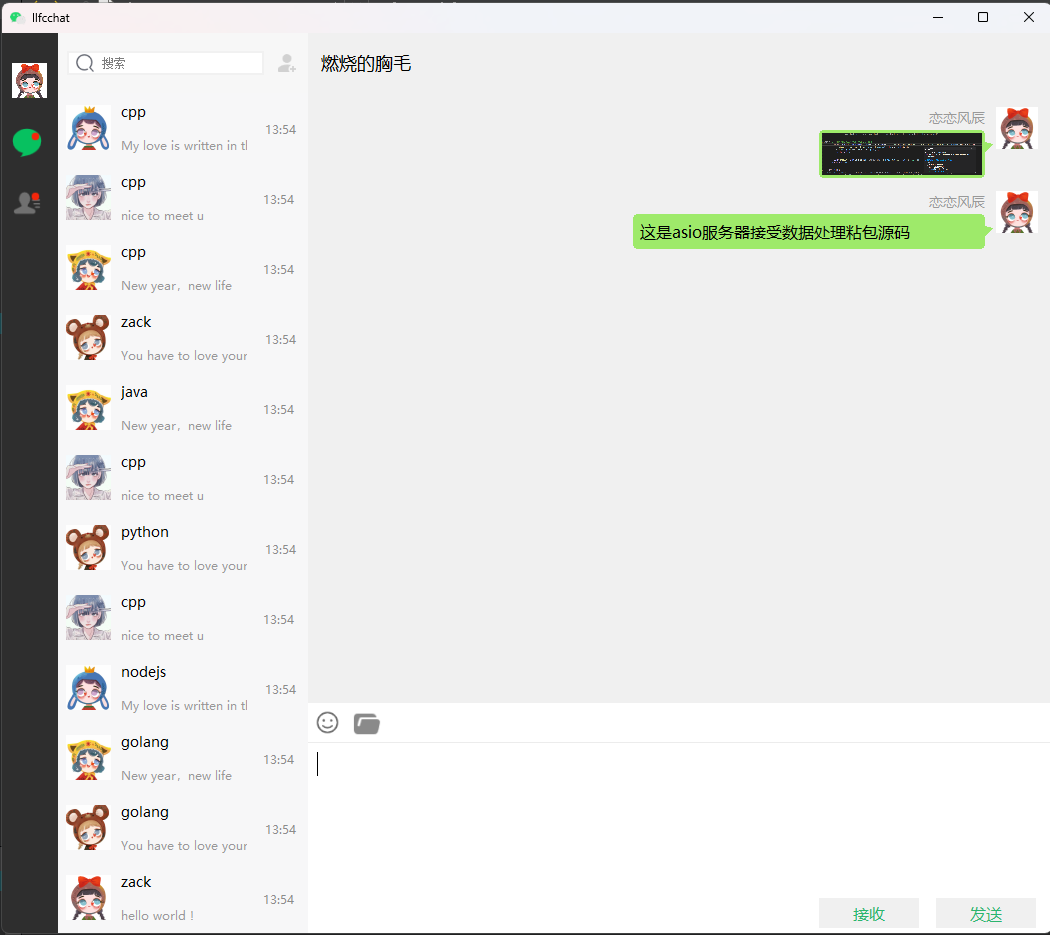
https://cdn.llfc.club/1718499438435.jpg

源码和视频

https://www.bilibili.com/video/BV1Mz4218783/?vd_source=8be9e83424c2ed2c9b2a3ed1d01385e9

源码链接

https://gitee.com/secondtonone1/llfcchat

聊天项目(24) EventFilter实现搜索隐藏

Posted on 2024-08-31 | In C++聊天项目

事件过滤器

我们为了实现点击界面某个位置判断是否隐藏搜索框的功能。我们期待当鼠标点击搜索列表之外的区域时显示隐藏搜索框恢复聊天界面。
点击搜索列表则不隐藏搜索框。可以通过重载ChatDialog的EventFilter函数实现点击功能

1
2
3
4
5
6
7
8
bool ChatDialog::eventFilter(QObject *watched, QEvent *event)
{
if (event->type() == QEvent::MouseButtonPress) {
QMouseEvent *mouseEvent = static_cast<QMouseEvent*>(event);
handleGlobalMousePress(mouseEvent);
}
return QDialog::eventFilter(watched, event);
}

具体判断全局鼠标按下位置和功能

1
2
3
4
5
6
7
8
9
10
11
12
13
14
15
16
17
void ChatDialog::handleGlobalMousePress(QMouseEvent *event)
{
// 实现点击位置的判断和处理逻辑
// 先判断是否处于搜索模式,如果不处于搜索模式则直接返回
if( _mode != ChatUIMode::SearchMode){
return;
}

// 将鼠标点击位置转换为搜索列表坐标系中的位置
QPoint posInSearchList = ui->search_list->mapFromGlobal(event->globalPos());
// 判断点击位置是否在聊天列表的范围内
if (!ui->search_list->rect().contains(posInSearchList)) {
// 如果不在聊天列表内,清空输入框
ui->search_edit->clear();
ShowSearch(false);
}
}

在ChatDialog构造函数中添加事件过滤器

1
2
3
4
5
//检测鼠标点击位置判断是否要清空搜索框
this->installEventFilter(this); // 安装事件过滤器

//设置聊天label选中状态
ui->side_chat_lb->SetSelected(true);

这样就可以实现在ChatDialog中点击其他位置隐藏SearchList列表了。

查找结果

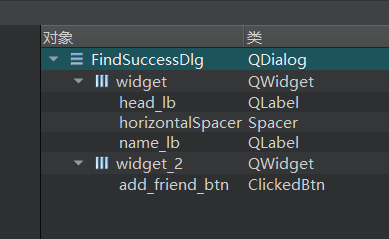
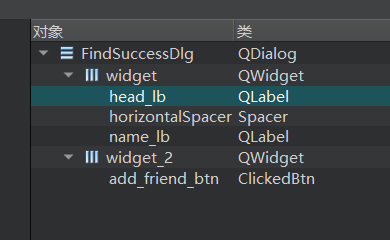
在项目中添加FindSuccessDlg设计师界面类,其布局如下

https://cdn.llfc.club/1719726260598.jpg

属性管理界面如下

https://cdn.llfc.club/1719726584051.jpg

FindSuccessDlg声明如下

1
2
3
4
5
6
7
8
9
10
11
12
13
14
15
16
class FindSuccessDlg : public QDialog
{
Q_OBJECT

public:
explicit FindSuccessDlg(QWidget *parent = nullptr);
~FindSuccessDlg();
void SetSearchInfo(std::shared_ptr<SearchInfo> si);
private slots:
void on_add_friend_btn_clicked();

private:
Ui::FindSuccessDlg *ui;
QWidget * _parent;
std::shared_ptr<SearchInfo> _si;
};

FindSuccessDlg实现如下

1
2
3
4
5
6
7
8
9
10
11
12
13
14
15
16
17
18
19
20
21
22
23
24
25
26
27
28
29
30
31
32
33
34
35
36
37
FindSuccessDlg::FindSuccessDlg(QWidget *parent) :
QDialog(parent),
ui(new Ui::FindSuccessDlg)
{
ui->setupUi(this);
// 设置对话框标题
setWindowTitle("添加");
// 隐藏对话框标题栏
setWindowFlags(windowFlags() | Qt::FramelessWindowHint);
// 获取当前应用程序的路径
QString app_path = QCoreApplication::applicationDirPath();
QString pix_path = QDir::toNativeSeparators(app_path +
QDir::separator() + "static"+QDir::separator()+"head_1.jpg");
QPixmap head_pix(pix_path);
head_pix = head_pix.scaled(ui->head_lb->size(),
Qt::KeepAspectRatio, Qt::SmoothTransformation);
ui->head_lb->setPixmap(head_pix);
ui->add_friend_btn->SetState("normal","hover","press");
this->setModal(true);
}

FindSuccessDlg::~FindSuccessDlg()
{
qDebug()<<"FindSuccessDlg destruct";
delete ui;
}

void FindSuccessDlg::SetSearchInfo(std::shared_ptr<SearchInfo> si)
{
ui->name_lb->setText(si->_name);
_si = si;
}

void FindSuccessDlg::on_add_friend_btn_clicked()
{
//todo... 添加好友界面弹出
}

在SearchList 的slot_item_clicked函数中添加点击条目处理逻辑

1
2
3
4
5
6
7
8
9
10
11
12
13
14
15
16
17
18
19
20
21
22
23
24
25
26
27
28
29
30
31
32
33
34
35
void SearchList::slot_item_clicked(QListWidgetItem *item)
{
QWidget *widget = this->itemWidget(item); //获取自定义widget对象
if(!widget){
qDebug()<< "slot item clicked widget is nullptr";
return;
}

// 对自定义widget进行操作, 将item 转化为基类ListItemBase
ListItemBase *customItem = qobject_cast<ListItemBase*>(widget);
if(!customItem){
qDebug()<< "slot item clicked widget is nullptr";
return;
}

auto itemType = customItem->GetItemType();
if(itemType == ListItemType::INVALID_ITEM){
qDebug()<< "slot invalid item clicked ";
return;
}

if(itemType == ListItemType::ADD_USER_TIP_ITEM){

//todo ...
_find_dlg = std::make_shared<FindSuccessDlg>(this);
auto si = std::make_shared<SearchInfo>(0,"llfc","llfc","hello , my friend!",0);
(std::dynamic_pointer_cast<FindSuccessDlg>(_find_dlg))->SetSearchInfo(si);
_find_dlg->show();
return;
}

//清楚弹出框
CloseFindDlg();

}

这样我们在输入框输入文字,点击搜索列表中搜索添加好友的item,就能弹出搜索结果对话框了。这里只做界面演示,之后会改为像服务器发送请求获取搜索结果。

pro的改写

我们对项目的pro做了调整,更新了static文件夹的拷贝以及编码utf-8的设定

1
2
3
4
5
6
7
8
9
10
11
12
13
14
15
16
17
18
19
20
21
22
23
24
25
26
27
28
29
30
31
32
33
34
35
36
37
38
39
40
41
42
43
44
45
46
47
48
49
50
51
52
53
54
55
56
57
58
59
60
61
62
63
64
65
66
67
68
69
70
71
72
73
74
75
76
77
78
79
80
81
82
83
84
85
86
87
88
89
90
91
92
93
94
95
96
97
98
99
100
101
102
103
104
105
106
107
108
109
110
111
112
113
114
115
116
117
118
119
120
121
122
123
124
125
126
127
128
129
130
131
132
133
134
135
136
137
138
139
140
141
142
143
QT       += core gui network

greaterThan(QT_MAJOR_VERSION, 4): QT += widgets

TARGET = llfcchat
TEMPLATE = app
RC_ICONS = icon.ico
DESTDIR = ./bin
DEFINES += QT_DEPRECATED_WARNINGS
CONFIG += c++11

SOURCES += \
adduseritem.cpp \
bubbleframe.cpp \
chatdialog.cpp \
chatitembase.cpp \
chatpage.cpp \
chatuserlist.cpp \
chatuserwid.cpp \
chatview.cpp \
clickedbtn.cpp \
clickedlabel.cpp \
customizeedit.cpp \
findsuccessdlg.cpp \
global.cpp \
httpmgr.cpp \
listitembase.cpp \
loadingdlg.cpp \
logindialog.cpp \
main.cpp \
mainwindow.cpp \
messagetextedit.cpp \
picturebubble.cpp \
registerdialog.cpp \
resetdialog.cpp \
searchlist.cpp \
statewidget.cpp \
tcpmgr.cpp \
textbubble.cpp \
timerbtn.cpp \
userdata.cpp \
usermgr.cpp

HEADERS += \
adduseritem.h \
bubbleframe.h \
chatdialog.h \
chatitembase.h \
chatpage.h \
chatuserlist.h \
chatuserwid.h \
chatview.h \
clickedbtn.h \
clickedlabel.h \
customizeedit.h \
findsuccessdlg.h \
global.h \
httpmgr.h \
listitembase.h \
loadingdlg.h \
logindialog.h \
mainwindow.h \
messagetextedit.h \
picturebubble.h \
registerdialog.h \
resetdialog.h \
searchlist.h \
singleton.h \
statewidget.h \
tcpmgr.h \
textbubble.h \
timerbtn.h \
userdata.h \
usermgr.h

FORMS += \
adduseritem.ui \
chatdialog.ui \
chatpage.ui \
chatuserwid.ui \
findsuccessdlg.ui \
loadingdlg.ui \
logindialog.ui \
mainwindow.ui \
registerdialog.ui \
resetdialog.ui

# Default rules for deployment.
qnx: target.path = /tmp/$${TARGET}/bin
else: unix:!android: target.path = /opt/$${TARGET}/bin
!isEmpty(target.path): INSTALLS += target

RESOURCES += \
rc.qrc

DISTFILES += \
config.ini


CONFIG(debug, debug | release) {
#指定要拷贝的文件目录为工程目录下release目录下的所有dll、lib文件,例如工程目录在D:\QT\Test
#PWD就为D:/QT/Test,DllFile = D:/QT/Test/release/*.dll
TargetConfig = $${PWD}/config.ini
#将输入目录中的"/"替换为"\"
TargetConfig = $$replace(TargetConfig, /, \\)
#将输出目录中的"/"替换为"\"
OutputDir = $${OUT_PWD}/$${DESTDIR}
OutputDir = $$replace(OutputDir, /, \\)
//执行copy命令
QMAKE_POST_LINK += copy /Y \"$$TargetConfig\" \"$$OutputDir\" &

# 首先,定义static文件夹的路径
StaticDir = $${PWD}/static
# 将路径中的"/"替换为"\"
StaticDir = $$replace(StaticDir, /, \\)
#message($${StaticDir})
# 使用xcopy命令拷贝文件夹,/E表示拷贝子目录及其内容,包括空目录。/I表示如果目标不存在则创建目录。/Y表示覆盖现有文件而不提示。
QMAKE_POST_LINK += xcopy /Y /E /I \"$$StaticDir\" \"$$OutputDir\\static\\\"

}else{
#release
message("release mode")
#指定要拷贝的文件目录为工程目录下release目录下的所有dll、lib文件,例如工程目录在D:\QT\Test
#PWD就为D:/QT/Test,DllFile = D:/QT/Test/release/*.dll
TargetConfig = $${PWD}/config.ini
#将输入目录中的"/"替换为"\"
TargetConfig = $$replace(TargetConfig, /, \\)
#将输出目录中的"/"替换为"\"
OutputDir = $${OUT_PWD}/$${DESTDIR}
OutputDir = $$replace(OutputDir, /, \\)
//执行copy命令
QMAKE_POST_LINK += copy /Y \"$$TargetConfig\" \"$$OutputDir\"

# 首先,定义static文件夹的路径
StaticDir = $${PWD}/static
# 将路径中的"/"替换为"\"
StaticDir = $$replace(StaticDir, /, \\)
#message($${StaticDir})
# 使用xcopy命令拷贝文件夹,/E表示拷贝子目录及其内容,包括空目录。/I表示如果目标不存在则创建目录。/Y表示覆盖现有文件而不提示。
QMAKE_POST_LINK += xcopy /Y /E /I \"$$StaticDir\" \"$$OutputDir\\static\\\"
}

win32-msvc*:QMAKE_CXXFLAGS += /wd"4819" /utf-8

视频

https://www.bilibili.com/video/BV1ww4m1e72G/

源码链接

https://gitee.com/secondtonone1/llfcchat

聊天项目(26) 实现联系人和好友申请列表

Posted on 2024-08-31 | In C++聊天项目

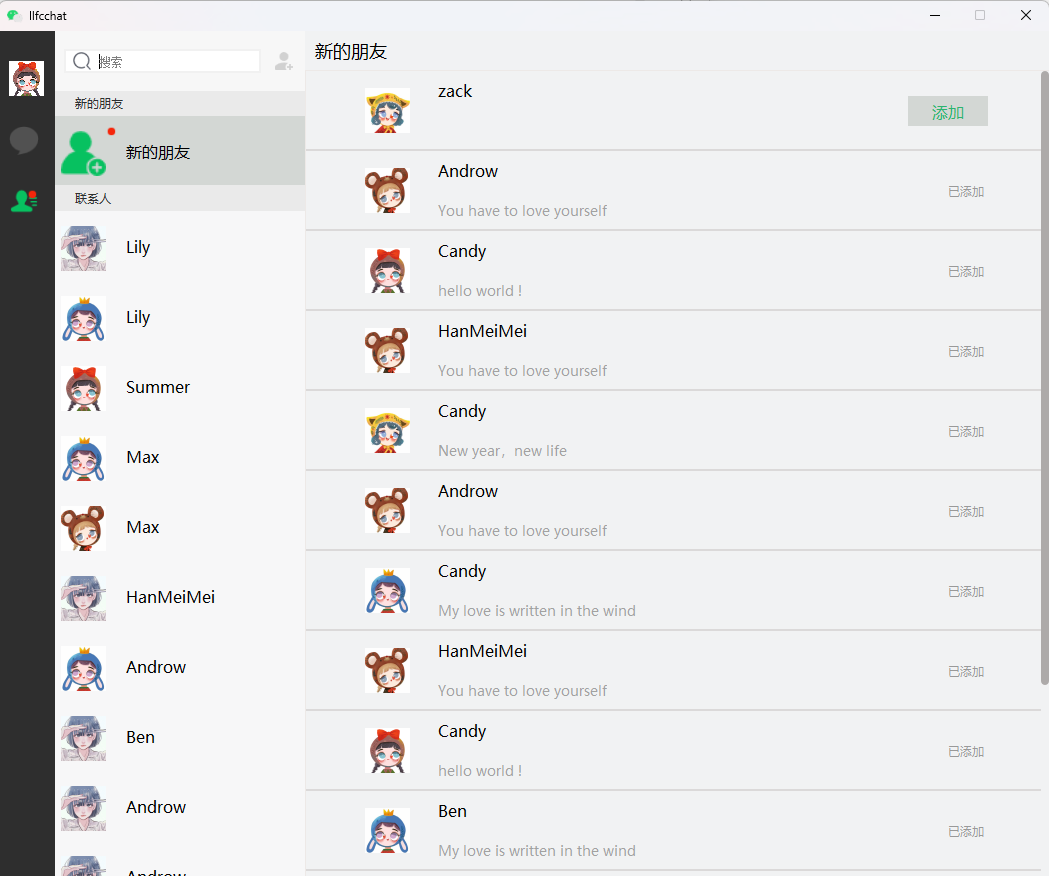
简介

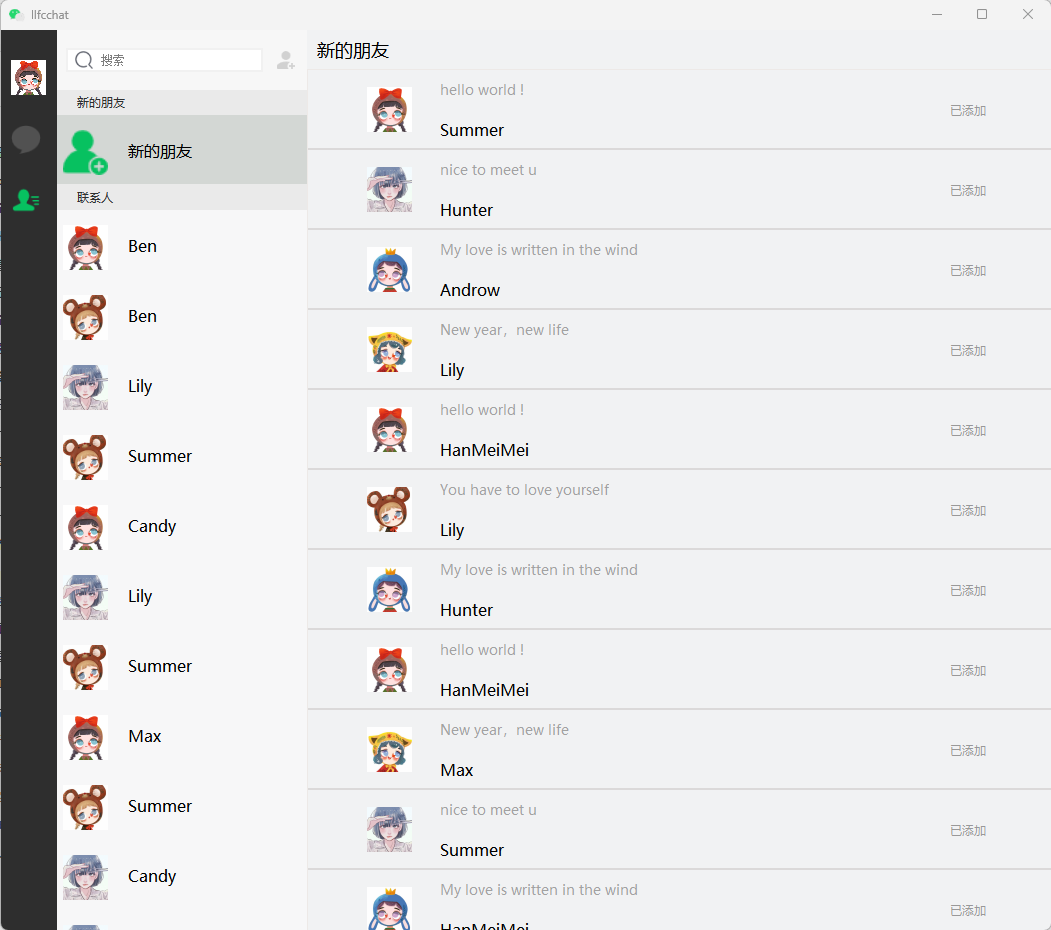
今日实现界面效果

https://cdn.llfc.club/1721547194830.jpg

联系人列表

我们自定义一个ChatUserList类,用来管理聊天列表。其声明如下:

1
2
3
4
5
6
7
8
9
10
11
12
13
14
15
16
17
18
19
20
21
22
23
24
25
class ContactUserList : public QListWidget
{
Q_OBJECT
public:
ContactUserList(QWidget *parent = nullptr);
void ShowRedPoint(bool bshow = true);
protected:
bool eventFilter(QObject *watched, QEvent *event) override ;

private:
void addContactUserList();

public slots:
void slot_item_clicked(QListWidgetItem *item);
// void slot_add_auth_firend(std::shared_ptr<AuthInfo>);
// void slot_auth_rsp(std::shared_ptr<AuthRsp>);
signals:
void sig_loading_contact_user();
void sig_switch_apply_friend_page();
void sig_switch_friend_info_page();
private:
ConUserItem* _add_friend_item;
QListWidgetItem * _groupitem;
};

具体实现

1
2
3
4
5
6
7
8
9
10
11
12
13
14
15
16
17
18
19
20
21
22
23
24
25
26
27
28
29
30
31
32
33
34
35
36
37
38
39
40
41
42
43
44
45
46
47
48
49
50
51
52
53
54
55
56
57
58
59
60
61
62
63
64
65
66
67
68
69
70
71
72
73
74
75
76
77
78
79
80
81
82
83
84
85
86
87
88
89
90
91
92
93
94
95
96
97
98
99
100
101
102
103
104
105
106
107
108
109
110
111
112
113
114
115
116
117
118
119
120
121
122
123
124
125
126
127
128
129
130
131
132
133
134
135
136
137
138
139
140
141
142
143
144
145
146
147
148
149
150
151
152
153
154
155
156
157
ContactUserList::ContactUserList(QWidget *parent)
{
Q_UNUSED(parent);
this->setHorizontalScrollBarPolicy(Qt::ScrollBarAlwaysOff);
this->setVerticalScrollBarPolicy(Qt::ScrollBarAlwaysOff);
// 安装事件过滤器
this->viewport()->installEventFilter(this);

//模拟从数据库或者后端传输过来的数据,进行列表加载
addContactUserList();
//连接点击的信号和槽
connect(this, &QListWidget::itemClicked, this, &ContactUserList::slot_item_clicked);
// //链接对端同意认证后通知的信号
// connect(TcpMgr::GetInstance().get(), &TcpMgr::sig_add_auth_friend,this,
// &ContactUserList::slot_add_auth_firend);

// //链接自己点击同意认证后界面刷新
// connect(TcpMgr::GetInstance().get(), &TcpMgr::sig_auth_rsp,this,
// &ContactUserList::slot_auth_rsp);
}

void ContactUserList::ShowRedPoint(bool bshow /*= true*/)
{
_add_friend_item->ShowRedPoint(bshow);
}

void ContactUserList::addContactUserList()
{
auto * groupTip = new GroupTipItem();
QListWidgetItem *item = new QListWidgetItem;
item->setSizeHint(groupTip->sizeHint());
this->addItem(item);
this->setItemWidget(item, groupTip);
item->setFlags(item->flags() & ~Qt::ItemIsSelectable);

_add_friend_item = new ConUserItem();
_add_friend_item->setObjectName("new_friend_item");
_add_friend_item->SetInfo(0,tr("新的朋友"),":/res/add_friend.png");
_add_friend_item->SetItemType(ListItemType::APPLY_FRIEND_ITEM);

QListWidgetItem *add_item = new QListWidgetItem;
//qDebug()<<"chat_user_wid sizeHint is " << chat_user_wid->sizeHint();
add_item->setSizeHint(_add_friend_item->sizeHint());
this->addItem(add_item);
this->setItemWidget(add_item, _add_friend_item);

//默认设置新的朋友申请条目被选中
this->setCurrentItem(add_item);

auto * groupCon = new GroupTipItem();
groupCon->SetGroupTip(tr("联系人"));
_groupitem = new QListWidgetItem;
_groupitem->setSizeHint(groupCon->sizeHint());
this->addItem(_groupitem);
this->setItemWidget(_groupitem, groupCon);
_groupitem->setFlags(_groupitem->flags() & ~Qt::ItemIsSelectable);


// 创建QListWidgetItem,并设置自定义的widget
for(int i = 0; i < 13; i++){
int randomValue = QRandomGenerator::global()->bounded(100); // 生成0到99之间的随机整数
int str_i = randomValue%strs.size();
int head_i = randomValue%heads.size();
int name_i = randomValue%names.size();

auto *con_user_wid = new ConUserItem();
con_user_wid->SetInfo(0,names[name_i], heads[head_i]);
QListWidgetItem *item = new QListWidgetItem;
//qDebug()<<"chat_user_wid sizeHint is " << chat_user_wid->sizeHint();
item->setSizeHint(con_user_wid->sizeHint());
this->addItem(item);
this->setItemWidget(item, con_user_wid);
}
}

bool ContactUserList::eventFilter(QObject *watched, QEvent *event)
{
// 检查事件是否是鼠标悬浮进入或离开
if (watched == this->viewport()) {
if (event->type() == QEvent::Enter) {
// 鼠标悬浮,显示滚动条
this->setVerticalScrollBarPolicy(Qt::ScrollBarAsNeeded);
} else if (event->type() == QEvent::Leave) {
// 鼠标离开,隐藏滚动条
this->setVerticalScrollBarPolicy(Qt::ScrollBarAlwaysOff);
}
}

// 检查事件是否是鼠标滚轮事件
if (watched == this->viewport() && event->type() == QEvent::Wheel) {
QWheelEvent *wheelEvent = static_cast<QWheelEvent*>(event);
int numDegrees = wheelEvent->angleDelta().y() / 8;
int numSteps = numDegrees / 15; // 计算滚动步数

// 设置滚动幅度
this->verticalScrollBar()->setValue(this->verticalScrollBar()->value() - numSteps);

// 检查是否滚动到底部
QScrollBar *scrollBar = this->verticalScrollBar();
int maxScrollValue = scrollBar->maximum();
int currentValue = scrollBar->value();
//int pageSize = 10; // 每页加载的联系人数量

if (maxScrollValue - currentValue <= 0) {
// 滚动到底部,加载新的联系人
qDebug()<<"load more contact user";
//发送信号通知聊天界面加载更多聊天内容
emit sig_loading_contact_user();
}

return true; // 停止事件传递
}

return QListWidget::eventFilter(watched, event);

}

void ContactUserList::slot_item_clicked(QListWidgetItem *item)
{
QWidget *widget = this->itemWidget(item); // 获取自定义widget对象
if(!widget){
qDebug()<< "slot item clicked widget is nullptr";
return;
}

// 对自定义widget进行操作, 将item 转化为基类ListItemBase
ListItemBase *customItem = qobject_cast<ListItemBase*>(widget);
if(!customItem){
qDebug()<< "slot item clicked widget is nullptr";
return;
}

auto itemType = customItem->GetItemType();
if(itemType == ListItemType::INVALID_ITEM
|| itemType == ListItemType::GROUP_TIP_ITEM){
qDebug()<< "slot invalid item clicked ";
return;
}

if(itemType == ListItemType::APPLY_FRIEND_ITEM){

// 创建对话框,提示用户
qDebug()<< "apply friend item clicked ";
//跳转到好友申请界面
emit sig_switch_apply_friend_page();
return;
}

if(itemType == ListItemType::CONTACT_USER_ITEM){
// 创建对话框,提示用户
qDebug()<< "contact user item clicked ";
//跳转到好友申请界面
emit sig_switch_friend_info_page();
return;
}
}

构造函数中关闭了滚动条的显示,重写了事件过滤器,实现了根据鼠标区域判断是否显示滚动条的功能。

并且实现了点击其中某个item响应对应的功能。并根据不同的item类型跳转不同的页面。

联系人item

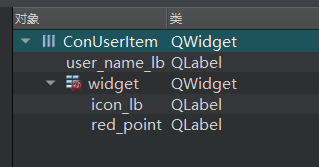
因为每一个item都是我们自己定义的,所以我们添加设计师界面类,界面布局如下所示

https://cdn.llfc.club/1721544014771.jpg

类的声明如下

1
2
3
4
5
6
7
8
9
10
11
12
13
14
15
16
class ConUserItem : public ListItemBase
{
Q_OBJECT

public:
explicit ConUserItem(QWidget *parent = nullptr);
~ConUserItem();
QSize sizeHint() const override;
void SetInfo(std::shared_ptr<AuthInfo> auth_info);
void SetInfo(std::shared_ptr<AuthRsp> auth_rsp);
void SetInfo(int uid, QString name, QString icon);
void ShowRedPoint(bool show = false);
private:
Ui::ConUserItem *ui;
std::shared_ptr<UserInfo> _info;
};

具体实现

1
2
3
4
5
6
7
8
9
10
11
12
13
14
15
16
17
18
19
20
21
22
23
24
25
26
27
28
29
30
31
32
33
34
35
36
37
38
39
40
41
42
43
44
45
46
47
48
49
50
51
52
53
54
55
56
57
58
59
60
61
62
63
64
65
66
67
68
69
ConUserItem::ConUserItem(QWidget *parent) :
ListItemBase(parent),
ui(new Ui::ConUserItem)
{
ui->setupUi(this);
SetItemType(ListItemType::CONTACT_USER_ITEM);
ui->red_point->raise();
ShowRedPoint(true);
}

ConUserItem::~ConUserItem()
{
delete ui;
}

QSize ConUserItem::sizeHint() const
{
return QSize(250, 70); // 返回自定义的尺寸
}

void ConUserItem::SetInfo(std::shared_ptr<AuthInfo> auth_info)
{
_info = std::make_shared<UserInfo>(auth_info);
// 加载图片
QPixmap pixmap(_info->_icon);

// 设置图片自动缩放
ui->icon_lb->setPixmap(pixmap.scaled(ui->icon_lb->size(), Qt::KeepAspectRatio, Qt::SmoothTransformation));
ui->icon_lb->setScaledContents(true);

ui->user_name_lb->setText(_info->_name);
}

void ConUserItem::SetInfo(int uid, QString name, QString icon)
{
_info = std::make_shared<UserInfo>(uid,name, icon);

// 加载图片
QPixmap pixmap(_info->_icon);

// 设置图片自动缩放
ui->icon_lb->setPixmap(pixmap.scaled(ui->icon_lb->size(), Qt::KeepAspectRatio, Qt::SmoothTransformation));
ui->icon_lb->setScaledContents(true);

ui->user_name_lb->setText(_info->_name);
}

void ConUserItem::SetInfo(std::shared_ptr<AuthRsp> auth_rsp){
_info = std::make_shared<UserInfo>(auth_rsp);

// 加载图片
QPixmap pixmap(_info->_icon);

// 设置图片自动缩放
ui->icon_lb->setPixmap(pixmap.scaled(ui->icon_lb->size(), Qt::KeepAspectRatio, Qt::SmoothTransformation));
ui->icon_lb->setScaledContents(true);

ui->user_name_lb->setText(_info->_name);
}

void ConUserItem::ShowRedPoint(bool show)
{
if(show){
ui->red_point->show();
}else{
ui->red_point->hide();
}

}

这样我们启动程序就能看到模拟的联系人列表被加载进来了。

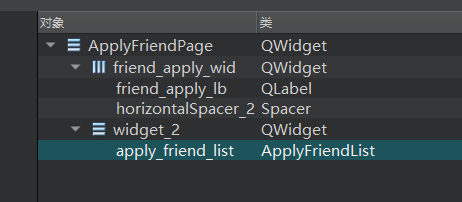
申请列表

申请页面ui布局如下

https://cdn.llfc.club/1721545292540.jpg

我们新增ApplyFriendPage类,用来显示申请列表

1
2
3
4
5
6
7
8
9
10
11
12
13
14
15
16
17
18
19
class ApplyFriendPage : public QWidget
{
Q_OBJECT

public:
explicit ApplyFriendPage(QWidget *parent = nullptr);
~ApplyFriendPage();
void AddNewApply(std::shared_ptr<AddFriendApply> apply);
protected:
void paintEvent(QPaintEvent *event);
private:
void loadApplyList();
Ui::ApplyFriendPage *ui;
std::unordered_map<int, ApplyFriendItem*> _unauth_items;
public slots:
void slot_auth_rsp(std::shared_ptr<AuthRsp> );
signals:
void sig_show_search(bool);
};

具体实现

1
2
3
4
5
6
7
8
9
10
11
12
13
14
15
16
17
18
19
20
21
22
23
24
25
26
27
28
29
30
31
32
33
34
35
36
37
38
39
40
41
42
43
44
45
46
47
48
49
50
51
52
53
54
55
56
57
58
59
60
61
62
63
64
65
66
67
68
69
70
71
72
73
74
75
76
77
78
79
80
81
82
83
84
85
86
87
88
89
90
91
92
93
94
95
96
97
98
99
100
101
102
103
104
105
106
107
108
109
110
111
112
113
114
115
116
117
118
119
ApplyFriendPage::ApplyFriendPage(QWidget *parent) :
QWidget(parent),
ui(new Ui::ApplyFriendPage)
{
ui->setupUi(this);
connect(ui->apply_friend_list, &ApplyFriendList::sig_show_search, this, &ApplyFriendPage::sig_show_search);
loadApplyList();
//接受tcp传递的authrsp信号处理
connect(TcpMgr::GetInstance().get(), &TcpMgr::sig_auth_rsp, this, &ApplyFriendPage::slot_auth_rsp);
}

ApplyFriendPage::~ApplyFriendPage()
{
delete ui;
}

void ApplyFriendPage::AddNewApply(std::shared_ptr<AddFriendApply> apply)
{
//先模拟头像随机,以后头像资源增加资源服务器后再显示
int randomValue = QRandomGenerator::global()->bounded(100); // 生成0到99之间的随机整数
int head_i = randomValue % heads.size();
auto* apply_item = new ApplyFriendItem();
auto apply_info = std::make_shared<ApplyInfo>(apply->_from_uid,
apply->_name, apply->_desc,heads[head_i], apply->_name, 0, 0);
apply_item->SetInfo( apply_info);
QListWidgetItem* item = new QListWidgetItem;
//qDebug()<<"chat_user_wid sizeHint is " << chat_user_wid->sizeHint();
item->setSizeHint(apply_item->sizeHint());
item->setFlags(item->flags() & ~Qt::ItemIsEnabled & ~Qt::ItemIsSelectable);
ui->apply_friend_list->insertItem(0,item);
ui->apply_friend_list->setItemWidget(item, apply_item);
apply_item->ShowAddBtn(true);
//收到审核好友信号
connect(apply_item, &ApplyFriendItem::sig_auth_friend, [this](std::shared_ptr<ApplyInfo> apply_info) {
// auto* authFriend = new AuthenFriend(this);
// authFriend->setModal(true);
// authFriend->SetApplyInfo(apply_info);
// authFriend->show();
});
}

void ApplyFriendPage::paintEvent(QPaintEvent *event)
{
QStyleOption opt;
opt.init(this);
QPainter p(this);
style()->drawPrimitive(QStyle::PE_Widget, &opt, &p, this);
}

void ApplyFriendPage::loadApplyList()
{
//添加好友申请
auto apply_list = UserMgr::GetInstance()->GetApplyList();
for(auto &apply: apply_list){
int randomValue = QRandomGenerator::global()->bounded(100); // 生成0到99之间的随机整数
int head_i = randomValue % heads.size();
auto* apply_item = new ApplyFriendItem();
apply->SetIcon(heads[head_i]);
apply_item->SetInfo(apply);
QListWidgetItem* item = new QListWidgetItem;
//qDebug()<<"chat_user_wid sizeHint is " << chat_user_wid->sizeHint();
item->setSizeHint(apply_item->sizeHint());
item->setFlags(item->flags() & ~Qt::ItemIsEnabled & ~Qt::ItemIsSelectable);
ui->apply_friend_list->insertItem(0,item);
ui->apply_friend_list->setItemWidget(item, apply_item);
if(apply->_status){
apply_item->ShowAddBtn(false);
}else{
apply_item->ShowAddBtn(true);
auto uid = apply_item->GetUid();
_unauth_items[uid] = apply_item;
}

//收到审核好友信号
connect(apply_item, &ApplyFriendItem::sig_auth_friend, [this](std::shared_ptr<ApplyInfo> apply_info) {
// auto* authFriend = new AuthenFriend(this);
// authFriend->setModal(true);
// authFriend->SetApplyInfo(apply_info);
// authFriend->show();
});
}

// 模拟假数据,创建QListWidgetItem,并设置自定义的widget
for(int i = 0; i < 13; i++){
int randomValue = QRandomGenerator::global()->bounded(100); // 生成0到99之间的随机整数
int str_i = randomValue%strs.size();
int head_i = randomValue%heads.size();
int name_i = randomValue%names.size();

auto *apply_item = new ApplyFriendItem();
auto apply = std::make_shared<ApplyInfo>(0, names[name_i], strs[str_i],
heads[head_i], names[name_i], 0, 1);
apply_item->SetInfo(apply);
QListWidgetItem *item = new QListWidgetItem;
//qDebug()<<"chat_user_wid sizeHint is " << chat_user_wid->sizeHint();
item->setSizeHint(apply_item->sizeHint());
item->setFlags(item->flags() & ~Qt::ItemIsEnabled & ~Qt::ItemIsSelectable);
ui->apply_friend_list->addItem(item);
ui->apply_friend_list->setItemWidget(item, apply_item);
//收到审核好友信号
connect(apply_item, &ApplyFriendItem::sig_auth_friend, [this](std::shared_ptr<ApplyInfo> apply_info){
// auto *authFriend = new AuthenFriend(this);
// authFriend->setModal(true);
// authFriend->SetApplyInfo(apply_info);
// authFriend->show();
});
}
}

void ApplyFriendPage::slot_auth_rsp(std::shared_ptr<AuthRsp> auth_rsp)
{
auto uid = auth_rsp->_uid;
auto find_iter = _unauth_items.find(uid);
if (find_iter == _unauth_items.end()) {
return;
}

find_iter->second->ShowAddBtn(false);
}

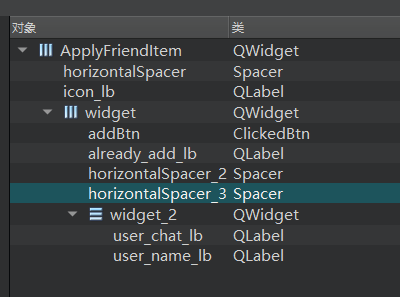
因为每个item自定义,所以我们新增设计师界面类ApplyFriendItem

界面布局

https://cdn.llfc.club/1721546273709.jpg

类的声明如下:

1
2
3
4
5
6
7
8
9
10
11
12
13
14
15
16
17
18
19
20
class ApplyFriendItem : public ListItemBase
{
Q_OBJECT

public:
explicit ApplyFriendItem(QWidget *parent = nullptr);
~ApplyFriendItem();
void SetInfo(std::shared_ptr<ApplyInfo> apply_info);
void ShowAddBtn(bool bshow);
QSize sizeHint() const override {
return QSize(250, 80); // 返回自定义的尺寸
}
int GetUid();
private:
Ui::ApplyFriendItem *ui;
std::shared_ptr<ApplyInfo> _apply_info;
bool _added;
signals:
void sig_auth_friend(std::shared_ptr<ApplyInfo> apply_info);
};

以下为具体实现

1
2
3
4
5
6
7
8
9
10
11
12
13
14
15
16
17
18
19
20
21
22
23
24
25
26
27
28
29
30
31
32
33
34
35
36
37
38
39
40
41
42
43
44
45
46
47
48
49
ApplyFriendItem::ApplyFriendItem(QWidget *parent) :
ListItemBase(parent), _added(false),
ui(new Ui::ApplyFriendItem)
{
ui->setupUi(this);
SetItemType(ListItemType::APPLY_FRIEND_ITEM);
ui->addBtn->SetState("normal","hover", "press");
ui->addBtn->hide();
connect(ui->addBtn, &ClickedBtn::clicked, [this](){
emit this->sig_auth_friend(_apply_info);
});
}

ApplyFriendItem::~ApplyFriendItem()
{
delete ui;
}

void ApplyFriendItem::SetInfo(std::shared_ptr<ApplyInfo> apply_info)
{
_apply_info = apply_info;
// 加载图片
QPixmap pixmap(_apply_info->_icon);

// 设置图片自动缩放
ui->icon_lb->setPixmap(pixmap.scaled(ui->icon_lb->size(), Qt::KeepAspectRatio, Qt::SmoothTransformation));
ui->icon_lb->setScaledContents(true);

ui->user_name_lb->setText(_apply_info->_name);
ui->user_chat_lb->setText(_apply_info->_desc);
}

void ApplyFriendItem::ShowAddBtn(bool bshow)
{
if (bshow) {
ui->addBtn->show();
ui->already_add_lb->hide();
_added = false;
}
else {
ui->addBtn->hide();
ui->already_add_lb->show();
_added = true;
}
}

int ApplyFriendItem::GetUid() {
return _apply_info->_uid;
}

申请列表类ApplyFriendList的声明如下

1
2
3
4
5
6
7
8
9
10
11
12
13
class ApplyFriendList: public QListWidget
{
Q_OBJECT
public:
ApplyFriendList(QWidget *parent = nullptr);
protected:
bool eventFilter(QObject *watched, QEvent *event) override;

private slots:

signals:
void sig_show_search(bool);
};

具体实现

1
2
3
4
5
6
7
8
9
10
11
12
13
14
15
16
17
18
19
20
21
22
23
24
25
26
27
28
29
30
31
32
33
34
35
36
37
38
39
40
41
42
43
44
ApplyFriendList::ApplyFriendList(QWidget *parent)
{
Q_UNUSED(parent);
this->setHorizontalScrollBarPolicy(Qt::ScrollBarAlwaysOff);
this->setVerticalScrollBarPolicy(Qt::ScrollBarAlwaysOff);
// 安装事件过滤器
this->viewport()->installEventFilter(this);
}

bool ApplyFriendList::eventFilter(QObject *watched, QEvent *event)
{

// 检查事件是否是鼠标悬浮进入或离开
if (watched == this->viewport()) {
if (event->type() == QEvent::Enter) {
// 鼠标悬浮,显示滚动条
this->setVerticalScrollBarPolicy(Qt::ScrollBarAsNeeded);
} else if (event->type() == QEvent::Leave) {
// 鼠标离开,隐藏滚动条
this->setVerticalScrollBarPolicy(Qt::ScrollBarAlwaysOff);
}
}

if (watched == this->viewport()) {
if (event->type() == QEvent::MouseButtonPress) {
emit sig_show_search(false);
}
}

// 检查事件是否是鼠标滚轮事件
if (watched == this->viewport() && event->type() == QEvent::Wheel) {
QWheelEvent *wheelEvent = static_cast<QWheelEvent*>(event);
int numDegrees = wheelEvent->angleDelta().y() / 8;
int numSteps = numDegrees / 15; // 计算滚动步数

// 设置滚动幅度
this->verticalScrollBar()->setValue(this->verticalScrollBar()->value() - numSteps);

return true; // 停止事件传递
}

return QListWidget::eventFilter(watched, event);

}

然后在ChatDialog的stackedWidget中将friend_apply_page升级为ApplyFriendPage.

这样我们启动程序就能看到联系人列表和申请列表了。

下一步还需要写QSS美化以下

1
2
3
4
5
6
7
8
9
10
11
12
13
14
15
16
17
18
19
20
21
22
23
24
25
26
27
28
29
30
31
32
33
34
35
36
37
38
39
40
41
42
43
44
45
46
47
48
49
50
51
52
53
54
55
56
57
58
59
60
61
62
63
64
65
66
67
68
69
70
71
72
73
74
75
76
77
78
79
80
81
82
83
84
85
86
87
88
89
90
91
92
93
94
95
96
97
98
99
100
101
102
103
104
105
106
107
108
109
#con_user_list {
background-color: rgb(247,247,248);
border: none;
}

#con_user_list::item:selected {
background-color: #d3d7d4;
border: none;
outline: none;
}

#con_user_list::item:hover {
background-color: rgb(206,207,208);
border: none;
outline: none;
}

#con_user_list::focus {
border: none;
outline: none;
}

#GroupTipItem {
background-color: #eaeaea;
border: none;
}

#GroupTipItem QLabel{
color: #2e2f30;
font-size: 12px; /* 设置字体大小 */
font-family: "Microsoft YaHei"; /* 设置字体 */
border: none;
}

#new_friend_item {
border-bottom: 1px solid #eaeaea;
}

#LineItem {
background-color:rgb(247,247,247);
border: none;
}

#friend_apply_lb {
font-family: "Microsoft YaHei";
font-size: 18px;
font-weight: normal;
}

#friend_apply_wid {
background-color: #f1f2f3;
border-bottom: 1px solid #ede9e7;
}

#apply_friend_list {
background-color: #f1f2f3;
border-left: 1px solid #ede9e7;
border-top: none;
border-right: none;
border-bottom: none;
}

ApplyFriendItem {
background-color: #f1f2f3;
border-bottom: 2px solid #dbd9d9;
}

ApplyFriendItem #user_chat_lb{
color: #a2a2a2;
font-size: 14px; /* 设置字体大小 */
font-family: "Microsoft YaHei"; /* 设置字体 */
}

ApplyFriendItem #addBtn[state='normal'] {
background-color: #d3d7d4;
color: #2cb46e;
font-size: 16px; /* 设置字体大小 */
font-family: "Microsoft YaHei"; /* 设置字体 */
border-radius: 20px; /* 设置圆角 */
}

ApplyFriendItem #addBtn[state='hover'] {
background-color: #D3D3D3;
color: #2cb46e;
font-size: 16px; /* 设置字体大小 */
font-family: "Microsoft YaHei"; /* 设置字体 */
border-radius: 20px; /* 设置圆角 */
}

ApplyFriendItem #addBtn[state='press'] {
background-color: #BEBEBE;
color: #2cb46e;
font-size: 16px; /* 设置字体大小 */
font-family: "Microsoft YaHei"; /* 设置字体 */
border-radius: 20px; /* 设置圆角 */
}

#already_add_lb{
color:rgb(153,153,153);
font-size: 12px;
font-family: "Microsoft YaHei";
}

#user_name_lb{
color:rgb(0,0,0);
font-size: 16px;
font-weight: normal;
font-family: "Microsoft YaHei";
}

源码连接

https://gitee.com/secondtonone1/llfcchat

视频连接

https://www.bilibili.com/video/BV1SS42197Yo/?vd_source=8be9e83424c2ed2c9b2a3ed1d01385e9

聊天项目(25) 实现好友申请界面

Posted on 2024-08-31 | In C++聊天项目

简介

本文介绍如何实现好友申请界面, 其效果如下图所示

https://cdn.llfc.club/1720423649556.jpg

在此之前我们需要先定义一个ClickedOnceLabel类,支持点击一次的label功能。

接着新增一个ClickedOnceLabel类

1
2
3
4
5
6
7
8
9
class ClickedOnceLabel : public QLabel
{
Q_OBJECT
public:
ClickedOnceLabel(QWidget *parent=nullptr);
virtual void mouseReleaseEvent(QMouseEvent *ev) override;
signals:
void clicked(QString);
};

实现

1
2
3
4
5
6
7
8
9
10
11
12
13
14
15
ClickedOnceLabel::ClickedOnceLabel(QWidget *parent):QLabel(parent)
{
setCursor(Qt::PointingHandCursor);
}


void ClickedOnceLabel::mouseReleaseEvent(QMouseEvent *event)
{
if (event->button() == Qt::LeftButton) {
emit clicked(this->text());
return;
}
// 调用基类的mousePressEvent以保证正常的事件处理
QLabel::mousePressEvent(event);
}

完善ClickedLabel

我们之前实现了ClickedLabel类,接下来修改下clicked信号,使其携带参数

1
void clicked(QString, ClickLbState);

然后在其实现的鼠标释放事件的逻辑中添加

1
2
3
4
5
6
7
8
9
10
11
12
13
14
15
16
17
18
19
20
21
void ClickedLabel::mouseReleaseEvent(QMouseEvent *event)
{
if (event->button() == Qt::LeftButton) {
if(_curstate == ClickLbState::Normal){
// qDebug()<<"ReleaseEvent , change to normal hover: "<< _normal_hover;
setProperty("state",_normal_hover);
repolish(this);
update();

}else{
// qDebug()<<"ReleaseEvent , change to select hover: "<< _selected_hover;
setProperty("state",_selected_hover);
repolish(this);
update();
}
emit clicked(this->text(), _curstate);
return;
}
// 调用基类的mousePressEvent以保证正常的事件处理
QLabel::mousePressEvent(event);
}

好友申请

好友申请界面和逻辑,我们可以创建一个设计师界面类叫做ApplyFriend类,我们在类的声明中添加如下成员。

1
2
3
4
5
6
7
8
9
10
11
12
13
14
15
16
17
18
19
20
21
22
23
24
25
26
27
28
29
30
31
32
33
34
35
36
37
38
39
40
41
42
43
44
45
46
47
class ApplyFriend : public QDialog
{
Q_OBJECT

public:
explicit ApplyFriend(QWidget *parent = nullptr);
~ApplyFriend();
void InitTipLbs();
void AddTipLbs(ClickedLabel*, QPoint cur_point, QPoint &next_point, int text_width, int text_height);
bool eventFilter(QObject *obj, QEvent *event);
void SetSearchInfo(std::shared_ptr<SearchInfo> si);

private:
Ui::ApplyFriend *ui;
void resetLabels();

//已经创建好的标签
QMap<QString, ClickedLabel*> _add_labels;
std::vector<QString> _add_label_keys;
QPoint _label_point;
//用来在输入框显示添加新好友的标签
QMap<QString, FriendLabel*> _friend_labels;
std::vector<QString> _friend_label_keys;
void addLabel(QString name);
std::vector<QString> _tip_data;
QPoint _tip_cur_point;
std::shared_ptr<SearchInfo> _si;
public slots:
//显示更多label标签
void ShowMoreLabel();
//输入label按下回车触发将标签加入展示栏
void SlotLabelEnter();
//点击关闭,移除展示栏好友便签
void SlotRemoveFriendLabel(QString);
//通过点击tip实现增加和减少好友便签
void SlotChangeFriendLabelByTip(QString, ClickLbState);
//输入框文本变化显示不同提示
void SlotLabelTextChange(const QString& text);
//输入框输入完成
void SlotLabelEditFinished();
//输入标签显示提示框,点击提示框内容后添加好友便签
void SlotAddFirendLabelByClickTip(QString text);
//处理确认回调
void SlotApplySure();
//处理取消回调
void SlotApplyCancel();
};

接下来我们修改ui使其变成如下布局

https://cdn.llfc.club/1720423721312.jpg

然后我们逐个实现功能,构造函数分别实现信号的链接和成员初始化,析构函数回收必要的资源。

1
2
3
4
5
6
7
8
9
10
11
12
13
14
15
16
17
18
19
20
21
22
23
24
25
26
27
28
29
30
31
32
33
34
35
36
37
38
39
40
41
42
43
44
45
46
47
48
ApplyFriend::ApplyFriend(QWidget *parent) :
QDialog(parent),
ui(new Ui::ApplyFriend),_label_point(2,6)
{
ui->setupUi(this);
// 隐藏对话框标题栏
setWindowFlags(windowFlags() | Qt::FramelessWindowHint);
this->setObjectName("ApplyFriend");
this->setModal(true);
ui->name_ed->setPlaceholderText(tr("恋恋风辰"));
ui->lb_ed->setPlaceholderText("搜索、添加标签");
ui->back_ed->setPlaceholderText("燃烧的胸毛");

ui->lb_ed->SetMaxLength(21);
ui->lb_ed->move(2, 2);
ui->lb_ed->setFixedHeight(20);
ui->lb_ed->setMaxLength(10);
ui->input_tip_wid->hide();

_tip_cur_point = QPoint(5, 5);

_tip_data = { "同学","家人","菜鸟教程","C++ Primer","Rust 程序设计",
"父与子学Python","nodejs开发指南","go 语言开发指南",
"游戏伙伴","金融投资","微信读书","拼多多拼友" };

connect(ui->more_lb, &ClickedOnceLabel::clicked, this, &ApplyFriend::ShowMoreLabel);
InitTipLbs();
//链接输入标签回车事件
connect(ui->lb_ed, &CustomizeEdit::returnPressed, this, &ApplyFriend::SlotLabelEnter);
connect(ui->lb_ed, &CustomizeEdit::textChanged, this, &ApplyFriend::SlotLabelTextChange);
connect(ui->lb_ed, &CustomizeEdit::editingFinished, this, &ApplyFriend::SlotLabelEditFinished);
connect(ui->tip_lb, &ClickedOnceLabel::clicked, this, &ApplyFriend::SlotAddFirendLabelByClickTip);

ui->scrollArea->horizontalScrollBar()->setHidden(true);
ui->scrollArea->verticalScrollBar()->setHidden(true);
ui->scrollArea->installEventFilter(this);
ui->sure_btn->SetState("normal","hover","press");
ui->cancel_btn->SetState("normal","hover","press");
//连接确认和取消按钮的槽函数
connect(ui->cancel_btn, &QPushButton::clicked, this, &ApplyFriend::SlotApplyCancel);
connect(ui->sure_btn, &QPushButton::clicked, this, &ApplyFriend::SlotApplySure);
}

ApplyFriend::~ApplyFriend()
{
qDebug()<< "ApplyFriend destruct";
delete ui;
}

因为此时还未与服务器联调数据,此时我们写一个InitLabel的函数模拟创建多个标签展示

1
2
3
4
5
6
7
8
9
10
11
12
13
14
15
16
17
18
19
20
21
22
23
24
25
26
27
28
29
30
31
32
33
34
35
36
void ApplyFriend::InitTipLbs()
{
int lines = 1;
for(int i = 0; i < _tip_data.size(); i++){

auto* lb = new ClickedLabel(ui->lb_list);
lb->SetState("normal", "hover", "pressed", "selected_normal",
"selected_hover", "selected_pressed");
lb->setObjectName("tipslb");
lb->setText(_tip_data[i]);
connect(lb, &ClickedLabel::clicked, this, &ApplyFriend::SlotChangeFriendLabelByTip);

QFontMetrics fontMetrics(lb->font()); // 获取QLabel控件的字体信息
int textWidth = fontMetrics.width(lb->text()); // 获取文本的宽度
int textHeight = fontMetrics.height(); // 获取文本的高度

if (_tip_cur_point.x() + textWidth + tip_offset > ui->lb_list->width()) {
lines++;
if (lines > 2) {
delete lb;
return;
}

_tip_cur_point.setX(tip_offset);
_tip_cur_point.setY(_tip_cur_point.y() + textHeight + 15);

}

auto next_point = _tip_cur_point;

AddTipLbs(lb, _tip_cur_point,next_point, textWidth, textHeight);

_tip_cur_point = next_point;
}

}

下面这个函数是将标签添加到展示区

1
2
3
4
5
6
7
8
9
void ApplyFriend::AddTipLbs(ClickedLabel* lb, QPoint cur_point, QPoint& next_point, int text_width, int text_height)
{
lb->move(cur_point);
lb->show();
_add_labels.insert(lb->text(), lb);
_add_label_keys.push_back(lb->text());
next_point.setX(lb->pos().x() + text_width + 15);
next_point.setY(lb->pos().y());
}

重写事件过滤器展示滑动条

1
2
3
4
5
6
7
8
9
10
11
12
bool ApplyFriend::eventFilter(QObject *obj, QEvent *event)
{
if (obj == ui->scrollArea && event->type() == QEvent::Enter)
{
ui->scrollArea->verticalScrollBar()->setHidden(false);
}
else if (obj == ui->scrollArea && event->type() == QEvent::Leave)
{
ui->scrollArea->verticalScrollBar()->setHidden(true);
}
return QObject::eventFilter(obj, event);
}

后期搜索用户功能用户数据会从服务器传回来,所以写了下面的接口

1
2
3
4
5
6
7
8
void ApplyFriend::SetSearchInfo(std::shared_ptr<SearchInfo> si)
{
_si = si;
auto applyname = UserMgr::GetInstance()->GetName();
auto bakname = si->_name;
ui->name_ed->setText(applyname);
ui->back_ed->setText(bakname);
}

当点击按钮,可展示更多标签的功能。

1
2
3
4
5
6
7
8
9
10
11
12
13
14
15
16
17
18
19
20
21
22
23
24
25
26
27
28
29
30
31
32
33
34
35
36
37
38
39
40
41
42
43
44
45
46
47
48
49
50
51
52
53
54
55
56
57
58
59
60
61
62
63
64
65
66
67
68
69
70
void ApplyFriend::ShowMoreLabel()
{
qDebug()<< "receive more label clicked";
ui->more_lb_wid->hide();

ui->lb_list->setFixedWidth(325);
_tip_cur_point = QPoint(5, 5);
auto next_point = _tip_cur_point;
int textWidth;
int textHeight;
//重拍现有的label
for(auto & added_key : _add_label_keys){
auto added_lb = _add_labels[added_key];

QFontMetrics fontMetrics(added_lb->font()); // 获取QLabel控件的字体信息
textWidth = fontMetrics.width(added_lb->text()); // 获取文本的宽度
textHeight = fontMetrics.height(); // 获取文本的高度

if(_tip_cur_point.x() +textWidth + tip_offset > ui->lb_list->width()){
_tip_cur_point.setX(tip_offset);
_tip_cur_point.setY(_tip_cur_point.y()+textHeight+15);
}
added_lb->move(_tip_cur_point);

next_point.setX(added_lb->pos().x() + textWidth + 15);
next_point.setY(_tip_cur_point.y());

_tip_cur_point = next_point;

}

//添加未添加的
for(int i = 0; i < _tip_data.size(); i++){
auto iter = _add_labels.find(_tip_data[i]);
if(iter != _add_labels.end()){
continue;
}

auto* lb = new ClickedLabel(ui->lb_list);
lb->SetState("normal", "hover", "pressed", "selected_normal",
"selected_hover", "selected_pressed");
lb->setObjectName("tipslb");
lb->setText(_tip_data[i]);
connect(lb, &ClickedLabel::clicked, this, &ApplyFriend::SlotChangeFriendLabelByTip);

QFontMetrics fontMetrics(lb->font()); // 获取QLabel控件的字体信息
int textWidth = fontMetrics.width(lb->text()); // 获取文本的宽度
int textHeight = fontMetrics.height(); // 获取文本的高度

if (_tip_cur_point.x() + textWidth + tip_offset > ui->lb_list->width()) {

_tip_cur_point.setX(tip_offset);
_tip_cur_point.setY(_tip_cur_point.y() + textHeight + 15);

}

next_point = _tip_cur_point;

AddTipLbs(lb, _tip_cur_point, next_point, textWidth, textHeight);

_tip_cur_point = next_point;

}

int diff_height = next_point.y() + textHeight + tip_offset - ui->lb_list->height();
ui->lb_list->setFixedHeight(next_point.y() + textHeight + tip_offset);

//qDebug()<<"after resize ui->lb_list size is " << ui->lb_list->size();
ui->scrollcontent->setFixedHeight(ui->scrollcontent->height()+diff_height);
}

重排好友标签编辑栏的标签

1
2
3
4
5
6
7
8
9
10
11
12
13
14
15
16
17
18
19
20
21
22
23
24
25
26
27
28
29
30
void ApplyFriend::resetLabels()
{
auto max_width = ui->gridWidget->width();
auto label_height = 0;
for(auto iter = _friend_labels.begin(); iter != _friend_labels.end(); iter++){
//todo... 添加宽度统计
if( _label_point.x() + iter.value()->width() > max_width) {
_label_point.setY(_label_point.y()+iter.value()->height()+6);
_label_point.setX(2);
}

iter.value()->move(_label_point);
iter.value()->show();

_label_point.setX(_label_point.x()+iter.value()->width()+2);
_label_point.setY(_label_point.y());
label_height = iter.value()->height();
}

if(_friend_labels.isEmpty()){
ui->lb_ed->move(_label_point);
return;
}

if(_label_point.x() + MIN_APPLY_LABEL_ED_LEN > ui->gridWidget->width()){
ui->lb_ed->move(2,_label_point.y()+label_height+6);
}else{
ui->lb_ed->move(_label_point);
}
}

添加好友标签编辑栏的标签

1
2
3
4
5
6
7
8
9
10
11
12
13
14
15
16
17
18
19
20
21
22
23
24
25
26
27
28
29
30
31
32
33
34
35
36
37
38
39
40
41
42
43
void ApplyFriend::addLabel(QString name)
{
if (_friend_labels.find(name) != _friend_labels.end()) {
return;
}

auto tmplabel = new FriendLabel(ui->gridWidget);
tmplabel->SetText(name);
tmplabel->setObjectName("FriendLabel");

auto max_width = ui->gridWidget->width();
//todo... 添加宽度统计
if (_label_point.x() + tmplabel->width() > max_width) {
_label_point.setY(_label_point.y() + tmplabel->height() + 6);
_label_point.setX(2);
}
else {

}


tmplabel->move(_label_point);
tmplabel->show();
_friend_labels[tmplabel->Text()] = tmplabel;
_friend_label_keys.push_back(tmplabel->Text());

connect(tmplabel, &FriendLabel::sig_close, this, &ApplyFriend::SlotRemoveFriendLabel);

_label_point.setX(_label_point.x() + tmplabel->width() + 2);

if (_label_point.x() + MIN_APPLY_LABEL_ED_LEN > ui->gridWidget->width()) {
ui->lb_ed->move(2, _label_point.y() + tmplabel->height() + 2);
}
else {
ui->lb_ed->move(_label_point);
}

ui->lb_ed->clear();

if (ui->gridWidget->height() < _label_point.y() + tmplabel->height() + 2) {
ui->gridWidget->setFixedHeight(_label_point.y() + tmplabel->height() * 2 + 2);
}
}

点击回车后,在好友标签编辑栏添加标签,在标签展示栏添加标签

1
2
3
4
5
6
7
8
9
10
11
12
13
14
15
16
17
18
19
20
21
22
23
24
25
26
27
28
29
30
31
32
33
34
35
36
37
38
39
40
41
42
43
44
45
46
47
48
49
50
51
52
53
54
55
56
57
void ApplyFriend::SlotLabelEnter()
{
if(ui->lb_ed->text().isEmpty()){
return;
}

auto text = ui->lb_ed->text();
addLabel(ui->lb_ed->text());

ui->input_tip_wid->hide();
auto find_it = std::find(_tip_data.begin(), _tip_data.end(), text);
//找到了就只需设置状态为选中即可
if (find_it == _tip_data.end()) {
_tip_data.push_back(text);
}

//判断标签展示栏是否有该标签
auto find_add = _add_labels.find(text);
if (find_add != _add_labels.end()) {
find_add.value()->SetCurState(ClickLbState::Selected);
return;
}

//标签展示栏也增加一个标签, 并设置绿色选中
auto* lb = new ClickedLabel(ui->lb_list);
lb->SetState("normal", "hover", "pressed", "selected_normal",
"selected_hover", "selected_pressed");
lb->setObjectName("tipslb");
lb->setText(text);
connect(lb, &ClickedLabel::clicked, this, &ApplyFriend::SlotChangeFriendLabelByTip);
qDebug() << "ui->lb_list->width() is " << ui->lb_list->width();
qDebug() << "_tip_cur_point.x() is " << _tip_cur_point.x();

QFontMetrics fontMetrics(lb->font()); // 获取QLabel控件的字体信息
int textWidth = fontMetrics.width(lb->text()); // 获取文本的宽度
int textHeight = fontMetrics.height(); // 获取文本的高度
qDebug() << "textWidth is " << textWidth;

if (_tip_cur_point.x() + textWidth + tip_offset + 3 > ui->lb_list->width()) {

_tip_cur_point.setX(5);
_tip_cur_point.setY(_tip_cur_point.y() + textHeight + 15);

}

auto next_point = _tip_cur_point;

AddTipLbs(lb, _tip_cur_point, next_point, textWidth, textHeight);
_tip_cur_point = next_point;

int diff_height = next_point.y() + textHeight + tip_offset - ui->lb_list->height();
ui->lb_list->setFixedHeight(next_point.y() + textHeight + tip_offset);

lb->SetCurState(ClickLbState::Selected);

ui->scrollcontent->setFixedHeight(ui->scrollcontent->height() + diff_height);
}

当我们点击好友标签编辑栏的标签的关闭按钮时会调用下面的槽函数

1
2
3
4
5
6
7
8
9
10
11
12
13
14
15
16
17
18
19
20
21
22
23
24
25
26
27
28
29
30
31
32
33
34
35
36
37
38
39
40
void ApplyFriend::SlotRemoveFriendLabel(QString name)
{
qDebug() << "receive close signal";

_label_point.setX(2);
_label_point.setY(6);

auto find_iter = _friend_labels.find(name);

if(find_iter == _friend_labels.end()){
return;
}

auto find_key = _friend_label_keys.end();
for(auto iter = _friend_label_keys.begin(); iter != _friend_label_keys.end();
iter++){
if(*iter == name){
find_key = iter;
break;
}
}

if(find_key != _friend_label_keys.end()){
_friend_label_keys.erase(find_key);
}


delete find_iter.value();

_friend_labels.erase(find_iter);

resetLabels();

auto find_add = _add_labels.find(name);
if(find_add == _add_labels.end()){
return;
}

find_add.value()->ResetNormalState();
}

当我们点击标签展示栏的标签,可以实现标签添加和删除

1
2
3
4
5
6
7
8
9
10
11
12
13
14
15
16
17
18
19
20
21
//点击标已有签添加或删除新联系人的标签
void ApplyFriend::SlotChangeFriendLabelByTip(QString lbtext, ClickLbState state)
{
auto find_iter = _add_labels.find(lbtext);
if(find_iter == _add_labels.end()){
return;
}

if(state == ClickLbState::Selected){
//编写添加逻辑
addLabel(lbtext);
return;
}

if(state == ClickLbState::Normal){
//编写删除逻辑
SlotRemoveFriendLabel(lbtext);
return;
}

}

当标签文本变化时,下面提示框的文本跟随变化

1
2
3
4
5
6
7
8
9
10
11
12
13
14
15
16
17
18
void ApplyFriend::SlotLabelTextChange(const QString& text)
{
if (text.isEmpty()) {
ui->tip_lb->setText("");
ui->input_tip_wid->hide();
return;
}

auto iter = std::find(_tip_data.begin(), _tip_data.end(), text);
if (iter == _tip_data.end()) {
auto new_text = add_prefix + text;
ui->tip_lb->setText(new_text);
ui->input_tip_wid->show();
return;
}
ui->tip_lb->setText(text);
ui->input_tip_wid->show();
}

如果编辑完成,则隐藏编辑框

1
2
3
4
void ApplyFriend::SlotLabelEditFinished()
{
ui->input_tip_wid->hide();
}

点击提示框,也会添加标签,功能如下

1
2
3
4
5
6
7
8
9
10
11
12
13
14
15
16
17
18
19
20
21
22
23
24
25
26
27
28
29
30
31
32
33
34
35
36
37
38
39
40
41
42
43
44
45
46
47
48
49
50
51
52
53
54
55
void ApplyFriend::SlotAddFirendLabelByClickTip(QString text)
{
int index = text.indexOf(add_prefix);
if (index != -1) {
text = text.mid(index + add_prefix.length());
}
addLabel(text);

auto find_it = std::find(_tip_data.begin(), _tip_data.end(), text);
//找到了就只需设置状态为选中即可
if (find_it == _tip_data.end()) {
_tip_data.push_back(text);
}

//判断标签展示栏是否有该标签
auto find_add = _add_labels.find(text);
if (find_add != _add_labels.end()) {
find_add.value()->SetCurState(ClickLbState::Selected);
return;
}

//标签展示栏也增加一个标签, 并设置绿色选中
auto* lb = new ClickedLabel(ui->lb_list);
lb->SetState("normal", "hover", "pressed", "selected_normal",
"selected_hover", "selected_pressed");
lb->setObjectName("tipslb");
lb->setText(text);
connect(lb, &ClickedLabel::clicked, this, &ApplyFriend::SlotChangeFriendLabelByTip);
qDebug() << "ui->lb_list->width() is " << ui->lb_list->width();
qDebug() << "_tip_cur_point.x() is " << _tip_cur_point.x();

QFontMetrics fontMetrics(lb->font()); // 获取QLabel控件的字体信息
int textWidth = fontMetrics.width(lb->text()); // 获取文本的宽度
int textHeight = fontMetrics.height(); // 获取文本的高度
qDebug() << "textWidth is " << textWidth;

if (_tip_cur_point.x() + textWidth+ tip_offset+3 > ui->lb_list->width()) {

_tip_cur_point.setX(5);
_tip_cur_point.setY(_tip_cur_point.y() + textHeight + 15);

}

auto next_point = _tip_cur_point;

AddTipLbs(lb, _tip_cur_point, next_point, textWidth,textHeight);
_tip_cur_point = next_point;

int diff_height = next_point.y() + textHeight + tip_offset - ui->lb_list->height();
ui->lb_list->setFixedHeight(next_point.y() + textHeight + tip_offset);

lb->SetCurState(ClickLbState::Selected);

ui->scrollcontent->setFixedHeight(ui->scrollcontent->height()+ diff_height );
}

确认申请和取消申请只是打印了对应信息,并且回收界面

1
2
3
4
5
6
7
8
9
10
11
12
13
void ApplyFriend::SlotApplyCancel()
{
qDebug() << "Slot Apply Cancel";
this->hide();
deleteLater();
}

void ApplyFriend::SlotApplySure()
{
qDebug()<<"Slot Apply Sure called" ;
this->hide();
deleteLater();
}

美化界面

添加如下qss文件美化界面

1
2
3
4
5
6
7
8
9
10
11
12
13
14
15
16
17
18
19
20
21
22
23
24
25
26
27
28
29
30
31
32
33
34
35
36
37
38
39
40
41
42
43
44
45
46
47
48
49
50
51
52
53
54
55
56
57
58
59
60
61
62
63
64
65
66
67
68
69
70
71
72
73
74
75
76
77
78
79
80
81
82
83
84
85
86
87
88
89
90
91
92
93
94
95
96
97
98
99
100
101
102
103
104
105
106
107
108
109
110
111
112
113
114
115
116
117
118
119
120
121
122
123
124
125
126
127
128
129
130
131
132
133
134
135
136
137
138
139
140
141
142
143
144
145
146
147
148
149
150
151
152
153
154
155
156
157
158
159
160
161
162
163
164
165
166
167
168
169
170
171
172
173
174
175
176
177
178
#ApplyFriend{
border: 2px solid #f1f1f1;
font-size: 14px;
background: #f7f7f8;
}

#scrollArea{
background: #f7f7f8;
border: none;
}

#scrollcontent{
background: #f7f7f8;
}

#scrollcontent #apply_lb{
font-family: "Microsoft YaHei";
font-size: 16px;
font-weight: normal;
}

#apply_wid QLabel{
color:rgb(140,140,140);
font-size: 14px;
font-family: "Microsoft YaHei";
height: 25px;
}

#apply_wid #name_ed, #apply_wid #back_ed{
border: 1px solid #f7f7f8;
font-size: 14px;
font-family: "Microsoft YaHei";
}

#apply_wid #lb_ed {
border: none;
font-size: 14px;
font-family: "Microsoft YaHei";
}

#apply_wid #more_lb{
border-image: url(:/res/arowdown.png);
}

#apply_wid #tipslb[state='normal'] {
padding: 2px;
background: #e1e1e1;
color: #1e1e1e;
border-radius: 10px;
}

#apply_wid #tipslb[state='hover'] {
padding: 2px;
background: #e1e1e1;
color: #1e1e1e;
border-radius: 10px;
}

#apply_wid #tipslb[state='pressed'] {
padding: 2px;
background: #e1e1e1;
color: #48bf56;
border-radius: 10px;
}

#apply_wid #tipslb[state='selected_normal'] {
padding: 2px;
background: #e1e1e1;
color: #48bf56;
border-radius: 10px;
}

#apply_wid #tipslb[state='selected_hover'] {
padding: 2px;
background: #e1e1e1;
color: #48bf56;
border-radius: 10px;
}

#apply_wid #tipslb[state='selected_pressed'] {
padding: 2px;
background: #e1e1e1;
color: #1e1e1e;
border-radius: 10px;
}

#input_tip_wid {
background: #d3eaf8;
}

#apply_wid #FriendLabel {
background: #daf6e7;
color: #48bf56;
border-radius: 10px;
}

#apply_wid #tip_lb {
padding-left: 2px;
color:rgb(153,153,153);
font-size: 14px;
font-family: "Microsoft YaHei";
}

#gridWidget {
background: #fdfdfd;
}

#close_lb[state='normal'] {
border-image: url(:/res/tipclose.png);
}

#close_lb[state='hover'] {
border-image: url(:/res/tipclose.png);
}

#close_lb[state='pressed'] {
border-image: url(:/res/tipclose.png);
}

#close_lb[state='select_normal'] {
border-image: url(:/res/tipclose.png);
}

#close_lb[state='select_hover'] {
border-image: url(:/res/tipclose.png);
}

#close_lb[state='select_pressed'] {
border-image: url(:/res/tipclose.png);
}

#apply_sure_wid #sure_btn[state='normal'] {
background: #f0f0f0;
color: #2cb46e;
font-size: 16px; /* 设置字体大小 */
font-family: "Microsoft YaHei"; /* 设置字体 */
border-radius: 20px; /* 设置圆角 */
}

#apply_sure_wid #sure_btn[state='hover'] {
background: #d2d2d2;
color: #2cb46e;
font-size: 16px; /* 设置字体大小 */
font-family: "Microsoft YaHei"; /* 设置字体 */
border-radius: 20px; /* 设置圆角 */
}

#apply_sure_wid #sure_btn[state='press'] {
background: #c6c6c6;
color: #2cb46e;
font-size: 16px; /* 设置字体大小 */
font-family: "Microsoft YaHei"; /* 设置字体 */
border-radius: 20px; /* 设置圆角 */
}

#apply_sure_wid #cancel_btn[state='normal'] {
background: #f0f0f0;
color: #2e2f30;
font-size: 16px; /* 设置字体大小 */
font-family: "Microsoft YaHei"; /* 设置字体 */
border-radius: 20px; /* 设置圆角 */
}

#apply_sure_wid #cancel_btn[state='hover'] {
background: #d2d2d2;
color: #2e2f30;
font-size: 16px; /* 设置字体大小 */
font-family: "Microsoft YaHei"; /* 设置字体 */
border-radius: 20px; /* 设置圆角 */
}

#apply_sure_wid #cancel_btn[state='press'] {
background: #c6c6c6;
color: #2e2f30;
font-size: 16px; /* 设置字体大小 */
font-family: "Microsoft YaHei"; /* 设置字体 */
border-radius: 20px; /* 设置圆角 */
}

视频

https://www.bilibili.com/video/BV1ZM4m127z8/?vd_source=8be9e83424c2ed2c9b2a3ed1d01385e9

源码链接

https://gitee.com/secondtonone1/llfcchat

聊天项目(27) 分布式聊天服务设计

Posted on 2024-08-31 | In C++聊天项目

简介

本文介绍如何将chatserver设置为分布式服务,并且实现statusserver的负载均衡处理,根据每个chatserver现有的连接数匹配最小的chatserver返回给GateServer并返回给客户端。

为了实现这一系列分布式设计,我们需要先完善chatserver,增加grpc客户端和服务端。这样能实现两个chatserver之间端对端的通信。

visual studio中右键chatserver项目选择添加新文件ChatGrpcClient, 会为我们生成ChatGrpcClient.h和ChatGrpcClient.cpp文件。

连接池客户端

先实现ChatConPool连接池

1
2
3
4
5
6
7
8
9
10
11
12
13
14
15
16
17
18
19
20
21
22
23
24
25
26
27
28
29
30
31
32
33
34
35
36
37
38
39
40
41
42
43
44
45
46
47
48
49
50
51
52
53
54
55
56
57
58
class ChatConPool {
public:
ChatConPool(size_t poolSize, std::string host, std::string port):
poolSize_(poolSize), host_(host),port_(port),b_stop_(false){
for (size_t i = 0; i < poolSize_; ++i) {
std::shared_ptr<Channel> channel = grpc::CreateChannel(host + ":" + port, grpc::InsecureChannelCredentials());
connections_.push(ChatService::NewStub(channel));
}
}

~ChatConPool() {
std::lock_guard<std::mutex> lock(mutex_);
Close();
while (!connections_.empty()) {
connections_.pop();
}
}

std::unique_ptr<ChatService::Stub> getConnection() {
std::unique_lock<std::mutex> lock(mutex_);
cond_.wait(lock, [this] {
if (b_stop_) {
return true;
}
return !connections_.empty();
});
//如果停止则直接返回空指针
if (b_stop_) {
return nullptr;
}
auto context = std::move(connections_.front());
connections_.pop();
return context;
}

void returnConnection(std::unique_ptr<ChatService::Stub> context) {
std::lock_guard<std::mutex> lock(mutex_);
if (b_stop_) {
return;
}
connections_.push(std::move(context));
cond_.notify_one();
}

void Close() {
b_stop_ = true;
cond_.notify_all();
}

private:
atomic<bool> b_stop_;
size_t poolSize_;
std::string host_;
std::string port_;
std::queue<std::unique_ptr<ChatService::Stub> > connections_;
std::mutex mutex_;
std::condition_variable cond_;
};

然后利用单例模式实现grpc通信的客户端

1
2
3
4
5
6
7
8
9
10
11
12
13
14
15
16
17
class ChatGrpcClient: public Singleton<ChatGrpcClient>
{
friend class Singleton<ChatGrpcClient>;

public:
~ChatGrpcClient() {

}

AddFriendRsp NotifyAddFriend(std::string server_ip, const AddFriendReq& req);
AuthFriendRsp NotifyAuthFriend(std::string server_ip, const AuthFriendReq& req);
bool GetBaseInfo(std::string base_key, int uid, std::shared_ptr<UserInfo>& userinfo);
TextChatMsgRsp NotifyTextChatMsg(std::string server_ip, const TextChatMsgReq& req, const Json::Value& rtvalue);
private:
ChatGrpcClient();
unordered_map<std::string, std::unique_ptr<ChatConPool>> _pools;
};

实现具体的ChatGrpcClient

1
2
3
4
5
6
7
8
9
10
11
12
13
14
15
16
17
18
19
20
21
22
23
24
25
26
27
28
29
30
31
32
33
34
35
36
37
38
39
40
41
42
43
ChatGrpcClient::ChatGrpcClient()
{
auto& cfg = ConfigMgr::Inst();
auto server_list = cfg["PeerServer"]["Servers"];

std::vector<std::string> words;

std::stringstream ss(server_list);
std::string word;

while (std::getline(ss, word, ',')) {
words.push_back(word);
}

for (auto& word : words) {
if (cfg[word]["Name"].empty()) {
continue;
}
_pools[cfg[word]["Name"]] = std::make_unique<ChatConPool>(5, cfg[word]["Host"], cfg[word]["Port"]);
}

}

AddFriendRsp ChatGrpcClient::NotifyAddFriend(std::string server_ip, const AddFriendReq& req) {
AddFriendRsp rsp;
return rsp;
}

AuthFriendRsp ChatGrpcClient::NotifyAuthFriend(std::string server_ip, const AuthFriendReq& req) {
AuthFriendRsp rsp;
return rsp;
}

bool ChatGrpcClient::GetBaseInfo(std::string base_key, int uid, std::shared_ptr<UserInfo>& userinfo) {
return true;
}

TextChatMsgRsp ChatGrpcClient::NotifyTextChatMsg(std::string server_ip,
const TextChatMsgReq& req, const Json::Value& rtvalue) {

TextChatMsgRsp rsp;
return rsp;
}

连接池服务端

向ChatServer中添加ChatServiceImpl类,自动生成头文件和源文件

1
2
3
4
5
6
7
8
9
10
11
12
13
14
15
16
17
class ChatServiceImpl final : public ChatService::Service
{
public:
ChatServiceImpl();
Status NotifyAddFriend(ServerContext* context, const AddFriendReq* request,
AddFriendRsp* reply) override;

Status NotifyAuthFriend(ServerContext* context,
const AuthFriendReq* request, AuthFriendRsp* response) override;

Status NotifyTextChatMsg(::grpc::ServerContext* context,
const TextChatMsgReq* request, TextChatMsgRsp* response) override;

bool GetBaseInfo(std::string base_key, int uid, std::shared_ptr<UserInfo>& userinfo);

private:
};

实现服务逻辑,先简单写成不处理直接返回。

1
2
3
4
5
6
7
8
9
10
11
12
13
14
15
16
17
18
19
20
21
22
23
ChatServiceImpl::ChatServiceImpl()
{

}

Status ChatServiceImpl::NotifyAddFriend(ServerContext* context, const AddFriendReq* request,
AddFriendRsp* reply) {
return Status::OK;
}

Status ChatServiceImpl::NotifyAuthFriend(ServerContext* context,
const AuthFriendReq* request, AuthFriendRsp* response) {
return Status::OK;
}

Status ChatServiceImpl::NotifyTextChatMsg(::grpc::ServerContext* context,
const TextChatMsgReq* request, TextChatMsgRsp* response) {
return Status::OK;
}

bool ChatServiceImpl::GetBaseInfo(std::string base_key, int uid, std::shared_ptr<UserInfo>& userinfo) {
return true;
}

并且完善chatserver配置

1
2
3
4
5
6
7
8
9
10
11
12
13
14
15
16
17
18
19
20
21
22
23
24
25
26
27
28
29
[GateServer]
Port = 8080
[VarifyServer]
Host = 127.0.0.1
Port = 50051
[StatusServer]
Host = 127.0.0.1
Port = 50052
[SelfServer]
Name = chatserver1
Host = 0.0.0.0
Port = 8090
RPCPort = 50055
[Mysql]
Host = 81.68.86.146
Port = 3308
User = root
Passwd = 123456.
Schema = llfc
[Redis]
Host = 81.68.86.146
Port = 6380
Passwd = 123456
[PeerServer]
Servers = chatserver2
[chatserver2]
Name = chatserver2
Host = 127.0.0.1
Port = 50056

增加了PeerServer字段,存储对端server列表,通过逗号分隔,可以通过逗号切割对端服务器名字,再根据名字去配置里查找对应字段。

对应的chatserver复制一份,改名为chatserver2,然后修改config.ini配置。要和server1配置不同,实现端对端的配置。具体详见服务器代码。

服务器连接数管理

每当服务器chatserver启动后,都要重新设置一下用户连接数管理,并且我们每个chatserver既要有tcp服务监听也要有grpc服务监听

1
2
3
4
5
6
7
8
9
10
11
12
13
14
15
16
17
18
19
20
21
22
23
24
25
26
27
28
29
30
31
32
33
34
35
36
37
38
39
40
41
42
43
44
45
46
47
48
49
50
51
52
using namespace std;
bool bstop = false;
std::condition_variable cond_quit;
std::mutex mutex_quit;

int main()
{
auto& cfg = ConfigMgr::Inst();
auto server_name = cfg["SelfServer"]["Name"];
try {
auto pool = AsioIOServicePool::GetInstance();
//将登录数设置为0
RedisMgr::GetInstance()->HSet(LOGIN_COUNT, server_name, "0");
//定义一个GrpcServer

std::string server_address(cfg["SelfServer"]["Host"] + ":" + cfg["SelfServer"]["RPCPort"]);
ChatServiceImpl service;
grpc::ServerBuilder builder;
// 监听端口和添加服务
builder.AddListeningPort(server_address, grpc::InsecureServerCredentials());
builder.RegisterService(&service);
// 构建并启动gRPC服务器
std::unique_ptr<grpc::Server> server(builder.BuildAndStart());
std::cout << "RPC Server listening on " << server_address << std::endl;


//单独启动一个线程处理grpc服务
std::thread grpc_server_thread([&server]() {
server->Wait();
});


boost::asio::io_context io_context;
boost::asio::signal_set signals(io_context, SIGINT, SIGTERM);
signals.async_wait([&io_context, pool, &server](auto, auto) {
io_context.stop();
pool->Stop();
server->Shutdown();
});

auto port_str = cfg["SelfServer"]["Port"];
CServer s(io_context, atoi(port_str.c_str()));
io_context.run();

RedisMgr::GetInstance()->HDel(LOGIN_COUNT, server_name);
RedisMgr::GetInstance()->Close();
grpc_server_thread.join();
}
catch (std::exception& e) {
std::cerr << "Exception: " << e.what() << endl;
}
}

我们在服务器启动后将本服务器的登录数量设置为0.

同样的道理,我们将服务器关闭后,也要删除对应key。

用户连接管理

因为我们用户登录后,要将连接(session)和用户uid绑定。为以后登陆踢人做准备。所以新增UserMgr管理类.

其声明如下

1
2
3
4
5
6
7
8
9
10
11
12
13
14
15
class CSession;
class UserMgr : public Singleton<UserMgr>
{
friend class Singleton<UserMgr>;
public:
~UserMgr();
std::shared_ptr<CSession> GetSession(int uid);
void SetUserSession(int uid, std::shared_ptr<CSession> session);
void RmvUserSession(int uid);

private:
UserMgr();
std::mutex _session_mtx;
std::unordered_map<int, std::shared_ptr<CSession>> _uid_to_session;
};

其实现如下

1
2
3
4
5
6
7
8
9
10
11
12
13
14
15
16
17
18
19
20
21
22
23
24
25
26
27
28
29
30
31
32
33
34
35
36
37
38
39
40
UserMgr:: ~UserMgr() {
_uid_to_session.clear();
}

std::shared_ptr<CSession> UserMgr::GetSession(int uid)
{
std::lock_guard<std::mutex> lock(_session_mtx);
auto iter = _uid_to_session.find(uid);
if (iter == _uid_to_session.end()) {
return nullptr;
}

return iter->second;
}

void UserMgr::SetUserSession(int uid, std::shared_ptr<CSession> session)
{
std::lock_guard<std::mutex> lock(_session_mtx);
_uid_to_session[uid] = session;
}

void UserMgr::RmvUserSession(int uid)
{
auto uid_str = std::to_string(uid);
//因为再次登录可能是其他服务器,所以会造成本服务器删除key,其他服务器注册key的情况
// 有可能其他服务登录,本服删除key造成找不到key的情况
//RedisMgr::GetInstance()->Del(USERIPPREFIX + uid_str);

{
std::lock_guard<std::mutex> lock(_session_mtx);
_uid_to_session.erase(uid);
}

}

UserMgr::UserMgr()
{

}

RmvUserSession 暂时屏蔽,以后做登录踢人后能保证有序移除用户ip操作。

当有连接异常时,可以调用移除用户Session的接口

1
2
3
4
5
6
7
8
9
10
11
12
13
void CServer::ClearSession(std::string session_id) {

if (_sessions.find(session_id) != _sessions.end()) {
//移除用户和session的关联
UserMgr::GetInstance()->RmvUserSession(_sessions[session_id]->GetUserId());
}

{
lock_guard<mutex> lock(_mutex);
_sessions.erase(session_id);
}

}

聊天服务完善用户登录,当用户登录后, 设置其uid对应的serverip。以及更新其所在服务器的连接数。

1
2
3
4
5
6
7
8
9
10
11
12
13
14
15
16
17
18
19
20
21
22
23
24
25
26
27
28
29
30
31
32
33
34
35
36
37
38
39
40
41
42
43
44
45
46
47
48
49
50
51
52
53
54
55
56
57
58
59
60
61
62
63
64
65
66
67
68
69
70
71
72
73
74
75
76
77
void LogicSystem::LoginHandler(shared_ptr<CSession> session, const short &msg_id, const string &msg_data) {
Json::Reader reader;
Json::Value root;
reader.parse(msg_data, root);
auto uid = root["uid"].asInt();
auto token = root["token"].asString();
std::cout << "user login uid is " << uid << " user token is "
<< token << endl;

Json::Value rtvalue;
Defer defer([this, &rtvalue, session]() {
std::string return_str = rtvalue.toStyledString();
session->Send(return_str, MSG_CHAT_LOGIN_RSP);
});

//从redis获取用户token是否正确
std::string uid_str = std::to_string(uid);
std::string token_key = USERTOKENPREFIX + uid_str;
std::string token_value = "";
bool success = RedisMgr::GetInstance()->Get(token_key, token_value);
if (!success) {
rtvalue["error"] = ErrorCodes::UidInvalid;
return;
}

if (token_value != token) {
rtvalue["error"] = ErrorCodes::TokenInvalid;
return;
}

rtvalue["error"] = ErrorCodes::Success;

std::string base_key = USER_BASE_INFO + uid_str;
auto user_info = std::make_shared<UserInfo>();
bool b_base = GetBaseInfo(base_key, uid, user_info);
if (!b_base) {
rtvalue["error"] = ErrorCodes::UidInvalid;
return;
}
rtvalue["uid"] = uid;
rtvalue["pwd"] = user_info->pwd;
rtvalue["name"] = user_info->name;
rtvalue["email"] = user_info->email;
rtvalue["nick"] = user_info->nick;
rtvalue["desc"] = user_info->desc;
rtvalue["sex"] = user_info->sex;
rtvalue["icon"] = user_info->icon;

//从数据库获取申请列表

//获取好友列表

auto server_name = ConfigMgr::Inst().GetValue("SelfServer", "Name");
//将登录数量增加
auto rd_res = RedisMgr::GetInstance()->HGet(LOGIN_COUNT, server_name);
int count = 0;
if (!rd_res.empty()) {
count = std::stoi(rd_res);
}

count++;

auto count_str = std::to_string(count);
RedisMgr::GetInstance()->HSet(LOGIN_COUNT, server_name, count_str);

//session绑定用户uid
session->SetUserId(uid);

//为用户设置登录ip server的名字
std::string ipkey = USERIPPREFIX + uid_str;
RedisMgr::GetInstance()->Set(ipkey, server_name);

//uid和session绑定管理,方便以后踢人操作
UserMgr::GetInstance()->SetUserSession(uid, session);

return;
}

状态服务

状态服务更新配置

1
2
3
4
5
6
7
8
9
10
11
12
13
14
15
16
17
18
19
20
21
22
23
[StatusServer]
Port = 50052
Host = 0.0.0.0
[Mysql]
Host = 81.68.86.146
Port = 3308
User = root
Passwd = 123456.
Schema = llfc
[Redis]
Host = 81.68.86.146
Port = 6380
Passwd = 123456
[chatservers]
Name = chatserver1,chatserver2
[chatserver1]
Name = chatserver1
Host = 127.0.0.1
Port = 8090
[chatserver2]
Name = chatserver2
Host = 127.0.0.1
Port = 8091

配置文件同样增加了chatservers列表,用来管理多个服务,接下来实现根据连接数动态返回chatserverip的功能

1
2
3
4
5
6
7
8
9
10
11
12
Status StatusServiceImpl::GetChatServer(ServerContext* context, 
const GetChatServerReq* request, GetChatServerRsp* reply)
{
std::string prefix("llfc status server has received : ");
const auto& server = getChatServer();
reply->set_host(server.host);
reply->set_port(server.port);
reply->set_error(ErrorCodes::Success);
reply->set_token(generate_unique_string());
insertToken(request->uid(), reply->token());
return Status::OK;
}

getChatServer用来获取最小连接数的chatserver 名字

1
2
3
4
5
6
7
8
9
10
11
12
13
14
15
16
17
18
19
20
21
22
23
24
25
26
27
28
29
30
31
32
33
34
35
ChatServer StatusServiceImpl::getChatServer() {
std::lock_guard<std::mutex> guard(_server_mtx);
auto minServer = _servers.begin()->second;
auto count_str = RedisMgr::GetInstance()->HGet(LOGIN_COUNT, minServer.name);
if (count_str.empty()) {
//不存在则默认设置为最大
minServer.con_count = INT_MAX;
}
else {
minServer.con_count = std::stoi(count_str);
}


// 使用范围基于for循环
for (auto& server : _servers) {

if (server.second.name == minServer.name) {
continue;
}

auto count_str = RedisMgr::GetInstance()->HGet(LOGIN_COUNT, server.second.name);
if (count_str.empty()) {
server.second.con_count = INT_MAX;
}
else {
server.second.con_count = std::stoi(count_str);
}

if (server.second.con_count < minServer.con_count) {
minServer = server.second;
}
}

return minServer;
}

测试

分别启动两个chatserver,gateserver,以及statusserver,并且启动两个客户端登录,

分别查看登录信息,发现两个客户端被分配到不同的chatserver了,说明我们实现了负载均衡的分配方式。

https://cdn.llfc.club/1722314087856.jpg

源码连接

https://gitee.com/secondtonone1/llfcchat

视频连接

https://www.bilibili.com/video/BV17r421K7Px/?spm_id_from=333.999.0.0&vd_source=8be9e83424c2ed2c9b2a3ed1d01385e9

聊天项目(28) 分布式服务通知好友申请

Posted on 2024-08-31 | In C++聊天项目

简介

本文介绍如何实现用户查找和好友申请功能。查找和申请好友会涉及前后端通信和rpc服务间调用。所以目前先从客户端入手,搜索用户后发送查找好友申请请求给服务器,服务器收到后判断是否存在,如果不存在则显示未找到,如果存在则显示查找到的结果

点击查询

客户端点击搜索列表的添加好友item后,先弹出一个模态对话框,上面有loading动作表示加载,直到服务器返回结果

1
2
3
4
5
6
7
8
9
10
11
12
13
14
15
16
17
18
19
20
21
22
23
24
25
26
27
28
29
30
31
32
33
34
35
36
37
38
39
40
41
42
43
44
45
46
47
void SearchList::slot_item_clicked(QListWidgetItem *item)
{
QWidget *widget = this->itemWidget(item); //获取自定义widget对象
if(!widget){
qDebug()<< "slot item clicked widget is nullptr";
return;
}

// 对自定义widget进行操作, 将item 转化为基类ListItemBase
ListItemBase *customItem = qobject_cast<ListItemBase*>(widget);
if(!customItem){
qDebug()<< "slot item clicked widget is nullptr";
return;
}

auto itemType = customItem->GetItemType();
if(itemType == ListItemType::INVALID_ITEM){
qDebug()<< "slot invalid item clicked ";
return;
}

if(itemType == ListItemType::ADD_USER_TIP_ITEM){
if(_send_pending){
return;
}

if (!_search_edit) {
return;
}

waitPending(true);
auto search_edit = dynamic_cast<CustomizeEdit*>(_search_edit);
auto uid_str = search_edit->text();
QJsonObject jsonObj;
jsonObj["uid"] = uid_str;

QJsonDocument doc(jsonObj);
QByteArray jsonData = doc.toJson(QJsonDocument::Compact);
emit TcpMgr::GetInstance()->sig_send_data(ReqId::ID_SEARCH_USER_REQ,
jsonData);
return;
}

//清楚弹出框
CloseFindDlg();

}

_send_pending为新增的成员变量,如果为true则表示发送阻塞.构造函数中将其设置为false。

waitPending函数为根据pending状态展示加载框

1
2
3
4
5
6
7
8
9
10
11
12
13
void SearchList::waitPending(bool pending)
{
if(pending){
_loadingDialog = new LoadingDlg(this);
_loadingDialog->setModal(true);
_loadingDialog->show();
_send_pending = pending;
}else{
_loadingDialog->hide();
_loadingDialog->deleteLater();
_send_pending = pending;
}
}

当我们发送数据后服务器会处理,返回ID_SEARCH_USER_RSP包,所以客户端要实现对ID_SEARCH_USER_RSP包的处理

1
2
3
4
5
6
7
8
9
10
11
12
13
14
15
16
17
18
19
20
21
22
23
24
25
26
27
28
29
30
31
32
33
34
35
_handlers.insert(ID_SEARCH_USER_RSP, [this](ReqId id, int len, QByteArray data){
Q_UNUSED(len);
qDebug()<< "handle id is "<< id << " data is " << data;
// 将QByteArray转换为QJsonDocument
QJsonDocument jsonDoc = QJsonDocument::fromJson(data);

// 检查转换是否成功
if(jsonDoc.isNull()){
qDebug() << "Failed to create QJsonDocument.";
return;
}

QJsonObject jsonObj = jsonDoc.object();

if(!jsonObj.contains("error")){
int err = ErrorCodes::ERR_JSON;
qDebug() << "Login Failed, err is Json Parse Err" << err ;
emit sig_login_failed(err);
return;
}

int err = jsonObj["error"].toInt();
if(err != ErrorCodes::SUCCESS){
qDebug() << "Login Failed, err is " << err ;
emit sig_login_failed(err);
return;
}

auto search_info = std::make_shared<SearchInfo>(jsonObj["uid"].toInt(),
jsonObj["name"].toString(), jsonObj["nick"].toString(),
jsonObj["desc"].toString(), jsonObj["sex"].toInt(), jsonObj["icon"].toString());

emit sig_user_search(search_info);
});

将搜索到的结果封装为search_info发送给SearchList类做展示, search_list中连接信号和槽

1
2
//连接搜索条目
connect(TcpMgr::GetInstance().get(), &TcpMgr::sig_user_search, this, &SearchList::slot_user_search);

slot_user_search槽函数弹出搜索结果

1
2
3
4
5
6
7
8
9
10
11
12
13
14
void SearchList::slot_user_search(std::shared_ptr<SearchInfo> si)
{
waitPending(false);
if(si == nullptr){
_find_dlg = std::make_shared<FindFailDlg>(this);
}else{
//此处分两种情况,一种是搜多到已经是自己的朋友了,一种是未添加好友
//查找是否已经是好友 todo...
_find_dlg = std::make_shared<FindSuccessDlg>(this);
std::dynamic_pointer_cast<FindSuccessDlg>(_find_dlg)->SetSearchInfo(si);
}

_find_dlg->show();
}

FindSuccessDlg是找到的结果展示,FindFailDlg是未找到结果展示。以下为FindSuccessDlg的ui布局

https://cdn.llfc.club/1722655438089.jpg

具体声明如下

1
2
3
4
5
6
7
8
9
10
11
12
13
14
15
16
17
18
class FindSuccessDlg : public QDialog
{
Q_OBJECT

public:
explicit FindSuccessDlg(QWidget *parent = nullptr);
~FindSuccessDlg();
void SetSearchInfo(std::shared_ptr<SearchInfo> si);

private:
Ui::FindSuccessDlg *ui;
std::shared_ptr<SearchInfo> _si;
QWidget * _parent;

private slots:
void on_add_friend_btn_clicked();
};

具体实现如下

1
2
3
4
5
6
7
8
9
10
11
12
13
14
15
16
17
18
19
20
21
22
23
24
25
26
27
28
29
30
31
32
33
34
35
36
37
38
39
40
41
42
43
FindSuccessDlg::FindSuccessDlg(QWidget *parent) :
QDialog(parent), _parent(parent),
ui(new Ui::FindSuccessDlg)
{
ui->setupUi(this);
// 设置对话框标题
setWindowTitle("添加");
// 隐藏对话框标题栏
setWindowFlags(windowFlags() | Qt::FramelessWindowHint);
// 获取当前应用程序的路径
QString app_path = QCoreApplication::applicationDirPath();
QString pix_path = QDir::toNativeSeparators(app_path +
QDir::separator() + "static"+QDir::separator()+"head_1.jpg");
QPixmap head_pix(pix_path);
head_pix = head_pix.scaled(ui->head_lb->size(),
Qt::KeepAspectRatio, Qt::SmoothTransformation);
ui->head_lb->setPixmap(head_pix);
ui->add_friend_btn->SetState("normal","hover","press");
this->setModal(true);
}

FindSuccessDlg::~FindSuccessDlg()
{
qDebug()<<"FindSuccessDlg destruct";
delete ui;
}

void FindSuccessDlg::SetSearchInfo(std::shared_ptr<SearchInfo> si)
{
ui->name_lb->setText(si->_name);
_si = si;
}

void FindSuccessDlg::on_add_friend_btn_clicked()
{
//todo... 添加好友界面弹出
this->hide();
//弹出加好友界面
auto applyFriend = new ApplyFriend(_parent);
applyFriend->SetSearchInfo(_si);
applyFriend->setModal(true);
applyFriend->show();
}

类似的FindFailDlg也是这种思路,大家自己实现即可。

服务器查询逻辑

chatserver服务器要根据客户端发送过来的用户id进行查找,chatserver服务器需先注册ID_SEARCH_USER_REQ和回调函数

1
2
3
4
5
6
7
void LogicSystem::RegisterCallBacks() {
_fun_callbacks[MSG_CHAT_LOGIN] = std::bind(&LogicSystem::LoginHandler, this,
placeholders::_1, placeholders::_2, placeholders::_3);

_fun_callbacks[ID_SEARCH_USER_REQ] = std::bind(&LogicSystem::SearchInfo, this,
placeholders::_1, placeholders::_2, placeholders::_3);
}

SearchInfo根据用户uid查询具体信息

1
2
3
4
5
6
7
8
9
10
11
12
13
14
15
16
17
18
19
20
21
22
void LogicSystem::SearchInfo(std::shared_ptr<CSession> session, const short& msg_id, const string& msg_data) {
Json::Reader reader;
Json::Value root;
reader.parse(msg_data, root);
auto uid_str = root["uid"].asString();
std::cout << "user SearchInfo uid is " << uid_str << endl;

Json::Value rtvalue;

Defer deder([this, &rtvalue, session]() {
std::string return_str = rtvalue.toStyledString();
session->Send(return_str, ID_SEARCH_USER_RSP);
});

bool b_digit = isPureDigit(uid_str);
if (b_digit) {
GetUserByUid(uid_str, rtvalue);
}
else {
GetUserByName(uid_str, rtvalue);
}
}

到此客户端和服务器搜索查询的联调功能已经解决了。

客户端添加好友

当Client1搜索到好友后,点击添加弹出信息界面,然后点击确定即可向对方Client2申请添加好友,这个请求要先发送到Client1所在的服务器Server1,服务器收到后判断Client2所在服务器,如果Client2在Server1则直接在Server1中查找Client2的连接信息,没找到说明Client2未在内存中,找到了则通过Session发送tcp给对方。如果Client2不在Server1而在Server2上,则需要让Server1通过grpc接口通知Server2,Server2收到后继续判断Client2是否在线,如果在线则通知。

如下图,Client1想和Client2以及Client3分别通信,需要先将请求发给Client1所在的Server1,再考虑是否rpc调用。

https://cdn.llfc.club/1722844689701.jpg

客户端在ApplySure槽函数中添加好友请求

1
2
3
4
5
6
7
8
9
10
11
12
13
14
15
16
17
18
19
20
21
22
23
24
25
26
27
28
void ApplyFriend::SlotApplySure()
{
qDebug() << "Slot Apply Sure called" ;
QJsonObject jsonObj;
auto uid = UserMgr::GetInstance()->GetUid();
jsonObj["uid"] = uid;
auto name = ui->name_ed->text();
if(name.isEmpty()){
name = ui->name_ed->placeholderText();
}

jsonObj["applyname"] = name;
auto bakname = ui->back_ed->text();
if(bakname.isEmpty()){
bakname = ui->back_ed->placeholderText();
}
jsonObj["bakname"] = bakname;
jsonObj["touid"] = _si->_uid;

QJsonDocument doc(jsonObj);
QByteArray jsonData = doc.toJson(QJsonDocument::Compact);

//发送tcp请求给chat server
emit TcpMgr::GetInstance()->sig_send_data(ReqId::ID_ADD_FRIEND_REQ, jsonData);

this->hide();
deleteLater();
}

另一个客户端会收到服务器通知添加好友的请求,所以在TcpMgr里监听这个请求

1
2
3
4
5
6
7
8
9
10
11
12
13
14
15
16
17
18
19
20
21
22
23
24
25
26
27
28
29
30
31
32
33
34
35
36
37
38
39
40
41
42
_handlers.insert(ID_NOTIFY_ADD_FRIEND_REQ, [this](ReqId id, int len, QByteArray data) {
Q_UNUSED(len);
qDebug() << "handle id is " << id << " data is " << data;
// 将QByteArray转换为QJsonDocument
QJsonDocument jsonDoc = QJsonDocument::fromJson(data);

// 检查转换是否成功
if (jsonDoc.isNull()) {
qDebug() << "Failed to create QJsonDocument.";
return;
}

QJsonObject jsonObj = jsonDoc.object();

if (!jsonObj.contains("error")) {
int err = ErrorCodes::ERR_JSON;
qDebug() << "Login Failed, err is Json Parse Err" << err;

emit sig_user_search(nullptr);
return;
}

int err = jsonObj["error"].toInt();
if (err != ErrorCodes::SUCCESS) {
qDebug() << "Login Failed, err is " << err;
emit sig_user_search(nullptr);
return;
}

int from_uid = jsonObj["applyuid"].toInt();
QString name = jsonObj["name"].toString();
QString desc = jsonObj["desc"].toString();
QString icon = jsonObj["icon"].toString();
QString nick = jsonObj["nick"].toString();
int sex = jsonObj["sex"].toInt();

auto apply_info = std::make_shared<AddFriendApply>(
from_uid, name, desc,
icon, nick, sex);

emit sig_friend_apply(apply_info);
});

服务调用

服务器要处理客户端发过来的添加好友的请求,并决定是否调用rpc通知其他服务。

先将AddFriendApply函数注册到回调map里

1
2
3
4
5
6
7
8
9
10
void LogicSystem::RegisterCallBacks() {
_fun_callbacks[MSG_CHAT_LOGIN] = std::bind(&LogicSystem::LoginHandler, this,
placeholders::_1, placeholders::_2, placeholders::_3);

_fun_callbacks[ID_SEARCH_USER_REQ] = std::bind(&LogicSystem::SearchInfo, this,
placeholders::_1, placeholders::_2, placeholders::_3);

_fun_callbacks[ID_ADD_FRIEND_REQ] = std::bind(&LogicSystem::AddFriendApply, this,
placeholders::_1, placeholders::_2, placeholders::_3);
}

接下来实现AddFriendApply

1
2
3
4
5
6
7
8
9
10
11
12
13
14
15
16
17
18
19
20
21
22
23
24
25
26
27
28
29
30
31
32
33
34
35
36
37
38
39
40
41
42
43
44
45
46
47
48
49
50
51
52
53
54
55
56
57
58
59
60
61
62
63
64
65
66
67
68
void LogicSystem::AddFriendApply(std::shared_ptr<CSession> session, const short& msg_id, const string& msg_data) {
Json::Reader reader;
Json::Value root;
reader.parse(msg_data, root);
auto uid = root["uid"].asInt();
auto applyname = root["applyname"].asString();
auto bakname = root["bakname"].asString();
auto touid = root["touid"].asInt();
std::cout << "user login uid is " << uid << " applyname is "
<< applyname << " bakname is " << bakname << " touid is " << touid << endl;

Json::Value rtvalue;
rtvalue["error"] = ErrorCodes::Success;
Defer defer([this, &rtvalue, session]() {
std::string return_str = rtvalue.toStyledString();
session->Send(return_str, ID_ADD_FRIEND_RSP);
});

//先更新数据库
MysqlMgr::GetInstance()->AddFriendApply(uid, touid);

//查询redis 查找touid对应的server ip
auto to_str = std::to_string(touid);
auto to_ip_key = USERIPPREFIX + to_str;
std::string to_ip_value = "";
bool b_ip = RedisMgr::GetInstance()->Get(to_ip_key, to_ip_value);
if (!b_ip) {
return;
}

auto& cfg = ConfigMgr::Inst();
auto self_name = cfg["SelfServer"]["Name"];

//直接通知对方有申请消息
if (to_ip_value == self_name) {
auto session = UserMgr::GetInstance()->GetSession(touid);
if (session) {
//在内存中则直接发送通知对方
Json::Value notify;
notify["error"] = ErrorCodes::Success;
notify["applyuid"] = uid;
notify["name"] = applyname;
notify["desc"] = "";
std::string return_str = notify.toStyledString();
session->Send(return_str, ID_NOTIFY_ADD_FRIEND_REQ);
}

return;
}

std::string base_key = USER_BASE_INFO + std::to_string(uid);
auto apply_info = std::make_shared<UserInfo>();
bool b_info = GetBaseInfo(base_key, uid, apply_info);

AddFriendReq add_req;
add_req.set_applyuid(uid);
add_req.set_touid(touid);
add_req.set_name(applyname);
add_req.set_desc("");
if (b_info) {
add_req.set_icon(apply_info->icon);
add_req.set_sex(apply_info->sex);
add_req.set_nick(apply_info->nick);
}

//发送通知
ChatGrpcClient::GetInstance()->NotifyAddFriend(to_ip_value, add_req);
}

上面的函数中先更新数据库将申请写入数据库中

1
2
3
bool MysqlMgr::AddFriendApply(const int& from, const int& to) {
return _dao.AddFriendApply(from, to);
}

内部调用dao层面的添加好友请求

1
2
3
4
5
6
7
8
9
10
11
12
13
14
15
16
17
18
19
20
21
22
23
24
25
26
27
28
29
30
31
32
bool MysqlDao::AddFriendApply(const int& from, const int& to) {
auto con = pool_->getConnection();
if (con == nullptr) {
return false;
}

Defer defer([this, &con]() {
pool_->returnConnection(std::move(con));
});

try {
std::unique_ptr<sql::PreparedStatement> pstmt(con->_con->prepareStatement("INSERT INTO friend_apply (from_uid, to_uid) values (?,?) "
"ON DUPLICATE KEY UPDATE from_uid = from_uid, to_uid = to_uid "));
pstmt->setInt(1, from);
pstmt->setInt(2, to);
//执行更新
int rowAffected = pstmt->executeUpdate();
if (rowAffected < 0) {
return false;
}

return true;
}
catch (sql::SQLException& e) {
std::cerr << "SQLException: " << e.what();
std::cerr << " (MySQL error code: " << e.getErrorCode();
std::cerr << ", SQLState: " << e.getSQLState() << " )" << std::endl;
return false;
}

return true;
}

添加完成后判断要通知的对端是否在本服务器,如果在本服务器则直接通过uid查找session,判断用户是否在线,如果在线则直接通知对端。

如果不在本服务器,则需要通过rpc通知对端服务器。rpc的客户端这么写即可。

1
2
3
4
5
6
7
8
9
10
11
12
13
14
15
16
17
18
19
20
21
22
23
24
25
26
27
28
AddFriendRsp ChatGrpcClient::NotifyAddFriend(std::string server_ip, const AddFriendReq& req) {
AddFriendRsp rsp;
Defer defer([&rsp, &req]() {
rsp.set_error(ErrorCodes::Success);
rsp.set_applyuid(req.applyuid());
rsp.set_touid(req.touid());
});

auto find_iter = _pools.find(server_ip);
if (find_iter == _pools.end()) {
return rsp;
}

auto& pool = find_iter->second;
ClientContext context;
auto stub = pool->getConnection();
Status status = stub->NotifyAddFriend(&context, req, &rsp);
Defer defercon([&stub, this, &pool]() {
pool->returnConnection(std::move(stub));
});

if (!status.ok()) {
rsp.set_error(ErrorCodes::RPCFailed);
return rsp;
}

return rsp;
}

同样rpc的服务端也要实现,我们先将rpc客户端和服务端的逻辑都在ChatServer1写好,然后复制给ChatServer2即可。 rpc的服务实现如下

1
2
3
4
5
6
7
8
9
10
11
12
13
14
15
16
17
18
19
20
21
22
23
24
25
26
27
28
29
30
31
32
33
Status ChatServiceImpl::NotifyAddFriend(ServerContext* context, const AddFriendReq* request,
AddFriendRsp* reply) {
//查找用户是否在本服务器
auto touid = request->touid();
auto session = UserMgr::GetInstance()->GetSession(touid);

Defer defer([request, reply]() {
reply->set_error(ErrorCodes::Success);
reply->set_applyuid(request->applyuid());
reply->set_touid(request->touid());
});

//用户不在内存中则直接返回
if (session == nullptr) {
return Status::OK;
}

//在内存中则直接发送通知对方
Json::Value rtvalue;
rtvalue["error"] = ErrorCodes::Success;
rtvalue["applyuid"] = request->applyuid();
rtvalue["name"] = request->name();
rtvalue["desc"] = request->desc();
rtvalue["icon"] = request->icon();
rtvalue["sex"] = request->sex();
rtvalue["nick"] = request->nick();

std::string return_str = rtvalue.toStyledString();

session->Send(return_str, ID_NOTIFY_ADD_FRIEND_REQ);

return Status::OK;
}

上面的代码也是判断要通知的客户端是否在内存中,如果在就通过session发送tcp请求。

将ChatServer1的代码拷贝给ChatServer2,重启两个服务,再启动两个客户端,一个客户端申请另一个客户端,通过查看客户端日志是能看到申请信息的。

申请显示

接下来被通知申请的客户端要做界面显示,我们实现被通知的客户端收到sig_friend_apply信号的处理逻辑。在ChatDialog的构造函数中连接信号和槽

1
2
//连接申请添加好友信号
connect(TcpMgr::GetInstance().get(), &TcpMgr::sig_friend_apply, this, &ChatDialog::slot_apply_friend);

实现申请好友的槽函数

1
2
3
4
5
6
7
8
9
10
11
12
13
14
15
void ChatDialog::slot_apply_friend(std::shared_ptr<AddFriendApply> apply)
{
qDebug() << "receive apply friend slot, applyuid is " << apply->_from_uid << " name is "
<< apply->_name << " desc is " << apply->_desc;

bool b_already = UserMgr::GetInstance()->AlreadyApply(apply->_from_uid);
if(b_already){
return;
}

UserMgr::GetInstance()->AddApplyList(std::make_shared<ApplyInfo>(apply));
ui->side_contact_lb->ShowRedPoint(true);
ui->con_user_list->ShowRedPoint(true);
ui->friend_apply_page->AddNewApply(apply);
}

这样就能显示新的申请消息和红点了。具体添加一个新的申请条目到申请好友页面的逻辑如下:

1
2
3
4
5
6
7
8
9
10
11
12
13
14
15
16
17
18
19
20
21
22
23
24
void ApplyFriendPage::AddNewApply(std::shared_ptr<AddFriendApply> apply)
{
//先模拟头像随机,以后头像资源增加资源服务器后再显示
int randomValue = QRandomGenerator::global()->bounded(100); // 生成0到99之间的随机整数
int head_i = randomValue % heads.size();
auto* apply_item = new ApplyFriendItem();
auto apply_info = std::make_shared<ApplyInfo>(apply->_from_uid,
apply->_name, apply->_desc,heads[head_i], apply->_name, 0, 0);
apply_item->SetInfo( apply_info);
QListWidgetItem* item = new QListWidgetItem;
//qDebug()<<"chat_user_wid sizeHint is " << chat_user_wid->sizeHint();
item->setSizeHint(apply_item->sizeHint());
item->setFlags(item->flags() & ~Qt::ItemIsEnabled & ~Qt::ItemIsSelectable);
ui->apply_friend_list->insertItem(0,item);
ui->apply_friend_list->setItemWidget(item, apply_item);
apply_item->ShowAddBtn(true);
//收到审核好友信号
connect(apply_item, &ApplyFriendItem::sig_auth_friend, [this](std::shared_ptr<ApplyInfo> apply_info) {
auto* authFriend = new AuthenFriend(this);
authFriend->setModal(true);
authFriend->SetApplyInfo(apply_info);
authFriend->show();
});
}

测试效果, 收到对方请求后如下图

https://cdn.llfc.club/1722851642815.jpg

登录加载申请

当用户登录后,服务器需要将申请列表同步给客户端, 写在登录逻辑里。

1
2
3
4
5
6
7
8
9
10
11
12
13
14
15
16
   //从数据库获取申请列表
std::vector<std::shared_ptr<ApplyInfo>> apply_list;
auto b_apply = GetFriendApplyInfo(uid,apply_list);
if (b_apply) {
for (auto & apply : apply_list) {
Json::Value obj;
obj["name"] = apply->_name;
obj["uid"] = apply->_uid;
obj["icon"] = apply->_icon;
obj["nick"] = apply->_nick;
obj["sex"] = apply->_sex;
obj["desc"] = apply->_desc;
obj["status"] = apply->_status;
rtvalue["apply_list"].append(obj);
}
}

获取好友申请信息函数

1
2
3
4
bool LogicSystem::GetFriendApplyInfo(int to_uid, std::vector<std::shared_ptr<ApplyInfo>> &list) {
//从mysql获取好友申请列表
return MysqlMgr::GetInstance()->GetApplyList(to_uid, list, 0, 10);
}

dao层面实现获取申请列表

1
2
3
4
5
6
7
8
9
10
11
12
13
14
15
16
17
18
19
20
21
22
23
24
25
26
27
28
29
30
31
32
33
34
35
36
37
38
39
40
41
42
43
44
45
46
47
bool MysqlMgr::GetApplyList(int touid, 
std::vector<std::shared_ptr<ApplyInfo>>& applyList, int begin, int limit) {

return _dao.GetApplyList(touid, applyList, begin, limit);
}

bool MysqlDao::GetApplyList(int touid, std::vector<std::shared_ptr<ApplyInfo>>& applyList, int begin, int limit) {
auto con = pool_->getConnection();
if (con == nullptr) {
return false;
}

Defer defer([this, &con]() {
pool_->returnConnection(std::move(con));
});


try {
// 准备SQL语句, 根据起始id和限制条数返回列表
std::unique_ptr<sql::PreparedStatement> pstmt(con->_con->prepareStatement("select apply.from_uid, apply.status, user.name, "
"user.nick, user.sex from friend_apply as apply join user on apply.from_uid = user.uid where apply.to_uid = ? "
"and apply.id > ? order by apply.id ASC LIMIT ? "));

pstmt->setInt(1, touid); // 将uid替换为你要查询的uid
pstmt->setInt(2, begin); // 起始id
pstmt->setInt(3, limit); //偏移量
// 执行查询
std::unique_ptr<sql::ResultSet> res(pstmt->executeQuery());
// 遍历结果集
while (res->next()) {
auto name = res->getString("name");
auto uid = res->getInt("from_uid");
auto status = res->getInt("status");
auto nick = res->getString("nick");
auto sex = res->getInt("sex");
auto apply_ptr = std::make_shared<ApplyInfo>(uid, name, "", "", nick, sex, status);
applyList.push_back(apply_ptr);
}
return true;
}
catch (sql::SQLException& e) {
std::cerr << "SQLException: " << e.what();
std::cerr << " (MySQL error code: " << e.getErrorCode();
std::cerr << ", SQLState: " << e.getSQLState() << " )" << std::endl;
return false;
}
}

好友认证界面

客户端需要实现好友认证界面,当点击同意对方好友申请后,弹出认证信息,点击确定后将认证同意的请求发给服务器,服务器再通知申请方,告知对方被申请人已经同意加好友了。认证界面和申请界面类似, 这个大家自己实现即可。

https://cdn.llfc.club/1722854446243.jpg

认证界面的函数和逻辑可以照抄申请好友的逻辑。

1
2
3
4
5
6
7
8
9
10
11
12
13
14
15
16
17
18
19
20
21
22
23
24
25
26
27
28
29
30
31
32
33
34
35
36
37
38
39
40
41
42
43
44
45
46
47
48
49
50
51
52
53
54
55
56
57
58
59
60
61
62
63
64
65
66
67
68
69
70
71
72
73
74
75
76
77
78
79
80
81
82
83
84
85
86
87
88
89
90
91
92
93
94
95
96
97
98
99
100
101
102
103
104
105
106
107
108
109
110
111
112
113
114
115
116
117
118
119
120
121
122
123
124
125
126
127
128
129
130
131
132
133
134
135
136
137
138
139
140
141
142
143
144
145
146
147
148
149
150
151
152
153
154
155
156
157
158
159
160
161
162
163
164
165
166
167
168
169
170
171
172
173
174
175
176
177
178
179
180
181
182
183
184
185
186
187
188
189
190
191
192
193
194
195
196
197
198
199
200
201
202
203
204
205
206
207
208
209
210
211
212
213
214
215
216
217
218
219
220
221
222
223
224
225
226
227
228
229
230
231
232
233
234
235
236
237
238
239
240
241
242
243
244
245
246
247
248
249
250
251
252
253
254
255
256
257
258
259
260
261
262
263
264
265
266
267
268
269
270
271
272
273
274
275
276
277
278
279
280
281
282
283
284
285
286
287
288
289
290
291
292
293
294
295
296
297
298
299
300
301
302
303
304
305
306
307
308
309
310
311
312
313
314
315
316
317
318
319
320
321
322
323
324
325
326
327
328
329
330
331
332
333
334
335
336
337
338
339
340
341
342
343
344
345
346
347
348
349
350
351
352
353
354
355
356
357
358
359
360
361
362
363
364
365
366
367
368
369
370
371
372
373
374
375
376
377
378
379
380
381
382
383
384
385
386
387
388
389
390
391
392
393
394
395
396
397
398
399
400
401
402
403
404
405
406
407
408
409
410
411
412
413
414
415
416
417
418
419
420
421
422
423
424
425
426
427
428
429
430
431
432
433
434
435
AuthenFriend::AuthenFriend(QWidget *parent) :
QDialog(parent),
ui(new Ui::AuthenFriend),_label_point(2,6)
{
ui->setupUi(this);
// 隐藏对话框标题栏
setWindowFlags(windowFlags() | Qt::FramelessWindowHint);
this->setObjectName("AuthenFriend");
this->setModal(true);
ui->lb_ed->setPlaceholderText("搜索、添加标签");
ui->back_ed->setPlaceholderText("燃烧的胸毛");

ui->lb_ed->SetMaxLength(21);
ui->lb_ed->move(2, 2);
ui->lb_ed->setFixedHeight(20);
ui->lb_ed->setMaxLength(10);
ui->input_tip_wid->hide();

_tip_cur_point = QPoint(5, 5);

_tip_data = { "同学","家人","菜鸟教程","C++ Primer","Rust 程序设计",
"父与子学Python","nodejs开发指南","go 语言开发指南",
"游戏伙伴","金融投资","微信读书","拼多多拼友" };

connect(ui->more_lb, &ClickedOnceLabel::clicked, this, &AuthenFriend::ShowMoreLabel);
InitTipLbs();
//链接输入标签回车事件
connect(ui->lb_ed, &CustomizeEdit::returnPressed, this, &AuthenFriend::SlotLabelEnter);
connect(ui->lb_ed, &CustomizeEdit::textChanged, this, &AuthenFriend::SlotLabelTextChange);
connect(ui->lb_ed, &CustomizeEdit::editingFinished, this, &AuthenFriend::SlotLabelEditFinished);
connect(ui->tip_lb, &ClickedOnceLabel::clicked, this, &AuthenFriend::SlotAddFirendLabelByClickTip);

ui->scrollArea->horizontalScrollBar()->setHidden(true);
ui->scrollArea->verticalScrollBar()->setHidden(true);
ui->scrollArea->installEventFilter(this);
ui->sure_btn->SetState("normal","hover","press");
ui->cancel_btn->SetState("normal","hover","press");
//连接确认和取消按钮的槽函数
connect(ui->cancel_btn, &QPushButton::clicked, this, &AuthenFriend::SlotApplyCancel);
connect(ui->sure_btn, &QPushButton::clicked, this, &AuthenFriend::SlotApplySure);
}

AuthenFriend::~AuthenFriend()
{
qDebug()<< "AuthenFriend destruct";
delete ui;
}

void AuthenFriend::InitTipLbs()
{
int lines = 1;
for(int i = 0; i < _tip_data.size(); i++){

auto* lb = new ClickedLabel(ui->lb_list);
lb->SetState("normal", "hover", "pressed", "selected_normal",
"selected_hover", "selected_pressed");
lb->setObjectName("tipslb");
lb->setText(_tip_data[i]);
connect(lb, &ClickedLabel::clicked, this, &AuthenFriend::SlotChangeFriendLabelByTip);

QFontMetrics fontMetrics(lb->font()); // 获取QLabel控件的字体信息
int textWidth = fontMetrics.width(lb->text()); // 获取文本的宽度
int textHeight = fontMetrics.height(); // 获取文本的高度

if (_tip_cur_point.x() + textWidth + tip_offset > ui->lb_list->width()) {
lines++;
if (lines > 2) {
delete lb;
return;
}

_tip_cur_point.setX(tip_offset);
_tip_cur_point.setY(_tip_cur_point.y() + textHeight + 15);

}

auto next_point = _tip_cur_point;

AddTipLbs(lb, _tip_cur_point,next_point, textWidth, textHeight);

_tip_cur_point = next_point;
}

}

void AuthenFriend::AddTipLbs(ClickedLabel* lb, QPoint cur_point, QPoint& next_point, int text_width, int text_height)
{
lb->move(cur_point);
lb->show();
_add_labels.insert(lb->text(), lb);
_add_label_keys.push_back(lb->text());
next_point.setX(lb->pos().x() + text_width + 15);
next_point.setY(lb->pos().y());
}

bool AuthenFriend::eventFilter(QObject *obj, QEvent *event)
{
if (obj == ui->scrollArea && event->type() == QEvent::Enter)
{
ui->scrollArea->verticalScrollBar()->setHidden(false);
}
else if (obj == ui->scrollArea && event->type() == QEvent::Leave)
{
ui->scrollArea->verticalScrollBar()->setHidden(true);
}
return QObject::eventFilter(obj, event);
}

void AuthenFriend::SetApplyInfo(std::shared_ptr<ApplyInfo> apply_info)
{
_apply_info = apply_info;
ui->back_ed->setPlaceholderText(apply_info->_name);
}

void AuthenFriend::ShowMoreLabel()
{
qDebug()<< "receive more label clicked";
ui->more_lb_wid->hide();

ui->lb_list->setFixedWidth(325);
_tip_cur_point = QPoint(5, 5);
auto next_point = _tip_cur_point;
int textWidth;
int textHeight;
//重拍现有的label
for(auto & added_key : _add_label_keys){
auto added_lb = _add_labels[added_key];

QFontMetrics fontMetrics(added_lb->font()); // 获取QLabel控件的字体信息
textWidth = fontMetrics.width(added_lb->text()); // 获取文本的宽度
textHeight = fontMetrics.height(); // 获取文本的高度

if(_tip_cur_point.x() +textWidth + tip_offset > ui->lb_list->width()){
_tip_cur_point.setX(tip_offset);
_tip_cur_point.setY(_tip_cur_point.y()+textHeight+15);
}
added_lb->move(_tip_cur_point);

next_point.setX(added_lb->pos().x() + textWidth + 15);
next_point.setY(_tip_cur_point.y());

_tip_cur_point = next_point;

}

//添加未添加的
for(int i = 0; i < _tip_data.size(); i++){
auto iter = _add_labels.find(_tip_data[i]);
if(iter != _add_labels.end()){
continue;
}

auto* lb = new ClickedLabel(ui->lb_list);
lb->SetState("normal", "hover", "pressed", "selected_normal",
"selected_hover", "selected_pressed");
lb->setObjectName("tipslb");
lb->setText(_tip_data[i]);
connect(lb, &ClickedLabel::clicked, this, &AuthenFriend::SlotChangeFriendLabelByTip);

QFontMetrics fontMetrics(lb->font()); // 获取QLabel控件的字体信息
int textWidth = fontMetrics.width(lb->text()); // 获取文本的宽度
int textHeight = fontMetrics.height(); // 获取文本的高度

if (_tip_cur_point.x() + textWidth + tip_offset > ui->lb_list->width()) {

_tip_cur_point.setX(tip_offset);
_tip_cur_point.setY(_tip_cur_point.y() + textHeight + 15);

}

next_point = _tip_cur_point;

AddTipLbs(lb, _tip_cur_point, next_point, textWidth, textHeight);

_tip_cur_point = next_point;

}

int diff_height = next_point.y() + textHeight + tip_offset - ui->lb_list->height();
ui->lb_list->setFixedHeight(next_point.y() + textHeight + tip_offset);

//qDebug()<<"after resize ui->lb_list size is " << ui->lb_list->size();
ui->scrollcontent->setFixedHeight(ui->scrollcontent->height()+diff_height);
}

void AuthenFriend::resetLabels()
{
auto max_width = ui->gridWidget->width();
auto label_height = 0;
for(auto iter = _friend_labels.begin(); iter != _friend_labels.end(); iter++){
//todo... 添加宽度统计
if( _label_point.x() + iter.value()->width() > max_width) {
_label_point.setY(_label_point.y()+iter.value()->height()+6);
_label_point.setX(2);
}

iter.value()->move(_label_point);
iter.value()->show();

_label_point.setX(_label_point.x()+iter.value()->width()+2);
_label_point.setY(_label_point.y());
label_height = iter.value()->height();
}

if(_friend_labels.isEmpty()){
ui->lb_ed->move(_label_point);
return;
}

if(_label_point.x() + MIN_APPLY_LABEL_ED_LEN > ui->gridWidget->width()){
ui->lb_ed->move(2,_label_point.y()+label_height+6);
}else{
ui->lb_ed->move(_label_point);
}
}

void AuthenFriend::addLabel(QString name)
{
if (_friend_labels.find(name) != _friend_labels.end()) {
return;
}

auto tmplabel = new FriendLabel(ui->gridWidget);
tmplabel->SetText(name);
tmplabel->setObjectName("FriendLabel");

auto max_width = ui->gridWidget->width();
//todo... 添加宽度统计
if (_label_point.x() + tmplabel->width() > max_width) {
_label_point.setY(_label_point.y() + tmplabel->height() + 6);
_label_point.setX(2);
}
else {

}


tmplabel->move(_label_point);
tmplabel->show();
_friend_labels[tmplabel->Text()] = tmplabel;
_friend_label_keys.push_back(tmplabel->Text());

connect(tmplabel, &FriendLabel::sig_close, this, &AuthenFriend::SlotRemoveFriendLabel);

_label_point.setX(_label_point.x() + tmplabel->width() + 2);

if (_label_point.x() + MIN_APPLY_LABEL_ED_LEN > ui->gridWidget->width()) {
ui->lb_ed->move(2, _label_point.y() + tmplabel->height() + 2);
}
else {
ui->lb_ed->move(_label_point);
}

ui->lb_ed->clear();

if (ui->gridWidget->height() < _label_point.y() + tmplabel->height() + 2) {
ui->gridWidget->setFixedHeight(_label_point.y() + tmplabel->height() * 2 + 2);
}
}

void AuthenFriend::SlotLabelEnter()
{
if(ui->lb_ed->text().isEmpty()){
return;
}

addLabel(ui->lb_ed->text());

ui->input_tip_wid->hide();
}

void AuthenFriend::SlotRemoveFriendLabel(QString name)
{
qDebug() << "receive close signal";

_label_point.setX(2);
_label_point.setY(6);

auto find_iter = _friend_labels.find(name);

if(find_iter == _friend_labels.end()){
return;
}

auto find_key = _friend_label_keys.end();
for(auto iter = _friend_label_keys.begin(); iter != _friend_label_keys.end();
iter++){
if(*iter == name){
find_key = iter;
break;
}
}

if(find_key != _friend_label_keys.end()){
_friend_label_keys.erase(find_key);
}


delete find_iter.value();

_friend_labels.erase(find_iter);

resetLabels();

auto find_add = _add_labels.find(name);
if(find_add == _add_labels.end()){
return;
}

find_add.value()->ResetNormalState();
}

//点击标已有签添加或删除新联系人的标签
void AuthenFriend::SlotChangeFriendLabelByTip(QString lbtext, ClickLbState state)
{
auto find_iter = _add_labels.find(lbtext);
if(find_iter == _add_labels.end()){
return;
}

if(state == ClickLbState::Selected){
//编写添加逻辑
addLabel(lbtext);
return;
}

if(state == ClickLbState::Normal){
//编写删除逻辑
SlotRemoveFriendLabel(lbtext);
return;
}

}

void AuthenFriend::SlotLabelTextChange(const QString& text)
{
if (text.isEmpty()) {
ui->tip_lb->setText("");
ui->input_tip_wid->hide();
return;
}

auto iter = std::find(_tip_data.begin(), _tip_data.end(), text);
if (iter == _tip_data.end()) {
auto new_text = add_prefix + text;
ui->tip_lb->setText(new_text);
ui->input_tip_wid->show();
return;
}
ui->tip_lb->setText(text);
ui->input_tip_wid->show();
}

void AuthenFriend::SlotLabelEditFinished()
{
ui->input_tip_wid->hide();
}

void AuthenFriend::SlotAddFirendLabelByClickTip(QString text)
{
int index = text.indexOf(add_prefix);
if (index != -1) {
text = text.mid(index + add_prefix.length());
}
addLabel(text);
//标签展示栏也增加一个标签, 并设置绿色选中
if (index != -1) {
_tip_data.push_back(text);
}

auto* lb = new ClickedLabel(ui->lb_list);
lb->SetState("normal", "hover", "pressed", "selected_normal",
"selected_hover", "selected_pressed");
lb->setObjectName("tipslb");
lb->setText(text);
connect(lb, &ClickedLabel::clicked, this, &AuthenFriend::SlotChangeFriendLabelByTip);
qDebug() << "ui->lb_list->width() is " << ui->lb_list->width();
qDebug() << "_tip_cur_point.x() is " << _tip_cur_point.x();

QFontMetrics fontMetrics(lb->font()); // 获取QLabel控件的字体信息
int textWidth = fontMetrics.width(lb->text()); // 获取文本的宽度
int textHeight = fontMetrics.height(); // 获取文本的高度
qDebug() << "textWidth is " << textWidth;

if (_tip_cur_point.x() + textWidth+ tip_offset+3 > ui->lb_list->width()) {

_tip_cur_point.setX(5);
_tip_cur_point.setY(_tip_cur_point.y() + textHeight + 15);

}

auto next_point = _tip_cur_point;

AddTipLbs(lb, _tip_cur_point, next_point, textWidth,textHeight);
_tip_cur_point = next_point;

int diff_height = next_point.y() + textHeight + tip_offset - ui->lb_list->height();
ui->lb_list->setFixedHeight(next_point.y() + textHeight + tip_offset);

lb->SetCurState(ClickLbState::Selected);

ui->scrollcontent->setFixedHeight(ui->scrollcontent->height()+ diff_height );
}

void AuthenFriend::SlotApplySure()
{
qDebug() << "Slot Apply Sure ";
//添加发送逻辑
QJsonObject jsonObj;
auto uid = UserMgr::GetInstance()->GetUid();
jsonObj["fromuid"] = uid;
jsonObj["touid"] = _apply_info->_uid;
QString back_name = "";
if(ui->back_ed->text().isEmpty()){
back_name = ui->back_ed->placeholderText();
}else{
back_name = ui->back_ed->text();
}
jsonObj["back"] = back_name;

QJsonDocument doc(jsonObj);
QByteArray jsonData = doc.toJson(QJsonDocument::Compact);

//发送tcp请求给chat server
emit TcpMgr::GetInstance()->sig_send_data(ReqId::ID_AUTH_FRIEND_REQ, jsonData);

this->hide();
deleteLater();
}

void AuthenFriend::SlotApplyCancel()
{
this->hide();
deleteLater();
}

源码连接

https://gitee.com/secondtonone1/llfcchat

视频连接

https://www.bilibili.com/video/BV1Ex4y1s7cq/

聊天项目(29) 好友认证和聊天通信

Posted on 2024-08-31 | In C++聊天项目

好友认证

服务器响应

服务器接受客户端发送过来的好友认证请求

1
2
3
4
5
6
7
8
9
10
11
12
13
14
15
16
17
18
19
20
21
22
23
24
25
26
27
28
29
30
31
32
33
34
35
36
37
38
39
40
41
42
43
44
45
46
47
48
49
50
51
52
53
54
55
56
57
58
59
60
61
62
63
64
65
66
67
68
69
70
71
72
73
74
75
76
77
78
79
80
81
82
83
84
85
86
87
88
89
90
void LogicSystem::AuthFriendApply(std::shared_ptr<CSession> session, const short& msg_id, const string& msg_data) {

Json::Reader reader;
Json::Value root;
reader.parse(msg_data, root);

auto uid = root["fromuid"].asInt();
auto touid = root["touid"].asInt();
auto back_name = root["back"].asString();
std::cout << "from " << uid << " auth friend to " << touid << std::endl;

Json::Value rtvalue;
rtvalue["error"] = ErrorCodes::Success;
auto user_info = std::make_shared<UserInfo>();

std::string base_key = USER_BASE_INFO + std::to_string(touid);
bool b_info = GetBaseInfo(base_key, touid, user_info);
if (b_info) {
rtvalue["name"] = user_info->name;
rtvalue["nick"] = user_info->nick;
rtvalue["icon"] = user_info->icon;
rtvalue["sex"] = user_info->sex;
rtvalue["uid"] = touid;
}
else {
rtvalue["error"] = ErrorCodes::UidInvalid;
}


Defer defer([this, &rtvalue, session]() {
std::string return_str = rtvalue.toStyledString();
session->Send(return_str, ID_AUTH_FRIEND_RSP);
});

//先更新数据库
MysqlMgr::GetInstance()->AuthFriendApply(uid, touid);

//更新数据库添加好友
MysqlMgr::GetInstance()->AddFriend(uid, touid,back_name);

//查询redis 查找touid对应的server ip
auto to_str = std::to_string(touid);
auto to_ip_key = USERIPPREFIX + to_str;
std::string to_ip_value = "";
bool b_ip = RedisMgr::GetInstance()->Get(to_ip_key, to_ip_value);
if (!b_ip) {
return;
}

auto& cfg = ConfigMgr::Inst();
auto self_name = cfg["SelfServer"]["Name"];
//直接通知对方有认证通过消息
if (to_ip_value == self_name) {
auto session = UserMgr::GetInstance()->GetSession(touid);
if (session) {
//在内存中则直接发送通知对方
Json::Value notify;
notify["error"] = ErrorCodes::Success;
notify["fromuid"] = uid;
notify["touid"] = touid;
std::string base_key = USER_BASE_INFO + std::to_string(uid);
auto user_info = std::make_shared<UserInfo>();
bool b_info = GetBaseInfo(base_key, uid, user_info);
if (b_info) {
notify["name"] = user_info->name;
notify["nick"] = user_info->nick;
notify["icon"] = user_info->icon;
notify["sex"] = user_info->sex;
}
else {
notify["error"] = ErrorCodes::UidInvalid;
}


std::string return_str = notify.toStyledString();
session->Send(return_str, ID_NOTIFY_AUTH_FRIEND_REQ);
}

return ;
}


AuthFriendReq auth_req;
auth_req.set_fromuid(uid);
auth_req.set_touid(touid);

//发送通知
ChatGrpcClient::GetInstance()->NotifyAuthFriend(to_ip_value, auth_req);
}

将请求注册到map里,在LogicSystem::RegisterCallBacks中添加

1
2
_fun_callbacks[ID_AUTH_FRIEND_REQ] = std::bind(&LogicSystem::AuthFriendApply, this,
placeholders::_1, placeholders::_2, placeholders::_3);

因为上面的逻辑调用了grpc发送通知,所以实现grpc发送认证通知的逻辑

1
2
3
4
5
6
7
8
9
10
11
12
13
14
15
16
17
18
19
20
21
22
23
24
25
26
27
28
29
AuthFriendRsp ChatGrpcClient::NotifyAuthFriend(std::string server_ip, const AuthFriendReq& req) {
AuthFriendRsp rsp;
rsp.set_error(ErrorCodes::Success);

Defer defer([&rsp, &req]() {
rsp.set_fromuid(req.fromuid());
rsp.set_touid(req.touid());
});

auto find_iter = _pools.find(server_ip);
if (find_iter == _pools.end()) {
return rsp;
}

auto& pool = find_iter->second;
ClientContext context;
auto stub = pool->getConnection();
Status status = stub->NotifyAuthFriend(&context, req, &rsp);
Defer defercon([&stub, this, &pool]() {
pool->returnConnection(std::move(stub));
});

if (!status.ok()) {
rsp.set_error(ErrorCodes::RPCFailed);
return rsp;
}

return rsp;
}

这里注意,stub之所以能发送通知,是因为proto里定义了认证通知等服务,大家记得更新proto和我的一样,这事完整的proto

1
2
3
4
5
6
7
8
9
10
11
12
13
14
15
16
17
18
19
20
21
22
23
24
25
26
27
28
29
30
31
32
33
34
35
36
37
38
39
40
41
42
43
44
45
46
47
48
49
50
51
52
53
54
55
56
57
58
59
60
61
62
63
64
65
66
67
68
69
70
71
72
73
74
75
76
77
78
79
80
81
82
83
84
85
86
87
88
89
90
91
92
93
94
95
96
97
98
99
100
101
102
103
104
105
106
107
108
109
110
111
112
113
114
115
116
117
118
119
120
121
122
syntax = "proto3";

package message;

service VarifyService {
rpc GetVarifyCode (GetVarifyReq) returns (GetVarifyRsp) {}
}

message GetVarifyReq {
string email = 1;
}

message GetVarifyRsp {
int32 error = 1;
string email = 2;
string code = 3;
}

message GetChatServerReq {
int32 uid = 1;
}

message GetChatServerRsp {
int32 error = 1;
string host = 2;
string port = 3;
string token = 4;
}

message LoginReq{
int32 uid = 1;
string token= 2;
}

message LoginRsp {
int32 error = 1;
int32 uid = 2;
string token = 3;
}

service StatusService {
rpc GetChatServer (GetChatServerReq) returns (GetChatServerRsp) {}
rpc Login(LoginReq) returns(LoginRsp);
}

message AddFriendReq {
int32 applyuid = 1;
string name = 2;
string desc = 3;
string icon = 4;
string nick = 5;
int32 sex = 6;
int32 touid = 7;
}

message AddFriendRsp {
int32 error = 1;
int32 applyuid = 2;
int32 touid = 3;
}

message RplyFriendReq {
int32 rplyuid = 1;
bool agree = 2;
int32 touid = 3;
}

message RplyFriendRsp {
int32 error = 1;
int32 rplyuid = 2;
int32 touid = 3;
}

message SendChatMsgReq{
int32 fromuid = 1;
int32 touid = 2;
string message = 3;
}

message SendChatMsgRsp{
int32 error = 1;
int32 fromuid = 2;
int32 touid = 3;
}

message AuthFriendReq{
int32 fromuid = 1;
int32 touid = 2;
}

message AuthFriendRsp{
int32 error = 1;
int32 fromuid = 2;
int32 touid = 3;
}

message TextChatMsgReq {
int32 fromuid = 1;
int32 touid = 2;
repeated TextChatData textmsgs = 3;
}

message TextChatData{
string msgid = 1;
string msgcontent = 2;
}

message TextChatMsgRsp {
int32 error = 1;
int32 fromuid = 2;
int32 touid = 3;
repeated TextChatData textmsgs = 4;
}

service ChatService {
rpc NotifyAddFriend(AddFriendReq) returns (AddFriendRsp) {}
rpc RplyAddFriend(RplyFriendReq) returns (RplyFriendRsp) {}
rpc SendChatMsg(SendChatMsgReq) returns (SendChatMsgRsp) {}
rpc NotifyAuthFriend(AuthFriendReq) returns (AuthFriendRsp) {}
rpc NotifyTextChatMsg(TextChatMsgReq) returns (TextChatMsgRsp){}
}

为了方便生成grpcpb文件,我写了一个start.bat批处理文件

1
2
3
4
5
6
7
8
9
10
11
12
@echo off
set PROTOC_PATH=D:\cppsoft\grpc\visualpro\third_party\protobuf\Debug\protoc.exe
set GRPC_PLUGIN_PATH=D:\cppsoft\grpc\visualpro\Debug\grpc_cpp_plugin.exe
set PROTO_FILE=message.proto

echo Generating gRPC code...
%PROTOC_PATH% -I="." --grpc_out="." --plugin=protoc-gen-grpc="%GRPC_PLUGIN_PATH%" "%PROTO_FILE%"

echo Generating C++ code...
%PROTOC_PATH% --cpp_out=. "%PROTO_FILE%"

echo Done.

执行这个批处理文件就能生成最新的pb文件了。

接下来实现grpc服务对认证的处理

1
2
3
4
5
6
7
8
9
10
11
12
13
14
15
16
17
18
19
20
21
22
23
24
25
26
27
28
29
30
31
32
33
34
35
36
37
38
39
40
41
42
Status ChatServiceImpl::NotifyAuthFriend(ServerContext* context, const AuthFriendReq* request,
AuthFriendRsp* reply) {
//查找用户是否在本服务器
auto touid = request->touid();
auto fromuid = request->fromuid();
auto session = UserMgr::GetInstance()->GetSession(touid);

Defer defer([request, reply]() {
reply->set_error(ErrorCodes::Success);
reply->set_fromuid(request->fromuid());
reply->set_touid(request->touid());
});

//用户不在内存中则直接返回
if (session == nullptr) {
return Status::OK;
}

//在内存中则直接发送通知对方
Json::Value rtvalue;
rtvalue["error"] = ErrorCodes::Success;
rtvalue["fromuid"] = request->fromuid();
rtvalue["touid"] = request->touid();

std::string base_key = USER_BASE_INFO + std::to_string(fromuid);
auto user_info = std::make_shared<UserInfo>();
bool b_info = GetBaseInfo(base_key, fromuid, user_info);
if (b_info) {
rtvalue["name"] = user_info->name;
rtvalue["nick"] = user_info->nick;
rtvalue["icon"] = user_info->icon;
rtvalue["sex"] = user_info->sex;
}
else {
rtvalue["error"] = ErrorCodes::UidInvalid;
}

std::string return_str = rtvalue.toStyledString();

session->Send(return_str, ID_NOTIFY_AUTH_FRIEND_REQ);
return Status::OK;
}

所以A认证B为好友,A所在的服务器会给A回复一个ID_AUTH_FRIEND_RSP的消息,B所在的服务器会给B回复一个ID_NOTIFY_AUTH_FRIEND_REQ消息。

客户端响应

客户端需要响应服务器发过来的ID_AUTH_FRIEND_RSP和ID_NOTIFY_AUTH_FRIEND_REQ消息

客户端响应ID_AUTH_FRIEND_RSP,在initHandlers中添加

1
2
3
4
5
6
7
8
9
10
11
12
13
14
15
16
17
18
19
20
21
22
23
24
25
26
27
28
29
30
31
32
33
34
35
36
_handlers.insert(ID_AUTH_FRIEND_RSP, [this](ReqId id, int len, QByteArray data) {
Q_UNUSED(len);
qDebug() << "handle id is " << id << " data is " << data;
// 将QByteArray转换为QJsonDocument
QJsonDocument jsonDoc = QJsonDocument::fromJson(data);

// 检查转换是否成功
if (jsonDoc.isNull()) {
qDebug() << "Failed to create QJsonDocument.";
return;
}

QJsonObject jsonObj = jsonDoc.object();

if (!jsonObj.contains("error")) {
int err = ErrorCodes::ERR_JSON;
qDebug() << "Auth Friend Failed, err is Json Parse Err" << err;
return;
}

int err = jsonObj["error"].toInt();
if (err != ErrorCodes::SUCCESS) {
qDebug() << "Auth Friend Failed, err is " << err;
return;
}

auto name = jsonObj["name"].toString();
auto nick = jsonObj["nick"].toString();
auto icon = jsonObj["icon"].toString();
auto sex = jsonObj["sex"].toInt();
auto uid = jsonObj["uid"].toInt();
auto rsp = std::make_shared<AuthRsp>(uid, name, nick, icon, sex);
emit sig_auth_rsp(rsp);

qDebug() << "Auth Friend Success " ;
});

在initHandlers中添加ID_NOTIFY_AUTH_FRIEND_REQ

1
2
3
4
5
6
7
8
9
10
11
12
13
14
15
16
17
18
19
20
21
22
23
24
25
26
27
28
29
30
31
32
33
34
35
36
_handlers.insert(ID_NOTIFY_AUTH_FRIEND_REQ, [this](ReqId id, int len, QByteArray data) {
Q_UNUSED(len);
qDebug() << "handle id is " << id << " data is " << data;
// 将QByteArray转换为QJsonDocument
QJsonDocument jsonDoc = QJsonDocument::fromJson(data);

// 检查转换是否成功
if (jsonDoc.isNull()) {
qDebug() << "Failed to create QJsonDocument.";
return;
}

QJsonObject jsonObj = jsonDoc.object();
if (!jsonObj.contains("error")) {
int err = ErrorCodes::ERR_JSON;
qDebug() << "Auth Friend Failed, err is " << err;
return;
}

int err = jsonObj["error"].toInt();
if (err != ErrorCodes::SUCCESS) {
qDebug() << "Auth Friend Failed, err is " << err;
return;
}

int from_uid = jsonObj["fromuid"].toInt();
QString name = jsonObj["name"].toString();
QString nick = jsonObj["nick"].toString();
QString icon = jsonObj["icon"].toString();
int sex = jsonObj["sex"].toInt();

auto auth_info = std::make_shared<AuthInfo>(from_uid,name,
nick, icon, sex);

emit sig_add_auth_friend(auth_info);
});

客户端ChatDialog中添加对sig_add_auth_friend响应,实现添加好友到聊天列表中

1
2
3
4
5
6
7
8
9
10
11
12
13
14
15
16
17
18
19
20
21
22
23
24
25
26
27
void ChatDialog::slot_add_auth_friend(std::shared_ptr<AuthInfo> auth_info) {
qDebug() << "receive slot_add_auth__friend uid is " << auth_info->_uid
<< " name is " << auth_info->_name << " nick is " << auth_info->_nick;

//判断如果已经是好友则跳过
auto bfriend = UserMgr::GetInstance()->CheckFriendById(auth_info->_uid);
if(bfriend){
return;
}

UserMgr::GetInstance()->AddFriend(auth_info);

int randomValue = QRandomGenerator::global()->bounded(100); // 生成0到99之间的随机整数
int str_i = randomValue % strs.size();
int head_i = randomValue % heads.size();
int name_i = randomValue % names.size();

auto* chat_user_wid = new ChatUserWid();
auto user_info = std::make_shared<UserInfo>(auth_info);
chat_user_wid->SetInfo(user_info);
QListWidgetItem* item = new QListWidgetItem;
//qDebug()<<"chat_user_wid sizeHint is " << chat_user_wid->sizeHint();
item->setSizeHint(chat_user_wid->sizeHint());
ui->chat_user_list->insertItem(0, item);
ui->chat_user_list->setItemWidget(item, chat_user_wid);
_chat_items_added.insert(auth_info->_uid, item);
}

客户端ChatDialog中添加对sig_auth_rsp响应, 实现添加好友到聊天列表中

1
2
3
4
5
6
7
8
9
10
11
12
13
14
15
16
17
18
19
20
21
22
23
24
25
26
27
void ChatDialog::slot_auth_rsp(std::shared_ptr<AuthRsp> auth_rsp)
{
qDebug() << "receive slot_auth_rsp uid is " << auth_rsp->_uid
<< " name is " << auth_rsp->_name << " nick is " << auth_rsp->_nick;

//判断如果已经是好友则跳过
auto bfriend = UserMgr::GetInstance()->CheckFriendById(auth_rsp->_uid);
if(bfriend){
return;
}

UserMgr::GetInstance()->AddFriend(auth_rsp);
int randomValue = QRandomGenerator::global()->bounded(100); // 生成0到99之间的随机整数
int str_i = randomValue % strs.size();
int head_i = randomValue % heads.size();
int name_i = randomValue % names.size();

auto* chat_user_wid = new ChatUserWid();
auto user_info = std::make_shared<UserInfo>(auth_rsp);
chat_user_wid->SetInfo(user_info);
QListWidgetItem* item = new QListWidgetItem;
//qDebug()<<"chat_user_wid sizeHint is " << chat_user_wid->sizeHint();
item->setSizeHint(chat_user_wid->sizeHint());
ui->chat_user_list->insertItem(0, item);
ui->chat_user_list->setItemWidget(item, chat_user_wid);
_chat_items_added.insert(auth_rsp->_uid, item);
}

因为认证对方为好友后,需要将申请页面的添加按钮变成已添加,所以ApplyFriendPage响应sig_auth_rsp信号

1
2
3
4
5
6
7
8
9
void ApplyFriendPage::slot_auth_rsp(std::shared_ptr<AuthRsp> auth_rsp) {
auto uid = auth_rsp->_uid;
auto find_iter = _unauth_items.find(uid);
if (find_iter == _unauth_items.end()) {
return;
}

find_iter->second->ShowAddBtn(false);
}

同意并认证对方为好友后,也需要将对方添加到联系人列表,ContactUserList响应sig_auth_rsp信号

1
2
3
4
5
6
7
8
9
10
11
12
13
14
15
16
17
18
19
20
21
22
23
24
25
26
void ContactUserList::slot_auth_rsp(std::shared_ptr<AuthRsp> auth_rsp)
{
qDebug() << "slot auth rsp called";
bool isFriend = UserMgr::GetInstance()->CheckFriendById(auth_rsp->_uid);
if(isFriend){
return;
}
// 在 groupitem 之后插入新项
int randomValue = QRandomGenerator::global()->bounded(100); // 生成0到99之间的随机整数
int str_i = randomValue%strs.size();
int head_i = randomValue%heads.size();

auto *con_user_wid = new ConUserItem();
con_user_wid->SetInfo(auth_rsp->_uid ,auth_rsp->_name, heads[head_i]);
QListWidgetItem *item = new QListWidgetItem;
//qDebug()<<"chat_user_wid sizeHint is " << chat_user_wid->sizeHint();
item->setSizeHint(con_user_wid->sizeHint());

// 获取 groupitem 的索引
int index = this->row(_groupitem);
// 在 groupitem 之后插入新项
this->insertItem(index + 1, item);

this->setItemWidget(item, con_user_wid);

}

登录加载好友

因为添加好友后,如果客户端重新登录,服务器LoginHandler需要加载好友列表,所以服务器要返回好友列表

1
2
3
4
5
6
7
8
9
10
11
12
13
14
15
16
17
18
19
20
21
22
23
24
25
26
27
28
29
30
31
32
33
34
35
36
37
38
39
40
41
42
43
44
45
46
47
48
49
50
51
52
53
54
55
56
57
58
59
60
61
62
63
64
65
66
67
68
69
70
71
72
73
74
75
76
77
78
79
80
81
82
83
84
85
86
87
88
89
90
91
92
93
94
95
96
97
98
99
100
101
void LogicSystem::LoginHandler(shared_ptr<CSession> session, const short &msg_id, const string &msg_data) {
Json::Reader reader;
Json::Value root;
reader.parse(msg_data, root);
auto uid = root["uid"].asInt();
auto token = root["token"].asString();
std::cout << "user login uid is " << uid << " user token is "
<< token << endl;

Json::Value rtvalue;
Defer defer([this, &rtvalue, session]() {
std::string return_str = rtvalue.toStyledString();
session->Send(return_str, MSG_CHAT_LOGIN_RSP);
});

//从redis获取用户token是否正确
std::string uid_str = std::to_string(uid);
std::string token_key = USERTOKENPREFIX + uid_str;
std::string token_value = "";
bool success = RedisMgr::GetInstance()->Get(token_key, token_value);
if (!success) {
rtvalue["error"] = ErrorCodes::UidInvalid;
return ;
}

if (token_value != token) {
rtvalue["error"] = ErrorCodes::TokenInvalid;
return ;
}

rtvalue["error"] = ErrorCodes::Success;

std::string base_key = USER_BASE_INFO + uid_str;
auto user_info = std::make_shared<UserInfo>();
bool b_base = GetBaseInfo(base_key, uid, user_info);
if (!b_base) {
rtvalue["error"] = ErrorCodes::UidInvalid;
return;
}
rtvalue["uid"] = uid;
rtvalue["pwd"] = user_info->pwd;
rtvalue["name"] = user_info->name;
rtvalue["email"] = user_info->email;
rtvalue["nick"] = user_info->nick;
rtvalue["desc"] = user_info->desc;
rtvalue["sex"] = user_info->sex;
rtvalue["icon"] = user_info->icon;

//从数据库获取申请列表
std::vector<std::shared_ptr<ApplyInfo>> apply_list;
auto b_apply = GetFriendApplyInfo(uid,apply_list);
if (b_apply) {
for (auto & apply : apply_list) {
Json::Value obj;
obj["name"] = apply->_name;
obj["uid"] = apply->_uid;
obj["icon"] = apply->_icon;
obj["nick"] = apply->_nick;
obj["sex"] = apply->_sex;
obj["desc"] = apply->_desc;
obj["status"] = apply->_status;
rtvalue["apply_list"].append(obj);
}
}

//获取好友列表
std::vector<std::shared_ptr<UserInfo>> friend_list;
bool b_friend_list = GetFriendList(uid, friend_list);
for (auto& friend_ele : friend_list) {
Json::Value obj;
obj["name"] = friend_ele->name;
obj["uid"] = friend_ele->uid;
obj["icon"] = friend_ele->icon;
obj["nick"] = friend_ele->nick;
obj["sex"] = friend_ele->sex;
obj["desc"] = friend_ele->desc;
obj["back"] = friend_ele->back;
rtvalue["friend_list"].append(obj);
}

auto server_name = ConfigMgr::Inst().GetValue("SelfServer", "Name");
//将登录数量增加
auto rd_res = RedisMgr::GetInstance()->HGet(LOGIN_COUNT, server_name);
int count = 0;
if (!rd_res.empty()) {
count = std::stoi(rd_res);
}

count++;
auto count_str = std::to_string(count);
RedisMgr::GetInstance()->HSet(LOGIN_COUNT, server_name, count_str);
//session绑定用户uid
session->SetUserId(uid);
//为用户设置登录ip server的名字
std::string ipkey = USERIPPREFIX + uid_str;
RedisMgr::GetInstance()->Set(ipkey, server_name);
//uid和session绑定管理,方便以后踢人操作
UserMgr::GetInstance()->SetUserSession(uid, session);

return;
}

客户端在initHandlers中加载聊天列表

1
2
3
4
5
6
7
8
9
10
11
12
13
14
15
16
17
18
19
20
21
22
23
24
25
26
27
28
29
30
31
32
33
34
35
36
37
38
39
40
41
42
43
44
45
46
47
48
49
_handlers.insert(ID_CHAT_LOGIN_RSP, [this](ReqId id, int len, QByteArray data){
Q_UNUSED(len);
qDebug()<< "handle id is "<< id ;
// 将QByteArray转换为QJsonDocument
QJsonDocument jsonDoc = QJsonDocument::fromJson(data);

// 检查转换是否成功
if(jsonDoc.isNull()){
qDebug() << "Failed to create QJsonDocument.";
return;
}

QJsonObject jsonObj = jsonDoc.object();
qDebug()<< "data jsonobj is " << jsonObj ;

if(!jsonObj.contains("error")){
int err = ErrorCodes::ERR_JSON;
qDebug() << "Login Failed, err is Json Parse Err" << err ;
emit sig_login_failed(err);
return;
}

int err = jsonObj["error"].toInt();
if(err != ErrorCodes::SUCCESS){
qDebug() << "Login Failed, err is " << err ;
emit sig_login_failed(err);
return;
}

auto uid = jsonObj["uid"].toInt();
auto name = jsonObj["name"].toString();
auto nick = jsonObj["nick"].toString();
auto icon = jsonObj["icon"].toString();
auto sex = jsonObj["sex"].toInt();
auto user_info = std::make_shared<UserInfo>(uid, name, nick, icon, sex);

UserMgr::GetInstance()->SetUserInfo(user_info);
UserMgr::GetInstance()->SetToken(jsonObj["token"].toString());
if(jsonObj.contains("apply_list")){
UserMgr::GetInstance()->AppendApplyList(jsonObj["apply_list"].toArray());
}

//添加好友列表
if (jsonObj.contains("friend_list")) {
UserMgr::GetInstance()->AppendFriendList(jsonObj["friend_list"].toArray());
}

emit sig_swich_chatdlg();
});

好友聊天

客户端发送聊天消息

客户端发送聊天消息,在输入框输入消息后,点击发送回执行下面的槽函数

1
2
3
4
5
6
7
8
9
10
11
12
13
14
15
16
17
18
19
20
21
22
23
24
25
26
27
28
29
30
31
32
33
34
35
36
37
38
39
40
41
42
43
44
45
46
47
48
49
50
51
52
53
54
55
56
57
58
59
60
61
62
63
64
65
66
67
68
69
70
71
72
73
74
75
76
77
78
79
80
81
82
83
84
85
86
87
88
89
90
91
92
93
94
95
96
void ChatPage::on_send_btn_clicked()
{
if (_user_info == nullptr) {
qDebug() << "friend_info is empty";
return;
}

auto user_info = UserMgr::GetInstance()->GetUserInfo();
auto pTextEdit = ui->chatEdit;
ChatRole role = ChatRole::Self;
QString userName = user_info->_name;
QString userIcon = user_info->_icon;

const QVector<MsgInfo>& msgList = pTextEdit->getMsgList();
QJsonObject textObj;
QJsonArray textArray;
int txt_size = 0;

for(int i=0; i<msgList.size(); ++i)
{
//消息内容长度不合规就跳过
if(msgList[i].content.length() > 1024){
continue;
}

QString type = msgList[i].msgFlag;
ChatItemBase *pChatItem = new ChatItemBase(role);
pChatItem->setUserName(userName);
pChatItem->setUserIcon(QPixmap(userIcon));
QWidget *pBubble = nullptr;

if(type == "text")
{
//生成唯一id
QUuid uuid = QUuid::createUuid();
//转为字符串
QString uuidString = uuid.toString();

pBubble = new TextBubble(role, msgList[i].content);
if(txt_size + msgList[i].content.length()> 1024){
textObj["fromuid"] = user_info->_uid;
textObj["touid"] = _user_info->_uid;
textObj["text_array"] = textArray;
QJsonDocument doc(textObj);
QByteArray jsonData = doc.toJson(QJsonDocument::Compact);
//发送并清空之前累计的文本列表
txt_size = 0;
textArray = QJsonArray();
textObj = QJsonObject();
//发送tcp请求给chat server
emit TcpMgr::GetInstance()->sig_send_data(ReqId::ID_TEXT_CHAT_MSG_REQ, jsonData);
}

//将bubble和uid绑定,以后可以等网络返回消息后设置是否送达
//_bubble_map[uuidString] = pBubble;
txt_size += msgList[i].content.length();
QJsonObject obj;
QByteArray utf8Message = msgList[i].content.toUtf8();
obj["content"] = QString::fromUtf8(utf8Message);
obj["msgid"] = uuidString;
textArray.append(obj);
auto txt_msg = std::make_shared<TextChatData>(uuidString, obj["content"].toString(),
user_info->_uid, _user_info->_uid);
emit sig_append_send_chat_msg(txt_msg);
}
else if(type == "image")
{
pBubble = new PictureBubble(QPixmap(msgList[i].content) , role);
}
else if(type == "file")
{

}
//发送消息
if(pBubble != nullptr)
{
pChatItem->setWidget(pBubble);
ui->chat_data_list->appendChatItem(pChatItem);
}

}

qDebug() << "textArray is " << textArray ;
//发送给服务器
textObj["text_array"] = textArray;
textObj["fromuid"] = user_info->_uid;
textObj["touid"] = _user_info->_uid;
QJsonDocument doc(textObj);
QByteArray jsonData = doc.toJson(QJsonDocument::Compact);
//发送并清空之前累计的文本列表
txt_size = 0;
textArray = QJsonArray();
textObj = QJsonObject();
//发送tcp请求给chat server
emit TcpMgr::GetInstance()->sig_send_data(ReqId::ID_TEXT_CHAT_MSG_REQ, jsonData);
}

TcpMgr响应发送信号

1
2
3
4
5
6
7
8
9
10
11
12
13
14
15
16
17
18
19
20
21
22
23
24
void TcpMgr::slot_send_data(ReqId reqId, QByteArray dataBytes)
{
uint16_t id = reqId;

// 计算长度(使用网络字节序转换)
quint16 len = static_cast<quint16>(dataBytes.length());

// 创建一个QByteArray用于存储要发送的所有数据
QByteArray block;
QDataStream out(&block, QIODevice::WriteOnly);

// 设置数据流使用网络字节序
out.setByteOrder(QDataStream::BigEndian);

// 写入ID和长度
out << id << len;

// 添加字符串数据
block.append(dataBytes);

// 发送数据
_socket.write(block);
qDebug() << "tcp mgr send byte data is " << block ;
}

服务器响应

服务器响应客户端发送过来文本消息,在initHandlers中添加处理文本消息的逻辑

1
2
3
4
5
6
7
8
9
10
11
12
13
14
15
16
17
18
19
20
21
22
23
24
25
26
27
28
29
30
31
32
33
34
35
36
37
38
39
40
41
42
43
44
45
46
47
48
49
50
51
52
53
54
55
56
57
58
59
60
61
62
63
void LogicSystem::DealChatTextMsg(std::shared_ptr<CSession> session, const short& msg_id, const string& msg_data) {
Json::Reader reader;
Json::Value root;
reader.parse(msg_data, root);

auto uid = root["fromuid"].asInt();
auto touid = root["touid"].asInt();

const Json::Value arrays = root["text_array"];

Json::Value rtvalue;
rtvalue["error"] = ErrorCodes::Success;
rtvalue["text_array"] = arrays;
rtvalue["fromuid"] = uid;
rtvalue["touid"] = touid;

Defer defer([this, &rtvalue, session]() {
std::string return_str = rtvalue.toStyledString();
session->Send(return_str, ID_TEXT_CHAT_MSG_RSP);
});


//查询redis 查找touid对应的server ip
auto to_str = std::to_string(touid);
auto to_ip_key = USERIPPREFIX + to_str;
std::string to_ip_value = "";
bool b_ip = RedisMgr::GetInstance()->Get(to_ip_key, to_ip_value);
if (!b_ip) {
return;
}

auto& cfg = ConfigMgr::Inst();
auto self_name = cfg["SelfServer"]["Name"];
//直接通知对方有认证通过消息
if (to_ip_value == self_name) {
auto session = UserMgr::GetInstance()->GetSession(touid);
if (session) {
//在内存中则直接发送通知对方
std::string return_str = rtvalue.toStyledString();
session->Send(return_str, ID_NOTIFY_TEXT_CHAT_MSG_REQ);
}

return ;
}


TextChatMsgReq text_msg_req;
text_msg_req.set_fromuid(uid);
text_msg_req.set_touid(touid);
for (const auto& txt_obj : arrays) {
auto content = txt_obj["content"].asString();
auto msgid = txt_obj["msgid"].asString();
std::cout << "content is " << content << std::endl;
std::cout << "msgid is " << msgid << std::endl;
auto *text_msg = text_msg_req.add_textmsgs();
text_msg->set_msgid(msgid);
text_msg->set_msgcontent(content);
}


//发送通知 todo...
ChatGrpcClient::GetInstance()->NotifyTextChatMsg(to_ip_value, text_msg_req, rtvalue);
}

服务器实现发送消息的rpc客户端

1
2
3
4
5
6
7
8
9
10
11
12
13
14
15
16
17
18
19
20
21
22
23
24
25
26
27
28
29
30
31
32
33
34
35
36
37
TextChatMsgRsp ChatGrpcClient::NotifyTextChatMsg(std::string server_ip, 
const TextChatMsgReq& req, const Json::Value& rtvalue) {

TextChatMsgRsp rsp;
rsp.set_error(ErrorCodes::Success);

Defer defer([&rsp, &req]() {
rsp.set_fromuid(req.fromuid());
rsp.set_touid(req.touid());
for (const auto& text_data : req.textmsgs()) {
TextChatData* new_msg = rsp.add_textmsgs();
new_msg->set_msgid(text_data.msgid());
new_msg->set_msgcontent(text_data.msgcontent());
}

});

auto find_iter = _pools.find(server_ip);
if (find_iter == _pools.end()) {
return rsp;
}

auto& pool = find_iter->second;
ClientContext context;
auto stub = pool->getConnection();
Status status = stub->NotifyTextChatMsg(&context, req, &rsp);
Defer defercon([&stub, this, &pool]() {
pool->returnConnection(std::move(stub));
});

if (!status.ok()) {
rsp.set_error(ErrorCodes::RPCFailed);
return rsp;
}

return rsp;
}

服务器实现rpc服务端处理消息通知

1
2
3
4
5
6
7
8
9
10
11
12
13
14
15
16
17
18
19
20
21
22
23
24
25
26
27
28
29
30
31
32
33
Status ChatServiceImpl::NotifyTextChatMsg(::grpc::ServerContext* context,
const TextChatMsgReq* request, TextChatMsgRsp* reply) {
//查找用户是否在本服务器
auto touid = request->touid();
auto session = UserMgr::GetInstance()->GetSession(touid);
reply->set_error(ErrorCodes::Success);

//用户不在内存中则直接返回
if (session == nullptr) {
return Status::OK;
}

//在内存中则直接发送通知对方
Json::Value rtvalue;
rtvalue["error"] = ErrorCodes::Success;
rtvalue["fromuid"] = request->fromuid();
rtvalue["touid"] = request->touid();

//将聊天数据组织为数组
Json::Value text_array;
for (auto& msg : request->textmsgs()) {
Json::Value element;
element["content"] = msg.msgcontent();
element["msgid"] = msg.msgid();
text_array.append(element);
}
rtvalue["text_array"] = text_array;

std::string return_str = rtvalue.toStyledString();

session->Send(return_str, ID_NOTIFY_TEXT_CHAT_MSG_REQ);
return Status::OK;
}

客户端响应通知

客户端响应服务器返回的消息,包括两种:

  1. A给B发送文本消息,A所在的服务器会给A发送ID_TEXT_CHAT_MSG_RSP消息。
  2. B所在的服务器会通知B,告诉B有来自A的消息,通知消息为ID_NOTIFY_TEXT_CHAT_MSG_REQ

所以在tcpmgr的initHandlers中添加响应ID_TEXT_CHAT_MSG_RSP消息

1
2
3
4
5
6
7
8
9
10
11
12
13
14
15
16
17
18
19
20
21
22
23
24
25
26
27
28
29
_handlers.insert(ID_TEXT_CHAT_MSG_RSP, [this](ReqId id, int len, QByteArray data) {
Q_UNUSED(len);
qDebug() << "handle id is " << id << " data is " << data;
// 将QByteArray转换为QJsonDocument
QJsonDocument jsonDoc = QJsonDocument::fromJson(data);

// 检查转换是否成功
if (jsonDoc.isNull()) {
qDebug() << "Failed to create QJsonDocument.";
return;
}

QJsonObject jsonObj = jsonDoc.object();

if (!jsonObj.contains("error")) {
int err = ErrorCodes::ERR_JSON;
qDebug() << "Chat Msg Rsp Failed, err is Json Parse Err" << err;
return;
}

int err = jsonObj["error"].toInt();
if (err != ErrorCodes::SUCCESS) {
qDebug() << "Chat Msg Rsp Failed, err is " << err;
return;
}

qDebug() << "Receive Text Chat Rsp Success " ;
//ui设置送达等标记 todo...
});

在TcpMgr的initHandlers中添加ID_NOTIFY_TEXT_CHAT_MSG_REQ

1
2
3
4
5
6
7
8
9
10
11
12
13
14
15
16
17
18
19
20
21
22
23
24
25
26
27
28
29
30
31
_handlers.insert(ID_NOTIFY_TEXT_CHAT_MSG_REQ, [this](ReqId id, int len, QByteArray data) {
Q_UNUSED(len);
qDebug() << "handle id is " << id << " data is " << data;
// 将QByteArray转换为QJsonDocument
QJsonDocument jsonDoc = QJsonDocument::fromJson(data);

// 检查转换是否成功
if (jsonDoc.isNull()) {
qDebug() << "Failed to create QJsonDocument.";
return;
}

QJsonObject jsonObj = jsonDoc.object();

if (!jsonObj.contains("error")) {
int err = ErrorCodes::ERR_JSON;
qDebug() << "Notify Chat Msg Failed, err is Json Parse Err" << err;
return;
}

int err = jsonObj["error"].toInt();
if (err != ErrorCodes::SUCCESS) {
qDebug() << "Notify Chat Msg Failed, err is " << err;
return;
}

qDebug() << "Receive Text Chat Notify Success " ;
auto msg_ptr = std::make_shared<TextChatMsg>(jsonObj["fromuid"].toInt(),
jsonObj["touid"].toInt(),jsonObj["text_array"].toArray());
emit sig_text_chat_msg(msg_ptr);
});

客户端ChatDialog添加对sig_text_chat_msg的响应

1
2
3
4
5
6
7
8
9
10
11
12
13
14
15
16
17
18
19
20
21
22
23
24
25
26
27
28
29
30
31
32
33
void ChatDialog::slot_text_chat_msg(std::shared_ptr<TextChatMsg> msg)
{
auto find_iter = _chat_items_added.find(msg->_from_uid);
if(find_iter != _chat_items_added.end()){
qDebug() << "set chat item msg, uid is " << msg->_from_uid;
QWidget *widget = ui->chat_user_list->itemWidget(find_iter.value());
auto chat_wid = qobject_cast<ChatUserWid*>(widget);
if(!chat_wid){
return;
}
chat_wid->updateLastMsg(msg->_chat_msgs);
//更新当前聊天页面记录
UpdateChatMsg(msg->_chat_msgs);
UserMgr::GetInstance()->AppendFriendChatMsg(msg->_from_uid,msg->_chat_msgs);
return;
}

//如果没找到,则创建新的插入listwidget

auto* chat_user_wid = new ChatUserWid();
//查询好友信息
auto fi_ptr = UserMgr::GetInstance()->GetFriendById(msg->_from_uid);
chat_user_wid->SetInfo(fi_ptr);
QListWidgetItem* item = new QListWidgetItem;
//qDebug()<<"chat_user_wid sizeHint is " << chat_user_wid->sizeHint();
item->setSizeHint(chat_user_wid->sizeHint());
chat_user_wid->updateLastMsg(msg->_chat_msgs);
UserMgr::GetInstance()->AppendFriendChatMsg(msg->_from_uid,msg->_chat_msgs);
ui->chat_user_list->insertItem(0, item);
ui->chat_user_list->setItemWidget(item, chat_user_wid);
_chat_items_added.insert(msg->_from_uid, item);

}

效果展示

https://cdn.llfc.club/1724470182274.jpg

源码连接

https://gitee.com/secondtonone1/llfcchat

视频连接

https://www.bilibili.com/video/BV1ib421J745/?vd_source=8be9e83424c2ed2c9b2a3ed1d01385e9

<1…8910…41>

401 posts
18 categories
21 tags
RSS
GitHub ZhiHu
© 2026 恋恋风辰 本站总访问量次 | 本站访客数人
Powered by Hexo
|
Theme — NexT.Muse v5.1.3